

Many gamers face sudden crashes, random reboots, or odd noise and blame drivers or graphics cards. The real problem often sits in the power supply, the power supply unit (psu) that feeds your gaming pc.
A failing PSU can harm parts, raise noise levels, and choke ventilation. A reliable power supply delivers steady wattage capacity, clean PCIe connectors, and tidy modular cabling.
Top units now follow ATX 3.1, they include modern PCIe connectors that help run high-end graphics cards and multi-gpu setups. This guide lists the 10 best power supplies for high-end gaming rigs, from the Corsair AX1600i and Corsair RM1200x Shift, to the Cooler Master MWE Gold 850 V3 and NZXT C1500 Platinum.
You will get clear specs on wattage, energy efficiency, modular vs non-modular psu, noise levels, and tips on using a power supply calculator, multimeters, and digital oscilloscopes.
Read on.
Key Takeaways
- Choose Titanium or Platinum PSUs like Corsair AX1600i and Seasonic Prime TX-1600 (1,600W+; Seasonic: 12-year warranty; ~$570) for top efficiency and headroom.
- Titanium, Platinum, Gold efficiencies: Titanium 90/94/90; Platinum 90/92/89; Gold 87/90/87 at 20/50/100% loads respectively.
- High-end rigs often peak near 800W; add 20% headroom and target 1000–1200W PSUs for overclocking, multi‑GPU, or future upgrades.
- Prefer fully modular PSUs for cable management; pick SFX options like SilverStone SX1000 or budget Cooler Master MWE Gold 850 V3 ($79.99).
Corsair AX1600i – Best for Extreme Performance
Corsair AX1600i packs 1,600 watts of stable output for extreme performance in high-end gaming rigs. It uses an 80 PLUS Titanium class design, so energy efficiency stays high under load.
The unit fits standard ATX mounts, though premium 1600W power supply units can reach up to 210mm in length, so check case clearance. Modular cabling helps cable management, and multiple PCI Express connectors feed demanding graphics cards and multi-gpu setups.
Gamers who overclock like the extra headroom and tight voltage control for peak frame rates.
Corsair’s digital controls deliver precise regulation, and they stand up to top rivals like the Seasonic Prime TX-1600 Noctua Edition. Seasonic’s Prime TX-1600 offers more than 1,600 watts, carries 80Plus Titanium and Cybenetics Titanium ratings, and ships with a 12-year warranty, its street price runs near $570.
Premium PSUs often pair Noctua cooling for lower noise levels and long run times, a boon for quiet gaming pcs under heavy load. Pick the AX1600i if you need a reliable power supply unit (psu) for multi-gpu builds, heavy overclocking, and long gaming sessions.
Seasonic Prime TX-1600 – Best Titanium Efficiency PSU
Seasonic Prime TX-1600 Noctua Edition packs more than 1600 watts of clean power. It meets ATX v3.1 and PCIe 5.1 standards, so it handles the latest gpus with ease. The unit uses modular cabling for tidy cable management.
You get 80Plus Titanium and Cybenetics Titanium certification, which boosts energy efficiency. Efficiency reads 90 percent at 20 percent and 100 percent load, and 94 percent at 50 percent load.
A 12-year warranty and a $570 price tag back the hardware.
Noctua fan cooling gives premium acoustics, and noise levels stay low under heavy gaming. Voltage regulation stays rock solid, which helps overclocked processors and multi-card GPU setups.
The case is long at 210 millimeters, so check your chassis clearance before ordering. Some users find the looks divisive, but most praise the top-tier build quality. You can route neat runs to PCIe connectors and motherboard sockets with the modular psu design.
Use a power supply calculator to confirm wattage capacity for your gaming pc and high-end builds.
MSI MEG Ai1300P Platinum – Best AI-Powered PSU
MSI MEG Ai1300P Platinum delivers 1300 watts with 80 PLUS Platinum efficiency, ready for high-end gaming pcs. The unit uses AI-driven fan curves and voltage control, and it gives detailed telemetry via MSI software, including true RMS readings and MCU-based regulation.
Full modular cabling and plentiful pcie connectors make cable management tidy, and the low noise levels fit quiet builds.
MSI also offers the Ai1600T, a related high-end model noted for extremely quiet operation and strong load handling under heavy draws. Many AI-driven enthusiast power supply units, such as the Ai1600T, can be overkill for most standard gaming setups, yet they shine with multi-gpu setups, heavy overclocks, and big Intel Core or AMD Ryzen CPUs.
Run a power supply calculator if you doubt wattage needs, and expect tight voltage and top-tier energy efficiency for serious rigs.
Dark Power 13 1000W – Best for Silent Operation
be quiet! Dark Power 13 supplies up to 1000W and supports ATX 3.0 plus PCIe 5.0. It carries 80Plus Titanium and Cybenetics Titanium ratings, which boost energy efficiency for gaming PCs.
The fully modular PSU keeps cables tidy, and modular cabling aids cable management. You get a 10-year warranty and a street price around $270, often available for $220.
Reviewers note very low noise levels and excellent electrical performance, ideal for quiet high-end builds. The unit sits at the pricey end of high-end PSUs, still it competes well on value.
Efficiency can drop at high loads on 115V input, which may cut peak headroom for multi-GPU setups or heavy overclocking. It includes modern PCIe connectors and fits power supply calculator targets for a 1kW gaming rig.
SilverStone SX1000 Platinum – Best Small Form Factor PSU
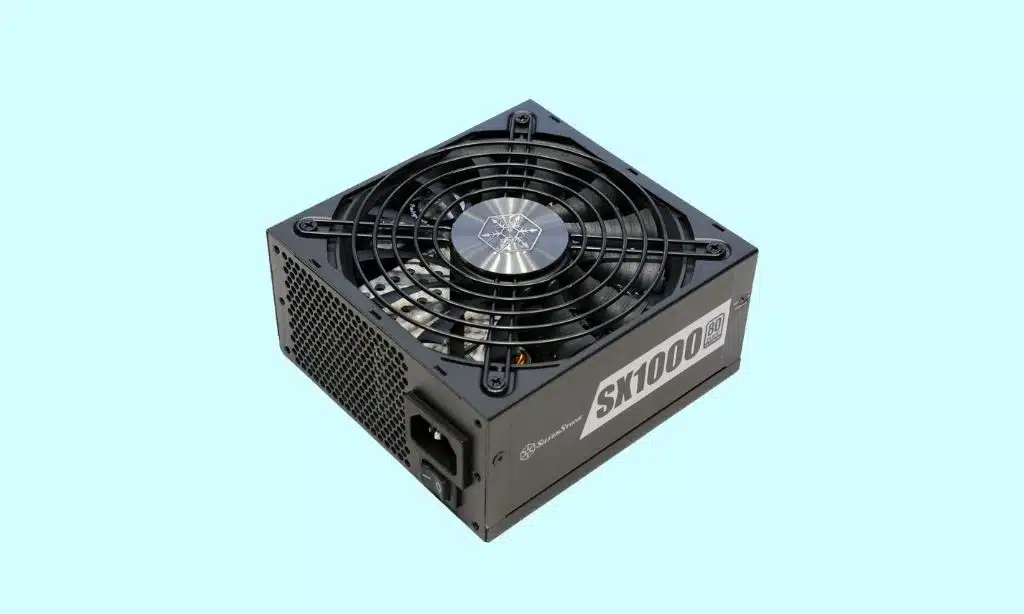
SilverStone Technology Extreme 1200R Platinum fits more than 800 watts into an SFX shell. The unit supports SFX12V 4.1, ATX 3.1, and PCIe 5.1 standards. It ships as a modular PSU, with tight modular cabling for neat cable management.
You get 80Plus Platinum, plus Cybenetics Platinum certification, and a five year warranty. Street price sits at $330, which matches other niche SFX power supply options.
High power density brings exceptional electrical performance, for compact gaming pcs. It also delivers strong energy efficiency, thanks to 80Plus Platinum certification and Cybenetics Platinum ratings.
Thermals stay solid, and noise levels remain low for this size class. Built in PCIe connectors follow PCIe 5.1 specs, so multi-GPU setups get modern cables. Gamers can check thermal design power, and use a power supply calculator to pick wattage capacity.
SFX units like this sit in a niche market due to size and price, yet they beat many ATX power supplies on density and modular cable management.
XPG Fusion 1600W – Best for Overclocking Enthusiasts
The 1600W, 80+ Titanium unit packs big wattage in a compact 210x150x86mm frame. It uses dual 12VHPWR PCIe connectors and a fully modular layout for clean modular cabling and easy cable management.
Software control cuts ripple to low levels, and it helps keep noise levels down during stress runs. The power supply unit includes protections like OPP, OVP, UVP, OCP, OTP, SCP, NLO, and SIP, and it carries a 12-year warranty.
Review scores put performance at 10 of 10, features at 9 of 10, and energy efficiency at 9 of 10, while value scores 7 of 10. This model uses switching power supply architecture, and works well for multi-gpu setups and high-end gaming pc builds that need massive wattage capacity.
At about $700, the unit feels expensive and is overkill for most users, so run a power supply calculator before you buy. Enthusiasts who chase extreme stability will like its tight power distribution and low ripple during stress tests.
Cooler Master MWE Gold 850 V3 – Best Budget-Friendly High-End PSU
Cooler Master MWE Gold 850 V3 delivers up to 850W of clean power, it supports Intel ATX v3.1 and pcie connectors version 5.1 for modern GPUs. It hits 80Plus Gold, holds PPLP.info Gold and Cybenetics Platinum ratings, and boosts energy efficiency for gaming pcs.
Modular cabling cuts clutter, the modular psu layout helps cable management, and a 10-year warranty backs long-term use.
Street price sits at $79.99 at CCL, making this power supply unit a bargain among high-end options. Fans stay quiet at low loads, but you will hear higher noise levels and see thermal stress at max load.
Builders who value reliable wattage capacity, modern pcie connectors, and easy modular cabling will find strong value here.
Corsair RM1200x Shift – Best Modular PSU for Cable Management
Corsair RM1200x Shift offers tidy cable routing, with fully modular cabling that cuts clutter. You attach only the cables you need, so airflow improves, and builds look clean. The power supply unit uses modular cables for PCIe connectors, SATA, and CPU rails.
Short, removable cables make installation fast, and they fit tight cases, so you tame cable snakes.
This 1200W unit meets high wattage demands for multi-GPU rigs and overclocked CPUs. Builders who swap parts often will like the replaceable cables, they speed upgrades. Use a power supply calculator to match system wattage, then pick the unit that has extra headroom.
Modular power supplies let you use only necessary cables, improving airflow and ease of installation. Fans run quietly, so noise levels stay low while energy efficiency helps lower bills.
For a high-end gaming PC, neat cable management also helps cooling under heavy loads, and this model suits readers who prioritize neat builds and frequent hardware changes.
NZXT C1500 Platinum – Best for Future-Proofing High-End Builds
NZXT C1500 Platinum offers 1250 to 1500 watts of wattage capacity for high-end gaming PC builds, multi-GPU setups, and extreme overclocks. It follows ATX 3.1 and PCIe 5.1 standards, and it provides dual 12VHPWR, 12-pin high-power connectors for modern GPUs and PCIe connectors.
The unit is fully modular, so modular cabling and cable management stay tidy, and the power supply unit (psu) gives reliable headroom for upgrades.
Tests show energy efficiency between 92.6 and 93.7 percent, matching 80 PLUS Platinum and Cybenetics Titanium levels for power conversion. It runs very quiet, acoustic performance ranks high, and noise levels stay low under load.
NZXT backs the product with a 10-year warranty, and the MSRP sits at $370. The C1500 is very expensive, and the large size can demand extra case space.
Enermax Revolution D. F. 2 850W – Best Compact Design for High Wattage
Enermax packed high-density tech into the Revolution D.F.2 850W, giving a compact, high-wattage power supply unit (psu) for gaming PC builders. The model taps design DNA from the PlatiGemini 1200W platform, which measures 150x150x86mm, carries 80 PLUS Platinum, and runs as a fully modular unit.
Engine tests show the platform can hit 93.92% conversion efficiency, so energy efficiency stays strong and noise levels stay low during heavy loads.
Tidy modular cabling helps cable management, and the PSU supports enough PCIe connectors for multi-GPU setups or beefy single GPUs. Review scores list performance 10/10, features 10/10, efficiency 10/10, and value 8/10, making this compact switching power supply a solid choice for tight builds that demand high wattage.
Key Features to Consider When Choosing a Power Supply
Match the power rating, efficiency tier, and plug count to your gaming PC, you don’t want a flaky PSU mid-match. Run a power supply calculator, pick a modular power supply with detachable cables for tidy routing, and favor titanium rated or Cybenetics certified units to save energy and cut noise from switching power supplies.
Wattage Requirements for High-End Gaming PCs
Many high-end gaming PCs peak at around 800W, so plan for that load. Mid-range systems often draw about 350W, while extreme setups with a Core i9-14900K and RTX 4090 can hit 800W peaks.
Use wattage calculators from Cooler Master, Seasonic, MSI, be quiet., or Newegg, then add 20% headroom by multiplying the total by 1.2. Pick a 1000W to 1200W power supply unit (psu) for future-proofing, this helps with heavy overclocking, multi-gpu setups, and extra RGB lighting.
Models like cooler master mwe gold 850 v3 and corsair rm1200x shift show how modular cabling and solid wattage capacity lower noise levels and boost reliability. Check modular cabling, cable management, air vents, PCIe connectors, SFX power supply options, and certifications such as titanium rated or cybenetics certification to improve energy efficiency, cut harmonic distortion, and survive power outages with a surge protector.
Efficiency Ratings: Importance of 80 PLUS Certification
80 PLUS certification shows how much input power a power supply unit keeps, rather than turning it into heat. Gold posts 87% at 20% load, 90% at 50%, and 87% at 100%. Platinum rates 90% at 20%, 92% at 50%, and 89% at full load.
Titanium hits 90% at 20%, 94% at 50%, and 90% at 100%.
Higher efficiency cuts wasted watts, so energy bills drop and the case runs cooler. That helps gaming pcs, especially with multi-gpu setups or tight sfx power supply builds. Use a power supply calculator to size wattage capacity, check PCIE connectors, and pick modular cabling for better cable management.
Look for Cybenetics certification and 80 PLUS labels on power supplies (psus), or choose models like Cooler Master MWE Gold 850 V3 or Corsair RM1200x Shift for known energy efficiency.
Modular vs. Non-Modular Power Supplies
Modular PSUs let you plug only the cables you need, and they cut clutter while improving case cooling. They improve airflow, and they make future upgrades easier for any gaming PC.
Modular cabling makes routing PCIe connectors neat, which helps small form factor units like an SFX power supply stay cool.
Non-modular PSUs cost less, but they send every cable out the back, which can hamper cable management and reduce airflow. Semi-modular and hybrid models give a middle ground, with some fixed leads and some removable ones, so you get partial customization.
Use a power supply calculator to match wattage capacity to your build, and pick the style that fits your case, noise goals, and upgrade plans.
Tips for Installing and Maintaining Your Power Supply
Use a power supply calculator to pick the right wattage, choose a cybenetics-certified power supply unit, route modular cabling for tidy cable management, secure PCIe connectors, clear fan vents to cut noise levels and boost energy efficiency, test rails with a multimeter, mind VAC ratings for your outlet or variac, and read on for more.
Ensuring Proper Airflow and Cooling
Keep high airflow in the gaming PC case, especially with high-wattage PSUs. Place intake and exhaust case fans to create a straight path for cool air, and use a fan hub to balance speeds.
Pick cases built for airflow. They often include large filters and space for an sfx power supply or multi-GPU setups.
Tidy cables with smart cable management, route modular psu and non-modular psu wires behind the tray, and avoid blocking the area around the power supply unit (psu). Take advantage of zero-RPM fan modes on some units to cut noise levels at low loads, while keeping energy efficiency.
Run a power supply calculator to pick the right wattage, and watch temps with temperature sensors or a fan controller readout.
Regular Cleaning and Cable Management
Clean power supply unit filters and fan areas monthly to stop overheating. Use an air duster and a soft brush to remove dust from vents and case filters. Modular cables let you unplug harnesses so you can reach dusty spots under the shroud, and high-end units like the Corsair RM1200x Shift and Cooler Master MWE Gold 850 V3 use modular cabling that speeds cleaning.
Dust bunnies love PSUs, so shoo them away before they raise fan noise levels.
Tidy cables with zip ties or Velcro straps to boost airflow and cut noise levels. Routine cable management prevents accidental disconnections in multi-gpu setups, and it helps with energy efficiency.
Label PCIe connectors, and check wattage capacity with a power supply calculator before you route cables. Semi-modular psus and non-modular psus need more planning, route unused leads clear of fans and filters.
Takeaways
A solid power supply unit gives your high-end gaming rig steady power and longer life. Pick a rated model with high energy efficiency, low noise levels, and the right wattage capacity.
Use a power supply calculator, check ATX compliance, and match PCIe connectors for your GPU. Prefer modular psu options for tidy cable management, and choose an SFX power supply for compact cases.
Lab testers from trusted sites rated these picks for performance, so you can shop with more confidence. No fried GPUs, just smooth frames.
FAQs on Best Power Supplies for High-End Gaming Rigs
1. What is a power supply unit (psu) for a gaming pc?
A power supply unit (psu) feeds your gaming pc like a heart, it gives stable power, and sets the wattage capacity for gaming pcs. A good, reliable power supply protects parts, and helps energy efficiency.
2. How many watts do I need for a high-end rig?
Use a power supply calculator to pick wattage capacity, add headroom for upgrades. Count GPU power needs if you plan multi-gpu setups, check pcie connectors, then round up a bit.
3. Modular psu, semi-modular psu, or non-modular psu, which is best?
A modular psu uses modular cabling, you plug only what you need, it helps cable management. A semi-modular psu keeps some cables fixed. A non-modular psu has all cables fixed, it is simple and often cheaper.
4. How loud or clean is a PSU, and what about certifications?
Noise levels come from the fan and load, brands like bequiet.com give low noise. Look for Cybenetics certification for rated sound and energy savings, and for energy efficiency. Words like sampling rate, bandwidth, interference, and insulator matter for clean signals on sensitive gear, they hint at electrical noise control.
5. Can I use an sfx power supply in a small but powerful build?
Yes, an sfx power supply fits tight cases, some still reach high wattage. Check models like corsair rm1200x shift or cooler master mwe gold 850 v3, watch pcie connectors, and remember rgb lighting adds a small draw.
6. How do I pick and install a reliable power supply?
Pick a reliable power supply with the right wattage capacity, good modular cabling, and enough pcie connectors for your cards. Run a power supply calculator, calibrate settings if needed, use solid insulator pads, tighten screws to cut interference, and favor high energy efficiency.