

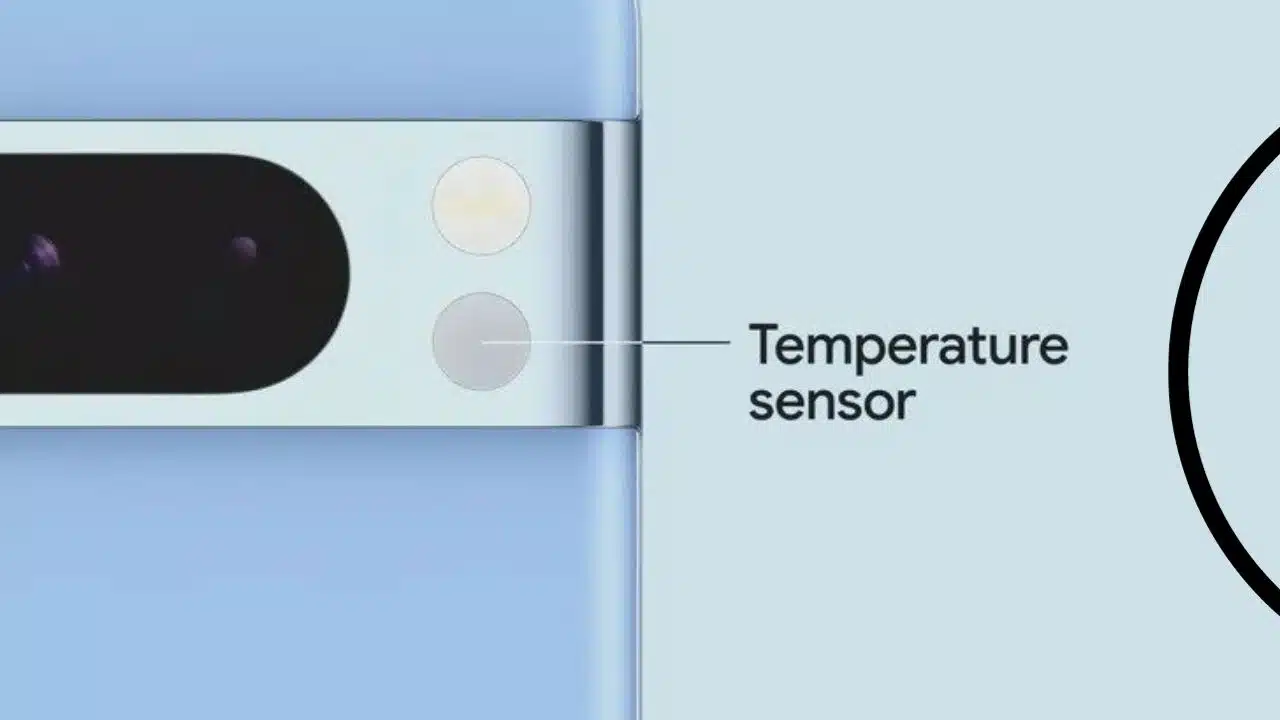
The Google Pixel 8 Pro is equipped with an infrared temperature sensor. But why is there a temperature sensor on the Pixel 8 Pro?
Google isn’t revealing much about the strange feature on a $1,000 flagship phone. It’s mentioned rather casually in the Pixel 8 Pro announcement.
A heated pan or a baby bottle can be measured with any standard infrared thermometer. But the moment you point it at a human and declare you’re detecting body temperature, congratulations: that’s medical data, you’re a Class II medical gadget, and you require FDA approval.
Things get a little complicated here: Google does not require approval for the phone or even the temperature sensor. Technically, it doesn’t even need permission to read your skin temperature as long as it’s not used to tell you your body temperature. (Several businesses already employ infrared temperature sensors embedded into smartwatches for sleep tracking and cycle prediction, but they all take great care not to display that data as body temperature.)
“Okay, but what if I just take my temperature with it anyway?” you might wonder. While there’s nothing keeping you from pointing it at your forehead right now, it won’t tell you your body temperature, only the surface temperature of your forehead. That is not the same thing! According to my non-contact infrared thermometer, my body temperature is 98.3 degrees Fahrenheit. But when I switch to surface mode, I’m a pleasant 94.7 degrees Fahrenheit in the same location.
There are two routes to FDA clearance (not approval) for Class II devices, and Google refused to say which one it is using or when it submitted for permission. De novo authorization — which Apple sought for the Apple Watch’s on-wrist EKG detection back in the day — is only granted for devices that are unlike anything else on the market and are “reasonably safe and effective.” Additionally, you can also read about- Google Photos Gets 4 New AI-powered Features on Pixel 8 and Pixel 8 Pro
A non-contact infrared thermometer, on the other hand, isn’t especially unique. It’s probable that Google has requested 510k approval, which means that the firm submits a slew of data regarding the thermometer, and if the FDA determines it’s functional, unlikely to cause harm, and significantly similar to other approved clinical infrared thermometers, it’s approved for sale. Google can’t let the Pixel 8 Pro tell you your body temperature without that permission, even though it’s perfectly capable of doing so.
Your body temperature can indicate whether you have a fever, and a fever can indicate whether you are sick. This is information that can impact the type of medical care you receive. Because this is medical data, Google must also demonstrate compliance with HIPAA as part of the FDA certification procedure. That is most likely why your body temperature data will be saved to Fitbit rather than your Google account. Fitbit data is compartmentalized, and the company is HIPAA compliant.
It isn’t apparent why Google included a temperature sensor on the Pixel 8 Pro and went to the expense of obtaining FDA approval to use it for body temperature readings. We asked four separate Google representatives, and each of them responded (promptly!) with a variation on the following: “All we can share at this time is that we submitted an application to the FDA so you can separately use our Thermometer App to take your own temperature and then save it to Fitbit.”
Vee Song, The Verge’s resident health gadget and FDA clearance expert, speculates that data from an FDA-cleared body thermometer may be utilized for sickness prediction and cycle tracking, similar to what other firms have done with wearable temperature sensors. It could also be laying the framework for future medical technology ambitions. Perhaps Google intends to sell a large number of Pixels to hospital systems!
The whole thing reminds me of the skin temperature sensor on the Galaxy Watch 5 and 6 models. Samsung recommends using it as a contactless thermometer to check the temperature of household goods, and it is also used to measure baseline skin temperature variations for sleep and period tracking. However, it expressly states that it will not provide you with your body temperature. In both situations, it appears that the corporation added the sensor to track body temperature and is now looking for other uses for it that don’t require as much paperwork.
FDA approval can take some time. The initial Withings ScanWatch wasn’t available in the United States for nearly two years as it awaited FDA approval for its EKG and blood oxygen functions. It took 16 months to complete.
It’s worth mentioning that while the ScanWatch 2 includes an infrared temperature sensor, Withings, like Samsung, is merely using the data in an indirect manner to avoid needing to obtain FDA approval. As far as I know, no smartwatch or phone has yet been certified to provide body temperature data through infrared sensors, so who knows how long the Pixel 8 Pro will have to wait.

























