Have you ever tried running a modern AI model like Llama 3 on a standard web server? If so, you probably know the feeling; it’s like trying to sip a thick milkshake through a tiny coffee stirrer. You hit “enter,” and then you wait. And wait. If your models are freezing mid-training or your chatbot takes ten seconds to say “hello,” you are definitely not alone. The bottleneck is almost always the hardware. CPU-based servers just aren’t built for the heavy lifting that deep learning requires.
Here is the reality check: switching to the right GPU can speed up your training by hundreds of times. It turns a week-long frustration into a lunch-break task.
I’m going to walk you through everything you need to know about the best GPU for AI Applications and requirements. We will look at the exact specs that matter (like why VRAM is more important than raw speed), compare top contenders like the NVIDIA H100 and the new Blackwell B200, and find the best cloud options for your budget.
Essential Role of GPUs in AI Applications
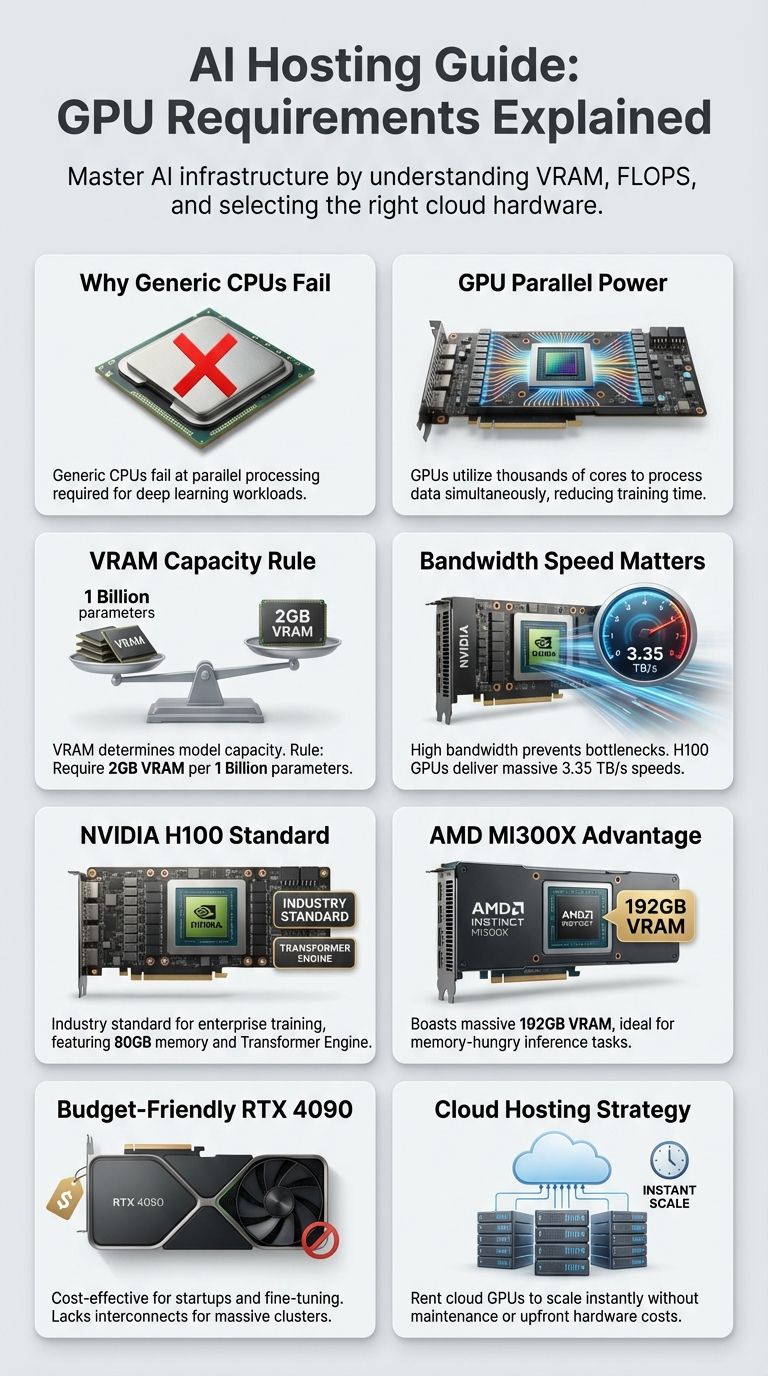
To understand why GPUs are non-negotiable for AI, you have to look at how they solve problems. A CPU is like a brilliant mathematician who solves complex equations one by one, very quickly. A GPU, on the other hand, is like an entire army of elementary school students solving thousands of simple math problems all at the exact same time. Since AI is basically just a mountain of simple matrix math, the army wins every time.
Importance of Parallel Processing
Parallel processing is the magic sauce here. In AI training, you aren’t just processing one data point; you are pushing thousands of images or tokens through the system simultaneously. A standard CPU might have 16 or 32 cores, but a GPU like the NVIDIA H100 has nearly 17,000 cores. This allows the GPU to tackle huge chunks of data at once.
“Think of it like a pizza shop. A CPU is one master chef making a gourmet pizza from scratch. A GPU is a hundred line cooks assembling a hundred pizzas at the exact same time.”
In server hosting for Artificial Intelligence, this means your “time-to-insight” drops drastically. Instead of waiting days for a model to converge, parallel processing lets you iterate in hours.
Role of Tensor and Matrix Cores
Speed is good, but efficiency is better. This is where Tensor Cores (NVIDIA) and Matrix Cores (AMD) come in. These aren’t just generic cores; they are specialized hardware blocks designed to do one thing perfectly: multiply and accumulate matrices.
Since 2024, these cores have evolved to support lower precision formats like FP8 (8-bit floating point). Why does this matter? Because it allows cards like the NVIDIA H100 to process data twice as fast as the older A100 without losing accuracy in the final model.
AMD’s Instinct MI300X uses similar technology in its Matrix Cores to compete directly with NVIDIA, offering massive throughput for data processing tasks. When you flip that switch, training a neural network stops feeling like a heavy lift and starts feeling automatic.
Support for Specialized AI Hardware
It’s not just about the chip itself; it’s about the ecosystem. Specialized hardware often comes with specialized software that unlocks its power.
- NVIDIA: Uses CUDA, the industry-standard software layer that nearly every AI library (like PyTorch and TensorFlow) is built on.
- AMD: Uses ROCm, which has improved massively in recent years to support major frameworks, making cards like the MI300X a viable alternative.
- ASICs: Some clouds offer Google TPUs or AWS Trainium chips, which are custom-built just for deep learning math.
Choosing hosting that supports these specialized architectures ensures you aren’t just getting raw power, but also the software compatibility to actually use it.
Why Generic Hosting Fails AI Applications
I often see developers try to save money by running inference on their existing web VPS. It rarely ends well. Generic hosting is built for serial tasks, serving web pages, running databases, or handling email. AI needs something else entirely: massive bandwidth.
The first wall you hit is the Memory Bandwidth. Standard server RAM moves data at about 50-100 GB/s. A high-end AI GPU moves data at over 3,000 GB/s. If you try to run a Large Language Model (LLM) on a CPU, the processor spends 99% of its time just waiting for data to arrive from memory.
Then there is the issue of “Out of Memory” (OOM) crashes. AI models, especially deep learning networks, need to load their entire weight set into VRAM (Video RAM). Generic servers rely on system RAM, which is far too slow for real-time applications.
Finally, standard data centers often lack the power infrastructure. A single rack of H100 GPUs can draw as much power as a small neighborhood. Generic hosts simply cannot supply the consistent juice needed for computational acceleration without tripping breakers or overheating.
Critical GPU Specifications for AI Tasks
When you are shopping for GPU hosting, don’t just look at the model name. You need to look at three specific numbers to know if it will handle your workload.
Analyze Processing Power: FLOPS and TOPS
FLOPS (Floating Point Operations Per Second) is your speedometer. For AI, we specifically look at “Tensor FLOPS.” In 2026, the benchmarks have shifted significantly:
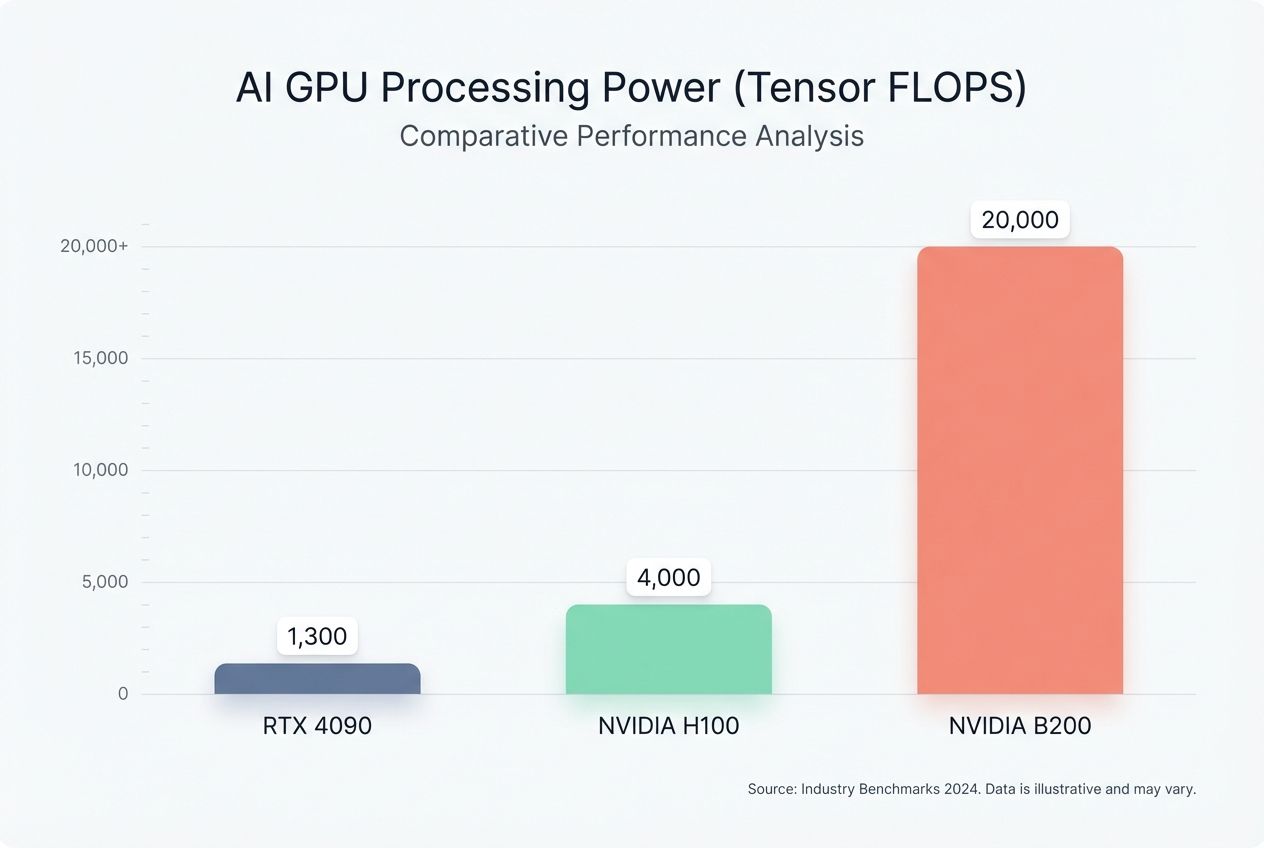
- NVIDIA B200 (Blackwell): The new speed king, offering up to 20 PetaFLOPS of FP4 performance.
- NVIDIA H100: Delivers roughly 4,000 TFLOPS (TeraFLOPS) for AI tasks.
- RTX 4090: A powerhouse for its size, hitting around 1,300 TFLOPS on tensor workloads.
If you are training a model, high FLOPS are critical. If you are just running inference (using the model), you might get away with lower FLOPS, provided you have enough memory.
Explore VRAM Capacity and Bandwidth
This is the most important section of this entire guide. VRAM determines which models you can actually run. If a model is too big for your VRAM, it simply won’t start.
The Golden Rule of Thumb: You generally need 2GB of VRAM for every 1 Billion Parameters at full precision (FP16). If you use 4-bit quantization (compression), you need about 0.7GB to 1GB per Billion Parameters.
For example, to run the popular Llama-3-70B model:
- At FP16 (Full Precision): You need ~140GB VRAM. This requires two NVIDIA A100s (80GB each) linked together.
- At 4-bit (Quantized): You need ~40GB VRAM. You can run this on two RTX 3090s or 4090s (24GB each).
Bandwidth is the highway speed. The NVIDIA H100 offers 3.35 TB/s of bandwidth, meaning it can feed data to the cores instantly. The AMD MI300X pushes this even further to 5.3 TB/s, making it incredible for massive models that are “bandwidth bound.”
Assess Thermal and Power Efficiency
Heat kills performance. A GPU like the NVIDIA H100 can consume 700 watts of power under full load. The newer B200 can push past 1,000 watts per chip.
For a home lab, this is a nightmare; you might trip your circuit breaker with just two cards. Data centers require liquid cooling. When choosing a host, ensure they guarantee “unthrottled” performance. Some cheaper providers cap the power usage to save electricity, which quietly slows down your AI training.
Leading GPUs for AI Applications
The market has split into two camps: expensive enterprise gear for training massive models, and affordable consumer gear for fine-tuning and inference.
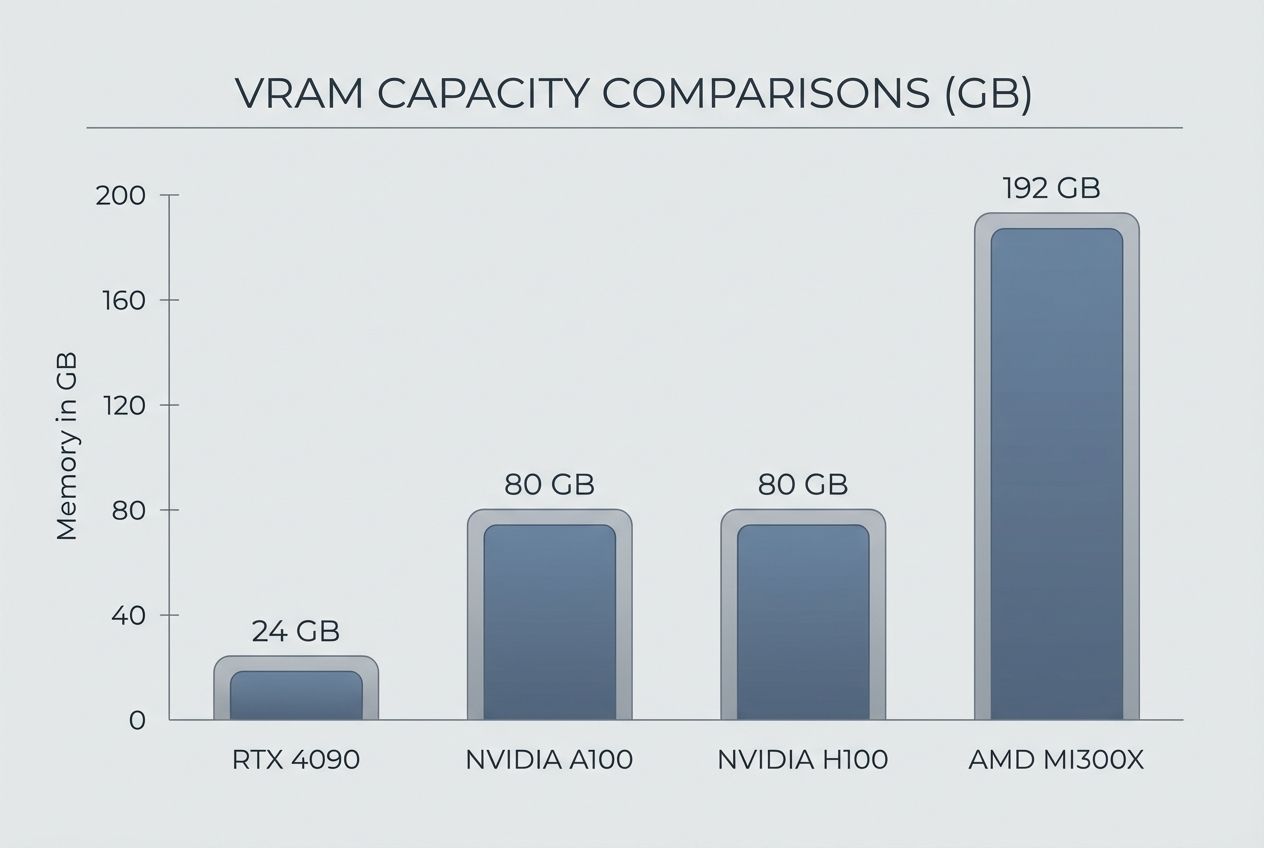
| GPU Model | VRAM | Best For | Est. Cloud Cost (2026) |
|---|---|---|---|
| NVIDIA H100 | 80GB HBM3 | Enterprise Training & Huge Models | $2.00 – $4.00 / hr |
| AMD MI300X | 192GB HBM3 | Memory-Hungry Inference | $3.00 – $5.00 / hr |
| NVIDIA A100 | 40GB / 80GB | Reliable Mainstream Production | $1.20 – $1.80 / hr |
| RTX 4090/5090 | 24GB / 32GB | Hobbyists & Small Startups | $0.40 – $0.70 / hr |
Overview of NVIDIA H100 Tensor Core GPU
The NVIDIA H100 remains the industry standard for serious work. Launched in 2022, it introduced the Hopper architecture. Its “Transformer Engine” automatically adjusts precision to speed up training for transformer models (like GPT and Llama).
With 80GB of high-speed memory and NVLink interconnects that allow up to 256 GPUs to act as one, it is the default choice for training Large Language Models. If you are building a foundational model from scratch, this is what you rent.
Details on NVIDIA B200 Blackwell GPU
The new heavyweight champion is the Blackwell B200. Released to tackle the trillion-parameter era, it connects two silicon dies to act as a single unified GPU. It offers up to 2.5x the training performance of the H100.
Its standout feature is support for FP4 (4-bit floating point) physics, allowing for insane throughput on inference tasks. If you see “GB200” instances in your cloud provider, grab them for the absolute highest performance available today.
Specifications of AMD Instinct MI300X
AMD has stopped playing catch-up and started leading in one specific area: VRAM Capacity. The MI300X packs a massive 192GB of memory.
This is a game-changer for inference. You can fit much larger models on a single MI300X card than you can on an H100. For many batch-processing tasks, this card offers better value per dollar, provided your software stack works well with ROCm.
Features of NVIDIA RTX 4090 & 5090
For individuals and small teams, the “enterprise” tax is too high. Enter the RTX series. The RTX 4090 (and the newer 5090) offers incredible speed for the price. With 24GB+ of VRAM, they are perfect for fine-tuning 7B or 8B parameter models or generating images with Stable Diffusion.
The catch? They are blocked from many large data centers due to NVIDIA’s licensing, and they lack high-speed interconnects (NVLink). This means you can’t easily chain 8 of them together to train a giant model. But for a single developer, they are the best bang for your buck.
Selecting the Appropriate GPU for AI Projects
Choosing the right hardware feels like buying a vehicle; you don’t need a semi-truck to buy groceries, and you can’t move a house with a sedan.
Scale Considerations: Hobbyist versus Enterprise
If you are a hobbyist or a student, start small. A single GPU with 24GB VRAM (like an A10G or RTX 4090) is enough to run Llama-3-8B, generate images, and learn the ropes. You can rent these for pennies an hour.
Enterprise teams typically need consistency and scalability. You need to verify that your host allows you to scale from 1 GPU to 8 GPUs seamlessly. This is where the H100 and A100 shine; their NVLink technology prevents bottlenecks when multiple cards talk to each other.
Balance Budget and Performance Needs
Don’t overspend on VRAM you won’t use. Here is a pro tip: calculate your model size first.
- Training a 7B Model: Fits on a 24GB card (batch size 1).
- Fine-Tuning a 70B Model (QLoRA): Requires roughly 48GB-80GB VRAM (needs 2x 3090s or 1x A100).
- Full Training 70B Model: Requires 8x A100/H100s or more.
Use “Spot Instances” or “Interruptible” instances on cloud platforms to save up to 70% on costs, as long as your training script saves checkpoints frequently.
Compatibility with AI Frameworks
Software support is the silent killer of AI projects. NVIDIA is the safe bet; PyTorch and TensorFlow work out of the box with CUDA. If you choose AMD (MI300X), verify that your specific model architecture supports ROCm.
For example, while standard Llama inference works great on AMD now, some niche custom layers or older codebases might still throw errors. Always test your container on a cheap instance before committing to a long-term contract.
Cloud Solutions for AI GPUs
Unless you have $30,000 burning a hole in your pocket, cloud hosting is the way to go. It lets you rent a supercomputer for the price of a cup of coffee.
Advantages of Cloud GPU Hosting
The biggest advantage is flexibility. You can spin up a cluster of H100s for two hours to train a model, and then shut it down immediately. No hardware maintenance, no cooling bills, and no depreciating assets.
- Instant Scalability: Go from 1 GPU to 100 GPUs in minutes.
- Access to Hardware: Try the new B200 without waiting on a 12-month shipping list.
- Pre-configured Environments: Most providers have “One-Click” templates with PyTorch, Drivers, and Jupyter Notebooks ready to go.
Top Platforms for AI GPU Hosting
The market has diversified into “Hyperscalers” and “Specialized Clouds.”
The Specialized Clouds (Best for Price):
- Lambda Labs: One of the most popular for AI. They offer H100s and H200s at very competitive rates.
- RunPod: A favorite for developers. They offer “Community Cloud” (secure consumer GPUs like 4090s), which are incredibly cheap (~$0.40/hr) and perfect for testing.
- Vast.ai: A peer-to-peer marketplace. It’s the Airbnb of GPUs. Extremely cheap, but reliability can vary.
The Hyperscalers (Best for Reliability):
- AWS (Amazon Web Services): Offers P5 instances (H100s). Expensive, but integrates with S3, SageMaker, and enterprise security tools.
- Google Cloud (GCP): unique because of its TPU (Tensor Processing Unit) options, which can be cheaper than NVIDIA GPUs for specific workloads.
- Microsoft Azure: The home of OpenAI. Excellent for massive scale training with their ND H100 v5 series.
Innovations in GPU Technology for AI
The hardware landscape is moving faster than the software can keep up. In 2026, we are seeing shifts that change how we think about efficiency.
Developments in Tensor Core Architecture
The newest innovation is the move to FP4 Quantization. NVIDIA’s Blackwell architecture introduces support for 4-bit floating point math. This effectively doubles the throughput and memory capacity of the card for inference.
It means we can run smarter, larger models on the same hardware we used last year. We are also seeing “Sparsity” support, where the GPU is smart enough to skip calculating zeros in the matrix, saving time and power.
Expansion of Multi-GPU Scalability
The bottleneck today isn’t the chip; it’s the wire connecting them. New interconnects like NVLink 5.0 and AMD’s Infinity Fabric are allowing dozens of GPUs to share memory as if they were one giant pool.
This is critical for “Model Parallelism,” where a single AI model is split across 8 or 16 cards. In the past, this was hard to set up. Today, with tools like Accelerate and Deepspeed combined with these fast interconnects, it’s becoming standard practice for anyone working with models larger than 70 billion parameters.
Final Thoughts
Picking the right GPU hosting doesn’t have to be a guessing game. It comes down to three numbers: your model size (VRAM), your training speed needs (FLOPS), and your budget.
If you are just starting, grab a cloud instance with an RTX 4090. If you are deploying a business-critical LLM, look at the H100 or MI300X. The hardware you choose today will define how fast you can innovate tomorrow.
Ready to get started? Check the specs of your model, calculate your VRAM needs using the rule of thumb above, and spin up your first instance. You’ll be amazed at the difference real power makes.