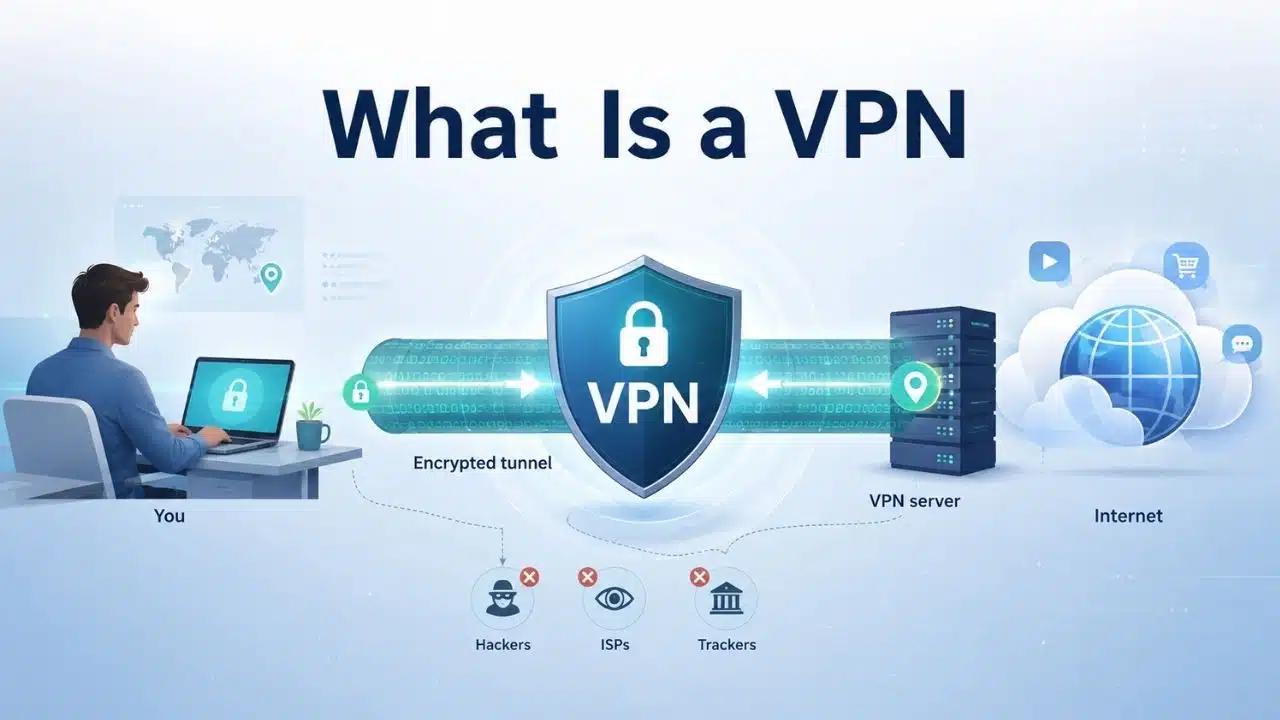
What is a VPN and when do you need one comes down to solving specific network and privacy problems. A Virtual Private Network (VPN) routes your internet traffic through an encrypted tunnel to a remote server, masking your public IP address and preventing local Wi-Fi networks or ISPs from monitoring your browsing activity.
You actually need a VPN when using untrusted public Wi-Fi, bypassing geo-restrictions while traveling, or securely accessing a remote workplace network. However, a VPN is not a total security fix—it cannot stop malware, block phishing attacks, or prevent tracking when signed into online accounts. For basic home browsing over HTTPS, primary defenses like strong passwords and regular software updates remain your first line of defense.
How Does a VPN Work?
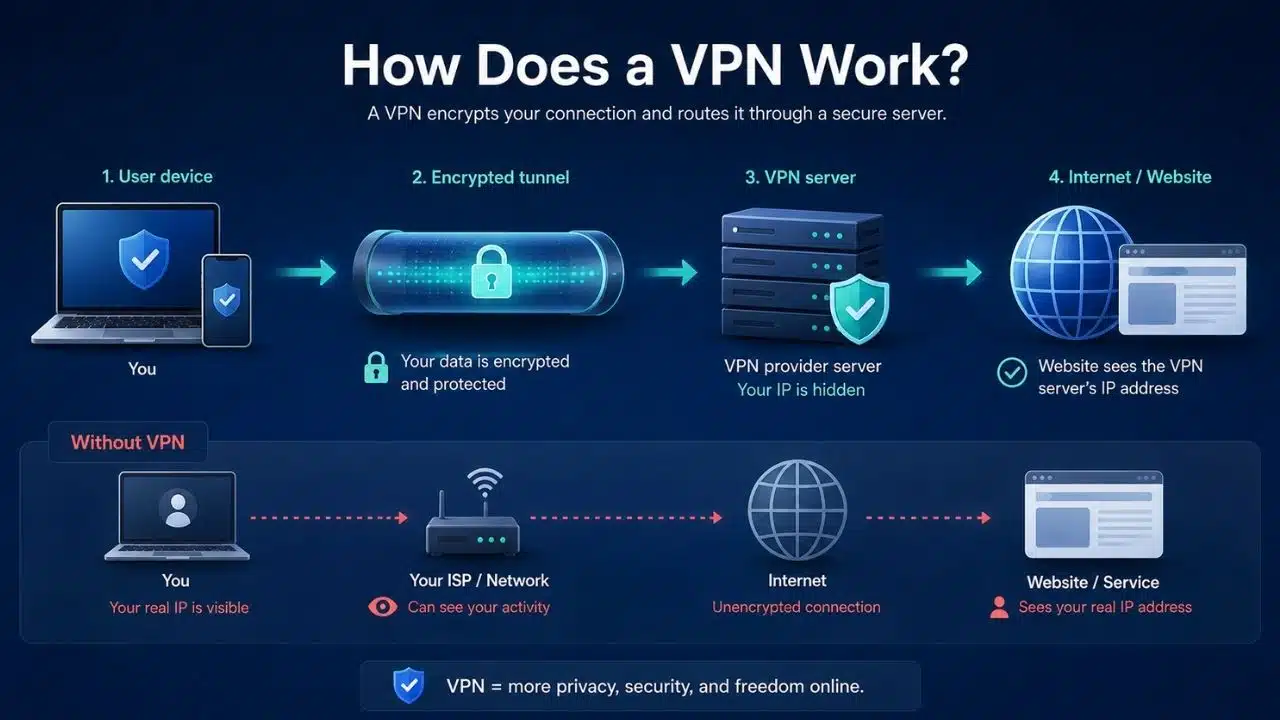
Without a VPN, your device reaches the internet through whatever network you are connected to: home broadband, mobile data, office Wi-Fi, a hotel connection, or a public hotspot.
Turn on a VPN and traffic covered by that VPN is first sent through an encrypted tunnel to the VPN provider’s server. From there, it travels onward to the website or service you requested. That changes two important things.
First, the destination usually sees the VPN server’s public IP address rather than the public IP address assigned to your normal connection. This is why a VPN can make your traffic appear to originate from another city or country.
Second, the internet provider or local network can see that you are communicating with a VPN service, but it no longer has the same direct view of the destinations carried inside that tunnel. It can still observe some connection metadata, including when data is transferred and roughly how much.
There is an important trade-off here: using a VPN changes who you have to trust. Your VPN provider becomes part of the connection path.
HTTPS still protects the contents of properly encrypted web sessions, so a VPN provider does not automatically gain access to your passwords, messages, or page contents simply because traffic passes through its servers. But the provider can still be in a position to observe connection information and destinations, depending on the service and configuration. That is why the company behind the VPN matters.
What Does a VPN Actually Protect?
A VPN is strongest when its job is clearly defined.
It can hide your usual public IP address
Websites will normally see an IP address belonging to the VPN service rather than the one assigned by your home internet provider, mobile carrier, hotel, or workplace network. That can reduce IP-based location exposure.
It does not hide every location signal. A mobile app with GPS permission, for example, can still know where the device is regardless of which VPN server is being used.
It can reduce what the local network or ISP sees
HTTPS already encrypts the contents of most mainstream web traffic. A VPN adds another layer by placing traffic inside an encrypted tunnel before it leaves your device for the VPN server.
That can be useful when you do not want a hotel network, café network, workplace connection, or ISP to have the same visibility into the destinations you visit. The information does not simply vanish. Some trust shifts to the VPN provider instead.
It can provide remote access
Businesses have long used VPN technology to let authorized employees connect to internal systems from outside the office. A private VPN can also be configured to reach a home network remotely.
This is a different purpose from buying a consumer VPN because you want more browsing privacy, and the two should not be confused.
What Is a VPN and When Do You Need One in Practice?
A VPN starts making sense when you can name the problem. It may be useful if you regularly connect through networks you do not trust and want to reduce what their operators can observe. It can also be useful if you want to limit browsing visibility available to your ISP, need encrypted remote access to a private network, or must use an employer’s approved VPN to reach internal resources.
Changing your apparent IP location is another legitimate use, although it is less reliable than many advertisements imply. By contrast, ordinary browsing from a secured home network does not automatically require a commercial VPN. This distinction is worth keeping because “everyone needs a VPN” is too broad to be useful advice.
Do You Still Need a VPN on Public Wi-Fi?
This is one of the clearest examples of security advice becoming outdated faster than the advice itself disappears. Public Wi-Fi used to be substantially riskier because large amounts of web traffic travelled without encryption. Someone monitoring the network could potentially see information sent over an unencrypted connection.
Modern HTTPS has changed that. Today, mainstream websites and apps generally encrypt traffic between your device and their servers. On a properly configured HTTPS site, someone sitting on the same café or airport Wi-Fi cannot simply read your password, private message, or banking information as it passes across the network.
That does not make every public network trustworthy. A VPN can still be worthwhile when you regularly use unfamiliar hotel, airport, conference, or shared networks and want to reduce the information available to the local operator. Travelers may value that extra layer more than someone who spends nearly all of their time on a secured home connection.
But a VPN should not create false confidence. A fake access point can still direct you toward trouble. A malicious download remains malicious. A phishing site can have HTTPS. If you enter your password into a convincing imitation of your bank, the encrypted connection simply delivers the password securely to the attacker.
For most people, the better public-Wi-Fi rule is not “never connect without a VPN.” It is: use modern HTTPS services, keep devices updated, be cautious about unexpected login pages, and add a trusted VPN when you want the extra network privacy.
Do I Need a VPN at Home?
Usually not as your first security measure. If your home router still uses a weak password, your laptop has missed security updates, and your important accounts reuse passwords, a VPN subscription is solving the wrong problem first.
Secure the basics:
- use WPA3 Personal or WPA2 Personal on Wi-Fi;
- replace default router administrator credentials;
- keep router firmware current where updates are available;
- use strong, unique account passwords;
- enable multifactor authentication;
- update operating systems, browsers, and apps.
Once those are in place, a VPN can become a privacy choice.
Someone who wants to reduce how much browsing metadata is directly available to their ISP may reasonably choose one. Someone who needs remote access to devices or files on a private home network may also have a clear use case. That is different from saying every home internet connection is unsafe without a commercial VPN.
Remote Workers Should Follow Their Employer’s Setup
A company VPN is not interchangeable with a consumer privacy VPN. An employer may require a managed VPN before allowing access to internal dashboards, file systems, administration tools, repositories, or other private services. In that case, use the company-approved client and configuration.
Running a personal VPN first does not replace those controls. Enterprise access is also moving beyond the older model in which joining a VPN effectively placed a remote device inside a company network. Organizations increasingly combine VPNs with identity checks, managed devices, granular permissions, Zero Trust controls, and newer access architectures.
Employees usually do not need to choose between those models themselves. The practical rule is simpler: use the access method your organization requires and do not improvise around it.
Changing Your Apparent Location Has Limits
A VPN can make an IP-based service think you are connecting from the VPN server’s location. That can be useful when travelling or when dealing with services that behave differently by region.
It is not guaranteed. Streaming platforms and other services can identify and block known VPN infrastructure. Some networks block VPN protocols. Apps may use GPS, account-region settings, payment information, or device data rather than relying only on the IP address.
Local law matters too. VPN use and circumvention rules vary between countries. Travelers should check current rules in the jurisdiction they are visiting rather than assuming that what is ordinary at home is permitted everywhere. A VPN changes a network route. It does not override a platform’s rules or local law.
A VPN Does Not Solve Phishing, Malware, or Tracking
This is where the limits become more important than the feature list.
Phishing
A VPN cannot determine whether the website you opened belongs to your bank or someone pretending to be your bank. If you voluntarily submit your credentials to the wrong site, the VPN has done nothing wrong technically. It simply was not designed to solve that problem.
Malware
The same applies to infected software, malicious attachments, deceptive installers, and browser exploits. A VPN is not antivirus software, a patching system, or a backup.
Account tracking
If you open a shopping site through a VPN and log into your account, the retailer still knows which customer is browsing. Changing the IP address does not remove account identity.
Cookies and fingerprinting
Websites can use cookies, tracking scripts, browser properties, and other signals that do not depend solely on an IP address. Some VPN applications include separate tracker-blocking or malware-filtering features. Those features should be judged on their own merits rather than treated as something every VPN tunnel inherently provides.
A VPN Is Not an Anonymity Tool
“Anonymous browsing” is one of the more misleading claims in consumer VPN marketing. A commercial VPN may know the IP address that connected to its service. Depending on its signup and payment model, it may also hold account or billing information.
The provider operates under the laws of one or more jurisdictions and may have its own logging practices. For someone whose security depends on serious anonymity rather than ordinary browsing privacy, that trust model may be insufficient.
Tor uses a different architecture, routing traffic through multiple relays so that one ordinary relay is not intended to know both who the user is and where the user is connecting. That stronger anonymity model comes with trade-offs, including slower performance and more friction on some websites. Tor is not a better VPN. It addresses a different problem.
Choosing a VPN Means Choosing a Company to Trust
Once you have decided a VPN would actually help, provider selection matters more than an impressive server count or a dramatic claim about “military-grade encryption.”
Check who owns the service and how the company makes money. Read what its privacy policy says about connection and activity data. Look for credible independent security or privacy audits, but remember that an audit is a snapshot, not a lifetime guarantee.
Past security incidents matter too. A provider that explains what happened, what data was affected, and what changed afterward gives readers more to evaluate than one that relies only on marketing claims.
“No logs” deserves similar scrutiny. It is a policy claim, not a magical property of VPN technology. Free services are not automatically unsafe, and paid services are not automatically trustworthy. The more useful question is what the business receives in exchange for operating servers, developing apps, providing bandwidth, and supporting users.
App-store presence should not settle the question either. Store approval does not independently verify every logging practice, infrastructure claim, ownership detail, or privacy promise.
Security Improvements That Often Matter More
If the only reason you are considering a VPN is “I want better cybersecurity,” start elsewhere.
For many users, these changes reduce more everyday risk:
- use unique passwords and a password manager;
- turn on multifactor authentication;
- install security updates promptly;
- secure home Wi-Fi and the router itself;
- back up files that matter;
- treat unexpected links and attachments cautiously;
- remove unnecessary app permissions;
- use end-to-end encrypted messaging for sensitive conversations.
A VPN belongs beside those tools when you have a relevant network or privacy need. It should not replace them.
A Better Way to Decide Whether You Need One
Before paying for a service, complete this sentence:
I need a VPN because I want to prevent _ from seeing _, or because I need secure access to _.
Useful answers might be:
- “I want to reduce what an unfamiliar hotel network can learn about where I connect.”
- “My employer requires its VPN for internal systems.”
- “I want to reduce browsing information directly visible to my ISP.”
- “I need secure remote access to my private network.”
- Those describe identifiable problems.
- If the only answer is “because I use the internet,” the need is much less clear.
Final Thoughts
So, what is a VPN and when do you need one? A VPN is useful when you want to change who can observe part of your network activity, mask your usual public IP address, or securely reach a private network from elsewhere.
That makes it valuable for some travelers, remote workers, privacy-conscious users, and people with specific networking requirements. It does not make an unsafe device safe or an untrustworthy website trustworthy.
Before buying one, identify exactly who you are trying to protect your traffic from and what information you want to hide. If you cannot name either, improve your passwords, multifactor authentication, updates, backups, and home network first.
When a VPN solves a real problem, use one. Just choose the provider carefully, because part of the privacy decision is deciding which company gets to sit in the middle of your connection.