
Handing a smartphone to a child is one of the biggest milestones in modern parenting. While a personal device offers convenience, safety in emergencies, and educational opportunities, it also opens a direct doorway to the internet. Simply installing parental control software is rarely enough; long-term safety relies on open communication and established ground rules.
Prioritizing phone safety for kids means setting clear expectations before the device is unboxed or activated. Proactive discussions help children understand that a phone is a privilege tied to responsibility rather than an unrestricted right. Below are 8 essential conversations every parent should have with their child before giving them a phone.
8 Critical Discussions for Phone Safety for Kids
1. Physical Care and Financial Responsibility
A smartphone is a fragile and expensive piece of technology, and children must understand the care required to keep it functional.
-
What to Discuss: Talk about basic device care, such as using protective cases, avoiding water damage, and placing the phone in designated safe spots when not in use. Clarify who covers the cost if the phone is lost, cracked, or damaged due to carelessness.
-
Key Takeaway: Establishes respect for property and sets clear consequences for negligence.
-
Actionable Step: Have your child contribute a small portion of their allowance or extra chores toward an insurance plan or screen protector.
2. Digital Footprint and Online Permanence
Young children often view text messages, photos, and app posts as temporary interactions, unaware that digital media can persist indefinitely.
-
What to Discuss: Explain that any photo, comment, or message sent from a phone can be screenshotted, saved, and shared with others. Emphasize the “billboard rule”: if you wouldn’t want the message printed on a giant outdoor sign for your teachers and family to see, don’t press send.
-
Key Takeaway: Teaches children to pause and evaluate the long-term impact of their digital words and images.
3. Cyberbullying and Respectful Communication
Communication through a screen can lower inhibitions, making it easier for kids to say things digitally that they would never say face-to-face.
-
What to Discuss: Set zero-tolerance guidelines for mean-spirited group chats, exclusion tactics, and gossip. Encourage your child to speak up or show a trusted adult if they witness someone else being picked on in a digital space.
-
Key Takeaway: Extends real-world empathy and anti-bullying values into digital messaging environments.
4. Screen Time Boundaries and Sleep Hygiene
Unrestricted access to a smartphone can disrupt sleep patterns, homework focus, and physical activity.
-
What to Discuss: Define specific times and zones where phones are off-limits, such as dinner tables, family outings, and late-night hours. Agree on a central charging station outside of bedrooms overnight to ensure rest is not compromised by late-night notifications.
-
Key Takeaway: Prevents device addiction and preserves healthy sleep habits.
-
Pro Tip: Set up automatic “Do Not Disturb” schedules on the phone that activate one hour before bedtime.
5. App Approvals and In-App Spending
Without strict boundaries, kids can quickly download inappropriate applications or accidentally generate large charges through microtransactions.
-
What to Discuss: Establish a mandatory policy that every app download – even free ones – requires parent approval. Talk explicitly about in-app purchases and explain that virtual currency costs real-world money.
-
Key Takeaway: Maintains parental oversight over device content and prevents accidental financial charges.
6. Online Strangers and Privacy Protection
Children need to understand that online profiles may not represent real people and that personal information must remain protected at all times.
-
What to Discuss: Teach kids never to share full names, home addresses, school locations, or current whereabouts online. Reinforce that friend requests and direct messages should only be accepted from people known in real life.
-
Key Takeaway: Protects child privacy and mitigates contact risks from unknown online users.
7. What to Do When Uncomfortable Content Appears
Despite filters, children will eventually encounter scary, explicit, or weird content online. How they react depends heavily on how their parents respond.
-
What to Discuss: Reassure your child that if they stumble across disturbing content, they will not lose their phone privileges if they report it to you immediately. The goal is to build an environment of trust rather than fear of punishment.
-
Key Takeaway: Encourages honest communication over hiding online mistakes.
8. Purposeful Screen Use vs. Mindless Scrolling
Not all screen time is created equal. Children should learn to distinguish between high-value digital engagement and passive, mindless media consumption.
-
What to Discuss: Talk about using screen time productively – such as learning new skills, communicating with family, or completing educational games – rather than endlessly scrolling through algorithm-driven video feeds.
-
Key Takeaway: Fosters intentional technology habits from day one.
Actionable Steps for Parents
Review these 8 topics with your child this week, draft a simple family phone agreement together, and check out safe, educational tools like 123 Magic Number Fun to start their digital journey on the right foot.
Promoting Healthy Habits with Purposeful Screen Options
Establishing phone safety for kids is easier when parents introduce high-quality, structured digital environments rather than open-ended entertainment apps.
When introducing younger family members to mobile screens, curated platforms offer a safe entry point. For example, educational applications like 123 Magic Number Fun on Google Play, created under the Edutorial brand, provide a controlled setting focused entirely on skill-building.
-
Ad-Free Learning: Carries Google Play’s Teacher Approved rating, ensuring age-appropriate mechanics without distracting popup ads or unmoderated social channels.
-
Skill-Based Focus: Features interactive counting, tracing, and early math puzzles that encourage active brain engagement rather than passive viewing.
-
Safe Sandbox Environment: Offers an ideal example of how screens can serve as constructive learning tools when proper guardrails are in place.
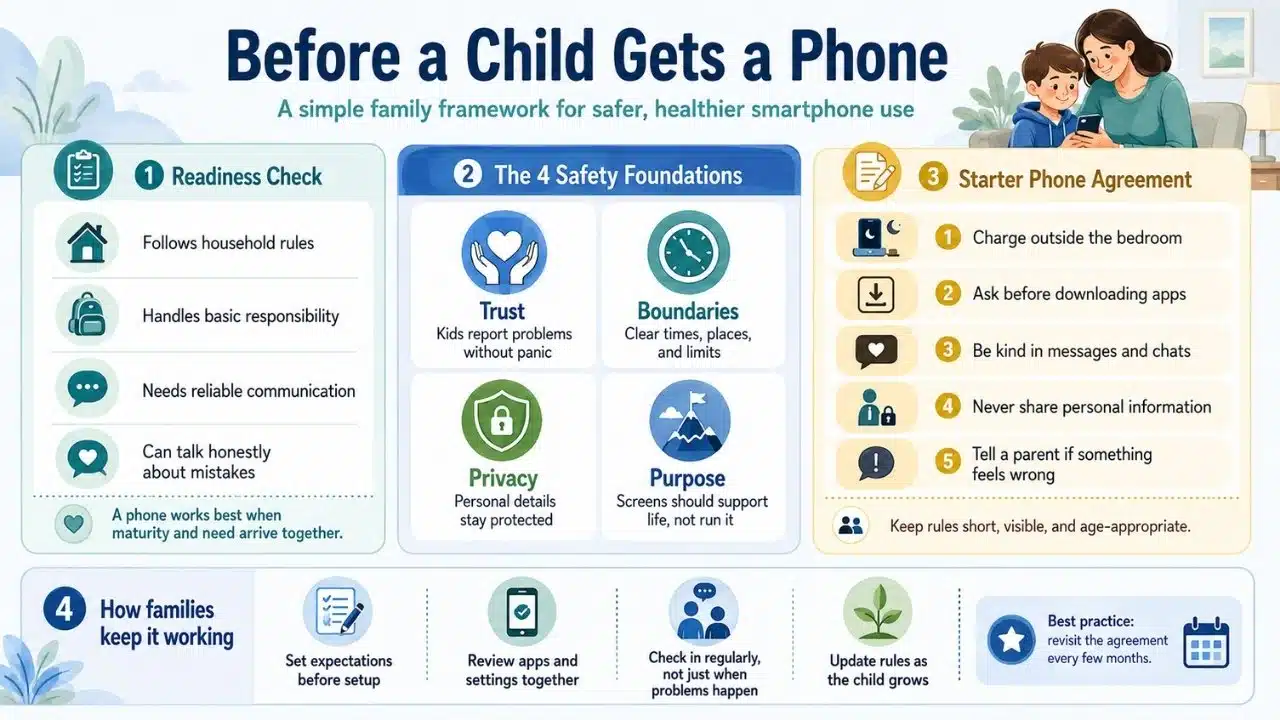
Creating a Family Cell Phone Agreement
Once these 8 discussions are complete, put the expectations in writing. A family cell phone contract acts as an objective reference point when rules need enforcing.
-
Keep It Simple: Limit the contract to 5 to 7 core rules written in clear, age-appropriate language.
-
Make It a Two-Way Street: Include commitments from parents as well, such as putting phones away during family conversations and respecting healthy boundaries.
-
Post It Publicly: Place the signed agreement in a visible spot, such as on the refrigerator or near the charging station.
Limitations & Trade-Offs
While proactive conversations are essential, parents should remain realistic about digital safety management:
-
Parental Controls Are Not Foolproof: Software filters can miss inappropriate content, making ongoing dialogue more critical than technical blocks alone.
-
Rules Must Evolve with Age: Boundaries designed for an 8-year-old will feel overly restrictive to a 13-year-old; rules require periodic updates.
-
Mistakes Will Happen: Children will occasionally break screen time limits or click wrong links. Focus on restorative lessons rather than immediate permanent bans.
Building Digital Resilience Together
Handing over a smartphone does not have to be a source of stress for parents. By having structured conversations about phone safety for kids, establishing clear usage rules, and promoting purposeful app choices, you can guide your child toward becoming a responsible digital citizen.
Frequently Asked Questions(FAQs) on Phone Safety for Kids
What is the right age to give a child their first phone?
There is no single correct age. Readiness depends on your child’s maturity, impulse control, need for communication during extracurriculars, and ability to follow household rules.
How can parents monitor phone safety without destroying trust?
Be transparent about monitoring from the start. Let your child know which apps you will check and why, framing oversight as a safety measures similar to wearing a seatbelt.
Should parents hold password access to their child’s phone?
Yes. For younger children and pre-teens, parents should hold device passcodes and app store credentials until the child consistently demonstrates responsible digital behavior.