Learning how to choose a task manager starts with understanding why your previous system stopped working. Most task apps can store reminders, dates, and lists. Far fewer will fit naturally into the way you capture commitments, plan your day, and recover when work gets messy.
The wrong tool often feels promising at first. You organize projects, assign priorities, choose colors, and import an ambitious backlog. Then a busy week arrives. Tasks become overdue, notifications pile up, and maintaining the system takes more energy than checking what needs to be done.
I would judge a task manager by what happens at that point. Can you return, clear the noise, and make a realistic plan for today? If not, the app may be well designed, but it is probably a poor fit for your life.
How to Choose a Task Manager?
Choose a task manager by examining your previous system, identifying the few functions you genuinely need, and testing the app during ordinary work before moving your full task list into it.
A sensible process looks like this:
- Work out why you stopped using your previous system.
- Decide what job the new task manager must perform.
- Identify how tasks need to enter and reappear in your day.
- Limit the amount of organization you are willing to maintain.
- Test the app with real tasks, devices, interruptions, and overdue work.
- Choose the simplest tool that remains dependable after the novelty wears off.
A task manager should work on a disorganized Wednesday afternoon, not only during a carefully planned Monday morning.
Begin With the Task Manager You Stopped Using
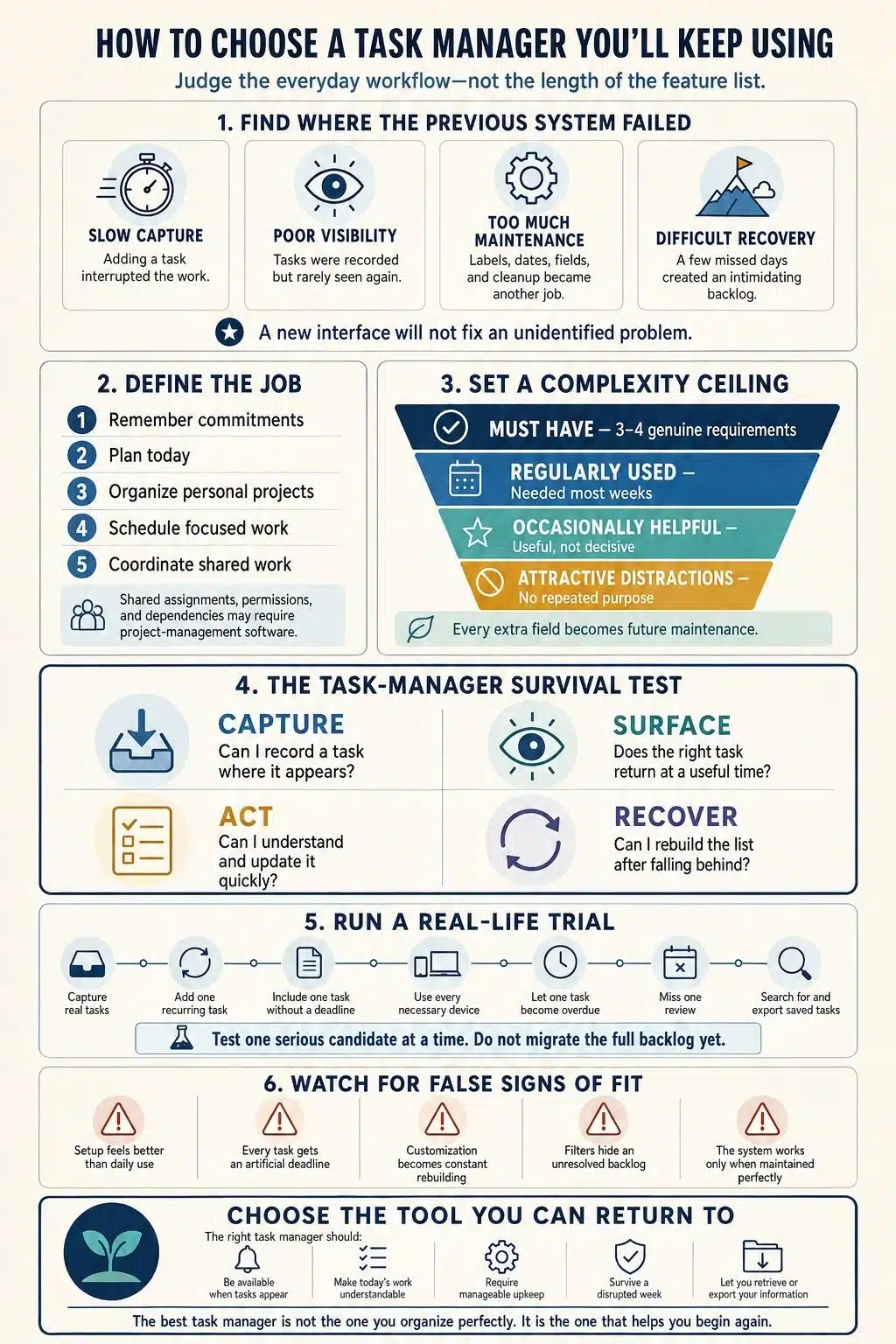
Before downloading another productivity app, examine the one you abandoned. The point is not to blame yourself or the software. You are looking for the moment the system stopped feeling trustworthy.
Perhaps adding a task took too long. The mobile version may have been awkward, or important work appeared in email while the task list lived somewhere else. You might have received so many reminders that dismissing them became automatic.
Maintenance is another common source of trouble. Every new task needs a project, label, priority, deadline, duration, and context. That structure can be satisfying while the list is small. Once work starts arriving faster, the same process becomes administrative clutter.
Then there is the overdue backlog. When every task appears late, the system no longer helps you decide what deserves attention now. Opening the app feels like reviewing a record of unfinished intentions.
Decide What Job the Task Manager Must Do
“Manage my tasks” can mean several different things.
You may need somewhere to record commitments before you forget them. Perhaps you already remember your responsibilities but struggle to decide what to do today. You might need to organize several personal projects, reserve time for focused work, or coordinate assignments with other people.
Each problem calls for a different level of software.
A simple to-do list may be enough when you mainly need quick capture, a few reminders, and a clear daily view. More structure becomes useful when your work involves subtasks, recurring schedules, supporting documents, filters, or several distinct areas of responsibility.
Calendars serve a related purpose, but they are not interchangeable with task managers. A calendar shows appointments and work assigned to specific periods. A task manager holds actions that need to be completed, including those that have not yet earned a place on the calendar.
For many people, the division can remain simple:
- Keep commitments and next actions in the task manager.
- Keep appointments, fixed deadlines, and scheduled work in the calendar.
Shared work introduces different requirements. If you need to assign tasks to several people, manage permissions, track dependencies, collect approvals, or report across projects, personal task software may be too limited. That situation calls for a team project-management platform.
Define the job first. Otherwise, it is easy to buy a complicated workspace for a personal list or expect a basic reminder app to manage work it was never built to handle.
Match the Tool to How You Capture and Remember Tasks
Research into personal task management has found wide differences in how people organize their commitments. Some prefer a dedicated task app. Others combine calendars, paper, notes, email, or general-purpose tools. Preferences for structure, portability, adaptability, and visual presentation also vary.
This is why generic recommendations for the “best” task manager have limited value. The more useful question is whether a tool fits your observable habits.
Test capture where tasks actually appear
A task manager cannot help with a commitment that never reaches it.
Research involving information workers found that roughly one-third regarded slow task capture as a problem. Authentication steps and systems that demanded immediate organization made the process more frustrating.
Do not judge capture while sitting inside an empty app. Test it where your real tasks appear:
- In an email
- During a meeting
- While browsing
- From your phone
- Inside another application
- When typing is inconvenient
- With an unreliable internet connection
Depending on your routine, useful options may include a home-screen widget, global shortcut, browser extension, share menu, voice entry, email forwarding, or natural-language input.
You do not need every capture feature. You need a quick route from the places where commitments appear to the system you regularly review.
Decide how tasks should return to your attention
Recording a task is only the beginning. The task must reappear when it is useful.
Personal task-management research has identified several remembering patterns. Some people depend on notifications. Others repeatedly check a list, associate work with a time or place, rely on another person, or mentally rehearse what they need to do.
If you already check a Today list each morning, frequent reminders may add little. If you routinely forget to open productivity apps, calendar visibility, a widget, or a well-timed planning prompt may matter much more.
Pay attention to when reminders arrive. An alert that appears while you cannot act is usually dismissed. Once that happens often enough, important notifications start blending into the noise.
During a trial, check whether reminders are easy to reschedule and whether you can control them without disabling every notification from the app.
Decide whether work and personal tasks belong together
Some people want one dependable list for every commitment. Others find it distracting or uncomfortable to see client work beside household errands, health reminders, or family responsibilities.
Either arrangement can work. If you want one system, make sure it separates areas clearly without complicating capture. If you prefer different systems, decide when and how you will check each one.
Using several capture points is manageable. Keeping several competing master lists is harder. A paper notebook may work well during meetings, for example, provided its action items reliably reach the main task system afterward. Trouble begins when email flags, sticky notes, chat messages, apps, and memory all hold different versions of what needs to happen.
Set a Complexity Ceiling Before Comparing Features
Most task managers offer more flexibility than the average person needs. That flexibility creates decisions.
Does this task need a label? Is it urgent, important, or both? Does it belong to a project or an area? Should it appear today because you plan to work on it, or because today is the real deadline?
None of these questions is unreasonable on its own. The burden comes from answering them repeatedly.
Before comparing tools, sort their features into four groups:
- Deal-breakers: Requirements the tool must meet, such as working on your devices, offering suitable privacy controls, functioning offline, or providing an acceptable export.
- Regular needs: Features you expect to use most days, such as fast capture, recurring tasks, reminders, or a useful daily view.
- Occasional conveniences: Helpful capabilities that will not determine whether you maintain the system.
- Attractive distractions: Features that look impressive but have no clear, repeated purpose in your workflow.
Keep your essential list short. Three or four behavioral requirements are usually more useful than a catalogue of everything you might use one day.
Treat AI features the same way. Automatic task extraction, summaries, or planning suggestions can save time in a repeated workflow. They can also add incorrect or unnecessary tasks that require another round of checking. Judge the result, not the novelty.
Even free features carry a cost when they clutter menus, settings, and everyday decisions.
Run a Real-Life Trial Before Migrating Everything
A polished setup is not proof that you will continue using an app. Give it real work.
Seven days is a reasonable starting point for a personal trial, though it is an editorial recommendation rather than a scientifically established duration. The trial should cover a representative work cycle. If your responsibilities run on a longer cycle, test for longer.
Use one serious candidate at a time. Running the same work through several apps creates an artificial routine and makes every option more difficult to judge.
During the trial:
- Capture tasks from several real situations.
- Add one recurring responsibility.
- Include a task with no deadline.
- Add one genuinely time-sensitive task.
- Plan a few ordinary days.
- Search for something you entered earlier.
- Use every device that matters to you.
- Let at least one task become overdue.
- Miss a review and see how the system handles your return.
- Export a small sample of your data.
Write down specific friction. “I liked the app” is not especially useful. “I could turn an email into a task without interrupting my work” or “rescheduling overdue items took several separate edits” gives you evidence you can compare.
Check pricing against the plan you would actually keep. Reminders, calendar views, recurring tasks, device syncing, history, integrations, or exports may be restricted. A free plan is only useful when it includes the capabilities your workflow depends on.
Avoid importing years of old tasks at the beginning. A large backlog makes an unfamiliar app harder to assess and can leave you feeling committed simply because migration took so much effort.
Watch for Misleading Signs of a Good Fit
Early enthusiasm can come from the setup experience rather than the daily workflow. Watch for these traps:
- You enjoy designing the system: Creating folders, icons, tags, and dashboards can feel productive. Check how much of that structure still requires attention after the first week.
- Endless customization feels like freedom: It helps only when it fixes recurring friction. Constantly rebuilding the system is usually another form of avoiding the work inside it.
- Every task has a date: A crowded calendar of artificial deadlines produces daily rollover and eventually makes overdue status meaningless.
- Filters make the backlog disappear: Hiding old tasks is different from reviewing and removing commitments that no longer matter.
- Paying feels like a commitment strategy: A subscription can unlock a necessary feature, but it cannot establish a review habit for you.
- The system works only when maintained perfectly: Missing one review should create some cleanup, not a full reconstruction.
A good trial should expose these weaknesses. That is more valuable than finding an app that looks impressive in a product demo.
Choose the Tool You Can Return To
The right personal task manager should be available when commitments appear, make current work understandable, and avoid unnecessary maintenance. It should suit your preferred reminder style, work on the devices you use, remain affordable on the required plan, and provide a reasonable way to retrieve your information.
Recovery is the final test.
I would choose the task manager that lets me come back after a difficult week, remove what no longer matters, and plan today without first repairing the whole system. Real life will interrupt any productivity routine eventually. The tool worth keeping is the one that helps you begin again.
Frequently Asked Questions on How to Choose a Task Manager
1. What features should I look for in a personal task manager?
Start with quick capture, a clear daily view, useful reminders, recurring tasks, reliable search, and access on the devices you use. Calendar integration, subtasks, attachments, filters, offline access, and export may matter too, but each feature should answer a genuine need.
2. Should I use a task manager or a calendar?
Use a task manager to hold commitments and actions. Use a calendar for appointments, fixed deadlines, and work assigned to a specific time. Many people use both successfully as long as each tool has a clear responsibility.
3. Is it better to keep work and personal tasks together?
It depends on how you prefer to see your responsibilities. One system can reduce missed commitments, while separate systems can protect boundaries and limit distraction. If you keep them separate, establish a reliable way to review both.
4. How long should I test a task-management app?
Test it through at least one representative work cycle. Seven days is a practical starting point for many people, but your trial should include normal capture, device use, reminders, overdue work, and recovery after a missed review.
5. Can I use more than one task manager?
Yes, when each tool has a clearly defined role. Confusion begins when the same kind of task can live in several places and none is treated as the main source of truth. If you use multiple capture tools, make sure their tasks reliably reach the system you review.