You know that sinking feeling when a marketing campaign goes live, traffic spikes, and your site suddenly slows to a crawl. For many businesses in the US, a Basic Cloudflare Plan acts as the default safety net. It is free, easy to set up, and works perfectly for personal blogs or small portfolios. But when revenue is on the line, that entry-level tier often lacks the muscle you need to compete.
I have seen too many growing companies hit a performance wall because they treated their Content Delivery Network (CDN) as a “set it and forget it” utility. The data is clear. A single second of load lag can drop conversion rates by up to 7%.
We are going to look at the hard limits of the free tier and the specific features that actually drive ROI. Then, we will walk through how to build a setup that survives the worst the internet can throw at it.
What is a CDN and How Does It Work?
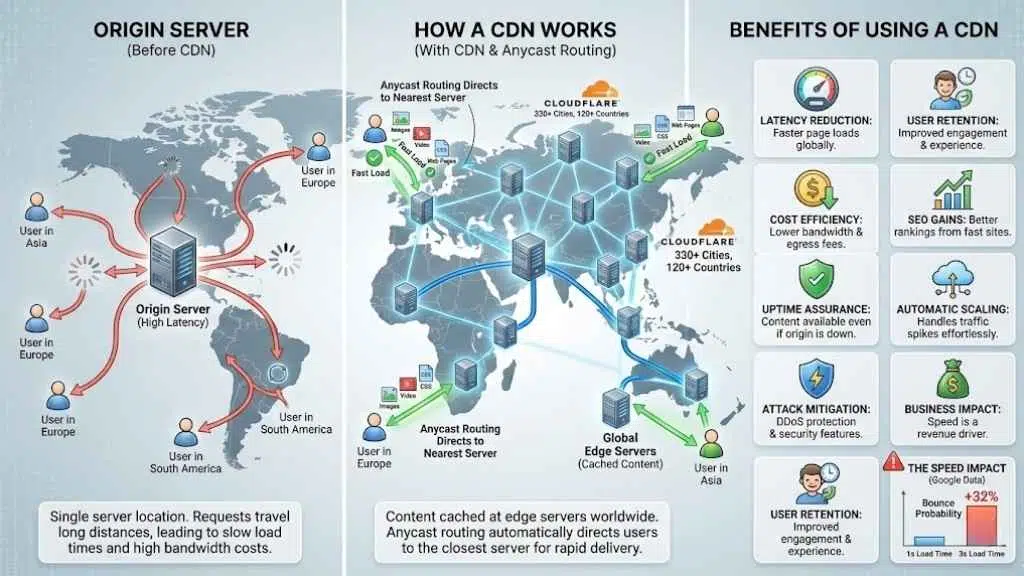
A CDN makes your website load faster by sending content from servers close to your visitors. While this sounds simple, the technology behind it acts as the backbone of the modern internet.
Definition of a Content Delivery Network
A Content Delivery Network, or CDN, is a group of servers spread around the world. These servers store copies of website content like images, videos, CSS files, and web pages. When someone visits a website that uses a CDN, the network sends the data from the server closest to that person.
This process is often powered by Anycast routing. This technology automatically directs a user’s request to the nearest operational data center without them needing to do a thing.
Cloudflare runs one of the largest CDNs. Its network covers more than 330 cities across over 120 countries. By using Cloudflare’s global reach, businesses can deliver site content much faster to users no matter where they are located.
This also reduces costs since the content gets cached near end users instead of traveling long distances every time it loads. With strong coverage and smart technology, top CDNs help websites stay speedy and reliable for everyone who visits them.
Benefits of Using a CDN
CDNs help websites load faster everywhere. They make web performance, reliability, and security much better for users. Here is why they are essential for any US-based business targeting a national or global audience:
- Latency Reduction: CDNs like Cloudflare lower latency by storing copies of your website close to users. This makes pages load quickly whether the visitor is in New York or San Francisco.
- Cost Efficiency: Using a CDN can reduce costs since it limits bandwidth and egress fees. Cloudflare helps cut these expenses while keeping speeds high.
- Global Scale: Companies get global coverage with networks such as Cloudflare’s. They now serve over 330 cities across more than 120 countries.
- SEO Gains: A good CDN improves SEO because fast sites rank better in Google search results. This naturally draws more visitors to your landing pages.
- Uptime Assurance: Caching at edge locations keeps content available even if your main server is slow or down. This increases uptime and reliability significantly.
- Attack Mitigation: Sites gain security features including DDoS protection. This shields them from attacks that could take a site offline or steal data.
- Automatic Scaling: Businesses experience easier scaling when using a CDN. The network handles traffic spikes without extra hardware or effort on your end.
- Proactive Maintenance: Tools from CDNs help monitor performance in real time. Issues can be fixed before they impact the user experience.
- Vendor Choice: Differences between top CDNs like Cloudflare and AWS CloudFront mean you can pick the one that fits your needs best for speed and safety.
- User Retention: Fast applications and smooth user experiences keep people engaged longer on your site. This improves reputation and sales potential.
The Speed Impact: According to data from Google, as page load time goes from one second to three seconds, the probability of a bounce increases by 32%. Speed is not just a metric. It is a revenue driver.
Cloudflare’s scale and reach make it a strong choice for many teams needing better site performance worldwide.
Limitations of a Basic Cloudflare Plan
A Basic Cloudflare Plan often leaves important needs unmet, especially as your website grows. Many businesses soon see the gaps. This usually prompts a frantic search for more powerful solutions right in the middle of a traffic surge.
Restricted Features
Free or basic Cloudflare plans come with strict limits. Access to some powerful features gets locked behind paid tiers. For example, you will not get advanced security tools or deep performance controls that larger sites need.
One of the most painful restrictions is the limit on Page Rules. On the free plan, you are typically limited to just three rules. This makes it nearly impossible to customize caching for a complex e-commerce site or a content-heavy portal.
Support is another major differentiator. Free plans usually rely on community forums or slow email tickets. If your site goes down on Black Friday, you cannot afford to wait 24 hours for a response.
| Feature | Free Plan | Pro Plan ($20/mo) | Business Plan ($200/mo) |
|---|---|---|---|
| Page Rules | 3 | 20 | 50 |
| WAF | N/A | Managed Rules | Custom Rules |
| Support | Email (Slow) | Email (Fast) | Chat & Email (Priority) |
| SLA | None | None | 100% Uptime SLA |
Many growing businesses hit a wall with the standard Cloudflare plan. You cannot use custom SSL certificates or detailed traffic analytics unless you upgrade your account. While Cloudflare’s network covers over 330 cities, only higher levels let you fine-tune how your site uses this massive global presence for faster speeds and better protection.
Limited Performance Optimization
A basic Cloudflare plan covers many regions with its vast network. Still, it does not give you full access to advanced speed and performance tools. Sites may load faster for some users, but important features like real-time monitoring or deep caching controls stay locked behind higher plans.
For instance, the free plan does not include image optimization tools like Polish or Mirage. These tools automatically compress images and adjust them for mobile devices. Without them, your mobile users might still be downloading heavy, slow-loading files.
Growing websites risk slowdowns during heavy traffic without extra options for fine-tuning or scaling. Many businesses need greater customization and smarter routing. This can lead to better search engine ranks and user experience.
Without deeper optimization tools from a more advanced CDN strategy, your site might fall behind competitors using premium solutions like CloudFront or upgraded Cloudflare plans.
Lack of Advanced Customization
Cloudflare’s basic plan limits how much you can change to fit your own needs. Many key features, like custom cache settings or deep traffic control, are not there. For example, you cannot set up detailed rules for different types of content or tweak security options for special cases.
This lack of control extends to the Web Application Firewall (WAF). On the free tier, you cannot write custom firewall rules to block specific malicious patterns unique to your industry.
If your business grows fast or serves many users in different countries, these missing tools can slow down your site and keep it from running at its best. Advanced customization helps large websites handle more visitors by letting teams adjust performance and security as needed.
Sites using only Cloudflare’s entry-level plan miss access to deeper real-time controls and unique configurations that top brands rely on. As a result, they risk slower load times during peak hours and may pay more bandwidth costs than needed.
Why You Need a Comprehensive CDN Strategy
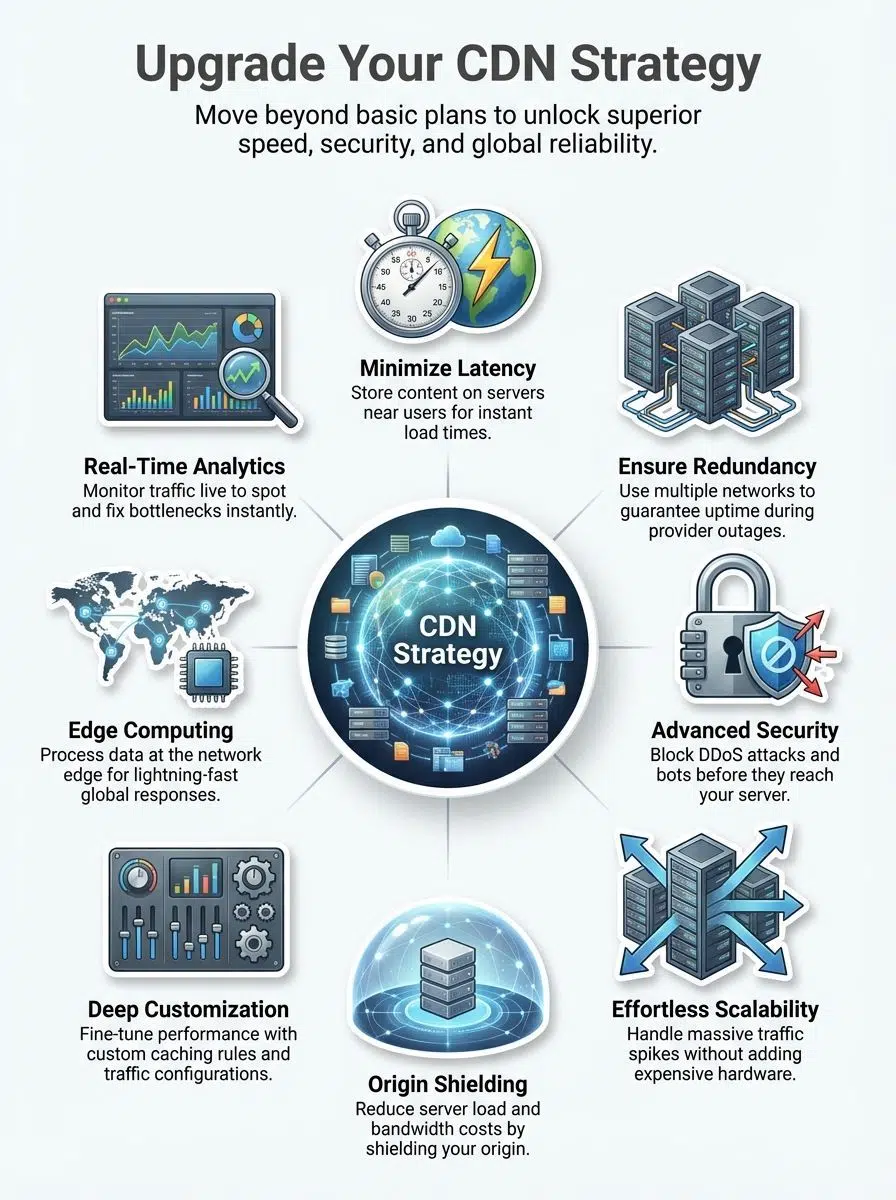
A simple CDN setup may leave your site open to slowdowns or threats. Building a stronger plan keeps content flowing fast and safe, even as your needs grow.
Enhanced Reliability with Multi-CDN Approaches
A Multi-CDN strategy lets you use more than one content delivery network for your website. This means if Cloudflare has a problem, another CDN like Amazon CloudFront or Fastly can take over.
No network is immune to failure. In recent years, major outages have taken down huge swathes of the internet for hours. Businesses that rely on just a Basic Cloudflare Plan may face outages during these major internet issues or attacks.
Using multiple CDNs spreads the risk and keeps sites online even under stress. Web traffic gets routed to the fastest and most reliable network at any moment. You get better uptime because if one service goes down or slows down, others can handle requests without users noticing problems.
Big brands and growing companies often choose this approach to ensure their websites stay available around the clock. Many experts recommend multi-CDN setups for higher reliability instead of sticking with only one provider’s standard package.
Improved Security Features
Better security is a big part of moving past a basic Cloudflare plan. With more advanced options, you get features like DDoS protection, SSL certificates, and bot management. Cloudflare’s large network helps block threats before they ever reach your site.
One specific tool you gain access to is advanced rate limiting. This allows you to cap the number of requests a single user can make in a minute. It is vital for stopping brute-force login attacks and scraping bots that steal your content.
Advanced CDN strategies can also stop data leaks and guard against hackers. You lower your risk by spreading traffic across many points and using smarter detection tools. These steps keep your website safe while still delivering fast speeds to users all over the world.
Greater Scalability for Growing Businesses
Growth means more website visitors, more data to handle, and a need for faster speeds. A basic Cloudflare plan can help at first. However, it often cannot keep up as your business expands.
Large global networks matter here. Cloudflare’s CDN now covers over 330 cities across more than 120 countries. This kind of reach makes it easier to serve content quickly everywhere.
Advanced CDN options give you much more control over traffic spikes or sudden growth. They lower bandwidth costs by caching content close to users and increase performance with features like origin shielding and real-time monitoring.
These upgrades let your site scale smoothly so customers always get a fast experience. For businesses that expect steady or rapid growth, reliable scalability is not just nice to have. It is the backbone of continued online success.
Advanced CDN Optimization Strategies
Explore these advanced techniques to boost your website’s speed and keep your visitors happy. These are the levers the pros pull to get that extra 10-20% performance boost.
Real-Time Performance Monitoring
Real-time performance monitoring lets you see how your website works at every moment. Cloudflare’s CDN covers over 330 cities in more than 120 countries, so real-time data can show if some locations load slower or face issues.
Quick alerts help teams fix problems before users even notice them. Fast action means a better user experience, improved SEO, and less chance for slowdowns during busy times.
Basic Cloudflare plans often lack detailed tools for this kind of live tracking. Features like Cloudflare Analytics or Logpush (available on Enterprise plans) provide granular data. You can see exactly which status codes your server is returning and where latency is spiking.
With better monitoring, websites spot trouble faster, boost security, and make smarter changes to save bandwidth. This is key as traffic grows or spreads across the globe.
Edge Computing for Reduced Latency
Edge computing puts processing power close to users. This means less lag and faster load times. Cloudflare’s network moves data closer to people worldwide. This is where tools like Cloudflare Workers come into play. Workers allow you to run JavaScript code directly on Cloudflare’s edge servers. You can modify HTTP requests, personalize content for specific regions, or even build entire applications without touching your origin server.
Businesses with large audiences see a big difference here. Faster response improves user experience and can boost SEO. Using edge features cuts bandwidth use and lowers egress costs for growing sites too.
For high-traffic web properties, this strategy keeps things speedy even during busy times or sudden spikes in visitors.
Origin Shielding to Reduce Server Load
Origin shielding acts like a protective layer for your main server. With this method, only one special cache pulls data directly from your origin. Cloudflare’s global network helps make this possible at scale.
Instead of every edge node contacting the original server for uncached files, only one “shield” location does this job. This feature is often referred to as Tiered Cache or Argo Smart Routing in the Cloudflare ecosystem.
This practice cuts down on the number of requests hitting your core website infrastructure. Lower request rates mean reduced server stress and often lead to lower bandwidth costs each month.
For larger sites or growing businesses relying on advanced CDN strategies, origin shielding means faster content delivery and better uptime during traffic spikes. This is another area where basic Cloudflare plans usually fall short compared to enterprise features or multi-CDN setups.
Multi-CDN Strategy: Benefits and Best Practices
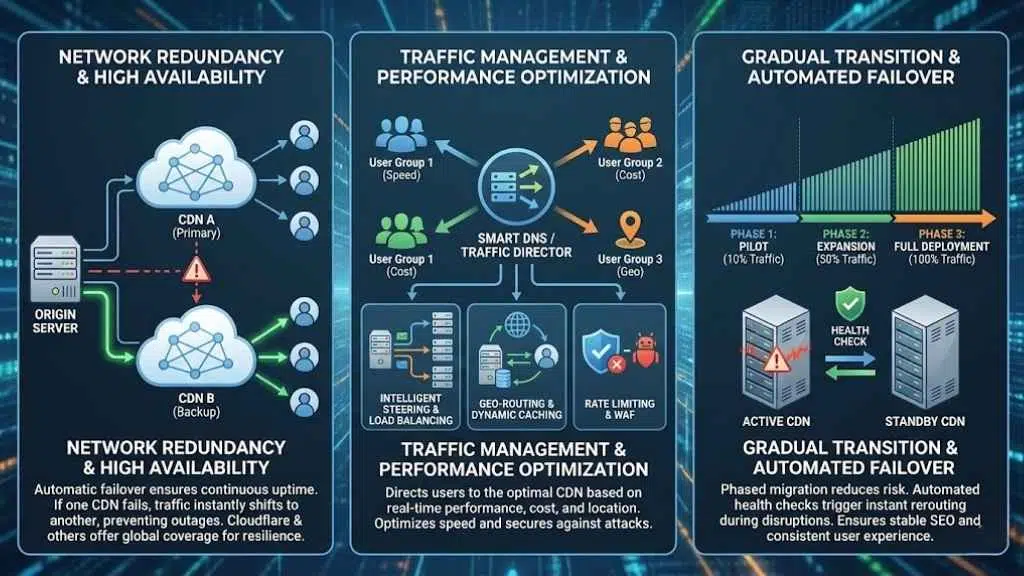
A smart multi-CDN plan keeps your site up, even if one network has issues. You can fine-tune traffic and boost speed for users everywhere. Here is how the right steps make all the difference.
Network Redundancy for High Availability
Network redundancy keeps websites running even if one CDN fails. Cloudflare’s network covers over 330 cities in more than 120 countries, which helps keep sites online all around the world. But having a backup plan is critical.
Using a multi-CDN approach boosts reliability since traffic can shift to another provider if needed. Specialized DNS providers like NS1 or Constellix can monitor your CDNs and automatically switch traffic if one goes down.
Web pages load faster and users stay happy when high availability is top priority. Businesses get peace of mind as CDNs like Cloudflare or AWS CloudFront lower bandwidth costs and provide backup routes for data. Choosing this strategy supports uptime, protects revenue, and builds trust with visitors who depend on quick access every day.
Traffic Management Tools for Performance Optimization
Traffic management tools help websites run faster and stay online. These powerful features keep visitors happy, cut down on costs, and improve website ranking.
- Intelligent Traffic Steering: Cloudflare uses smart traffic steering to send users to the closest server in its massive network. This reduces wait times and boosts loading speed anywhere in the world.
- Load Balancing: This spreads user requests across different servers. It helps avoid overloads, keeps sites stable during traffic spikes, and lets businesses scale with confidence as visits grow.
- Rate Limiting: This feature blocks or slows bad traffic before it can harm your website. Attacks that aim to overwhelm servers get stopped early, so real users get a smooth experience.
- Geo-Routing: This sends visitors to local content caches near them for faster access. Businesses lower their server costs because popular images, videos, or files load from nearby points instead of overloading a central system.
- Real-Time Analytics: These dashboards show how data flows through the CDN network at any moment. Teams spot slow areas instantly and take action to fix them before users notice a problem.
- Application Firewalls: In advanced plans, WAFs protect web properties from threats like bots and hackers. They filter risky traffic right at the edge of the network.
- Failover Systems: These reroute users if one connection goes down due to an outage or attack. Sites stay online for customers even if there is trouble with a single provider or path.
- Dynamic Caching: This stores changing content closer to end users while updating it regularly. It helps both SEO and user satisfaction as pages stay fresh without slowing down performance.
- Egress Cost Reduction: Cloudflare’s smart routing algorithms also trim egress costs. Less data travels back from origin servers thanks to heavy use of cached content on its wide-reaching global infrastructure.
- Provider Comparison: Both Cloudflare and Amazon’s CloudFront offer these benefits, but their tools differ in fine-tuning options. Picking a CDN that matches your exact business needs makes all the difference for optimized speed and security.
Gradual Transition and Failover Mechanisms
Building a strong CDN strategy means planning for sudden changes and failures. Gradual transitions and failover mechanisms keep your site up, even during outages or heavy traffic.
- Multiple CDNs can handle large spikes in demand, so no single network gets overloaded or goes down by itself. Cloudflare’s network spans over 330 cities across more than 120 countries, giving you vast coverage.
- A slow shift, instead of a quick cutover, lets you test new settings without losing access. You get time to see how users respond to new routes or features before making them live everywhere.
- Failover systems spot problems quickly and re-route web traffic to healthy servers or other CDNs within seconds. Your visitors almost never notice disruptions.
- Major companies use Cloudflare alongside other solutions like AWS CloudFront for this reason. Together they provide stronger backup against global outages.
- Automated tools check website health in real time. If one provider fails, requests move to another CDN instantly, avoiding lost sales or bad user experiences.
- Search engines reward stable sites with better rankings. Reliable CDNs help you stay fast and online for SEO gains.
- These approaches also reduce costs by controlling bandwidth use. Cached content near users cuts down on expensive data transfers from your origin server.
- Gradual transitions lower risk for growing businesses because you avoid big, risky changes. You can scale up at your own pace.
Smart use of transition and failover keeps websites reliable and fast while supporting millions of users worldwide every day.
Final Words
A smart CDN strategy requires more than just the basics. It includes real-time checks, stronger security, and ways to keep your site fast and safe. Choosing upgrades or a mix of networks gives you better speed, reliability, and control.
Using these steps helps websites grow, protect data, and handle more visitors with ease. Take the time to evaluate your current setup and ask if it can truly handle your next big traffic spike. Small changes today could make a huge difference in performance tomorrow. Take that first step toward a faster site now.