How often does it happen that your favorite photos get corrupted for no apparent reason? You either cannot view them or they look too bad to show to your family or friends!
In either case, the way forward is to repair damaged photos using a competent third-party tool as Windows has no built-in mechanism to fix the corrupted pictures. To save you from the hassle of choosing the right program, we have handpicked the most popular photo recovery program for 2022.
Let’s find out!
Part 1: What Causes Photos Damage?
A lot many reasons can be the culprit why your photos are damaged. Experts believe that the most common causes of photo corruption include, but are not limited to:
- Photo files are damaged during the transfer process from the storage device to your PC or within your, This happens mostly when there’s an unexpected system shutdown or crash during the process.
- A malware or virus attack has rendered photos corrupt, along with other data on the drive.
- Your PC drive is damaged or else, the storage media is damaged. In both cases, the photo files are not loaded on the drive and any file that gets loaded is corrupt by default.
- The file format of the photo is incompatible with your photo viewer.
Luckily, the process of damaged photo repair is quite straightforward, no matter the reason it got corrupted in the first place.

When it comes to the quickest method to repair corrupt photos on Windows, Tenorshare 4DDiG stands out. The software features a highly sophisticated algorithm to repair all kinds of damaged photos.
It supports all popular image formats including jpg. and png. and offers a 3-step procedure to bring an image back to its original form. 4DDiG boasts of its ability to repair unlimited photos in one go, irrespective of the level of corruption. The reasons for its popularity include ease of use, stellar functionality, reliability, and short repairing time.
The functionality of 4DDiG extends beyond a powerful photo repairer. It also acts as a complete data recovery tool. It won’t take you more than a few clicks to retrieve the lost photos or any other data type on your PC.
Compared to its competitors, Tenorshare 4DDiG comes in three different premium packages to let you decide the best option.

Notable Features
- Repair damaged photos and videos quickly
- Supports all popular image formats
- Allows you to repair multiple photos in one go
- The super-quick repairing process
- A comprehensive data recovery software
- Very easy to set up and use
- Free customer support service
- Works on both Windows and Mac
To keep the ball rolling, follow the below steps to repair your damaged photos quickly:
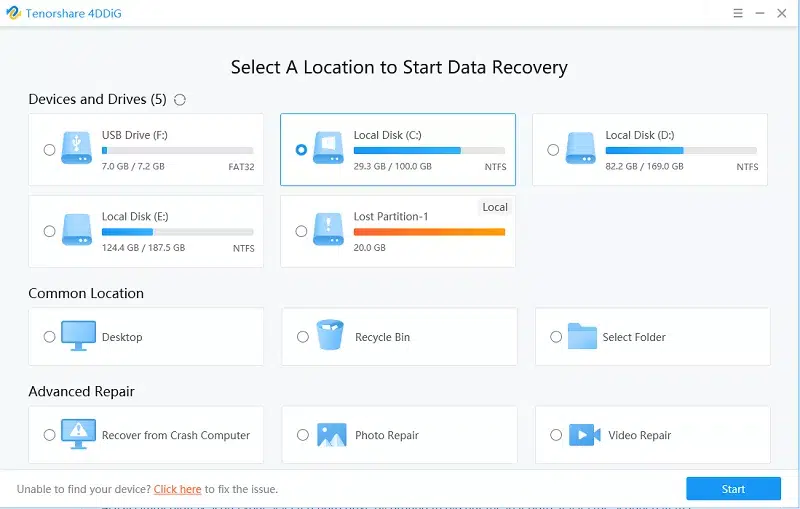
Step 1. After launching the program, select “Photo Repair” on its home interface to get started.
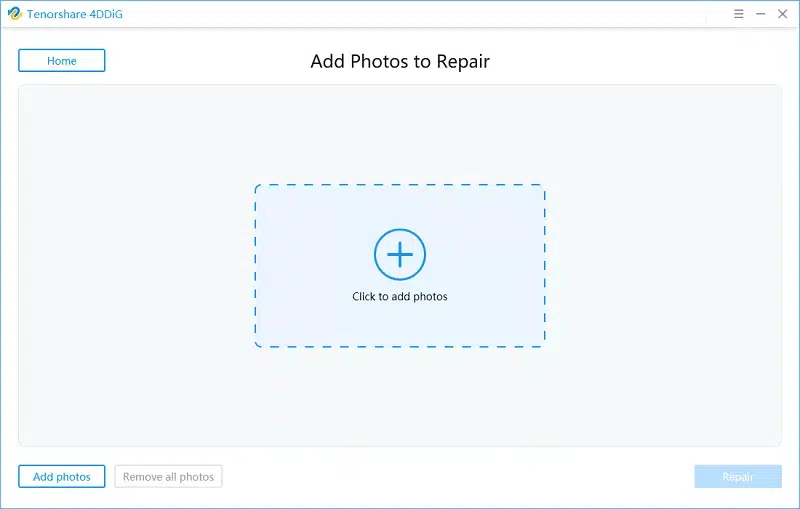
Step 2. Drag and drop the photos you want to repair.
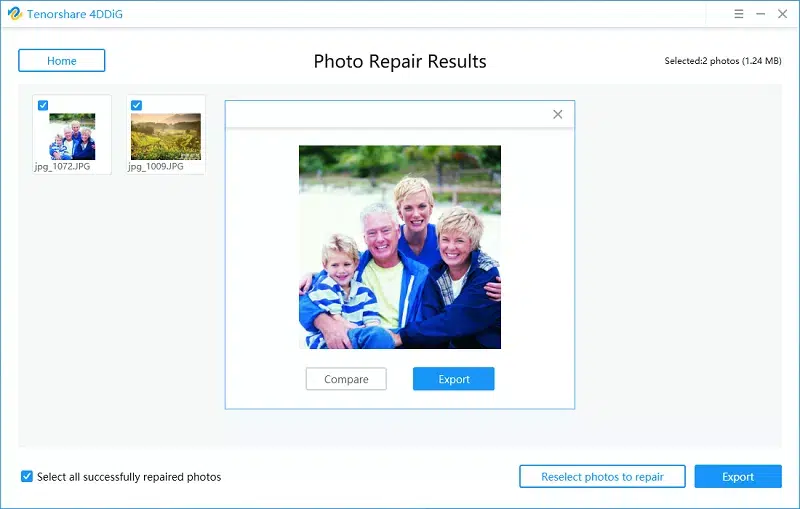
The program will immediately repair the photos and display them on the screen.
Step 3. Preview them and if they meet your expectations, hit Export to save on your PC.
Part 3: How to Avoid Damaged Photos?
If anything, repairing damaged photo files is not a walk in the park. That’s why this section is going to discuss a few effective tips and tricks to prevent photo corruption.
- If you’re getting error messages while trying to open an image file, chances are your photo viewer is not compatible with the image format. Try to update the viewer to the latest version or install a reliable program from the internet.
- Install a competent antivirus program on your Windows. This prevents malware or virus from attacking and damaging your photos or other data stored on your
- Properly insert and remove the external storage media containing the photos.
- Never interrupt the photo transfer or saving process, no matter how slow it is.
- Make sure your computer has a consistent power supply, during the photo transfer process. An accidental shutdown or power outage can render the photos corrupt.
Stellar Repair for Photo
Stellar Repair for Photo is easy to use because its GUI is simple and easy to understand. With easy-to-follow instructions on the screen, you can fix several photos at once. Even people who don’t know much about computers can easily fix their corrupted image files in a variety of formats with this software.
Conclusion
Photo corruption is a very common issue that can happen to anybody, anytime. After reading this guide, you are never going to have any hassles with how to repair a damaged photo using Tenorshare 4DDiG.
With this tool installed on your PC, repairing even the worst corrupted photos is at your fingertips. Just get its premium version and start fixing your favorite photos right away.