
Websites experiencing high traffic volumes need more than engaging content and visually appealing designs—they require a strong, optimized infrastructure to handle the load. A Virtual Private Server (VPS) offers dedicated resources and scalability, making it an excellent choice for high-traffic websites.
However, without proper optimization, even the best VPS can struggle with traffic spikes, leading to slow load times, crashes, or security vulnerabilities. In this guide, we’ll cover 7 VPS Optimization Tips for High-Traffic Websites to help you enhance performance, ensure reliability, and provide a seamless experience for your users.
Why VPS Optimization Is Crucial for High-Traffic Websites
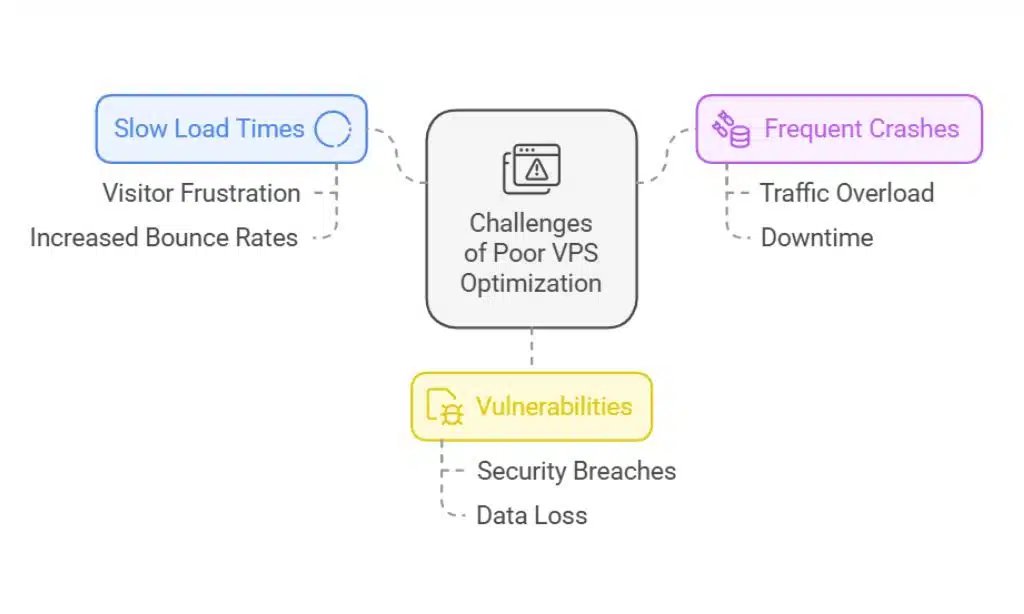
When managing high-traffic websites, the demand for server resources like CPU, RAM, and bandwidth increases significantly. Without effective VPS Optimization Tips for High-Traffic Websites, your server may fail to meet these demands, leading to frustrating issues such as:
- Slow Load Times: Visitors leave when pages take too long to load.
- Frequent Crashes: Spikes in traffic can overload the VPS and cause downtime.
- Vulnerabilities: A poorly optimized VPS is more susceptible to security risks.
Key Stats and Trends
- Impact of Speed: According to Google, a 1-second delay in page load time can reduce conversions by 7%.
- Traffic Surges: E-commerce platforms experience up to 500% more traffic during holiday sales, highlighting the need for proper VPS Optimization Tips for High-Traffic Websites.
Benefits of Implementing VPS Optimization
- Enhanced Speed: Faster response times keep users engaged.
- Scalability: An optimized VPS can easily handle sudden traffic spikes.
- Improved Security: Regular updates and configurations mitigate risks.
7 VPS Optimization Tips for High-Traffic Websites
1. Choose the Right VPS Hosting Plan
Selecting a suitable hosting plan is the first step in applying VPS Optimization Tips for High-Traffic Websites. High-traffic websites require a hosting plan with adequate CPU, RAM, and storage resources to meet demand.
Key Considerations When Choosing a VPS Plan
- Evaluate Resource Needs: Analyze your current and expected traffic to determine CPU and RAM requirements.
- Scalability: Choose a plan that allows seamless upgrades.
- Managed Hosting: Consider managed VPS hosting for expert guidance.
| Hosting Features | Minimum Requirement | Recommended for High Traffic |
| CPU Cores | 2 | 4 or more |
| RAM | 4 GB | 8–16 GB |
| Storage (SSD) | 20 GB | 50+ GB |
| Bandwidth | 1 TB | Unlimited |
2. Optimize Server Configurations
Fine-tuning server configurations is critical for effective VPS Optimization Tips for High-Traffic Websites. By tweaking settings, you can maximize resource efficiency and improve overall performance.
Steps to Optimize Server Settings
- Enable Keep-Alive Connections: Reuse connections to speed up responses.
- Adjust Timeout Values: Free up resources quickly by shortening idle time.
- Use Compression: Gzip reduces the size of HTML, CSS, and JavaScript files.
| Server Setting | Recommended Value | Benefit |
| Keep-Alive | On | Faster connection reuse |
| Timeout | 5–10 seconds | Frees up idle resources |
| Gzip Compression | Enabled | Smaller file sizes and faster loads |
Example
A high-traffic blog implemented Nginx configurations as part of its VPS Optimization Tips for High-Traffic Websites, reducing average page load times by 30% and significantly improving user retention.
3. Implement Caching Solutions
Caching is one of the most effective VPS Optimization Tips for High-Traffic Websites. It reduces server load by storing frequently accessed data for quick delivery.
Types of Caching to Consider
- Page Caching: Saves entire web pages to reduce server requests.
- Object Caching: Uses tools like Redis or Memcached to cache database queries.
- Browser Caching: Enables visitors’ browsers to store static assets like images.
| Caching Tool | Best Use Case | Performance Boost |
| Redis | Database caching | Faster query response times |
| Varnish | HTTP accelerator | Improved content delivery |
| WP Super Cache | WordPress sites | Optimized page loads |
Example
An e-commerce website applied caching solutions like Varnish Cache as part of its VPS Optimization Tips for High-Traffic Websites, cutting response times by 40% during a holiday sales event with 5x more visitors.
4. Use a Content Delivery Network (CDN)
A CDN is an indispensable part of VPS Optimization Tips for High-Traffic Websites, especially for websites with global audiences. It distributes your static files across servers worldwide to reduce latency and improve load times.
| Popular CDN Options | Features | Best For |
| Cloudflare | Free DDoS protection | Small to medium websites |
| Akamai | Enterprise solutions | High-traffic e-commerce platforms |
| Amazon CloudFront | AWS integration | Websites hosted on AWS |
5. Regularly Update Software and Security Patches

Keeping your VPS updated is critical for maintaining performance and security. Regular updates prevent vulnerabilities, improve compatibility with new technologies, and ensure stable operations—an essential part of VPS Optimization Tips for High-Traffic Websites.
| Monitoring Tool | Features | Best For |
| New Relic | Tracks outdated software versions monitors updated performance, and analyzes server behavior post-update. | Ensuring smooth updates for high-traffic e-commerce and enterprise sites. |
| Datadog | Tracks system logs, flags outdated software, and provides visual dashboards for software versions. | Managing updates in multi-cloud or hybrid environments. |
| SolarWinds | Monitors patch compliance, automates update rollouts and provides detailed reporting on applied patches. | Enterprise-level patch management and compliance. |
| Patch My PC | It simplifies third-party app updates, ensures timely software patching, and integrates with SCCM or Intune. | Smaller businesses need streamlined update processes. |
| ManageEngine Patch Manager Plus | Automates OS and application updates detects vulnerabilities, and deploys patches seamlessly. | Comprehensive patch management for medium to large organizations. |
6. Monitor Server Performance
Monitoring is at the core of VPS Optimization Tips for High-Traffic Websites. Real-time tracking helps identify bottlenecks and resolve them before they impact user experience.
| Monitoring Tool | Features | Best For |
| New Relic | Real-time insights | High-traffic websites |
| Datadog | Advanced analytics | Multi-server environments |
| SolarWinds | Network monitoring | Enterprise-level setups |
7. Enable Automatic Scaling for Traffic Spikes
Automatic scaling is one of the most proactive VPS Optimization Tips for High-Traffic Websites. It dynamically adjusts server resources during unexpected traffic surges to ensure stability.
| Provider | Auto-Scaling Feature | Ideal For |
| AWS Elastic Beanstalk | Dynamic scaling | E-commerce sites |
| Google Cloud | Auto-scaling groups | Applications with variable traffic |
| DigitalOcean | Horizontal scaling | Small to medium websites |
Example
A media streaming platform leveraged auto-scaling through AWS to handle a 300% traffic surge during a live event, ensuring zero downtime and consistent performance.
Final Thoughts on VPS Optimization Tips for High-Traffic Websites
By following these VPS Optimization Tips for High-Traffic Websites, you can ensure your site remains fast, reliable, and secure, even during periods of high traffic. Start by selecting the right hosting plan, optimizing server configurations, and leveraging tools like CDNs and caching.
With regular updates and real-time monitoring, your VPS will perform at its peak, providing a seamless experience for your audience while supporting your business growth.