Running a business means juggling many tasks at once. Customers call all day asking about appointments. You spend hours on the phone instead of working. Your paper calendar gets messy and confusing.
Double bookings happen way too often. This creates stress for you and your customers.
WordPress booking plugins can solve these problems fast. These tools turn your website into a smart scheduling system. Customers book their own appointments online. The system sends automatic email confirmations.
Your google calendar stays updated without any extra work. Payment processing happens right on your site. This saves you time and makes customers happy.
We tested over 20 appointment booking plugins to find the best ones. Our team has 16 years of WordPress experience and helps over 25 million websites. This guide shows you seven top booking plugins that work great.
Each plugin handles different business needs. Some work best for salons and spas. Others shine for hotels and consultants.
Ready to stop playing phone tag with customers?
Key Takeaways
- WordPress booking plugins solve scheduling problems by letting customers book appointments online, preventing double bookings and saving business owners time.
- Seven top plugins include Amelia, Booking Calendar, Simply Schedule Appointments, MotoPress Hotel Booking, BookingPress, Salon Booking System, and WooCommerce Bookings.
- Key features to consider include payment gateway support, mobile optimization, multi-user capabilities, customization options, and Google Calendar integration.
- Premium versions typically cost $49-199 per year, while free versions offer basic functionality with limited features and payment processing.
- Choose plugins based on your industry needs: salons need staff scheduling, hotels require inventory management, consultants focus on calendar sync.
Important Features to Consider in a WordPress Booking Plugin
Picking the right booking plugin can make or break your business. You need to know what features matter most before you start shopping around.
What makes a WordPress booking plugin easy to use?
A booking plugin becomes easy to use when it offers drag-and-drop builders and setup wizards. Tools like WPForms and Simply Schedule Appointments make setup simple for beginners. These plugins detect your time zone and date format right away.
You don’t need to guess or spend hours figuring out basic settings.
Plugins with clear admin dashboards win every time. Amelia and BookingPress shine here with their clean interfaces. They work well with the WordPress block editor too. Real-time availability displays help customers see open slots fast.
Sugar Calendar stands out for its quick, simple interface that gets you booking appointments in minutes, not hours.
How customizable should a booking plugin be?
Customizable booking forms and calendar displays make the difference between a plugin that works and one that works perfectly for your business. Plugins with drag-and-drop editors, like Simply Schedule Appointments, give you complete control over your scheduling system.
WPForms offers over 2,000 templates, making it easy to create custom booking forms that match your brand. Your booking plugin should let you change colors, fonts, and layouts to fit your website’s look.
Custom branding and styling options help your online booking system feel like part of your site, not an add-on. The best wordpress booking plugins let you customize notification emails and booking flows to match your business voice.
Salon Booking System allows customizable schedules for multiple locations and services, perfect for growing businesses. Look for plugins that support custom fields and conditional logic, so you can collect exactly the information you need from customers.
WP Simple Booking Calendar offers unlimited calendars and flexible scheduling options, giving you the freedom to set up complex booking scenarios without breaking a sweat.
Which payment gateways should the plugin support?
Your booking plugin needs to accept money from customers easily. Most top WordPress booking plugins support Stripe and PayPal in their premium versions. These two payment processors handle the majority of online transactions worldwide.
BookingPress goes above and beyond with support for over 20 payment gateways. MotoPress Hotel Booking accepts PayPal, Stripe, 2Checkout, Braintree, and Beanstream. WPForms processes payments through Stripe, PayPal, and Square.
Some plugins offer Apple Pay and Google Pay through special add-ons. Free versions often lack online payment support, which creates a major bottleneck for service businesses trying to collect deposits or full payments upfront.
Does the plugin support multiple users effectively?
Multiple user support separates good booking plugins from great ones. Simply Schedule Appointments manages multiple team members and locations with ease. Salon Booking System supports multiple staff, locations, and services, plus offers mobile apps for staff members.
BookingPress includes separate dashboards for staff and managers, along with advanced staff management features.
Amelia supports multiple employees and locations while sending real-time SMS notifications to team members. MotoPress Hotel Booking handles multi-location and multi-service setups perfectly.
Booking Calendar provides unlimited calendars and resources, making it effective for multi-user environments. Staff members get their own schedules and booking forms, which keeps everything organized and running smoothly.
How mobile-friendly is the booking plugin?
Mobile-friendly booking plugins work perfectly on phones, tablets, and computers. Amelia and Salon Booking System provide mobile apps for staff members to manage appointments on the go.
Simply Schedule Appointments optimizes booking forms and notifications for mobile devices. MotoPress Hotel Booking includes a mobile app for property management tasks. Webba Booking creates responsive frontends that adapt to any screen size.
Booking Calendar displays calendar views clearly on mobile devices for both customers and visitors. Easy Appointments responds to different screen sizes, letting people book appointments from any device.
These wordpress booking plugins adjust their booking forms automatically to fit smaller screens. Staff members can access their admin dashboard from phones to check schedules and manage appointments.
Mobile optimization helps service businesses capture more bookings from customers who prefer using their smartphones.
Amelia
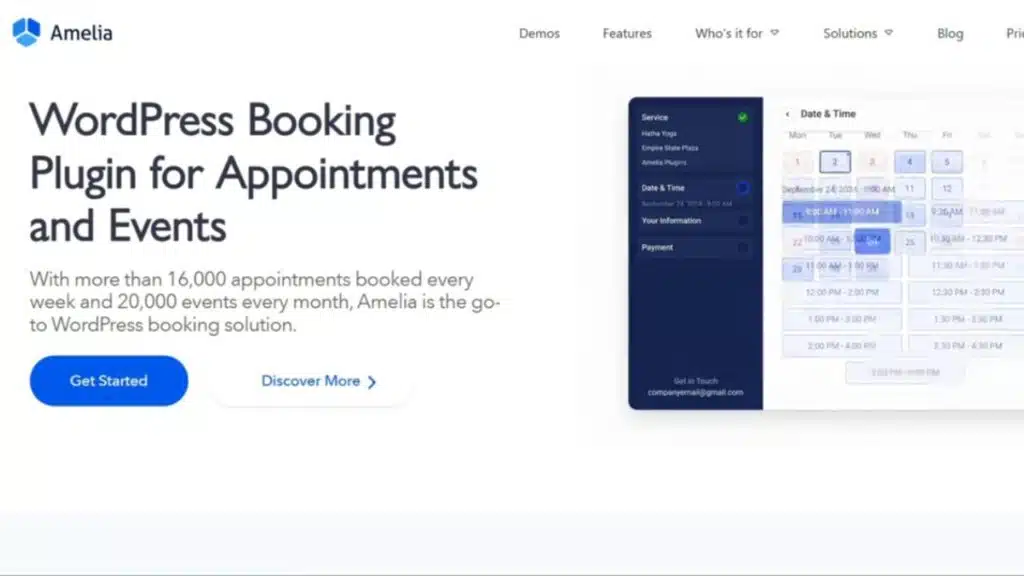
Amelia stands out as a comprehensive appointment booking plugin that transforms your WordPress site into a professional scheduling system. This powerful tool handles everything from simple appointments to complex service bookings, making it perfect for salons, consultants, and healthcare providers who need reliable online booking capabilities.
What are the key features of Amelia?
Amelia packs a punch with features that make appointment scheduling a breeze for service businesses. This booking plugin supports multi-service and multi-site businesses through a clean admin dashboard.
The WYSIWYG editor lets you customize booking forms without touching code. Real-time SMS notifications keep clients in the loop, while Google Calendar synchronization prevents double bookings.
WooCommerce integration handles payment processing smoothly, and the system works with multiple employees across different locations.
Visual KPI tracking tools help you monitor business performance at a glance. Coupon code management attracts new customers with discount offers. Flexible pricing structures adapt to your business model, whether you charge hourly or per service.
Automatic invoice generation saves time on paperwork. The plugin offers a free lite version for testing, with premium plans starting at $49 per year and scaling up to $199 per domain for advanced features.
What are the pros and cons of using Amelia?
This booking plugin brings both advantages and drawbacks to consider for your business setup.
| Pros | Advantages |
|---|---|
| Multi-Service Flexibility | Versatile for multi-service setups that grow with your business needs |
| Real-Time Communication | Real-time SMS notifications keep clients informed instantly |
| Business Analytics | Visual KPI tracking helps monitor performance metrics effectively |
| Pricing Options | Flexible pricing structures adapt to different service models |
| Integration Support | Google Calendar sync and WooCommerce integration for streamlined operations |
| Budget-Friendly Start | Free lite version available for small businesses testing the waters |
| Cons | Limitations |
|---|---|
| Cost Structure | Paid version starts at $49/year, and premium features require higher-tier plans |
| Feature Restrictions | Real-time SMS and some advanced features are only in premium versions |
| Payment Limitations | No mention of unlimited free online payments in the free version |
| Single-Service Pricing | Higher-tier plans may be costly for single-service providers |
| Advanced Tools | Some features (tax calculation, automatic invoices) only in paid plans |
Booking Calendar
Booking Calendar stands out as one of the most popular appointment booking plugins for WordPress sites. This plugin transforms your website into a powerful scheduling system that handles everything from simple appointments to complex recurring events.
What are the key features of Booking Calendar?
Booking Calendar brings a flexible calendar view that works great for both site owners and visitors. This free plugin handles unlimited resources and supports businesses with multiple venues.
You can import and export your Google Calendar data easily, which helps keep everything in sync. The built-in CAPTCHA feature stops spam bookings from cluttering your system. Custom forms and skins let you match the booking interface to your brand perfectly.
Automated email notifications keep both you and your customers informed about appointments. The system sends confirmations, reminders, and updates without any manual work. Premium business plans start at around $60 and include double booking control.
This feature prevents scheduling conflicts that could hurt your business. The plugin works well for service businesses, salons, and any company that needs appointment scheduling. Google calendar integration makes managing your schedule much simpler.
What are the pros and cons of using Booking Calendar?
Booking Calendar brings both strengths and weaknesses to your WordPress site that deserve careful consideration.
| Pros | Details |
|---|---|
| Entirely free for core functionality | Access all basic booking features without paying a dime |
| Strong free features and flexible calendar | Handles varied booking needs across different industries |
| Customizable forms, skins, and calendar display | Match your website’s design and branding perfectly |
| Spam protection via built-in CAPTCHA | Blocks fake bookings and automated spam attempts |
| Cons | Details |
| User experience is less polished compared to premium competitors | Interface feels basic and lacks modern design elements |
| Advanced features available only in paid versions | Premium upgrades required for professional functionality |
| Multi-venue and some calendar integrations are premium-only | Multiple locations need paid plans to work properly |
| Lacks advanced payment gateways by default | Limited payment options without purchasing add-ons |
Simply Schedule Appointments
Simply Schedule Appointments makes booking a breeze for service-based businesses that need a clean, straightforward scheduling system. This plugin shines with its user-friendly interface and solid google calendar integration, making it perfect for coaches, consultants, and small business owners who want to get up and running fast.
What are the key features of Simply Schedule Appointments?
Simply Schedule Appointments comes packed with smart features that make appointment scheduling a breeze. The setup wizard detects your time zone and date format automatically, giving you a personalized booking experience right from the start.
You get multiple appointment types to choose from, plus a drag-and-drop editor that lets you customize everything without touching a single line of code.
Real-time availability display keeps your customers informed about open slots instantly. The plugin integrates smoothly with Google Calendar, Outlook Calendar, Zoom, and Google Meet, so all your appointments sync perfectly across platforms.
Customizable branding options help your booking forms match your website’s look and feel. Mobile-optimized forms work great on phones and tablets, making it easy for clients to book appointments anywhere, anytime.
What are the pros and cons of using Simply Schedule Appointments?
Simply Schedule Appointments brings both strengths and weaknesses to your booking operation.
| Pros | Cons |
|---|---|
| User-friendly setup makes getting started a breeze | Free version is limited and lacks advanced features |
| Real-time availability keeps customers informed instantly | Premium plans may be costly for simple booking needs |
| Manages multiple team members smoothly across different locations | Booking flows and group events require a paid plan |
| Integrates seamlessly with major calendar platforms | Free version does not include booking flows |
| Video platform integration works well for online appointments | Advanced booking flows need premium subscription |
| Premium plans offer advanced booking flows for complex scheduling | Group event bookings are locked behind paywall |
| Group event bookings help manage workshops and classes | Small businesses might find costs prohibitive |
| Multi-location support scales with growing businesses | Basic features feel restrictive in free tier |
MotoPress Hotel Booking
MotoPress Hotel Booking stands out as a complete solution for hotels, B&Bs, and vacation rental properties. This powerful plugin transforms your WordPress site into a professional accommodation booking platform with advanced features like property management systems, seasonal pricing, and automated email notifications.
What are the key features of MotoPress Hotel Booking?
MotoPress Hotel Booking brings powerful features to hotels and vacation properties. This wordpress booking plugin handles unlimited reservations with ease. The system works perfectly with start and end date calendars.
Property owners can set up per-night, per-day, or per-week bookings without hassle.
Two-way iCal sync connects your booking system with major platforms like Airbnb, Booking.com, and HomeAway. This calendar synchronization prevents double bookings across all channels.
The plugin supports multiple payment gateways including PayPal, Stripe, 2Checkout, Braintree, and Beanstream. Seasonal pricing helps maximize revenue during peak times. Buffer periods between bookings give staff time to prepare rooms.
A mobile app lets managers handle bookings on the go. Email notifications keep guests informed about their accommodation bookings and cancellations. Coupon creation tools help attract more customers with discount offers.
What are the pros and cons of using MotoPress Hotel Booking?
MotoPress Hotel Booking shines as a top choice for hotels, vacation rentals, and property management companies. This booking plugin supports a wide range of payment gateways, giving you flexibility with online payments. Two-way iCal sync prevents double bookings with OTAs, making your scheduling system more reliable. Property managers love the mobile app for on-the-go management tasks.
Several downsides come with this accommodation bookings plugin. Premium version starts at $139/year, higher than many competitors in the wordpress booking plugins market. Some key features like seasonal pricing and buffer periods are premium-only, limiting the free version’s usefulness. Advanced integrations and features require higher-tier plans, which can get expensive for service businesses. The free lite version has limited features compared to premium options, making it less appealing for serious property management system needs.
BookingPress
BookingPress stands out as a modern appointment booking plugin that brings professional scheduling to your WordPress site. This plugin packs powerful features like automated email notifications, payment processing, and google calendar integration into one clean package.
What are the key features of BookingPress?
This appointment booking plugin comes packed with features that make scheduling a breeze. You get customizable booking forms that adapt to your business needs. The admin dashboard gives you complete control over appointments and services.
Staff members can manage their own schedules through separate dashboards. The system handles recurring appointments automatically, saving you tons of time.
Payment processing becomes simple with support for over 20 payment gateways. Your customers receive automated email notifications for confirmations and reminders. The plugin integrates smoothly with Google Calendar and Microsoft Outlook for calendar synchronization.
You can set up buffer time between appointments to avoid double-booking. SMS notifications and WhatsApp notifications keep everyone in the loop. The system supports unlimited locations and services, perfect for growing businesses.
What are the pros and cons of using BookingPress?
BookingPress brings comprehensive dashboard features for both staff and managers to your WordPress site. Staff members can track their appointments easily, while managers get detailed insights into business operations. The plugin supports wide payment gateway options, making it simple for customers to pay through their preferred methods. Many free add-ons come with BookingPress, giving you extra features without spending more money. Multi-language support helps businesses serve international clients, while notification versatility includes WhatsApp, SMS, and email confirmations. Unlimited locations work perfectly for businesses with multiple branches, and advanced reporting tools help track performance across all sites.
Some advanced features require premium plans starting at $79/year, which might stretch tight budgets. The free version offers limited functionality compared to premium options, potentially forcing upgrades sooner than expected. Dynamic pricing and advanced staff management stay locked behind premium-only access, restricting flexibility for growing service businesses. Setting up multi-location businesses can create a potential learning curve, especially for users new to booking plugins. Small salon booking system operators might find the extensive features overwhelming when they only need basic appointment scheduling capabilities.
Salon Booking System
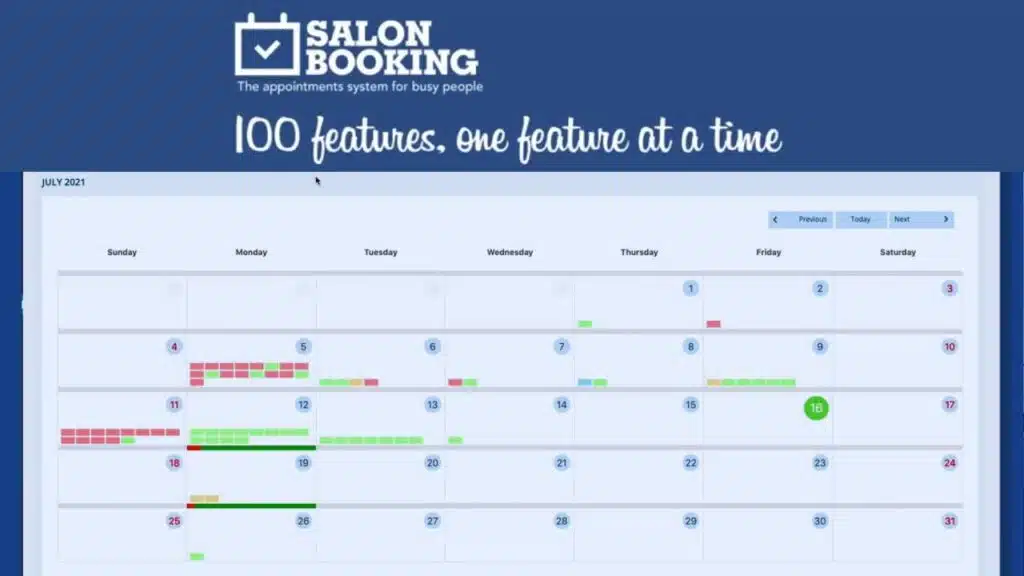
Salon Booking System caters specifically to beauty salons, spas, and barbershops with specialized features. This plugin handles multiple staff members, services, and complex scheduling scenarios that hair stylists and beauty professionals face daily.
What are the key features of Salon Booking System?
Salon Booking System offers powerful features for service-based businesses that need multiple staff and location support. This booking plugin comes with a mobile app that lets staff members manage their schedules and appointment bookings on the go.
The system integrates with Google Calendar for real-time calendar synchronization, making it easy to track all appointments across different platforms.
Advanced discount management helps salon owners create special offers and gift cards for their customers. The booking forms are completely customizable, allowing businesses to collect the exact information they need from clients.
Notifications work through multiple channels, including automated email notifications, SMS notifications, and WhatsApp notifications to keep everyone informed. The plugin supports over 20 language translations, making it perfect for businesses with diverse customer bases.
Premium plans start at $99 per year, though a free version gives you basic functionality to test the waters.
What are the pros and cons of using Salon Booking System?
Salon Booking System shines for salons and barbershops with multi-staff and multiple location needs. This booking plugin offers a staff mobile app that makes schedule management a breeze for busy professionals. Multi-channel notifications keep everyone in the loop through email, SMS, and WhatsApp notifications. Advanced discounts and customizable booking forms help businesses run promotions that actually work.
Premium features come with a price tag starting at $99/year, which runs higher than some alternatives in the market. API access and advanced features require premium subscriptions, leaving free users with limited options. The free version restricts many essential features that service businesses need. This appointment booking plugin may feel too specialized for businesses outside the salon and barbershop industry.
WooCommerce Bookings and Appointments
WooCommerce Bookings and Appointments turns your existing WooCommerce store into a powerful scheduling system. This plugin works like a Swiss Army knife for online businesses, letting customers book services, rent equipment, or reserve time slots right from your website.
What are the key features of WooCommerce Bookings and Appointments?
This WooCommerce extension transforms your online store into a complete booking system for service businesses. Built specifically for WooCommerce stores, it handles bookings, reservations, and rentals with deep payment processing integration.
The plugin costs $149 per year, with additional add-ons starting at $69 annually. Staff can create detailed profiles while managing flexible cost structures across different services.
Recurring bookings work seamlessly with Google Calendar synchronization to prevent double-booking conflicts. Business owners customize booking slots through an intuitive admin dashboard that connects directly with their existing WooCommerce setup.
The system supports service bookings, rental management, and product reservations all in one place. No free version exists, so businesses must purchase the premium license to access these appointment scheduling features.
What are the pros and cons of WooCommerce Bookings and Appointments?
WooCommerce Bookings and Appointments brings powerful advantages to your online business. This plugin integrates booking functionality directly into the WooCommerce system, eliminating the need for separate payment options. You get seamless payment processing through your existing store setup. Two-way Google Calendar sync enhances schedule management for both admins and customers. Your team can manage appointments while customers see real-time availability. Pricing for WooCommerce Bookings starts at $149/year, with optional premium add-ons from $69/year. The system handles appointment bookings, service scheduling, and product rentals in one place.
Some drawbacks come with this booking system choice. Users may experience a steeper learning curve due to extensive features and complex setups. The plugin requires WooCommerce knowledge to maximize its potential. Small businesses might find the yearly cost high compared to simpler booking plugins. Setup takes more time than basic appointment scheduling tools. You need technical skills to customize advanced features. The system works best for established WooCommerce stores rather than new websites.
How to Choose the Right Plugin for Your Business Needs
Picking the right booking plugin for your business can feel like finding a needle in a haystack, but it doesn’t have to be rocket science. Your choice depends on your specific industry needs, budget constraints, and growth plans for the future.
How do you assess your industry requirements for booking plugins?
Your business type shapes which booking plugin features you actually need. Salons require staff scheduling and service duration controls, while hotels need room inventory management and multi-day reservations.
Consulting firms focus on calendar synchronization with Google Calendar and automated email notifications for client meetings.
Start by listing your specific service requirements and daily operations. Check if the plugin supports your service type, whether that’s accommodation bookings, appointment scheduling, or recurring events.
Look for industry-specific templates and customizable booking forms that match your workflow. Review feedback from similar businesses in your sector to see which wordpress booking plugins work best for companies like yours.
Why is scalability important for future growth?
Scalability acts as the backbone of any successful online booking system. Business growth brings more appointments, customers, and services to manage. Plugins with unlimited calendars, staff, and locations support business expansion without hitting roadblocks.
BookingPress and Simply Schedule Appointments offer premium plans supporting unlimited growth, making them smart choices for ambitious businesses. Scalable plugins support advanced reporting and analytics for performance tracking, giving you clear insights into your success.
Growing businesses need systems that grow with them. Scalability in software reduces the need for frequent platform changes or migrations, saving time and money down the road. Integration with eCommerce and payment gateways aids revenue growth by streamlining transactions.
Automated notifications and reminders reduce manual workload as bookings increase, freeing up your team for other important tasks. Consider plugins allowing easy addition of new team members, services, or locations as your business expands.
Takeaways
Choosing the right booking plugin can transform your business operations. These seven WordPress booking plugins offer different strengths for various industries. Some excel at appointment scheduling, while others shine with accommodation bookings or service-based businesses.
Your business needs will guide your decision. Consider your budget, required features, and growth plans when making this choice. Most plugins offer free versions, so you can test them before committing to premium features.
Start with one plugin today and watch your booking process become smoother. Your customers will appreciate the convenience, and you’ll love the organized schedule.
FAQs
1. What are the best WordPress booking plugins for appointment scheduling?
The top WordPress booking plugins include Simply Schedule Appointments, WooCommerce Bookings, and MotoPress Hotel Booking. These plugins offer robust scheduling systems with Google Calendar integration and payment processing. Most come with customizable booking forms and automated email notifications.
2. Can booking plugins handle online payments and payment gateways?
Yes, most appointment booking plugins support multiple payment gateways for seamless payment processing. They integrate with popular systems to accept credit cards and online payments right through your booking forms.
3. Do WordPress booking plugins work with Google Calendar and other calendar systems?
Absolutely! Most booking plugins offer Google Calendar synchronization and iCalendar support. This calendar synchronization helps prevent double bookings and keeps your schedule organized across platforms.
4. Are these plugins suitable for service businesses and accommodation bookings?
These plugins work great for service-based businesses, salon booking systems, and accommodation bookings. WooCommerce extensions make it easy to handle recurring appointments and manage different types of bookings from your admin dashboard.
5. What advanced features do booking plugins offer beyond basic appointment scheduling?
Modern booking plugins include SMS notifications, WhatsApp notifications, and Zoom integration for virtual meetings. Many also offer Google Meet integration, buffer time settings, gift cards, and discount coupons to boost your business.
6. How user-friendly are these booking plugins for both admins and customers?
Most plugins prioritize ease of use with intuitive front end booking forms and simple admin dashboards. They often include mobile app integration, recurring events management, and automated systems that make booking a breeze for everyone involved.