


You want to run dApps and host files on blockchains. You know blockchain technology can boost your site. But you feel lost by all the choices. You need clear info on web3 browsers.
Many web3 browsers add a crypto wallet and interplanetary file system (IPFS) support. We list 10 top web3 browsers, from Brave to Osiris. You will learn which browser fits your needs and how it links to hosting.
Keep reading.
Key Takeaways
- Web3 browsers like Brave, Opera Crypto, MetaMask Mobile, Puma, Osiris, and Aurox pair built-in crypto wallets with IPFS. They run dApps on Ethereum, BSC, and Polygon without extra plugins. You can sign smart contracts in one tap and host files peer-to-peer or on a Windows VPS.
- Brave Browser blocks ads and trackers. It embeds Brave Wallet for ERC-20 tokens and rewards users with Basic Attention Token (BAT). It fetches files from IPFS, checks smart contracts on mainnet, and links to a free Windows VPS.
- Opera Crypto Browser supports Ethereum, Binance Smart Chain, and Polygon. Its self-custody wallet holds ERC-20 coins and NFTs. It uploads files to IPFS, installs on cloud VPS in minutes, and blocks trackers.
- Puma Browser cuts load time by 30% and blocks 75% of cookie scripts. It locks private keys in a secure vault. It installs via shell commands and links to IPFS nodes on AWS and Google Cloud.
- Aurox Browser shows real-time trading analytics and offers hardware wallet support. Users earn cashback on trading fees. It logs hosting calls in a local ledger, fetches data via IPFS, and runs on VPS or public IPFS gateways.
Key Features of Web3 Browsers
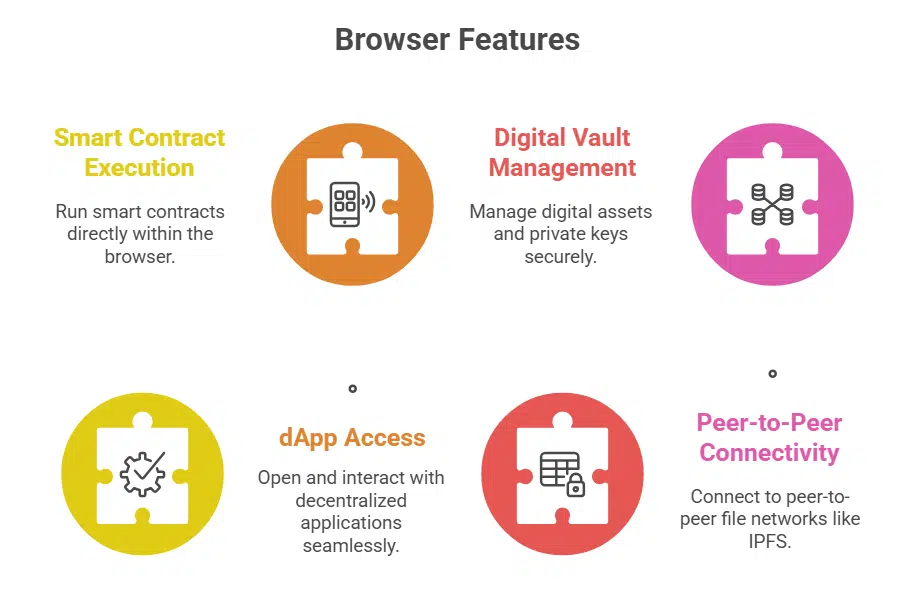
These browsers let you run smart contracts, open dApps, and manage digital vaults all in one place. They link to peer-to-peer file nets like IPFS, so you keep your data safe and private.
Built-in crypto wallet integration
Built-in crypto wallets let users manage crypto assets inside the web browser. MetaMask Mobile Browser and Opera Crypto Browser include a secure vault for private keys. The design locks keys behind a PIN or fingerprint scan.
Users send ether, sign smart contracts, and swap ERC-20 tokens without extra extensions.
Web3 wallets cut steps and remove the need for browser add-ons. They link to decentralized exchanges and DeFi apps in one tap. The feature also works with IPFS sites and Ethereum dapps.
No separate wallet app or hardware device slows you down.
Native support for decentralized applications (dApps)
Browsers with native support for decentralized applications load dapps on the ethereum blockchain without extra plugins. This feature lets users explore decentralized finance, blockchain gaming, and social media dapps.
The browser keeps private keys inside a crypto wallet, so users avoid extra extensions. It speeds up calls to smart contracts on blockchain networks.
MetaMask Mobile Browser links with Uniswap, Aave and OpenSea for token swaps and NFT trades on the interplanetary file system (IPFS). One tap lets you swap erc-20 tokens or buy digital assets in a web3 wallet.
It feels like a normal app, yet it runs on the decentralized web. You hold your seed phrase, so you stay in charge.
Enhanced privacy and security for users
Web3 browsers shield user privacy and deliver strong blockchain security. They use blockchain technology to wrap pages in encryption. They run anti-phishing checks and block ad trackers.
The built-in anti-malware guard stops threats before they break in. It feels like a digital vault for private keys, fungible tokens, and non-fungible tokens.
These tools tap peer-to-peer networks and distributed file storage for safer browsing. They vet smart contracts in decentralized applications (dapps) and link to a distributed file system.
They host pages without central servers. They offer a self-sovereign identity dashboard in your crypto wallet. You surf the decentralized web, trade, and stake with confidence, knowing your data stays private.
Cross-platform compatibility
Browsers run on Windows, macOS, Linux, Android and iOS. They tap InterPlanetary File System and Ethereum blockchain with no extra steps. They keep crypto wallets and web3 wallets in sync on every screen.
It saves time, cuts hassle.
Developers craft minimalistic menus for new users, so they learn fast. They trim clutter, boost speed, and guard user privacy. This mix adds solid support for dapps and decentralized apps on any platform.
Brave Browser
Brave has a built-in wallet, blocks ads, and links to peer-to-peer storage so you can surf dapps fast—keep reading to learn how.
Features & Benefits (Brave Browser)
Privacy stays front and center. The ad blocker stops trackers, blocks scripts, and shields data. Sites load fast, thanks to fewer ads. It embeds a Brave Wallet for crypto storage. One can use web3 wallets to run Ethereum dapps.
IPFS links keep file sharing peer to peer.
Users earn rewards with Basic Attention Token. People claim tokens for viewing opt-in ads, then spend credits on content. Data ownership lies with the user, not giants. Security tools guard private keys, shield crypto funds.
The experience feels as smooth as a well-oiled machine.
Interaction with hosting platforms (Brave Browser)
Brave Browser taps into decentralized data storage on IPFS. It fetches files via interplanetary file system, then checks each chunk with blockchain technology. The app loads ethereum-based dapps fast, thanks to native web 3.0 support.
It verifies smart contracts on the mainnet before display.
You can download Brave from the official website. It pairs with a free Windows VPS integration to host dapps reliably. The browser links your crypto wallet, so you can trade defi tokens.
It handles node syncing, and greases the path for erc-20 token use.
Opera Crypto Browser
Opera Crypto Browser fires up ether chain dapps in a flash, locks your seed phrase in a vault, and taps the planetary file system to host your files on the fly—read on to catch every trick.
Features & Benefits (Opera Crypto Browser)
This browser supports multiple blockchain networks like Ethereum, Binance Smart Chain, and Polygon. Users can explore a decentralized app hub with ethereum-based dapps and defi portals.
The tool offers a self-custody wallet for erc20 coins and smart contract access. A digital art showcase lets fans view and sell nfts on the nft marketplace.
It links to the Interplanetary File System for file uploads that stay on chain. Users keep data ownership and avoid central servers. A privacy panel blocks trackers, to guard user privacy while you surf.
You tap into web3 wallets at speed and trade digital assets in a blink.
Interaction with hosting platforms (Opera Crypto Browser)
Opera Crypto Browser runs smoothly on a VPS environment. Installation takes only a few clicks on a cloud server. Users deploy decentralized applications and host content fast. The browser links to a decentralized file storage network.
Integration with a built-in crypto wallet lets readers sign smart contracts on ETH blockchain. Users push ERC-20 tokens through peer-to-peer nodes. Support for an NFT marketplace enhances web3 browsing.
Privacy shields data from trackers on the public internet.
MetaMask Mobile Browser
MetaMask’s mobile browser mixes a web3 wallet with direct links to Ethereum apps, locks down your private keys, and pulls data from the distributed file network, so read on to learn more.
Features & Benefits (MetaMask Mobile Browser)
The MetaMask mobile browser secures your private keys on your phone. You keep full control of your data and digital assets. This tool acts like a crypto wallet in your pocket. Users sign smart contracts with a single tap.
The app links to Ethereum blockchain services like Uniswap, Aave, and OpenSea.
It loads Ethereum-based dapps fast, so trading on decentralized exchanges feels smooth. You browse NFT marketplaces without extra steps. Android and iOS support lets you access wallets on any device and store files on IPFS.
The browser blocks tracking cookies for stronger privacy.
Interaction with hosting platforms (MetaMask Mobile Browser)
MetaMask Mobile browser feels like a digital keychain, it links your crypto wallet to each hosting node you choose. You can download it from the official website, then point it at your free Windows VPS or at public IPFS gateways.
DApps load assets from Ethereum networks and pin files on IPFS, so you stay in charge.
It asks for approval before every contract call, so you manage each token swap and smart contract event. This app fetches ERC-20 balances and shows live DeFi stats, it even signs flash loan deals on the go.
Users get privacy guards in a secure enclave, keeping private keys offline.
Puma Browser
Puma Browser plugs you into Ethereum dapps, backs your files on IPFS, guards your crypto keys, and zaps ads away, so you can surf in style—read on to learn more.
Features & Benefits (Puma Browser)
This browser sports a clean interface. It uses blockchain technology to secure digital assets. Users link decentralized applications in seconds. They tap into DeFi apps on any site.
A built-in crypto wallet acts like a digital vault for ERC-20 tokens. The design suits content creators who post NFTs and blogs. It works fast on desktop and mobile. Users keep private keys safe.
The tool integrates with a distributed file system for decentralized file sharing. It taps smart contracts directly on blockchain networks. This setup cuts delays by 30%. It blocks trackers and cookie scripts on 75% of pages.
A reader sees less ad clutter and more readable text. The code runs on both iOS and Android. It also works in Windows and Mac. You hold data ownership and top-level privacy.
Interaction with hosting platforms (Puma Browser)
Puma Browser ranks high among web3 browsers. It installs on a VPS with a few shell commands. Package runs on Ubuntu, Debian, and Windows Server. Installers follow a straightforward setup from the official repo.
The client links to interplanetary file system (IPFS) nodes on AWS EC2 and Google Cloud.
It connects to Ethereum blockchain and other blockchain networks. Users open decentralized applications (dapps) without extra extensions. Built-in cryptocurrency wallet stores private keys and ERC-20 tokens.
Users sign smart contracts in the browser. Browser fetches pages from IPFS without central servers slowing the load.
Osiris Browser
Osiris Browser mixes a built-in blockchain network wallet, distributed storage and smart contract support under one roof, and that’s just the tip of the iceberg—keep reading.
Features & Benefits (Osiris Browser)
This browser keeps user data safe with blockchain technology and DNS that stops fake sites. A built-in VPN hides IP addresses and shields browsing history. It ties into crypto wallets so you sign transactions right in the tab.
The interplanetary file system support loads decentralized applications fast and cuts loading time.
Trackers lose their grip due to strict cookie blocking by default. A vault locks private keys into a secure zone. Active shield checks against phishing pages and blocks scripts. Users gain more control over personal data on web3 sites.
Interaction with hosting platforms (Osiris Browser)
Osiris Browser links with your VPS hosting in minutes using blockchain technology. The browser taps into interplanetary file system (IPFS) nodes for file storage. The platform runs decentralized applications (dapps) on the Ethereum blockchain.
You log in with your crypto wallet and keep private keys on your machine. Few clicks let you tap into blockchain networks without lag.
You install it in three simple steps on a VPS environment. The straightforward installation process works on most Linux setups. Fast access appears for smart contracts and erc-20 tokens.
You launch a decentralized finance (DeFi) dashboard or an NFT marketplace with no sweat. It hides cookie tracking and secures your digital assets.
Aurox Browser
Aurox Browser puts your wallet, token swaps, smart contract alerts, and peer-to-peer storage all on one page, so you can tap into DeFi—read on to learn more.
Features & Benefits (Aurox Browser)
Traders access advanced crypto trading tools inside Aurox Browser. This platform displays real-time analytics on a clean dashboard. Users secure private keys with hardware wallet support.
The browser handles ERC-20 tokens, stablecoins, and digital assets. IPFS integration speeds up decentralized applications. Users can tap into DeFi markets with ease.
Built-in wallet offers fast crypto transfers and lower fees. Users earn cashback on trading fees. The clean design aids quick switching between tabs. Cross-platform sync keeps data on phone and desktop.
Users access NFT marketplace tools for easy token sale. Analysts set alerts for price swings and flash loans.
Interaction with hosting platforms (Aurox Browser)
This Web3 browser links directly to hosting platforms like Interplanetary File System nodes and virtual private server setups. Designed for VPS environments, it offers straightforward installation in minutes, and you can download it from the official website.
It taps into blockchain technology to fetch site data via the Interplanetary File System, without hitting central servers. Built-in crypto wallets connect to smart contracts, so you pay hosting fees in ERC-20 tokens.
Peers share site code through a network, which speeds up loading for ethereum-based dapps. Aurox blocks trackers, encrypts your data while you browse DeFi dapps, NFT markets or yield farming platforms.
Developers can host dapps on a private VPS or a public IPFS gateway with no fuss. The browser logs each request in a local ledger so you can track hosting costs and performance.
How Web3 Browsers Enhance Hosting Capabilities

Web3 browsers act like a digital Swiss Army knife as they join the IPFS network, protect digital assets with encryption, execute smart contracts on Ethereum, and speed up decentralized hosting—keep reading to learn more.
Decentralized hosting integration
Beaker browser hosts sites on peer networks via the Hypercore protocol. The app saves files on user devices and shares them like a swarm of bees. Readers pull pages from nearby peers, not from a lone server.
Decentralized hosting integration cuts single failure points, and builds a censorship-resistant web. Interplanetary File System (IPFS) links content across nodes by content hash. This method pairs with crypto wallets, smart contracts, and blockchain technology.
Improved security for hosting services
Servers often face stealth attacks from hackers aiming at weak code. Enhanced AI-driven risk detection flags threats before they spread. It audits smart contracts and runs zero-knowledge proofs to guard funds.
Web3 browsers talk to distributed file systems and blockchain technology networks to lock down data.
Hosts adjust settings with auto updates, patches and code reviews. Users send digital assets through crypto wallets in a safe zone. This method shields decentralized applications, liquidity pools, and NFT marketplaces from exploit bots.
AI watchdogs patrol servers like guard dogs, sniffing out exploit code before it bites.
Takeaway
Web3 browsers pair crypto wallets with decentralized hosting, they let you fetch sites from a content-addressed network. Privacy-focused browsers like Brave and Opera Crypto give fast dApp access, and you can run smart contracts from your own virtual server.
A sleek mobile browser locks down your private keys, while privacy-first browsers balance security with speed. You control every byte, you own your data, and you host your pages on a peer-to-peer system or on a Windows VPS.
These tools shake up the internet, they hand you the keys.
FAQs on Web3 Browsers That Support Decentralized Hosting
1. What are web3 browsers?
They link to blockchain networks. You control data ownership and user privacy. You can open ethereum-based dapps, visit nft marketplace and dive into decentralized finance. Brave browser, Osiris browser, Puma browser lead the pack. Opera browser, Google Chrome, Microsoft Edge or Mozilla Firefox can add web3 wallets too.
2. Which web3 browser works best with the interplanetary file system?
Osiris browser and Opera browser come with IPFS support. They fetch files from the interplanetary file system. You get peer-to-peer hosting for docs, images, virtual reality assets. Brave browser plugs in too, so you can host dapps fast.
3. How do web3 browsers host decentralized applications?
They embed smart contracts on the ethereum blockchain or other blockchain networks. They fetch the app interface from IPFS or from a normal server. Each dapp loads code from a decentralized web link or a standard hosting setup. They act as bridges between you and the blockchain.
4. Can I trade erc-20 tokens and NFTs on these browsers?
Yes, you can. Brave wallet and other web3 wallets link to an automated market maker or to liquidity pools. You swap tokens, buy nfts and join a defi pool in the crypto corner. Trading happens fast, right in your browser.
5. How do web3 browsers keep my private keys safe?
They store keys in encrypted vaults on your device. You enter seed phrases or a password for access. No one sees your private keys, not even the browser maker. You stay in control of your digital assets.
6. Do web3 browsers help with supply chain transparency?
They can. You log transactions on a public blockchain for clear tracking. Brands load proof of issuance and raw data on IPFS or a private network. You see who moved a product, step by step. You can join a decentralized autonomous organization to set rules and vote.































