

SaaS makes small businesses faster. A new tool can fix a real problem in one day, and that speed is addictive. But when tools pile up without ownership, the budget starts leaking, workflows break, and security risk quietly grows. That is what people mean when they talk about the hidden costs of SaaS sprawl.
This guide is built for SMEs that feel like software spending is out of control, but they are not sure where the money is going. You will learn what SaaS sprawl looks like, what it really costs beyond subscriptions, and how to fix it without slowing the team down.
What SaaS Sprawl Looks Like In Real Businesses
SaaS sprawl is not just “too many tools.” It is the lack of a system for choosing, using, and retiring tools.
Common signs include:
- Multiple tools doing the same job, like chat, project management, or email marketing
- Licenses that keep renewing even when people stop using the tool
- New tools purchased by one team without IT or leadership knowing
- Data scattered across platforms with no clear source of truth
- People doing manual work because tools do not connect cleanly
- Security settings left at defaults because nobody owns the setup
- Reports that do not match because each tool defines metrics differently
SaaS sprawl is often created by good intentions. A team wants to move fast, so they buy a tool. Then another team buys a similar tool. Then renewals happen quietly. Then the company is stuck paying for a messy stack that no one fully understands.
Why SaaS Sprawl Is Worse In 2026
The SaaS market is bigger, pricing models are more complex, and AI add-ons create new cost layers. Many tools now charge separately for:
- AI credits or usage based features
- Extra storage
- Automation runs
- Advanced analytics
- Additional integrations
- Team permissions and admin controls
A tool that looked cheap at first can become expensive after the team depends on it. SaaS sprawl is not just a subscription problem. It becomes a business operations problem.
The Hidden Costs Of SaaS Sprawl You Are Probably Missing
Most SMEs track subscription totals. They do not track the invisible costs that sit behind the subscriptions.
Below are the most common hidden costs that make SaaS sprawl so painful.
Unused Seats And Shelfware
Shelfware is paid software that is barely used. It usually happens because:
- Seats were purchased for future hires
- Teams overestimated adoption
- People left the company, and licenses were never reclaimed
- The tool solved a short-term problem and then became irrelevant
Shelfware is often the easiest savings opportunity, but only if you measure usage and assign ownership.
Duplicate Tools And Redundant Features
Duplicates are rarely identical. One tool may have better features, so it feels justified. But in practice, duplication creates:
- Higher costs
- Split documentation and training
- Fragmented workflows
- Conflicting data
A common example is having two project tools and two messaging tools. The team spends time deciding where work lives, not doing the work.
Context Switching And Productivity Loss
Every tool adds a cognitive tax. People lose time when they switch between platforms, re-enter data, or search for information.
Sprawl costs you:
- Time to find files, messages, and past decisions
- Time to recreate work because you cannot locate the latest version
- Time spent updating multiple tools with the same information
Even small daily friction becomes expensive at scale.
Broken Processes And Tool-Driven Chaos
Tools shape behavior. When the stack is messy, the business starts operating around tools instead of outcomes.
You see it when:
- Sales uses one system and support uses another, so handoffs break
- Marketing cannot track content performance because analytics are split
- Projects stall because tasks are scattered across multiple systems
A messy stack increases miscommunication, delays, and rework.
Training, Onboarding, And Support Costs
Every tool requires training. Sprawl increases:
- New hire onboarding time
- Internal support requests
- Documentation maintenance
- Workflow confusion
If you have frequent churn or contractors, the cost multiplies fast.
Security, Compliance, And Legal Exposure
A bigger stack creates more risk. Each tool is a new entry point for data loss.
Risks include:
- Weak access controls and shared logins
- Default settings that allow public links
- Vendors with unclear data policies
- Tools purchased without proper agreements
- Lost visibility into where sensitive data lives
For many SMEs, the biggest cost of SaaS sprawl is not financial. It is risk.
Integration Costs And Automation Debt
Teams often buy tools assuming they will “connect later.” Later rarely comes, and the business ends up with manual workarounds.
Costs show up as:
- Paid integration platforms
- Custom automations that break
- Ongoing maintenance
- Data mapping issues
Automation debt is real. If you do not manage it, you will pay for it every month.
SaaS Sprawl Cost Map
Use this table to see how SaaS sprawl creates both direct and indirect costs.
| Cost Category | What It Looks Like | How It Hurts |
| Direct subscriptions | multiple renewals, add-ons, AI usage | budget creep |
| Duplicate tools | two tools for the same job | fragmented workflow |
| Productivity loss | context switching, rework | slower output |
| Training cost | onboarding, support questions | more internal time waste |
| Integration debt | paid connectors, broken automations | hidden monthly expenses |
| Security risk | weak access, shadow IT | incident risk and downtime |
The SaaS Audit: A Step By Step Process That Works For SMEs
A SaaS audit is not a spreadsheet exercise. It is a decision making process. The goal is to know what you have, who owns it, what it costs, and whether it earns its place.
Step 1: Build A Complete Inventory
Start with a full list of tools, including free tools. Free tools still create risk and workflow fragmentation.
Inventory sources:
- Bank and card statements
- Expense reimbursements
- Email receipts and invoices
- SSO or identity provider app list
- Browser extension list on company devices
- Department head interviews
Capture essentials:
- Tool name
- Category
- Owner
- Purpose
- Number of users
- Monthly or annual cost
- Renewal date
- Where data lives
- Critical integrations
SaaS Inventory Table Template
| Tool | Category | Owner | Users | Monthly Cost | Renewal Date | Business Critical | Replacement Option |
Step 2: Assign An Owner For Every Tool
If a tool has no owner, it becomes nobody’s problem. That is how sprawl grows.
An owner is responsible for:
- User access and seat management
- Renewals and cancellation decisions
- Basic configuration and security settings
- Measuring value and usage
Ownership does not have to be IT. It can be a team lead, as long as it is clear.
Step 3: Measure Usage And Real Value
Usage is not only for logins. A tool might be used, but not valuable.
Measure:
- Active users per month
- Feature usage, if available
- Output tied to the tool, like campaigns shipped or projects completed
- Team sentiment, does it actually help
- Cost per active user
A simple rule:
- If fewer than 30 to 40 percent of paid seats are active, investigate immediately.
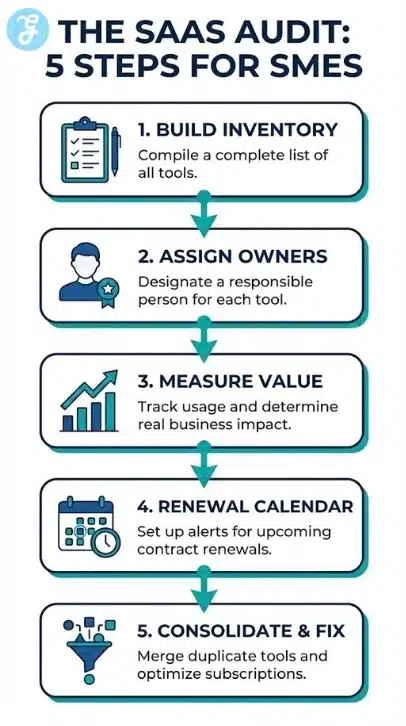
Step 4: Create A Renewal Calendar And A Review Rule
Renewals should never surprise you. Build a renewal calendar and set a review window.
Suggested review windows:
- 60 days before renewal for annual contracts
- 30 days before renewal for monthly plans with big spend
During review:
- Confirm usage
- Compare with alternatives
- Decide keep, downgrade, consolidate, or cancel
Step 5: Identify Duplicates And Consolidation Candidates
Consolidation is where big savings live, but it must be done carefully.
Look for overlap in:
- Messaging
- Project management
- File storage
- CRM
- Email marketing
- Meeting scheduling
- Analytics
Ask:
- Which tool is the source of truth
- Which tool has better adoption
- Which tool has better security and admin controls
- Which tool fits your workflow long term
How To Consolidate Without Slowing Down The Team
Consolidation fails when leadership forces change without support. The goal is to reduce tools while protecting productivity.
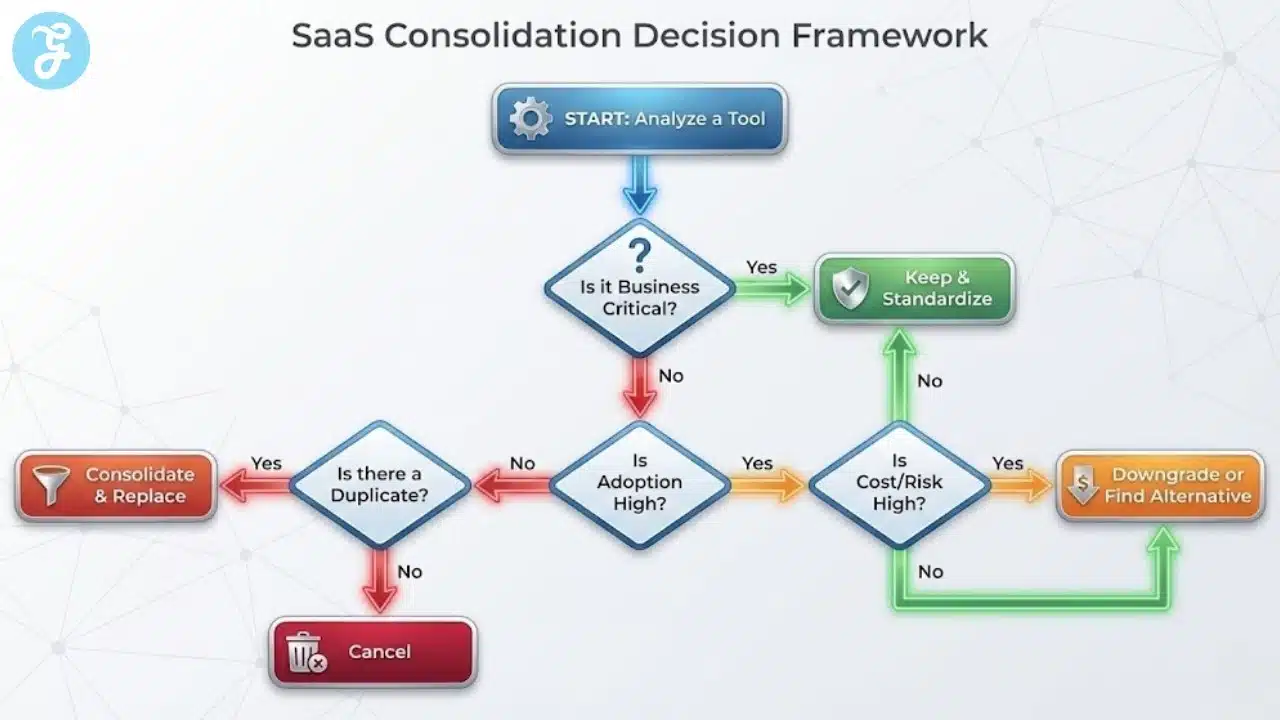
Use A Simple Decision Framework
For each tool, classify it as:
- Keep and standardize
- Downgrade plan
- Replace with a standard tool
- Cancel
Then decide based on:
- Adoption
- Business impact
- Total cost
- Risk level
- Integration fit
Consolidation Priority List
Start with tools that create the most pain:
- Duplicates with low adoption
- Tools with high cost and low usage
- Tools that hold sensitive data with weak access controls
- Tools that require heavy manual work because integrations are broken
These are usually the fastest wins.
Run A Controlled Migration
A clean consolidation does not happen overnight.
Migration steps:
- Set a cutoff date for new work in the old tool
- Export important data and archive it properly
- Train the team with a short workflow guide
- Provide a two-week support window
- Remove access to the old tool after transition
If you keep both tools running forever, you never consolidate. You just add cost.
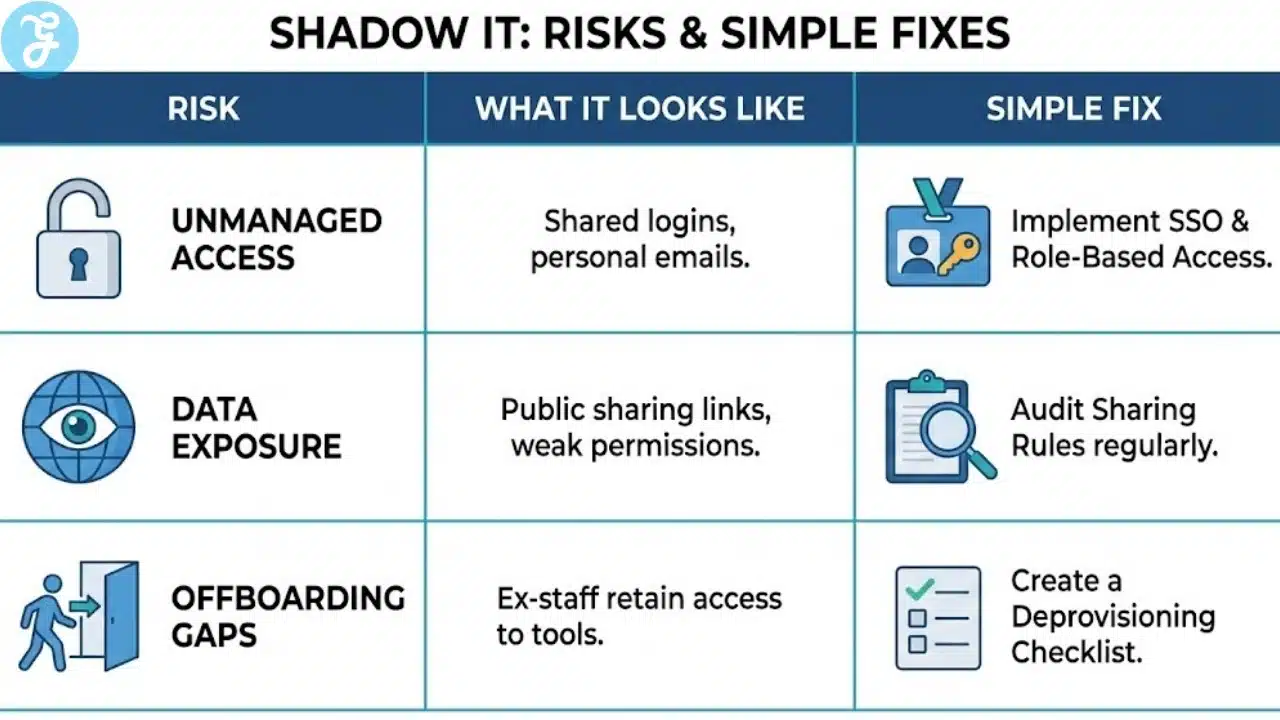
The Real Security Problem: Shadow IT
Shadow IT is software used without approval or oversight. It is often created by teams trying to move faster.
Shadow IT becomes dangerous when:
- People upload customer data to unknown tools
- Tools have public sharing links
- Access is managed through personal emails
- Departing employees still have access
Shadow IT is one of the most important hidden costs of SaaS sprawl because it increases incident risk while reducing visibility.
Shadow IT Risk Table
| Risk | What It Looks Like | Simple Fix |
| Unmanaged access | shared logins, personal emails | SSO and role based access |
| Data exposure | public links, weak permissions | sharing rules and audits |
| Vendor risk | unclear data policy | approved vendor list |
| Offboarding gaps | ex staff still have access | deprovision checklist |
Governance Rules That Prevent SaaS Sprawl From Coming Back
If you only clean up once, sprawl returns. You need lightweight governance that keeps agility while preventing chaos.
Create An Approved Tools List
An approved list does not kill innovation. It prevents duplication and risk.
Include:
- Category
- Standard tool
- Approved alternatives
- Who to contact for approval
- Basic usage rules
Set A Simple Procurement Rule
Before buying a tool, require:
- A clear use case
- A named owner
- A cost estimate
- A check for duplication
- Basic security review
- A plan for offboarding and cancellation
Keep it simple so people follow it.
Require Seat Reviews
Seat reviews should happen monthly for big tools and quarterly for smaller ones.
Review questions:
- Who is active
- Who can be downgraded
- Who left the company
- Are there unused seats
Seat reviews alone can save meaningful money.
Standardize Identity And Access
If possible, use:
- SSO
- MFA
- Role based permissions
- Centralized user provisioning
This reduces risk and makes offboarding easier.
Create A Cancellation Playbook
Many SMEs keep tools because canceling feels risky. A cancellation playbook makes it easier.
Include:
- Data export steps
- Backup locations
- Owner signoff
- Communication plan
- Archive policy
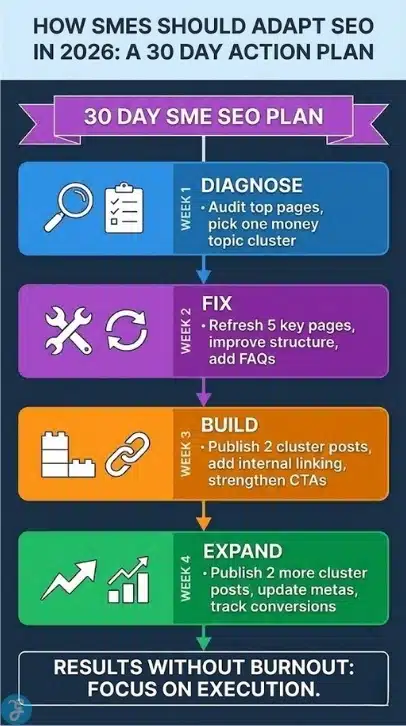
A 30 Day Plan To Reduce SaaS Sprawl
This plan is realistic for most SMEs. It focuses on quick wins first.
| Week | Goal | Actions |
| Week 1 | Visibility | inventory tools, assign owners, build renewal calendar |
| Week 2 | Savings | reclaim seats, cancel shelfware, downgrade obvious waste |
| Week 3 | Consolidation | choose standard tools, plan migrations, update workflows |
| Week 4 | Prevention | approved list, procurement rule, monthly review process |
If you follow this plan, you reduce spend while improving clarity and security.
Common Mistakes That Make SaaS Sprawl Worse
Avoid these mistakes because they create sprawl faster than any tool purchase.
Mistake patterns:
- Buying tools without a clear owner
- Keeping duplicates because nobody wants to decide
- Renewing automatically without a review
- Letting teams use personal emails for business tools
- Treating security as optional configuration
- Migrating without training, then blaming the new tool
Sprawl is not a tooling problem. It is a decision problem.
Spot The Hidden Costs Of SaaS Sprawl With A Quick Diagnostic
If you are not sure how serious your sprawl is, run a fast diagnostic. It helps you pinpoint where the hidden costs of SaaS sprawl are coming from before you spend weeks auditing everything.
Look for these red flags across teams:
- People cannot name the standard tool for a core workflow, like chat, tasks, files, or meetings
- Teams store the same files in multiple places, then argue about the latest version
- You pay for tools that only one person can explain or administer
- New hires need multiple logins and tools just to start basic work
- You have tools connected through fragile automations that break silently
- Departing staff lose access late, or nobody knows which tools they used
Now run this quick scoring check. Rate each item from 1 to 5. A score of 4 or 5 means urgent attention.
| Diagnostic Area | What To Check | Score 1 To 5 |
| Duplicate tools | more than one tool per category | |
| Seat waste | paid seats not actively used | |
| Renewal risk | auto renewals without review | |
| Data chaos | files and notes split across platforms | |
| Access risk | personal emails or shared logins | |
| Integration debt | manual work because tools do not connect |
Once you score it, pick the top two problem areas and fix those first. For most SMEs, the fastest wins come from reclaiming seats, canceling shelfware, and consolidating duplicate tools that confuse the team.
A practical rule is to reduce tool count before you try to automate more. Automation on top of a messy stack creates more breakage and more cost. Clean the foundation, standardize the core tools, then build workflows that your team can follow without friction.
Wrap Up And Next Steps
The fastest way to reduce software waste is to stop guessing and start managing your stack like a business system. When you track ownership, usage, renewals, and duplication, you expose the hidden costs of SaaS sprawl and replace chaos with clarity.
Start with inventory, reclaim seats, and build a renewal calendar. Then consolidate thoughtfully with a migration plan. Finally, put lightweight governance in place so the problem does not come back. This approach saves money, reduces risk, and makes work smoother for everyone.
Frequently Asked Questions
Here are the most frequently asked questions people have about The Hidden Costs Of SaaS Sprawl.
The biggest hidden costs include unused seats, duplicate tools, productivity loss from switching platforms, training overhead, integration debt, and increased security risk. These costs are often larger than the subscription total because they affect time, operations, and exposure to data issues.
How do I find all the SaaS tools my business is paying for
Start with bank and card statements, invoice emails, and expense reports, then validate with department leads and any identity app list if you use SSO. Build one inventory table that includes owner, users, cost, renewal date, and business critical status so you can make decisions quickly.
What should I cancel first when cleaning up SaaS sprawl
Cancel or downgrade tools with low usage, unused seats, and clear duplicates. Shelfware is usually the fastest win. Then focus on tools that create risk, like those holding sensitive data without clear access control.
How do I reduce SaaS costs without hurting productivity
Consolidate around a small set of standard tools that match your workflow, then run controlled migrations with training and cutoff dates. Reclaim seats monthly, review renewals before they auto-renew, and assign owners so tools stay configured and monitored.
How do I prevent SaaS sprawl from coming back
Put lightweight governance in place: an approved tools list, a simple procurement rule, monthly seat reviews for major tools, a renewal calendar, and centralized access controls like SSO and MFA. These habits keep the stack lean without slowing innovation.
































