Flying a drone feels exciting and maybe a bit scary at first. The Ruko U11MINI 4K makes it simple. This small drone has smart features that help you learn fast.
You can take amazing photos from the sky with just a few practice flights. Let’s explore how this drone works and what makes it special.
Key Takeaways
- The Ruko U11MINI 4K weighs less than 249 grams. It shoots 4K videos at 30 frames per second. The 48MP camera with CMOS sensor takes super clear 8K photos. A 3-axis brushless gimbal with EIS keeps your shots steady.
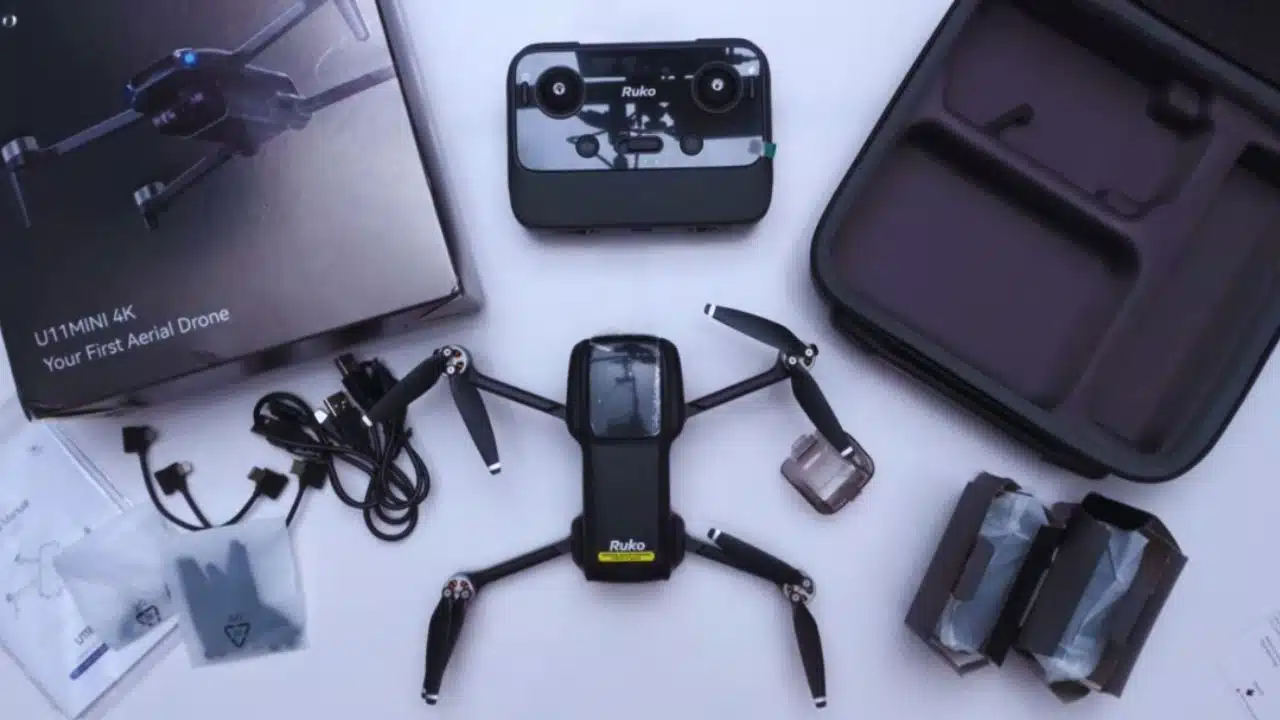
- The Ruko U11MINI 4K has three sets, one-battery set, three-battery set, and two-battery set. But the controller of the two-battery set is with a display screen, so the users don’t need to connect the controller to their mobile phone to see the live footage.
Each battery can provide 32-minute flight time.
- This drone flies up to 20,000 feet away with clear video. GPS features include auto-return and Follow-me mode. The quadruple positioning system keeps it stable. The Ruko U11 app lets you control settings from your phone.
- Need help? Call +1 (888) 892-0155 or email SERVICE@RUKOTOY.COM. Support runs Monday to Friday, 8 AM to 5 PM PST. The drone uses 50% recycled materials. It has a GRS stamp for eco-friendly making.
- Smart features make flying easy. AI takeoff and landing work great. Cruise control keeps speed steady. Waypoint flying lets you plan routes. The small size helps you avoid many drone rules.
- The Ruko U11 app has built-in tutorials and live chat support. It controls camera settings like exposure and frame rates. Golden hour gives the best lighting. Keep the battery above 30% for smooth footage.
Key Features of the Ruko U11MINI 4K Drone
The Ruko U11MINI 4K packs big features into a tiny frame. This camera drone works great for new pilots and pros alike. Its 4K camera captures stunning videos. Smart flight modes make every flight fun and safe.
What video and photo quality does the Ruko U11MINI 4K offer?
The camera on this drone will amaze you. It shoots 4K video at 30 frames per second. That means smooth, clear footage every time. The 48MP CMOS sensor is the brain of the camera. It takes 8K photos that show every tiny detail.
Think about your favorite movie. The footage looks smooth and professional, right? This drone gives you that same quality. The 3-axis brushless gimbal with EIS is like a steady hand holding your camera. It stops shaking and wobbling. The EIS system works with the gimbal too. Together, they make your videos look like a pro shot them.
Wind can mess up drone videos. Not with this one. The stabilization keeps working even when it’s breezy. Your friends will think you hired a film crew. Every shot looks clean and sharp.
Why is the drone’s lightweight design important?
Weight matters a lot with drones. The Ruko U11MINI 4K weighs under 249 grams. That’s lighter than a can of soda! This weight keeps you out of trouble with drone rules. Many places have strict laws for heavier drones. But this lightweight drone flies under those limits.
Small size means big convenience. Slip it in your backpack or even a large pocket. No need for special cases or bags. The light weight also helps your batteries last longer. Heavy drones drain power fast. Light ones stay in the air longer.
Here’s something cool. The drone uses 50% recycled materials. It has a GRS stamp too. GRS stands for Global Recycled Standard. This proves the company cares about our planet. The eco-friendly design doesn’t hurt performance either. The drone still flies great and takes amazing shots.
How does the 3-axis gimbal and EIS improve footage?
Let me explain what these features do. A gimbal is like a robot arm that holds the camera. It has three motors that move in different directions. These motors fight against any shaking or tilting. EIS stands for Electronic Image Stabilization. It’s software that smooths out your video even more.
Picture holding a camera while running. The video would be shaky and hard to watch. Now imagine a robot holding that camera perfectly still while you run. That’s what the gimbal does for your drone. The EIS then polishes the video to remove any last bits of shake.
This combo works magic on your footage. Fast turns look smooth. Quick stops don’t jar the camera. Even flying in light wind produces stable video. The 48MP sensor captures all this in crystal clear detail. You get professional results without professional skills.
Flight Performance
Performance makes or breaks a drone. The Ruko U11MINI 4K delivers where it counts. Strong signals and smart GPS features keep you in control. Let’s look at what this drone can really do in the air.
How far can the Ruko U11MINI 4K transmit signals?
This drone reaches far. Really far. In open spaces, you can fly up to 20,000 feet away. The FPV feed stays clear the whole time. FPV means First Person View. It’s a live video from your drone’s camera.
Signal strength stays rock solid at long distances. The video doesn’t freeze or break up. Controls respond instantly even at maximum range. This lets you explore large areas without worry. Parks, beaches, and fields become your playground.
Different flight modes work at full range too. Sport mode lets you zip around fast. Normal mode gives steady, controlled flight. The signal handles both without problems. You can focus on getting great shots instead of watching signal bars.
What GPS features help with auto return and flight stability?
GPS makes flying safer and easier. This drone uses quadruple positioning. That means four different systems work together. They keep your drone exactly where you want it. No drifting or wandering around.
The auto-return feature could save your drone someday. Press one button and it flies back to you. The GPS remembers where you took off. If the battery gets low, it comes back automatically. Lost connection? The drone returns home on its own.
Here are the GPS features that help you fly better:
- AI takeoff and landing use GPS for perfect launches
- The beeper system helps you find a landed drone
- Cruise Control maintains steady speed using GPS data
- Follow-me mode tracks you as you move
- Anti-flyaway protection stops the drone from getting lost
- Position hold keeps the drone hovering in one spot
These features work together seamlessly. New pilots love how stable the drone feels. The GPS takes care of the hard stuff. You just point and shoot.
Battery Life and Efficiency
Battery life can make or break your flying fun. The Ruko U11MINI 4K is available in three options — a one-battery set, a two-battery set, and a three-battery set. Each battery gives you up to 32 minutes of flight time, so you can enjoy long sessions in the air.
The two-battery set comes with a special controller featuring a built-in display, letting you watch live footage directly without needing to connect your phone. Quick battery swaps mean more flying and less waiting.
How long can the drone fly with Triple 2200mAh batteries?
Each battery gives you about 32 minutes of flight. With two batteries, that’s 64 minutes total! And with three batteries it gives you 96mins Flight Time. Most entry-level drones give you 10 to 15 minutes. This drone gives you nearly 6-8 times that. More flight time means more chances for perfect shots.
The Ruko U11 app shows battery levels clearly. You always know how much power remains. A warning tells you when to land. The batteries pop in and out quickly. Changing them takes just seconds. You can also get three charging cables.
Real flight time depends on how you fly. Fast flying uses more power. Wind makes the motors work harder. Cold weather drains batteries faster. Still, even in tough conditions, you get good flight time. The fast charger gets you back up quickly too.
Ease of Use for Beginners
Starting with drones can feel overwhelming. The Ruko U11MINI 4K makes it simple. Clear controls and a helpful app guide you through everything. Even first-time pilots can fly confidently in minutes.
How intuitive are the controls and smartphone app integration?
The controls feel natural from the start. Your phone becomes your command center. The Ruko U11 app shows everything clearly. Battery life, signal strength, and flight data appear on one screen. No hunting through confusing menus.
AI features do the tricky stuff for you. Takeoff happens with one tap. Landing works the same way. The drone handles the technical parts. You focus on where to fly and what to film. Point-and-shoot controls make photography simple too.
Advanced features hide in plain sight. Want to follow a bike rider? Turn on Follow-me mode. Need smooth footage of a building? Use Point of Interest. The drone circles while keeping the camera centered. Waypoint flying lets you plan complex routes. Draw a path on your phone and watch the drone follow it.
Connection stays strong during flights. The app rarely crashes or freezes. Built-in tutorials teach you new tricks. Help videos show exactly what to do. Most people master basic flying in one session.
Troubleshooting Common Issues
Every drone pilot faces problems sometimes. The good news? Most issues have simple fixes. Let’s solve the most common problems step by step.
How do I connect the drone to the controller?
Connecting your drone takes just minutes. Follow these steps carefully:
- Power on the drone.
- Power on the remote controller.
- The drone and remote controller will automatically complete the pairing process within approximately 30 seconds.
- Connect your mobile phone to the remote controller, then open the App to access the control interface.
Once connected, you will see the remote controller signal strength and a live camera screen, indicating that pairing was successful.
How can I fix battery-related errors?
Battery problems stop the fun fast. Try these fixes to get flying again:
- Check battery contacts for dirt or damage, then clean with a dry cloth
- Hold the power button for 3 seconds to reset if the drone won’t start
- Look up error codes in your manual for specific solutions
- Contact support through live chat for quick help
- Try a different outlet if batteries won’t charge
- Update the Ruko U11 app to fix battery reading errors
- Test both batteries separately if flight time seems short
- File a warranty claim online for defective batteries
- Send error message photos to support for faster help
- Buy official replacements when batteries get old
Advanced Tips for Mastery
Ready to level up your drone skills? These pro tips will transform your footage. Master the app settings and filming techniques. Soon you’ll create videos that wow everyone.
How do I use the Ruko U11 app for the best settings?
The app holds all the power. Learning its features unlocks your drone’s potential. Start with these essential settings:
- Tap the settings gear to switch between 4K and standard video quality
- Choose frame rates in the camera menu for different effects
- Monitor battery and signal on the telemetry screen before flying
- Plan flight paths by tapping waypoints on the map
- Enable Follow Me mode through quick settings for tracking shots
- Set cruise control in flight menu for steady filming speeds
- Adjust exposure in camera settings to fix bright or dark footage
- Use the calibration tool if the drone drifts or feels unsteady
- Update firmware through the app for new features
- Watch support videos to learn advanced techniques
- Switch between Normal, Sport, and Cine modes for different shots
- Enable Return to Home for automatic battery-low returns
- Create camera presets for quick photo and video switches
- Check optical flow sensor status before indoor flights
What techniques help capture professional-quality aerial footage?
Professional footage starts with good planning. Your Ruko U11MINI 4K has all the tools. These techniques will improve your videos right away.
First, always check your gimbal before flying. The 3-axis system needs proper setup. This keeps your 48MP camera perfectly level. Shaky footage ruins even the best scenes.
- Choose the right mode for each shot, Normal for basics, Cine for smooth motion
- Use Waypoint Flight to create repeatable path patterns
- Turn on Follow-me Mode to track moving subjects automatically
- Enable Point of Interest for perfect circular shots around objects
- Fix exposure settings in the app before you start recording
- Fly with Cruise Control for consistent speed during long shots
- Move control sticks slowly and smoothly to avoid jerky footage
- Film during golden hour for warm, beautiful lighting
- Keep battery above 30% while shooting for stable performance
- Study app tutorials to learn new shot types and techniques
- Clean your lens before every flight to avoid spots in footage
Practice makes perfect with these techniques. Start simple and add complexity over time. Your videos will improve with every flight.
Final Words
The Ruko U11MINI 4K Drone brings professional features to everyone. Its 4K camera and smart modes make aerial photography accessible and take 8K pictures. GPS tracking, long battery life, and the helpful Ruko U11 app give you confidence in the sky.
This lightweight drone fits perfectly in your travel bag. Yet it delivers footage that rivals much bigger drones. Both beginners and experienced pilots will love its mix of simplicity and power.
Start your aerial adventure with the Ruko U11MINI 4K today.
Every flight teaches you something new. Soon you’ll capture breathtaking views and memories from angles you never imagined. The sky truly becomes your creative canvas with this amazing little drone.
FAQs
1. What makes the Ruko U11MINI 4K a good beginner-friendly drone?
The Ruko U11MINI 4K is a lightweight drone perfect for new pilots. It has three flight modes: Cine Mode for smooth shots, Normal Mode for regular flying, and Sport Mode for fast action. The optical flow sensor helps keep it stable.
2. How do I set up the Ruko U11 app on my smartphone?
Download the Ruko U11 app from your phone’s app store. The app works with most smartphones. Connect your drone to the app, and you’ll see live video from your camera drone right on your screen.
3. What safety features does this entry-level drone have?
This drone comes with Return to Home (RTH) feature and ToF sensors for safe flying. These tools help prevent crashes and make sure your drone comes back safely if it loses connection.
4. What’s included when I buy the Ruko U11MINI 4K?
The package includes the camera drone, drone accessories, and free shipping. The list price covers everything you need to start flying. You can pay with any major credit card at checkout.
5. How does the image sensor work for drone photography?
The 4K image sensor helps you take clear pictures. It stops photos from being overexposed or underexposed. You can control the camera settings through the app for better shots.
6. Do I need Remote ID for this drone?
The Ruko U11MINI 4K is under 249g, according to the FAA rules, drones weighing less than 249g are not required to carry a remote ID module. However, for the safety and security of the drone, users can also purchase a remote ID module on their own.