

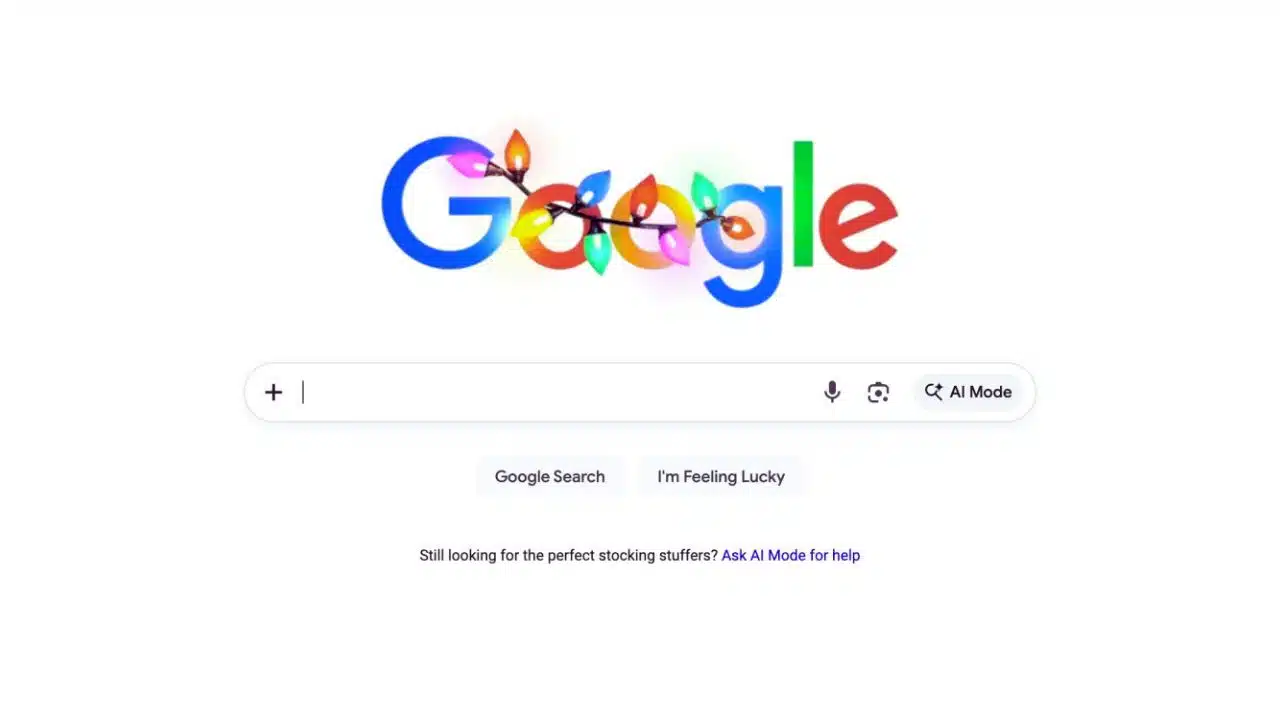
Google is adding a new “+” button in the Google Search bar that lets people upload an image or a file and then routes the query straight into AI Mode. The change is appearing first on desktop web and is rolling out where AI Mode is available, with reports noting expansion beyond the US in English.
The new “+” icon replaces the classic magnifier on desktop Search for some users and offers Upload image and Upload file, opening a more chatbot-like AI Mode experience.
What Google changed
Google’s Search homepage is showing a plus (+) icon at the far left of the search bar that replaces the traditional magnifying-glass icon in some views. Clicking the “+” opens a small menu with options such as Upload image and Upload file, according to multiple reports that observed the UI change.
After a user selects an upload option, Search initiates an AI Mode interaction designed for asking questions about the uploaded content (for example, summaries or explanations). Outlets covering the update describe it as a more direct on-ramp to AI Mode, because it surfaces file/image uploads right in the main search box instead of requiring users to navigate deeper into AI features.
When and where it’s rolling out
The “+” menu has been reported as available on desktop web, with some coverage noting it showed up even in signed-out Incognito sessions during checks. Reporting also indicates the rollout started in the US and then began expanding more broadly (in English) in markets where AI Mode is available.
Several outlets framed the change as a quiet or experimental rollout, noting there was no sweeping standalone announcement focused specifically on the plus button at the time of discovery. Separately, Google’s public AI Mode documentation describes AI Mode availability across many countries/territories and languages, reflecting the broader footprint the company is targeting for the feature set overall.
How the “+” button works (and what it does)
The new “+” button acts as an upload shortcut: users pick Upload image or Upload file, and then ask a question tied to what they uploaded. Coverage of the feature says the interaction continues in AI Mode, which presents responses in a conversational format rather than only the traditional list of blue links.
Google describes AI Mode as its most powerful AI search experience, designed for deeper exploration with follow-up questions and links to the web. Google also says AI Mode uses a query fan-out approach—breaking a question into subtopics and searching for each simultaneously—so it can pull together information across sources.
Why uploads matter for AI Mode
Google has been building AI Mode toward multimodal inputs—text, voice, and images—so adding a prominent upload entry point aligns with that direction. In a July update, Google said AI Mode can analyze the contents of files and cross-reference them with relevant web information, then respond with prominent links so people can dig deeper.
Google also said it was adding support for PDF uploads on desktop and planned to expand to additional file types (including files from Google Drive) over time. That roadmap helps explain why a front-and-center upload control in the Search bar could be useful as AI Mode’s document-based queries expand.
Why Google is pushing AI Mode inside Search
Google has been steadily placing AI features more visibly inside Search, including AI Overviews and a dedicated AI Mode. Google said AI Overviews became one of the most successful launches in Search in the past decade and claimed that, in major markets like the US and India, AI Overviews drove over 10% growth in usage for the types of queries where AI Overviews appear.
Google also positioned AI Mode as the place where it will introduce frontier capabilities first, before graduating some of those features into the core Search experience. Against that backdrop, a new “+” button that nudges people into uploading content and continuing in AI Mode functions as a product-discovery lever—making AI Mode feel like a default path for certain tasks rather than an optional tab.
Key timeline of AI Mode and the new “+” shortcut
| Date | Update | What Google/Reports said | Why it matters |
| Mar 4, 2025 | AI Mode introduced as a Search experiment | Google introduced AI Mode as a generative AI experiment in Search. | Established AI Mode as a distinct experience inside Search. |
| May 19, 2025 (Google I/O) | AI Mode broader rollout messaging | Google said AI Mode was rolling out in the US and emphasized query fan-out and multimodality. | Positioned AI Mode as the flagship AI search interface. |
| Jul 28, 2025 | Upload and learning-focused updates | Google said AI Mode would support questions about images on desktop and add PDF uploads on desktop, with analysis plus web links. | Set expectations for document/image Q&A workflows. |
| Dec 14–16, 2025 | “+” upload menu appears in Search bar | Reports said Google added a “+” menu on desktop Search with Upload image and Upload file, expanding beyond the US (in English) where AI Mode is available. | Reduces friction and pushes more users into AI Mode flows. |
“+” button vs other Search entry points
| Entry point | What it’s for | Where it appears | What happens next |
| “+” upload button | Upload image/file to ask AI Mode about it | Desktop Google.com Search bar (reported rollout) | Launches an AI Mode interaction tied to the upload. |
| AI Mode button/tab | Enter AI Mode for AI answers + follow-ups | Appears in Search as an AI Mode option/tab per Google | Provides an AI response with links and follow-up questions. |
| Lens (image search) | Visual search using images/camera | Google describes Lens usage for image-based questions | Can support image queries that continue into AI Mode. |
What it means for users (and what to watch next)
For users, the plus button makes it faster to do ask about this file/image workflows directly from the main Search bar, instead of treating AI Mode as a separate destination. Because Google says AI Mode is designed to include links to the web and may show web links when it lacks confidence in an AI response, the company is signaling that AI Mode is meant to coexist with traditional web results rather than fully replace them.
Next milestones to watch include whether Google brings the same prominent “+” control to mobile Search, and how quickly AI Mode’s file support expands beyond PDFs and images (including Google Drive integrations previously signaled by Google). Another open question is whether Google will formalize the “+” button with a dedicated product announcement, since early coverage characterized the rollout as quiet and observational.































