
Listen to the Podcast:
If you are bored with Kik, the free messaging and chat application preferred by teenagers and fans of private communications, or you feel that your child is exposed to risks, we tell you that you will only have to follow a few steps to delete Kik account.
With 300 million users worldwide, it works like a messaging app to communicate with friends and family or make new friends online. It offers fun chat and bot features that appeal to teenagers. However, it also has some disadvantages. Since their accounts are not associated with verifiable phone numbers, creating fake profiles is easy. The company’s reputation is also related to criminal activity, which can make some people uncomfortable, even after an initial positive experience.
Many users may conclude that other chat alternatives, such as WhatsApp, with its end-to-end encryption and links to real phone numbers, have more advantages and are more secure. Others may get tired of the mass conversations.
Temporary and permanent deactivation
There is a difference between deactivating and deleting a Kik account. Temporary deactivation means that you will stop receiving messages and emails from Kik, they will not be able to look up your username, and you will be removed from all contact lists. However, you can reactivate the account by logging in again. To permanently delete a Kik account, go to the service’s website from your phone or computer. From your smartphone, you can also go to the Help section directly in the app and type Delete account in the search box.
To temporarily deactivate a Kik account, click this link to receive an email.
Permanent deactivation involves deleting a Kik account forever. Once deleted, you will not be able to restore it. You will no longer receive messages or emails from Kik. Also, no one can search for you on the platform, and your username and profile will be removed forever from your friends’ contact lists. When you delete your account, you cannot sign in again or access your contact information or message history. If you wish to use the service in the future, you must register again with another email address.
To permanently deactivate your Kik account, click this link to receive an email.
Deactivating or delete Kik account is easy
- Ensure you know the email you used to sign up for the service.
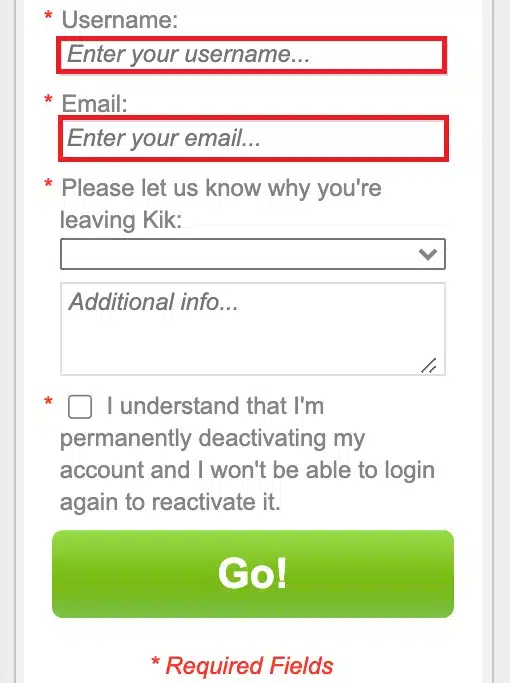
- Enter the correct information on the Kik permanent deactivation website.
- Kik will email you a link to delete your account permanently.
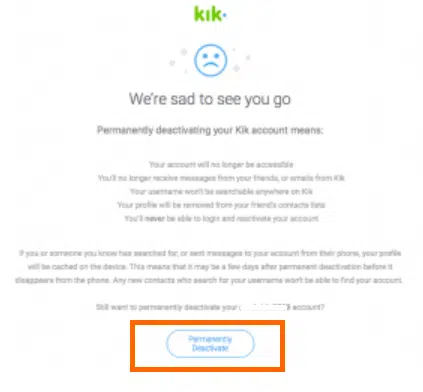
- If you or someone you know has sent messages to your account, your profile will be cached on your device, so it could take a few days to completely disappear from it.
- Anyone else searching for your username will not find you.
- Delete or uninstall the app from your phone, just like you would any other app.
Parents can deactivate a teen’s account
Parents can ask Kik to deactivate their teen’s account. For this, they must send a request by email to safety@kik.com, with the request in the message’s subject. In addition, they must include the Kik username and age of the teen.
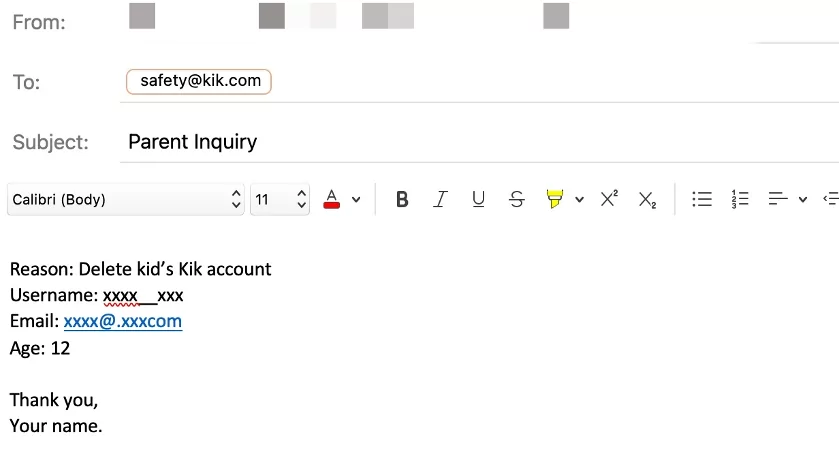
Deactivating a teen’s account will stop them from appearing in Kik searches and will be removed from all their contact lists. To complete this process, parents must first know their child’s username and the email address she used to register her account.
Here we explain how to find the username.
- The username is available when you open the Kit app in the list of main conversations.
- Select the icon at the top of the screen to open the settings, where you will see the username, while in bold will be the name you chat with.
- If you’ve ever chatted with your teen via Kik on your phone, you can see their username from the chat on your device.
Kik usernames do not have spaces and can contain upper and lower case letters, numbers, and special characters. If the teen resets their Kik account, the parent can find the username on the login screen.
Kik recommends that parents use the teen’s device to get information about their Kik conversations and not expect to review them from their device. The reason? Due to its privacy features, Kik will automatically delete the chat history. The service does not view or store chats between users.