

Hey there, gamers! Is your gaming desk a tangled mess of cables, making you feel like you’re wrestling with a giant octopus every time you reach for your headset? You’re not alone, and that cable clutter can turn your epic gaming setup into a real frustration, fast.
Let’s be real, a messy desk can disrupt your vibe. Did you know that proper cable management keeps things neat and also safeguards your gaming PC and gear from damage? That’s a game-changer right there.
In this post, I’ve got 10 awesome tips to help you tame those wild power cables and audio cables, using tricks like cable sleeves and zip ties. Stick with me, and we’ll transform your desk into a clean, mean gaming machine.
Ready to level up?
Key Takeaways
- Unplug and sort all cables into groups like power, video, and audio for a tidy gaming desk.
- Mount power strips under the desk or use a cable management box to hide clutter.
- Use cable sleeves or zip ties to bundle wires and keep your setup neat.
- Install under-desk trays or racks to organize cables and surge protectors.
- Label cables with tags for easy identification, preventing mix-ups in your gaming setup.
Disconnect and Organize Your Cables
Let’s tackle the mess of wires at your gaming desk. A tidy setup can make your gaming experience so much better, trust me!
- First off, unplug every single device from your PC and surge protectors. This means your gaming mice, keyboards, headsets, and all those pesky power cables. Disconnecting everything gives you a clean slate, kinda like rebooting a laggy game, so you can see the full tangle and plan your attack.
- Next up, grab all those cords and sort them by what they do. Group power cables together, keep video wires with video, and bundle audio cables like those for your speakers or headset in their own pile. Sorting by function, as I mentioned, cuts down on cable clutter and makes it a snap to find what you need later.
- After sorting, lay out each group on your desk or floor to spot any extras or doubles. You might notice two USB hub cords when you only need one for your setup. This step helps you ditch unnecessary wires that just add to the chaos of desk cable management.
- Finally, give each cable a quick once-over for damage or fraying before plugging back in. A worn-out cord for your power supply or PSU can be a real hazard, like a sneaky glitch in your hardware. Toss any bad ones to keep your gaming setup safe and smooth.
Position Your Power Strip Strategically
Hey, want a neat gaming desk without the cable mess? Place your power strip in a smart spot, and watch the chaos vanish!
Mount it under the desk
Mounting your power strip under the desk is a game-changer for gaming desk cable management. It keeps those pesky power cables out of sight, giving your setup a neat look. Grab some double-sided tape, and stick that power strip right under the surface.
This trick stops cables from dangling like a mess of spaghetti on your floor.
Got a cable tray? Even better, buddy. Use it to hold your power strips and chargers snugly beneath the desk. This setup hides the clutter and frees up space for your keyboard and mouse.
Trust me, a tidy gaming setup feels like a breath of fresh air. Let’s keep those wires tamed with this simple step.
Use a cable management box
Hey there, gamers, let’s tackle that messy cable clutter on your gaming desk. A cable management box is a total game-changer for hiding those pesky power cables and surge protectors.
Just pop your power strip inside, tuck it behind furniture or under the desk, and watch the chaos disappear.
Isn’t it neat how this simple trick transforms your home office setup? These boxes keep everything tidy, so you’re not tripping over wires during an intense gaming session. Grab one, slide in your cables, and enjoy a slick, clean gaming setup without the hassle.
Use Cable Sleeves or Zip Ties

Let’s tidy up that messy gaming desk, folks. Cables everywhere can drive anyone up the wall, so here’s a quick fix with sleeves and ties.
- Grab some cable sleeves to bundle those pesky wires together; they hide the clutter and come in cool colors or sizes to match your gaming setup vibe.
- Opt for zip ties if you’re on a tight budget; they’re super cheap and stop power cables from tangling like a knot in a rope.
- Slide those audio cables into a sleeve for a slick look; it keeps your desk cable management game strong and hassle-free.
- Tighten zip ties around loose cords near your electrical outlet; this trick keeps everything neat and out of sight.
- Mix and match sleeves with your home office setup; customize them to fit around laptops or monitor arms for a clean finish.
- Snip off extra zip tie length after securing cable clutter; it prevents stray ends from poking out and ruining your gaming desk cable management.
- Check that cable sleeves cover wires from your surge protectors; this shields them from dust and keeps your space looking sharp.
Install Under-Desk Trays or Racks
Got a messy gaming desk with cables all over? Let’s tidy it up with under-desk trays or racks for awesome cable management.
- First off, grab a cable tray to install under your gaming desk; it’s a game-changer for keeping power cables and chargers in check.
- These trays give a clear path for your wires, so no more tangled messes tripping you up.
- Pop your surge protectors right into these cable management trays, hiding the clutter like a pro.
- You can also stash excess cords for audio cables or docking stations, making your home office setup look slick.
- Pick a sturdy rack if you’ve got heavier gear, as it holds everything tight and out of sight.
- Setting this up is easier than beating a noob in a game; just screw it in and route those wires.
- Trust me, this trick cuts down on cable clutter big time, giving your desk that clean, boss-level vibe.
Utilize Desk Grommets for Cable Routing
Hey there, let’s tackle that messy gaming desk together. Desk grommets can be a real game-changer for cable routing, so let’s dive right in.
- First off, grab some desk grommets if your gaming setup doesn’t already have them; these little holes let you pass power cables and audio cables through the desk surface, keeping things tidy.
- Check your desk for built-in cable management features, as many modern gaming desks come with pre-drilled spots or channels just for this purpose.
- If your desk lacks these handy openings, don’t sweat it; pick up some grommet kits from a local store or online to add compartments and holes for better organization.
- Slide those pesky wires, like the ones from your monitor or surge protectors, right through the grommet to hide cable clutter from plain sight.
- Make sure to pick grommets that match your desk size; a snug fit keeps everything looking sharp and stops cables from slipping out.
- Route your wiring with care, guiding each cord through the hole to avoid a tangled mess below your desk surface.
- Pair this trick with other tools like cable clips or a cable raceway to keep things even neater down under.
- Keep an eye on heavy cords, especially for expansion cards or a modular power supply, so they don’t tug too hard on the grommet spot.
- Adding these openings near your power socket area can cut down on visible wires snaking across your home office setup.
- Trust me, once you set this up, your gaming desk cable management will feel like a breath of fresh air, slick as a whistle.
Arrange Monitor Cables Efficiently
Hey, got a mess of monitor wires all over your gaming desk? Let’s tidy up those pesky cords with some smart moves, and keep reading for the full scoop!
Use monitor arms
Mount those monitors on arms to clean up your gaming desk, folks. Using a monitor arm clears up valuable space and conceals those annoying wires for a polished appearance. It’s like giving your setup a clean trim, all neat and crisp.
Got a cluttered gaming setup with cables all over? A monitor arm provides adaptability and often includes built-in cable organization to guide wires along the arm. Say goodbye to cable mess and hello to a sleek, orderly desk that’s primed for action.
Route cables along the arm
Hey there, let’s organize those annoying monitor cables with a smart solution. If you’ve got a monitor arm for your gaming setup, you’re in luck; these useful tools often have built-in paths for cable routing.
Just slip your wires through these routes to keep them hidden and off your desk. It’s like stashing away a messy snack pile before guests show up, fast and smart.
Now, take those power cables and audio cables, and guide them along the arm’s path. This greatly reduces cable mess and also gives your gaming desk a smooth, tidy look. With monitor arms providing this neat feature for desk cable management, your setup will look polished with minimal work.
Label Your Cables for Easy Identification
Labeling cables can save you a ton of hassle. Trust me, digging through a mess of wires is no fun at all.
- Grab some small tags or masking tape to mark each cord. Write down what it connects to, like “monitor” or “power,” so you instantly know its job. This tiny step cuts down on guesswork for your gaming setup.
- Sort your wires by their purpose before tagging them. Group power cables, audio cables, and video lines as you label. This trick, straight from solid cable management tips, keeps tangling at bay.
- Place labels near the ends of each wire for quick spotting. You won’t have to trace a cord through a jungle of cable clutter. It’s like giving each one a name tag at a party.
- Use color-coded stickers if you want a fast visual cue. Red for power, blue for audio, and so on makes your desk cable management pop. It’s a simple hack for a cleaner gaming desk.
- Keep a spare pen or marker handy near your setup. If a label fades or falls off, you can fix it right away. No more mysteries in your home office setup.
- Double-check your labels after plugging everything back in. Make sure they match the right device, like your surge protectors or KVM switches. A quick peek saves future headaches.
- Think about using pre-printed tags for a neater look. They’re cheap, easy to find, and boost your cable routing game. Your gaming setup will thank you for the clarity.
Hide Excess Cables with Cable Clips
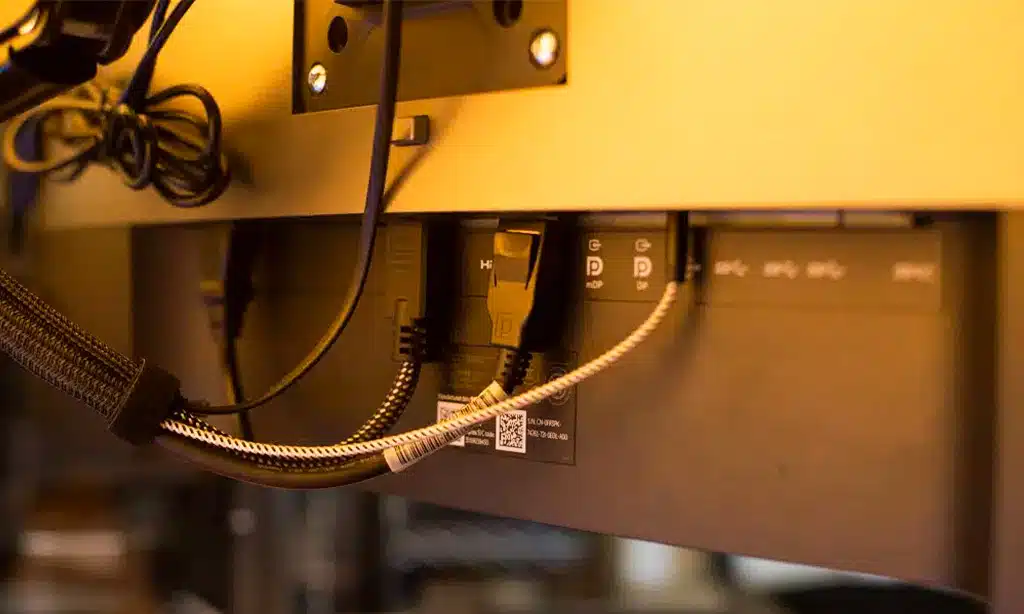
Got a mess of wires on your gaming desk? Let’s organize it with some useful tips using cable clips for impressive desk cable management!
- Pick up some cable clips or adhesive mounts to attach directly to your desk or wall, keeping those annoying power cables and audio cables hidden. These small tools grip onto surfaces and secure your wires firmly, so your gaming setup looks clean and sharp.
- Attach the clips behind your desk to conceal excess cables from sight, transforming your space into a pro gamer’s hub. Arranging cables like this keeps everything smooth and avoids tripping over loose cords during heated matches.
- Use these mounts to gather up extra wire length, preventing cable clutter from overwhelming your home office setup. Simply loop the slack through a clip, and just like that, no more tangled chaos to frustrate you.
- Position clips along the desk edges to direct cables down to a surge protector, ensuring safety and neatness. This arrangement clears up space and also reduces dust buildup around your tech.
- Combine a few cable ties with your clips to group wires together before securing them for extra tidiness. This pairing keeps everything fixed in place, so your gaming desk cable management remains exceptional even after long gaming sessions.
Regularly Maintain and Adjust Your Cable Setup
Hey there, let’s keep that gaming desk looking sharp! A tidy cable setup makes your gaming setup shine, so don’t let clutter creep back in.
- First off, check your cables often for any mess or loose ends. Pop under your desk every few weeks to spot any stray power cables or audio cables. Keeping things neat with cable management prevents a tangled disaster.
- Next up, reorganize whenever you add new gear to your home office setup. Got a new monitor or device? Take a moment to route those wires with cable clips or sleeves to avoid cable clutter piling up.
- Also, shuffle things around if you rearrange your desk layout. Moving stuff means cables might shift, so grab some zip ties or a cable raceway to keep everything in line after the switch.
- Don’t forget to watch out for overloaded outlets while you tweak your setup. Plug into surge protectors to keep your tech safe, especially during those long gaming sessions on platforms like Steam.
- Finally, stay on top of this habit to make desk cable management a breeze. A quick scan now and then saves you from a giant headache later, trust me, it’s like dodging a sneaky boss in your favorite game!
Takeaways
Wrapping up, a tidy gaming desk isn’t just visually appealing; it elevates your entire setup’s atmosphere. Picture engaging in epic battles without a clutter of wires getting in your way.
Keep refining your cable management, and you’ll game effortlessly. Got a chaotic mess under there? Drop a comment, and let’s exchange some solutions!
FAQs
1. Why does cable management matter for my gaming desk setup?
Hey, let’s face it, a messy gaming setup with cable clutter can drive you up the wall. Taming those power cables and audio cables with solid desk cable management not only looks slick but also saves you from tripping over a jungle of wires while you’re deep in a game.
2. How can cable clips help with my gaming desk cable management?
Yo, cable clips are your secret weapon against chaos. They stick right onto your desk, holding those pesky cords in place, so your gaming setup stays neat as a pin.
3. What’s the deal with using a monitor arm for cable routing?
A monitor arm isn’t just for show, my friend; it’s a game-changer. It lifts your screen, freeing up space, and often has built-in channels for cable routing to keep those wires out of sight. Plus, it makes your home office setup look like something straight out of a techlinked video.
4. Are cable sleeves worth it for a cleaner gaming desk?
Absolutely, cable sleeves are like a cozy blanket for your cords. They bundle up power cables and audio cables, cutting down on cable clutter in a snap.
5. How do cable management trays or a cable raceway fit into my gaming setup?
Listen up, if you’re tired of wires snaking everywhere, grab some cable management trays or a cable raceway. These handy tools stick under your desk, guiding cords neatly out of the way, kinda like a highway for your cables. They pair great with surge protectors too, keeping your gamelinked or shortcircuit vibes strong and tangle-free.






























