You want a store that looks great, but building pages can feel like a puzzle. You need simple tools, yet you face lines of code. Many owners get stuck on page layouts and bug fixes.
They need a drag-and-drop interface, a template library, and fast performance. They also want responsive design on phones and tablets.
WooCommerce powers about 30 percent of all online shops. That fact shows how tough the competition is. We list the 10 Best WooCommerce-Compatible Page Builders right here. You will learn to use Elementor, Divi Builder, Beaver Builder and more.
Each builder offers pre-designed templates, dynamic content options, and clean code for flexible page layouts.
Which builder fits you best?
Key Takeaways
- WooCommerce powers about 30% of online shops, and these builders give you drag-and-drop editors, template libraries, and responsive designs to shape pages without code.
- Elementor offers over 150 shop templates, live front-end editing, and WooCommerce widgets for product grids, upsells, and cart popups.
- Divi packs 40+ WooCommerce modules, 800+ pre-built layouts, and real-time style tweaks with both frontend and backend editors.
- Gutenberg uses WordPress’s built-in block editor, free WooCommerce blocks, and native code output for fast, stable, mobile-ready pages.
- Additional tools like Beaver Builder, SeedProd, Visual Composer, Themify Builder, Breakdance, ShopEngine, and CoDesigner add clean code, dynamic content, and custom modules to boost speed and conversions.
Elementor

Elementor offers a big template library and WooCommerce blocks that snap into any WordPress theme. You shape responsive designs on a drag-and-drop editor, and watch your product pages come alive in minutes, no code needed.
Features: WooCommerce widgets, drag-and-drop interface, and extensive templates
This builder brings pro-level shop elements to your WordPress site. It speeds up front-end design with live editing.
- WooCommerce widgets steer product grids, upsell blocks, and cart popups with dynamic content, and a Pro plan adds over 20 ready-to-use elements that speed up rapid page creation and boost conversion optimization.
- Drag-and-drop interface builds pages in real time, you tap, move sections, and see on-the-fly edits, and the system outputs clean HTML code that cuts time to first byte and lifts Google PageSpeed scores.
- Extensive templates live in a template library with more than 150 shop layouts, landing pages, and checkout flows, and pre-designed templates plug into most WordPress themes so you can tweak them with custom CSS or A/B tests.
Best For: Customizing product pages, checkout layouts, and category designs
Elementor Pro commands the screen with a drag and drop interface that loads pre built templates to speed up work. Single store owners get cost effective solutions without coding fees.
The builder adds product page widgets so you tweak CSS classes in real time. Each layout can fit any WordPress theme or store module.
You shift icons, drop dynamic content and set up countdown timers for lead generation. Page designs stay crisp thanks to responsive design checks and lightweight code output. You build checkout flows that cut cart abandonment and shape category layouts with ease.
You need no dev skills to add custom CSS and styling options.
Divi
Divi turns your WordPress site into a craft table with its grab-and-place editor. It has ready-made layouts and custom CSS tweaks for WooCommerce pages.
Features: Visual editor, WooCommerce modules, and real-time customization
This builder adds a live canvas for edits. It taps into modules made for online shops.
- A visual editor pairs with a drag-and-drop interface in this WordPress page builder.
- A template library holds more than 40 elements and 800 built-in designs.
- WooCommerce integration powers product pages, carts and checkout layouts.
- Custom CSS fuels hover effects and shape dividers for fine-tuned styling.
- Real time edits display instantly on screen.
- Backend and frontend editors offer full control over layout and code.
- Dynamic content pulls in live product data.
- Theme compatibility ensures no drag on page speed.
- Advanced builders enjoy unmatched design flexibility.
Best For: Flexible store designs and advanced styling options
Divi Builder loads a drag-and-drop interface that reacts in real time, so you watch changes as you make them. You drag blocks such as product grid or countdown timers into any section and tweak custom CSS on the fly.
A built-in template library offers over 200 pre-designed layouts, all built for responsive design. Marketers love its conversion optimization tools and dynamic content features.
Store owners can craft complex layouts without code or a developer. You pick a header block, add a shop section or cart widget and adjust fonts right away. The builder ties into WooCommerce integration and works with any WordPress theme.
It also runs well under Pagespeed Insights and suits stores that need design flexibility and advanced styling options.
Beaver Builder
Beaver Builder uses clean code, a drag-and-drop editor, and responsive design blocks, so your pages load fast and shine on every device. Keep reading to meet more page builders that can turbocharge your WooCommerce shop.
Features: Lightweight, clean code output, and robust WooCommerce integration
This builder cuts page weight with a modular codebase. Its lean code slashes server load and speeds up page render.
- Modular codebase delivers lightweight code, eases server load on your web server, and speeds up page loads for better search engine ranking.
- Clean markup uses minimal HTML, boosts usability, and lets custom CSS and drag-and-drop interface tweaks load fast with your wordpress themes.
- Premium plan unlocks powerful integration with WooCommerce, extends your template library with WooPack and Beaver Themer add-ons for advanced product and cart page design, and costs $99 to $399 with add-ons sold separately.
Best For: Speed and performance-focused websites
Beaver Builder runs light code. It loads in under a second on shared servers. You get fast pages thanks to minification, image optimization, and lazy load. Its front-end output keeps resource use low.
It uses responsive design to fit mobile screens without lag. You can pair it with a CDN or Apache on AWS for even more speed.
The builder offers a simple drag-and-drop interface and a rich template library. You can use its WooCommerce integration or custom CSS on your pages. It fits stores that need top speed and steady performance.
Designers keep control while preserving user-friendly page builder tools.
Gutenberg
Curious how the block editor can boost your shop? Read on to see eCommerce elements, style tweaks, and mobile-friendly setups take shape.
Features: Native WordPress block editor with WooCommerce blocks
Gutenberg serves as the default WP block editor, with built in WooCommerce blocks. It costs nothing and links straight to core WP for fast, stable performance.
- Developers can add product grids, cart previews, checkout forms, and shop layouts, all via WooCommerce blocks.
- Users tap the core integration to avoid extra plugins, for speed and clean code output.
- Every WordPress install includes this built in editor, so no extra downloads or fees apply.
- Designers drop in custom CSS to tweak block styles, for more design flexibility.
- The basic template library offers shop and product page layouts, which speed up setup.
- Content adapts across devices thanks to responsive design baked into each block.
- SEO plugins and caching tools work seamlessly, since it follows WordPress coding standards.
- Beginners drag and drop with ease, for quick store setup and a friendly learning curve.
- Teams import CSV files with WP All Import, then style new products with block controls.
Best For: Seamless integration with core WordPress functionality
This tool links WordPress and WooCommerce like peanut butter and jelly. A built-in block tool fits into your site, with no extra extension needed. You get a drag-and-drop interface, custom CSS tweaks, and smooth WooCommerce integration, all without slowing your store down.
A low learning curve helps you start fast, cutting days off setup time. Lightweight code keeps pages nimble, while a template library helps pop in layouts. Site builders love the resource savings, stellar performance, and built-in responsive design.
WPBakery Page Builder
WPBakery arrives as a WordPress plugin, bringing a front-end layout maker, a shortcode library, and rich-text editing tools. You can style your shop shelves with ready JavaScript modules; learn more in the official guide.
Features: Frontend and backend editors, WooCommerce add-ons
WPBakery Page Builder packs both front and back end editors right out of the box. It costs $64 per site and often comes free with themes like Avada.
- Frontend editor loads on the live page. You drag-and-drop modules, paint layouts like a painter on a canvas, and preview responsive design.
- Backend editor lives in the WordPress dashboard. You edit within a grid, tweak custom CSS, and speed up workflow in your content management system.
- WooCommerce add-ons unlock product grid, carousel, and checkout tweaks. They integrate with the WooCommerce plugin to show price, stock, and reviews.
- Template library holds pre-built templates for shop pages and landing pages. It fuels conversion optimization with ready-made designs and countdown timers.
- Bundled in popular WordPress themes on ThemeForest. You skip the $64 per site price tag when you grab themes such as Avada.
Best For: Beginners looking for simplicity and functionality
This tool works like a simple puzzle set. It offers a drag-and-drop interface, a template library, and bundled WooCommerce components. Its ease of use wins over new shop owners. A user can place product layouts, cart blocks, and checkout modules in minutes.
It links smoothly with popular WordPress themes from theme shops.
You can tweak pages with custom CSS or pick from pre-designed skins. It runs light and keeps pages fast. It supports responsive design for screens of all sizes. You get strong WooCommerce integration and smooth site performance.
Many premium theme bundles include this tool for fast site builds.
SeedProd
SeedProd turns your vision into a live page in no time, using a drag-and-drop interface that feels as smooth as butter. You can fire up maintenance mode, brand every corner of your WordPress theme, and pack in countdown timers and custom CSS for extra flair.
Features: Drag-and-drop builder with pre-built WooCommerce templates
This builder gives you a drag-and-drop interface and ready-made shop layouts. It cuts setup time with pre-built WooCommerce templates.
- Intuitive drag-and-drop interface makes layout edits swift.
- Pre-built WooCommerce templates launch product pages in minutes.
- Responsive design adapts store layouts to phones and tablets.
- Clean code output keeps loading times under two seconds.
- Custom CSS controls let you tweak fonts, colors, and spacing.
- Template library holds dozens of e-commerce page designs.
- WooCommerce integration unites checkout, cart, and product blocks.
- Conversion optimization tools add countdown timers and lead magnets.
- Maintenance mode screen guides users, boosting site engagement.
Best For: Quickly setting up landing pages for eCommerce
SeedProd offers a drag-and-drop interface, plus a template library full of eCommerce designs. You can build landing pages for sales or holiday deals in minutes. The plugin ties into WooCommerce and WordPress themes without extra code.
Pre-designed templates cut design time and boost conversion optimization.
Countdown timers, lead generation widgets, and maintenance mode let you prep campaigns fast. Pages load fast, thanks to lightweight code output. Marketers launch products and promotions with fewer headaches.
Visual Composer
Visual Composer slaps together templates with drag-and-drop ease, so you can paint page layouts fast. Its responsive grid, template library, and live CSS tweaks turn each design into a head-turner.
Features: Intuitive interface, WooCommerce product elements
This builder offers a smooth layout tool any user can master. It comes packed with WooCommerce product elements for a clean showcase.
- Features a drag-and-drop interface that cuts down on learning time and avoids custom CSS.
- Lets non-technical users browse a template library filled with pre-built designs to style their shop without coding.
- Adds grid and carousel elements to highlight new items and best-sellers, boosting conversion optimization.
- Takes charge of responsive design to keep every page sharp on mobile and desktop.
- Merges with WooCommerce hooks to pull live stock levels, prices, and product details.
- Works with most WordPress themes to prevent conflicts and simplify maintenance mode.
Best For: Creating visually appealing store layouts
Visual Composer gives you a drag-and-drop editor for your store. You open a template library full of pre-built layouts. You swap product elements, filter bars, and buy buttons with a click.
Each design shifts to fit phones, tablets, or desktop screens.
As a WordPress page builder, it fits any theme and supports custom CSS. It ties into WooCommerce with product grids and cart modules. Users gain design flexibility and responsive design.
Your store pops with visual flair and smooth shopping flows.
Themify Builder
Themify Builder serves pre-designed shop layouts and site templates for a neat responsive design. You can tweak carts or checkout pages with style sheet rules, script language hooks, and modular editing blocks.
Features: Pre-designed WooCommerce templates and modular editing
The plugin packs dozens of shop, product, and cart layouts. You can swap modules fast, then style each block with simple controls.
- It offers over 30 pre-designed templates for store homepages, product grids, and checkout pages.
- Templates adapt to mobile and desktop screens with responsive design code.
- You drag and drop blocks, then arrange them in seconds with modular editing.
- Modules lock into place to keep code clean and boost performance.
- Each layout links smoothly with your WordPress theme and WooCommerce integration.
- You add custom CSS per section for fine-tuned design flexibility.
- The template library updates monthly with fresh patterns and page kits.
- It uses native WooCommerce hooks to show live stock, pricing, and add-to-cart buttons.
- Pages load fast thanks to clean HTML5 output, which helps with SERP rankings.
Best For: Customizing product and cart pages with ease
Fans of Themify Builder enjoy its drag-and-drop interface and template library. It brings preset layouts for product and cart pages. Shops swap colors, fonts, and images with CSS tweaks in minutes.
This WordPress page builder hooks into WooCommerce integration without fuss. You can arrange grid widgets, edit buttons, and tweak checkout layouts live. It feels like playing with blocks, minus the mess.
Small business owners praise the simple customization options.
Breakdance
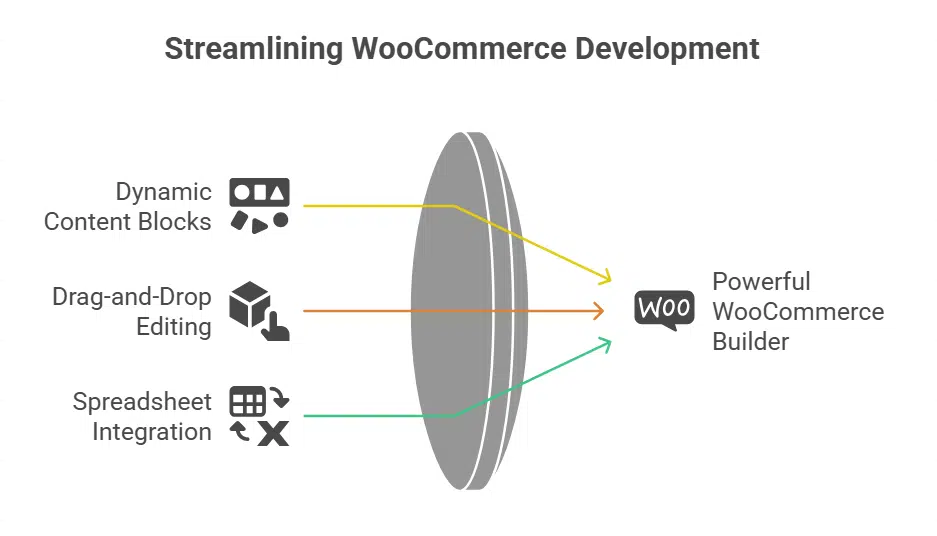
Breakdance gives you a powerful WooCommerce builder with dynamic content blocks. It swaps manual coding for drag-and-drop editing and even links with spreadsheet programs for easy product tables.
Features: Advanced WooCommerce builder with dynamic content options
Breakdance packs a power punch for WooCommerce shops. It puts dynamic content and layout control at your fingertips.
- It pulls user data, like cart value or purchase history, to swap in customized headlines and images.
- It adds conditional logic, so you hide sections on checkout pages until customers reach a set order amount.
- It blends CSS tweaks with JavaScript hooks for live updates and custom animations on product listings.
- It taps into the REST API to fetch real-time stock levels, ratings, or customer notes right on your shop page.
- It ships with a template library for product grids, upsell banners, and checkout blocks you can shape via drag-and-drop.
- It outputs clean code to boost page speed, keeping your responsive design sharp across devices.
- It links to WordPress shortcodes and dynamic tags, letting you swap in session data, user names, or order totals.
- It gives advanced cart layout tools, so you can reorder fields, add custom CSS classes, or inject JavaScript snippets.
- It integrates with third-party plugins via API, so you connect to CRM data or email platforms for personalized outreach.
- It stores custom logic rules, such as “show related products if order exceeds $50,” for next-level conversion optimization.
Best For: Complete control over WooCommerce layouts
Advanced users gain granular layout power with this page builder. They drag and drop elements, add custom CSS, and inject dynamic content. Every button, image, or form on product and cart pages fits your vision.
The tool plugs into WP themes, so you skip extra plugins.
A rich template library cuts setup time. Responsive design means sites look sharp on phones, tablets, and desktops. Code stays lightweight, so load times stay low. You can tweak every setting with WooCommerce integration and specialized modules.
ShopEngine
ShopEngine adds a set of e-commerce components, shortcodes, and a rich template library to your Elementor canvas, so you can stack product blocks like Lego bricks. Read on to see how this tool sharpens your product layout and speeds up your setup.
Features: WooCommerce-specific templates, widgets, and modules
These features speed up store setup and cut coding time. You get templates, modules, and widgets all in one place.
- It includes more than 50 importable layouts for product, cart, and checkout pages so you can adapt your site with pre-designed templates in seconds.
- Over 60 custom widgets and 13 modules power sales notifications, countdown timers, currency switching, and installment payments to boost conversion optimization.
- The drag-and-drop interface moves elements into place with no coding needed, so you can shape layouts like a pro in minutes.
- Multi-language support ensures compatibility with popular WordPress themes and plugins for smooth woocommerce integration.
- Responsive templates adjust to mobile and desktop screens for a seamless shop experience across devices.
- This suite beats Beaver Builder, Divi builder, Visual Composer, WPBakery page builder, and the wordpress block editor in template library size and design flexibility.
- Custom widgets drive lead generation, conversion optimization, and maintenance mode controls in real time.
Best For: Extending WooCommerce functionality with Elementor
ShopEngine extends WooCommerce features inside Elementor. It adds product widget modules, dynamic content options, and a template library of pre-designed templates. Store owners can create custom product variations, set preorder/backorder rules, and add countdown timers for flash sales.
The drag-and-drop interface and custom CSS controls give design flexibility.
Free trial and premium plans cover small shops and large stores alike. You can blend responsive design with lead generation strategies, apply conversion optimization tools, and keep your code light.
This integration keeps your workflow in Elementor, so you avoid switching to a WordPress page builder or a block editor.
CoDesigner
CoDesigner adds a friendly editor to WP, with drag-and-drop blocks for shop pages and live previews of dynamic content. It packs responsive design tools and custom CSS fields, so new shop owners tweak layouts and checkout flows with no code.
Features: User-friendly interface for WooCommerce customization
The CoDesigner builder uses a visual editor that makes store tweaks a breeze. Small shops can tap into an Email Designer and a Checkout Builder loaded in the toolbox.
- Drag and drop interface simplifies WooCommerce integration, letting you place components without typing code.
- Email Designer tool helps craft marketing mails that match your store branding.
- Checkout Builder feature lets you tweak layout, fields, style, for a smooth buy flow.
- Template library offers 50 plus cart pages and single product blocks ready to use.
- Customizable product filters let shoppers sort by price, size, or any tag you set.
- Editor lets you add custom CSS code right inside, fitting any design requirement.
- All modules follow responsive design principles, so pages look sharp on phones and tablets.
Best For: Small business owners and first-time users
CoDesigner works with minimal tech skills. Owners drag and drop elements in pages without code. They pick from a template library full of pre-designed templates. It lets owners integrate with WooCommerce smoothly.
Users tweak custom CSS or choose ready styling. The builder stays light so WordPress themes and plugins run fast.
Operators import product lists from Google Sheets or Excel in a few clicks. Each layout adapts to desktops and smartphones with responsive design. Owners set maintenance mode or countdown timers for flash sales.
They drive conversion optimization with simple tools. A free edition and pro plan suit each budget.
Key Factors to Consider in a WooCommerce Page Builder
Your page builder must handle responsive design, load fast, and slot into your WordPress theme with ease. Give the block editor or a drag-and-drop builder a spin and see how they make product pages pop.
Ease of use and learning curve
Gutenberg feels easy for WordPress users. It uses the block editor to build pages. This free page builder packs basic WooCommerce blocks and fits right into core themes. Beginners master it in under an hour.
You can add product grids with a click.
Elementor shines with its drag-and-drop interface. It offers a vast template library and WooCommerce integration. ShopEngine and CoDesigner work the same way. Both need no code skills and keep designs responsive across devices.
They cut the learning curve for small business owners. You can tweak checkout layouts or cart pages on the spot.
Compatibility with themes and plugins
Page builders must fit with WordPress themes. Elementor, Divi and ShopEngine pair with most designs. These tools merge with block editor integration and custom CSS. They maintain responsive design and plugin support across templates.
They also support WPML and Polylang for multi-language stores.
Plugin conflicts slow page loads and crash layouts. These builders test countless add-ons. They match sections with Yoast SEO and other plugins. Builders deliver speed, design flexibility and strong plugin compatibility.
Impact on website loading speed
Lightweight builders cut load times. Builder output from Beaver Builder uses slim markup, so browsers gulp pages fast. Block editor code from Gutenberg ties to core WordPress, which keeps server load low.
Heavy plugins, like Divi or WPBakery, pack more scripts that can slow WooCommerce shops.
Each half second shaved off load time can lift sales. Google flags any site slower than three seconds as a laggard, hurting SEO and the web, too. Responsive design works best on a fast page, and caching or a CDN can trim extra weight.
A drag-and-drop interface feels snappy when code remains light, but bulky page builders drag them down.
Availability of WooCommerce-specific features
ShopEngine adds widgets for product filters, sorting, wishlist features. Jet Woo Builder includes templates for custom cart, checkout, and account pages. These modules slot into a page builder.
They let you tweak product pages with responsive design and custom CSS.
Divi and Elementor sync with WooCommerce integration. Both offer drag-and-drop controls and pre-designed templates for shop grids and single product displays. You change styles, add dynamic content, and test layouts.
This cuts development time and keeps code light.
Takeaways
Every store needs a strong foundation. These builders deliver. Elementor shines with its widget set, Divi brings live styling, Beaver Builder keeps code lean. Gutenberg feels natural for WordPress fans, WPBakery Page Builder works front and back.
SeedProd speeds up landing pages, Visual Composer paints rich layouts, Themify Builder shapes product pages with ease. Breakdance adds dynamic content, ShopEngine feeds WooCommerce templates, CoDesigner guides first-time users.
Choose a tool, tweak settings, watch your shop spring to life with fast loading, mobile-ready design, and a template library at your side.
FAQs on Best WooCommerce-Compatible Page Builders
1. What is a WooCommerce-compatible wordpress page builder?
A WooCommerce-compatible wordpress page builder is a plugin that works with WooCommerce integration. It uses a drag-and-drop interface inside the wordpress block editor. You can build product pages, checkout layouts, and cart designs with no code. It fits into most wordpress themes. Popular options include Divi Builder, Beaver Builder, and Thrive Architect.
2. How can I use a template library and pre-designed templates to speed website designs?
Pick a pre-designed template from the built-in template library. Swap in your logo, images, and text in minutes. Most page builders offer dozens of pre-built templates for web design. You can tweak every block in the wordpress block editor. This cuts design time and helps you launch fast.
3. Do page builders like Beaver Builder, Thrive Architect, Visual Composer, Themify Builder, or WPBakery Page Builder support responsive design and parallax effects?
Yes, they all use responsive design to fit phones, tablets, and desktops. You drag and drop blocks that adapt to any screen. Many also let you add a parallax effect to give depth and design flexibility. They run on lightweight code, so pages load fast.
4. Can I add countdown timers and maintenance mode to boost conversion optimization?
Yes. Many wordpress page builder plugins include a maintenance mode toggle so you can work offline. They also let you add countdown timers to spark urgency. These features fuel conversion optimization and drive lead generation.
5. Should I use custom CSS or built-in customization options?
You have a choice. If you love code, you can add custom CSS to tweak each detail. If you prefer simple tools, use built-in customization options like color pickers, font sliders, and layout menus. That way you keep your code light and skip bloat.
6. How do I choose the best builder for dynamic content and better search results?
First, list your goals. Do you need dynamic content that updates live? Or focus on ranking high in search results? If you need live product feeds, pick a builder with strong WooCommerce integration and dynamic content modules. For SEO, choose one that lets you tweak meta tags. Then test a few options. Compare speed, layouts, and personalization features. Use these frequently asked questions as your guide.