In 2026, the process of ideation has moved beyond static bubbles and lines into the realm of “dynamic knowledge graphs.” The best mind mapping tools for brainstorming have integrated generative AI to suggest related concepts in real-time, helping users break through creative blocks and visualize complex relationships instantly. Whether you are a solo researcher building a “second brain” or a remote team architecting a new product, these tools ensure that every stray thought is captured, connected, and actionable.
The 2026 landscape is defined by “Interconnected Intelligence.” Modern mind mapping software no longer lives in a vacuum; it acts as a visual layer for your entire productivity stack, pulling data from CRMs, task managers, and cloud storage. The best mind mapping tools for brainstorming 2026 mentioned in this guide are selected for their spatial canvas flexibility, their AI-assisted expansion capabilities, and their ability to turn a messy brainstorm into a structured project plan with a single click.
Selection Criteria For Our Top Rankings
We evaluated over thirty visual thinking platforms based on their “Infinite Canvas” performance and the intuitiveness of their AI features. Our team prioritized tools that offer seamless real-time collaboration and cross-device synchronization. The following table illustrates the weighting system used to determine the top contenders for 2026.
| Criterion | Weighting |
| AI Concept Expansion & Suggestions | 35% |
| Real-Time Collaborative Features | 25% |
| Visual Customization & Export Depth | 20% |
| Integration with Task Management | 20% |
Analyzing The 12 Best Mind Mapping Tools for Brainstorming 2026
The following selections represent the absolute pinnacle of visual ideation technology. From AI-first startups to established industry giants, these tools provide the mental scaffolding you need to turn abstract ideas into concrete results. These platforms provide the digital foundation you need for a creative 2026.
1. Miro
Miro has solidified its position as the 2026 “Creative Hub” for global teams. While it is a full-featured whiteboard, its dedicated mind mapping tools are unrivaled for scale. In 2026, its “Miro Assist” AI can take a single central node and generate twenty related sub-topics in seconds based on live web data and your internal company documents. It reveal the intent behind “collaboration” by allowing hundreds of users to work on the same infinite canvas without lag.
Special Features:
-
AI Concept Mapping: Automatically expands your brainstorm with contextually relevant branches.
-
Smart Diagramming: Snap-to-grid features that keep complex maps looking professional and clean.
-
Interactive Presentation Mode: Turns your mind map into a slide-by-slide walkthrough for stakeholders.
Things To Consider:
-
The feature set is massive; it can be “overkill” for a simple personal brainstorm.
-
The free tier limits you to three editable boards.
Best For: Marketing agencies, product teams, and large-scale collaborative sessions.
2. MindMeister
MindMeister remains the “Cleanest Experience” in 2026, adhering strictly to the classical mind mapping principles of Tony Buzan while modernizing the tech. In 2026, it features a unique “Focus Mode” that hides everything except the branch you are currently working on, making it perfect for deep-dive thinking. It simplify the bridge between “ideation” and “execution” by allowing you to turn any node into a task in its sister app, MeisterTask.
Special Features:
-
Stunning Templates: Professionally designed layouts for business plans, study guides, and life coaching.
-
History Playback: See exactly how a brainstorm evolved over time with a visual timeline.
-
Mixed Layouts: Combine mind maps with list views and organizational charts in a single file.
Things To Consider:
-
Lacks the “freeform” drawing capabilities found in Miro or FigJam.
-
AI suggestions are helpful but less “generative” than newer AI-first rivals.
Best For: Students, teachers, and professionals who prefer a structured, tidy aesthetic.
3. Obsidian (Canvas)
Obsidian has transformed the “Personal Knowledge Management” space in 2026 with its Canvas feature. It isn’t just a map; it is a visual representation of your local markdown files. In 2026, its “Link Graph” visualization is considered the gold standard for researchers. It reveal the intent behind “longevity” by storing everything as local files on your machine, ensuring you own your data forever. It provides the digital foundation for building a truly interconnected “second brain.”
Special Features:
-
Bidirectional Linking: Every node in your map is a living document that can be referenced elsewhere.
-
Infinite Community Plugins: Thousands of user-made tools to add AI, kanban, or calendar views.
-
Zero Cloud Reliance: Your maps are yours; no subscription required to keep your data.
Things To Consider:
-
Higher learning curve; requires a “builder” mindset to get the most out of it.
-
Real-time collaboration is not native and requires specific, paid setups.
Best For: Researchers, writers, and power users who want absolute control over their data.
4. Xmind
Xmind is the 2026 “Aesthetic Leader,” famous for producing the most beautiful, “social-media-ready” maps in the industry. In 2026, it features a revolutionary “Zen Mode” that removes all interface elements for a distraction-free experience. Its “Pitch Mode” has been upgraded with AI to automatically generate transitions and animations between your ideas, making it a favorite for startup founders presenting to investors.
Special Features:
-
Outliner to Map: Toggle instantly between a structured bulleted list and a visual mind map.
-
Skeleton & Color Themes: Elegant, modern designs that require zero manual formatting.
-
ZEN Mode: A dedicated focus environment designed to minimize cognitive load.
Things To Consider:
-
Primarily a desktop-first tool; the mobile experience is solid but less powerful.
-
Lacks the deep collaborative “whiteboard” feel of Miro or Mural.
Best For: Designers, founders, and those who need their maps to look “presentation-perfect.”
5. Coggle
Coggle remains the 2026 champion for “Simplicity and Speed.” It is a browser-based tool that focuses on one thing: creating beautiful, branching diagrams as quickly as possible. In 2026, it is highly rated for its “Multiple Starting Points,” allowing you to explore three or four unrelated ideas on a single page before finding the connection between them. It simplify the bridge between a “quick thought” and a visual record.
Special Features:
-
Real-Time Collaboration: Just share a link; no account creation is required for guests to view.
-
Markdown Support: Use standard formatting for text within your nodes.
-
Infinite Image Uploads: Easily drag and drop reference images directly into your branches.
Things To Consider:
-
Very limited features compared to enterprise tools like Miro.
-
The free version makes your diagrams public; privacy requires a paid plan ($5/mo).
Best For: Freelancers and small teams needing a quick, no-fuss visual tool.
6. Ayoa
Ayoa (developed by the team behind iMindMap) is the “Neuro-Inclusive” choice of 2026. It combines traditional mind mapping with “Organic” hand-drawn styles that mimic the way the brain actually processes information. In 2026, its AI-driven “Task Management Integration” is its standout feature, allowing you to move from a wild brainstorm to a strict schedule without losing the visual context.
Special Features:
-
Organic Mind Maps: Curvy, colorful branches that stimulate creative right-brain thinking.
-
Radial Maps: A unique circular view perfect for goal setting and project overviews.
-
Team Pulse: A social-media-style feed that keeps your team updated on map changes.
Things To Consider:
-
The interface can feel a bit “busy” compared to the minimalism of Xmind.
-
Steeper learning curve for its task-management ecosystem.
Best For: Creative thinkers and those who find linear lists uninspiring.
7. Lucidchart
Lucidchart is the 2026 standard for “Technical Brainstorming.” While it handles mind maps beautifully, its true power lies in its ability to turn those maps into complex flowcharts and architectural diagrams. In 2026, it features “Data-Linked Shapes,” meaning your mind map can pull live stats from a Google Sheet or Jira ticket and change color based on the status of a project.
Special Features:
-
Enterprise-Grade Security: The preferred choice for IT departments and secure organizations.
-
Vast Shape Library: Thousands of specialized icons for AWS, Google Cloud, and networking.
-
Layering: Hide complex sub-branches behind “layers” to keep your main map clean.
Things To Consider:
-
Can feel “stiff” and less organic for purely creative, non-technical brainstorming.
-
Mobile app is functional but not optimized for heavy mapping.
Best For: Engineers, project managers, and technical architects.
8. Scapple
Scapple is the “Writer’s Favorite” in 2026, created by the team behind Scrivener. It breaks the “one-central-node” rule of traditional mind mapping, allowing you to double-click anywhere and start a note. You only link them if you want to. In 2026, it is considered the best tool for “Non-Linear Brainstorming,” where you just want to throw ideas on a page and worry about the connections later.
Special Features:
-
Freeform Canvas: No hierarchy by default; move notes around like sticky notes on a table.
-
Magnetic Nodes: Group related notes together just by dragging them close to each other.
-
One-Time Purchase: No subscription model; buy it once and own it forever.
Things To Consider:
-
Desktop-only (macOS/Windows); no mobile or web-based app.
-
No collaboration features; purely a solo thinking tool.
Best For: Novelists, screenwriters, and anyone who hates “forced” hierarchies.
9. Mural
Mural is the 2026 leader in “Visual Facilitation.” It is designed for workshops and guided brainstorming sessions. In 2026, its “Facilitator Superpowers” allow you to set timers, lock certain areas of the map, and run anonymous voting sessions on which ideas are best. It provide a professional “workshop” experience that ensures even the quietest team members are heard during a brainstorm.
Special Features:
-
Private Mode: Let team members add ideas secretly before revealing them all at once.
-
Voting Sessions: Quickly identify the most popular ideas in a massive map.
-
Summon Feature: Instantly bring all participants to the specific part of the map you are viewing.
Things To Consider:
-
Best for “Event-Based” brainstorming; less focused on long-term personal knowledge.
-
Pricing is geared toward corporate teams and consultants.
Best For: Consultants, design thinkers, and workshop facilitators.
10. MindNode
MindNode is the 2026 “Apple Ecosystem” champion. It is a masterclass in minimalist design, optimized perfectly for Mac, iPad, and iPhone. In 2026, its “Visual Tags” feature allows you to categorize nodes across different branches, making it easy to see all “Budget” or “Research” items regardless of where they sit in the hierarchy. It provides a great user experience for those who value iCloud sync and Apple Pencil support.
Special Features:
-
Apple Pencil Support: Hand-draw branches and watch them snap into professional digital shapes.
-
Dynamic Layout: The map automatically rearranges itself as you add content to stay balanced.
-
Widgets: See your most important mind map nodes directly on your iPhone home screen.
Things To Consider:
-
Strictly Apple-only; no Windows, Android, or web version.
-
Lacks the deep AI-generative features found in Miro or Xmind.
Best For: Apple power users and those who value high-end mobile brainstorming.
11. GitMind
GitMind is a 2026 “Value Powerhouse,” offering a surprising amount of AI power for a very low price (including a generous free tier). In 2026, it features “AI Image to Mind Map”—take a photo of a whiteboard or a napkin sketch, and GitMind will turn it into a fully editable digital map. It simplify the bridge between “analog sketches” and “digital workflows” with incredible speed.
Special Features:
-
AI Chat Integration: Ask the built-in AI to research a topic and add the findings as nodes.
-
Massive Community Gallery: Thousands of free templates for every imaginable industry.
-
Cloud-First: Instant sync across web, mobile, and desktop.
Things To Consider:
-
Visual polish is slightly lower than Xmind or MindNode.
-
Customer support is primarily forum-based for free users.
Best For: Students and startups on a budget who still want AI features.
12. Heptabase
Heptabase is the “New Frontier” of 2026, blending mind mapping with “Card-Based” thinking. Every node in your mind map is a “Card” that can contain thousands of words, images, and PDFs. In 2026, it is the favorite for those dealing with Information Overload. It allow you to see the “Big Picture” of your map while keeping the “Deep Data” just one click away. It reveal the intent behind “visual learning” by helping you map out entire subject areas in one visual hub.
Special Features:
-
Deep Whiteboarding: Drag notes from your database and visually map their relationships.
-
Multi-Map Support: Place the same note card in different maps without creating duplicates.
-
PDF Annotation: Highlights in your PDFs automatically appear as linkable nodes in your maps.
Things To Consider:
-
Focused more on “Learning/Research” than “Creative Brainstorming.”
-
Subscription-based model with no free tier.
Best For: Academics, PhD students, and anyone building a massive, complex knowledge base.
2026 Visual Thinking Market Overview
The market has shifted toward “Infinite Workspaces” where mind mapping, whiteboarding, and document editing coexist. Most leading platforms now feature “Semantic Linking,” which automatically suggests connections between different maps based on the content of your notes. This comparison highlights the primary strengths of the three industry leaders in the 2026 landscape.
| Platform Name | Primary Advantage | Best For |
| Miro | Ultimate Team Collaboration | Hybrid & Remote Agencies |
| MindMeister | Classic Mind Map Logic | Educators & Traditionalists |
| Obsidian | Personal Knowledge Graphs | Researchers & “Second Brainers” |
How To Choose Your Mind Mapping Path
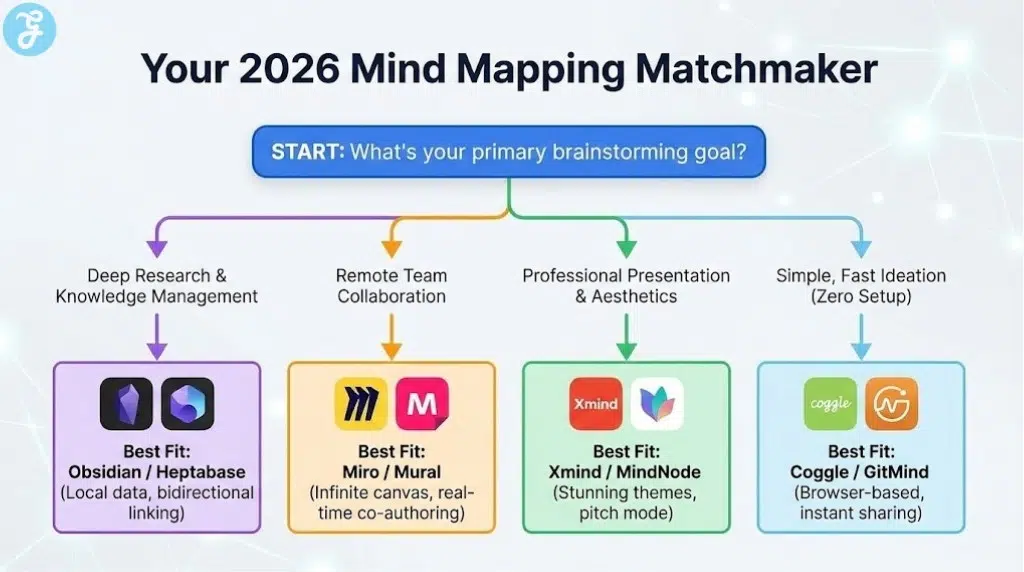
Choosing a platform depends on your “Output Goal”—do you want a “Project Plan” or a “Knowledge Graph”? You should audit your team’s existing stack; if you use Jira/Salesforce, Lucidchart or Miro is best; if you are a solo researcher, Obsidian or Heptabase is your winner. This comparison matrix helps you align your 2026 creative goals with the most appropriate visual hardware.
| Creativity Goal | Recommended Platform | Primary Benefit |
| Max Team Collaboration | Miro | Infinite Canvas & AI Facilitation |
| Professional Presentation | Xmind | Stunning Aesthetics & Pitch Mode |
| Academic/Deep Research | Obsidian / Heptabase | Local Data & Bidirectional Linking |
| Simplest/Fastest Start | Coggle | Zero-Setup Browser Access |
Final Thoughts On Visual Thinking
Winning the creative battle in 2026 means moving faster than the speed of thought. The best mind mapping tools for brainstorming 2026 mentioned here provide more than just a place to draw; they provide a toolkit for cognitive expansion. By selecting a tool that fits your specific mental model—whether it is the freeform chaos of Scapple or the structured logic of MindMeister—you ensure that your 2026 ideas are not just captured, but cultivated into reality.