
Your website can slow down or crash when a big sale brings a traffic spike. Auto-scaling in cloud hosting uses load balancers and SSD storage to add servers on the fly. We look at 10 providers, like Amazon Web Services, Microsoft Azure, and SiteGround, and show how they use CDNs and DDoS protection to keep sites fast.
Keep reading.
Key Takeaways
- Amazon Web Services (AWS) uses CloudWatch metrics to fire up or park virtual machines in seconds. It keeps sites at 99.9% uptime and starts at $110 per month.
- Microsoft Azure and Google Cloud Platform run across 37 global data centers. They add VMs on demand, use smart load balancers, edge caches, and built-in DDoS shields to keep pages fast.
- IBM Cloud and Oracle Cloud tap SSD storage, Kubernetes or block storage, virtual cloud networks, and Terraform or CLI tools. They auto-scale compute nodes for WordPress, VPS, or custom apps.
- Providers like Cloudways (from $11/month), Kinsta (from $35), SiteGround (from $3.99; GoGeek $10.69 for 400,000 visits), DreamHost DreamPress ($16.95) and Liquid Web mix load balancers, CDNs, root access, and database tuning.
- Auto-scaling uses CPU, memory, and network thresholds plus simple APIs and load balancers. It handles big traffic spikes for sales or news events, cutting slowdowns and costs when demand drops.
Amazon Web Services (AWS)
AWS uses auto scaling groups to fire up or park virtual machines when traffic spikes hit your cloud hosting, no sweat. It feeds metrics into CloudWatch and links them to a load balancer to spread traffic smoothly and keep pages zipping.
How does AWS support auto-scaling for traffic spikes?
Traffic spikes can overwhelm servers, drop user experience. Amazon Web Services tracks demand with CloudWatch monitoring. The platform triggers scaling groups to add virtual machines.
It cuts resources once demand falls. This setup keeps website speed high and uptime at 99.9%. Customers pay cloud hosting from $110 per month. Clients gain managed WordPress hosting, vps hosting, or dedicated hosting.
They also get ddos protection, load balancing, and ssd storage across data centers.
Auto scaling acts across public cloud and hybrid cloud setups. It fits content delivery network bursts too. You set metrics, like CPU or network load. A monitoring alarm scales up capacity within seconds.
You need no manual provisioning or root access. This system boosts hosting scalability and performance. Developers enjoy database optimization, web application firewalls, and content delivery network support.
The result feels like magic to news portals or e-commerce sites.
Microsoft Azure

Microsoft Azure scales your cloud services on demand, spinning up extra virtual machines behind smart load balancers and edge caching for sudden traffic surges—read on to see how it keeps your site flying high.
What auto-scaling features does Microsoft Azure offer?
Azure offers robust scalability options on its cloud platform. It uses instance clusters and load balancers to adjust server capacity in real time, so traffic spikes do not slow down websites.
Its monitoring hub tracks CPU, memory and custom metrics. The system adds or removes VMs on demand, helping with website speed, uptime guarantee and hosting performance. It works like adding new lanes on a busy highway, easing traffic and avoiding slowdowns.
It also fits private cloud, shared hosting or managed wordpress hosting needs, supporting VPS hosting or containerized apps. That setup serves startups or global firms. You can link to content delivery network (cdn) providers like Cloudflare, ddos protection tools, storage accounts with NVMe SSD storage, and database optimization services.
Teams can use active directory and linux distributions for hybrid or on-premises website hosting. This scale up feature keeps costs in check and boosts hosting reliability.
Google Cloud Platform
GCP’s container orchestrator spins up pods in seconds, so you beat traffic spikes. Its global edge caches and smart load balancing keep your site lean and swift.
How can Google Cloud Platform handle sudden traffic increases?
Google Cloud Platform listens to metrics like CPU load and network traffic. It uses instance groups and autoscaling tools to add more virtual servers. The system adjusts resources when traffic spikes hit a site.
It moves traffic across load balancers and content delivery networks. That keeps page loads fast. It protects against DDoS hits with built-in shields. Tasks like database optimization run in parallel.
The platform uses SSD storage to speed up reads.
Customers tap into a network of 37 data centers worldwide. That brings content closer to visitors and boosts website speed. A pay-as-you-go model cuts costs when demand drops. It fits managed hosting and VPS hosting plans.
Managed WordPress hosting plans run smooth too. Developers tap cloud storage for images or videos. Users get an uptime guarantee with a strong service level agreement. They gain root access for custom tweaks.
That stacks well with high-performance computing and machine learning workloads. Firms handle traffic spikes without manual checks or excess spending.
IBM Cloud
IBM Cloud fires up auto-scaling groups and SSD-backed cloud instances that spring into action when your site hits record traffic. Its Cloud Load Balancer and Kubernetes Service link with a Virtual Private Cloud to keep pages humming, even under wild traffic swings.
What auto-scaling options are available on IBM Cloud?
Built-in auto-scaling adapts server count to demand. Admins set rules in the IBM Cloud console. Real-time rules watch CPU, memory, or HTTP rate. Virtual Server Instances and cluster pods ramp up or down, matching traffic spikes.
A traffic manager then spreads requests across healthy nodes. Think of it as a traffic cop directing cars to open lanes.
Large sites enjoy smooth performance with managed WordPress hosting and vps hosting on SSD storage. Developers tap into container platform, auto-scaling, and load balancers under a unified cloud infrastructure.
Policies trigger extra nodes in minutes, cutting lag and boosting page loads. Enterprises avoid downtime during peak hours.
Oracle Cloud Infrastructure
Oracle Cloud Infrastructure auto scales compute nodes with network traffic managers, block storage, virtual cloud networks and a DDoS shield, so your site rides traffic waves like a pro surfer—read on to learn more.
How does Oracle Cloud Infrastructure manage auto-scaling?
This cloud hosting service sets rules on CPU and memory use, spots traffic spikes, fires up extra compute instances, and shields sites from ddos attacks. It taps built-in load balancers and ssd storage volumes for quick scaling.
Developers link instances to a virtual cloud network for secure routing of user requests. Teams run Linux or Windows servers in minutes, without manual steps. Firms from blogs to e-commerce shops scale capacity to match demand, and they keep website speed fast.
Metrics flow from compute logs, database queries, and network use. Alarms trigger API calls that spin new servers in seconds, so businesses see real-time traffic management. A content delivery network (cdn) caches images to curb load on origin servers.
Engineers script policies with Oracle Cloud CLI, Terraform, or SDK tools. An uptime guarantee backs the service level agreement, and cuts hosting costs for vps hosting and managed wordpress hosting.
Cloudways
Cloudways spins up fresh servers in a flash when your site greets a crowd. It weaves isolated compute nodes, traffic directors, and a global edge network, backed by solid-state arrays, for rock-solid performance.
What makes Cloudways a good choice for auto-scaling?
Users can spin servers in seconds on Amazon Web Services and Google Cloud Platform. The service auto-scales when traffic spikes hit. The system adds virtual machines fast. It uses load balancers, SSD storage, and Cloudflare CDN.
Clients get an uptime guarantee and ddos protection. Plans start at $11 per month and rise to $1,056. All tiers include root access and database optimization.
This setup suits WordPress hosting and vps hosting alike. It blends managed wordpress hosting with cloud hosting. Sites keep fast page loads under heavy hits. It cuts hosting costs when load drops.
Teams view resource use in one dashboard. You tweak PHP, track malware scanning, scale on demand. Auto-scaling acts like a traffic guard and keeps performance high.
Kinsta
Kinsta spins up extra WordPress containers with a smart cluster orchestrator and a fast web server. It pairs a global cloud platform with SSD drives and automatic load balancing to soak up big traffic surges.
How does Kinsta support auto-scaling during traffic surges?
It taps 37 Google Cloud data centers around the world. It scales instantly as traffic spikes hit. Load balancers steer requests across many servers. A built-in content delivery network speeds static files from the closest point.
The platform tracks metrics in real time. It pairs SSD storage with fast PHP engines. A network of cache layers cuts database queries.
Plans start at $35 per month with an uptime guarantee and 24/7 support. The WP 2 tier at $70 monthly handles up to 70,000 visits. Engineers fine-tune resources for peak loads. You get managed WordPress hosting with SSD storage and DDoS protection.
Root access stays reserved for specialists, while users manage content easily. A global CDN powered by Cloudflare boosts site speed under heavy traffic. The service ranks high in hosting scalability and reliability.
Liquid Web
Liquid Web revs up your cloud VPS hosting with SSD drives, a traffic distributor, security shields, and full root access for smooth database optimization—keep reading.
What auto-scaling capabilities does Liquid Web provide?
Their autoscaling system tracks server load and spins up CPU, RAM, or new nodes as traffic spikes hit peak levels. It modifies vps hosting or managed wordpress hosting plans on demand across any cloud provider.
It taps load balancers, content delivery network (CDN), and Cloudflare CDN to boost website speed. It layers DDoS protection, SSD storage, and database optimization to keep sites stable across cloud hosting and shared hosting plans.
Businesses get dynamic resource adjustment in real time to match visitor surges. Teams keep root access so they can tune servers or tweak databases. Users also get an uptime guarantee and strong hosting reliability.
This approach cuts hosting costs and lifts hosting performance for WordPress hosting.
SiteGround
SiteGround arms your site with smart load balancers, storage, and traffic management, so it flexes when visitors swarm. You get a full content delivery network, uptime guarantee, and malware scanning, all stitched in for extra peace of mind.
How does SiteGround implement auto-scaling for high traffic?
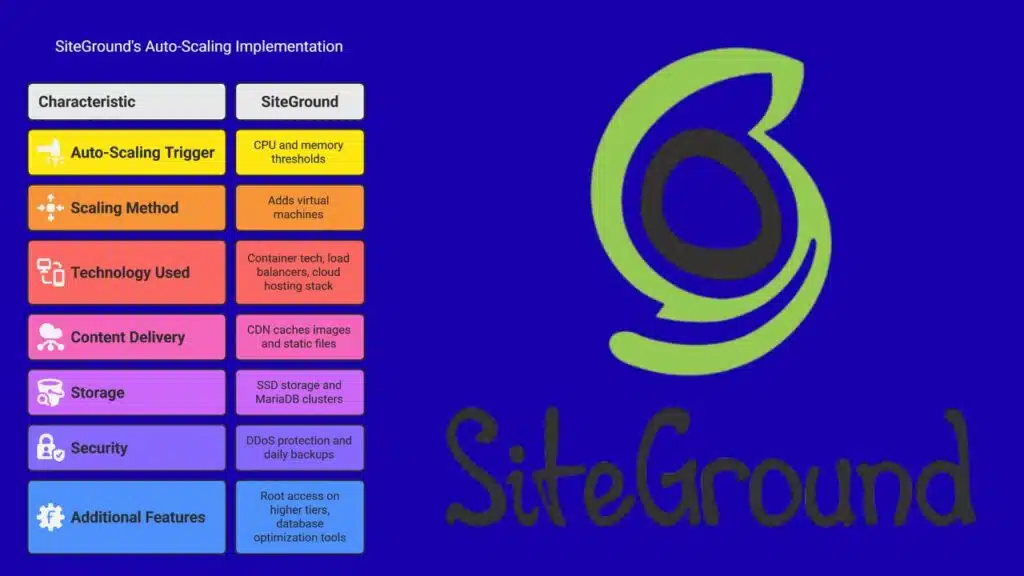
Automatic scaling kicks in when traffic spikes. The system uses container tech and load balancers on a cloud hosting stack to add new nodes in seconds. A content delivery network caches images and static files at edge servers.
Scaling triggers rely on CPU use and memory thresholds. The platform serves PHP workers in extra containers during rushes. It also taps SSD storage and MariaDB clusters to boost performance.
Plans start at $3.99 per month for managed WordPress hosting. GoGeek runs 400,000 visits at $10.69 monthly. Auto-scaling adds virtual machines when visits spike. The setup pairs DDoS protection and daily backups for safety.
Customers get root access on higher tiers and database optimization tools. The service blends SSD storage, a global CDN, and worldwide load balancers. It keeps website speed high and hosting costs from flying sky high.
DreamHost
DreamHost flips on DreamCompute servers in seconds, letting your site grow on demand. Their SSD cluster and a CDN cache soak up traffic spikes, while their DDoS shield stands guard.
What auto-scaling solutions does DreamHost offer?
This provider uses smart load balancers and SSD storage to scale bandwidth and CPU in real time. Its DreamPress plan spins up extra servers the moment traffic spikes push visitor counts near 100,000.
You pay $16.95 per month for DreamPress and get managed WordPress hosting with database optimization and malware scanning.
An uptime guarantee of 99.99% keeps cloud hosting reliability high for dynamic content and indexing. VPS hosting options let users add CPU, memory and root access on demand, with built-in DDoS protection and a content delivery network.
Kamatera
Kamatera mixes SSD storage, global load balancers, and a simple API to pop new VPS nodes like popcorn, so your site races through traffic spikes with top speed—read on to learn more.
How does Kamatera handle auto-scaling for traffic spikes?
Traffic spikes hit like waves in a storm. A smart engine catches each one. It checks CPU load and RAM use every few seconds. It uses load balancers and firewall tools to steer data.
Cloud hosting nodes spring to life in under 60 seconds. Each server runs on a KVM node with SSD storage. This setup boosts hosting performance. Enterprises see minimal slowdowns.
Developers keep root access to tweak configs. APIs trigger scale rules tied to metrics. A CDN integration cuts latency across regions. DDoS protection stays active as new nodes join.
A built in cost meter runs in real time, so clients track hosting costs and tweak limits. They link database optimization scripts to new VPS hosting nodes. This setup suits managed WordPress hosting or custom cloud apps.
It keeps website speed high, so sites purr like well oiled engines.
Takeaways
Every site can handle sudden crowds, like a dam opening more gates in a flood. Your hosting plan can tap elastic VM pools that spin up extra servers. Load balancers and a content network keep page loads quick.
Many users cheer how this cuts slowdowns. Security scans and DDoS shields stand guard. Pick a cloud platform now, to dodge last-minute headaches.
FAQs
1. What is auto-scaling for traffic spikes?
Auto-scaling keeps your site live when traffic spikes hit by adding cloud hosting servers on demand, like vps hosting nodes or shared hosting pools. It uses load balancers to spread visitors, and works like a bouncer at a busy club.
2. Which cloud platforms support auto-scaling?
AWS, Google Cloud, Azure Stack, and oracle’s cloud infrastructure all offer auto-scaling. Many cloud providers and web hosts bundle this with managed wordpress hosting or vps hosting plans.
3. How does auto-scaling affect hosting costs?
Auto-scaling can raise hosting costs when you spin up extra servers, but you pay only for what you use. It beats the cost of permanent overcapacity and gives more ease of use than fixed shared hosting.
4. Will auto-scaling improve website speed and performance?
Auto-scaling boosts hosting performance, and ssd storage drives keep website speed high. You can add a content delivery network (cdn) like Cloudflare CDN to smooth out slow spots.
5. Does auto-scaling handle security during growth?
Yes, top providers include ddos protection, malware scanning, and security audits even during scale ups. You get an uptime guarantee and a solid sla to keep hackers at bay.
6. Can I still get root access and tune my setup?
You can grab root access on many vps hosting tiers and tweak operating systems for database optimization or search engine optimization. Auto-scaling works with your custom cloud infrastructure in real time.