

Cross-platform gaming has become a cornerstone of the gaming industry, enabling players to enjoy their favorite titles across multiple devices seamlessly.
As gaming evolves, the demand for versatile and Affordable controllers for cross-platform gaming has grown.
These controllers bridge the gap between devices, ensuring a consistent gaming experience, whether you’re using a PC, console, or mobile device.
For budget-conscious gamers, finding an affordable yet high-quality controller for cross-platform gaming can be challenging.
This guide aims to simplify your search by highlighting the top 7 affordable controllers for cross-platform gaming, detailing their features, pros, cons, and why they stand out in the market.
What to Look for in a Cross-Platform Controller?
Compatibility
When selecting a controller for cross-platform gaming, compatibility is key. A reliable controller should work across multiple platforms without requiring extensive setup or additional adapters.
The more devices a controller supports, the more versatile it becomes.
- Bluetooth Connectivity: This feature allows wireless connections with modern devices, enhancing mobility.
- Adapter Requirements: Some controllers may need adapters for legacy devices or specific consoles.
- Platform-Specific Modes: Controllers with platform modes (e.g., Switch, Android, or PC) offer enhanced compatibility.
| Compatibility Checklist | Notes |
| Multi-platform support | Works with PC, Xbox, PlayStation, Switch |
| Bluetooth-enabled | Essential for wireless gaming |
| Plug-and-play functionality | Simplifies setup for quick use |
| Adapters included | Reduces additional purchase requirements |
Build Quality and Design
Gaming sessions can last for hours, making comfort and durability essential. High-quality materials and ergonomic designs ensure a satisfying experience.
- Ergonomic Design: Minimizes hand strain during prolonged use.
- Sturdy Materials: Durable plastic, reinforced buttons, and responsive analog sticks improve longevity.
- Grip Texture: A textured surface can reduce slipping, even during intense gameplay.
| Design Features | Importance |
| Ergonomic grip | Comfort for extended play |
| Lightweight materials | Easier handling and portability |
| Textured surface | Reduces slippage during gameplay |
Features and Customization
Modern controllers are equipped with features that cater to diverse gaming needs. These enhancements improve accuracy, immersion, and customization.
- Customizable Buttons: Personalize controls for different games.
- Trigger Adjustments: Fine-tune sensitivity for genres like shooters or racing.
- Vibration Feedback: Adds realism to in-game actions through haptic feedback.
| Feature | Benefit |
| Fully remappable buttons | Adapt to personal gaming styles |
| Adjustable trigger resistance | Increases precision in FPS and racing games |
| Programmable macros | Improves performance in competitive gaming |
Price vs Value
Budget-friendly doesn’t mean sacrificing quality. Look for controllers that balance price and performance.
- Seasonal Deals: Watch for discounts during holidays or promotional events.
- Longevity: A slightly higher upfront cost may save money in the long run by avoiding frequent replacements.
| Price Consideration | Tip |
| Seasonal discounts | Shop during sales like Black Friday or Prime Day |
| Higher initial investment | Often translates to better long-term performance |
Top 7 Affordable Controllers for Cross-Platform Gaming
1. Xbox Core Wireless Controller
The Xbox Core Wireless Controller is a top contender for its robust build and versatility. Designed for PC, Xbox, and mobile devices, it’s a trusted choice among casual and competitive gamers.
The textured grip and hybrid D-pad provide added comfort and precision, making it an excellent controller for cross-platform gaming.
| Feature | Details |
| Connectivity | Bluetooth |
| Battery Type | AA or rechargeable packs |
| Compatibility | PC, Xbox, Mobile |
| Price Range | $60 – $70 |
Pros and Cons
- Pros: Excellent build quality, wide compatibility, responsive buttons.
- Cons: Requires separate purchase of rechargeable batteries.
Real-Life Use Case:
A streamer who frequently switches between PC and Xbox praised the controller’s seamless connectivity and durability during extended gaming marathons.
2. Sony DualShock 4 Wireless Controller
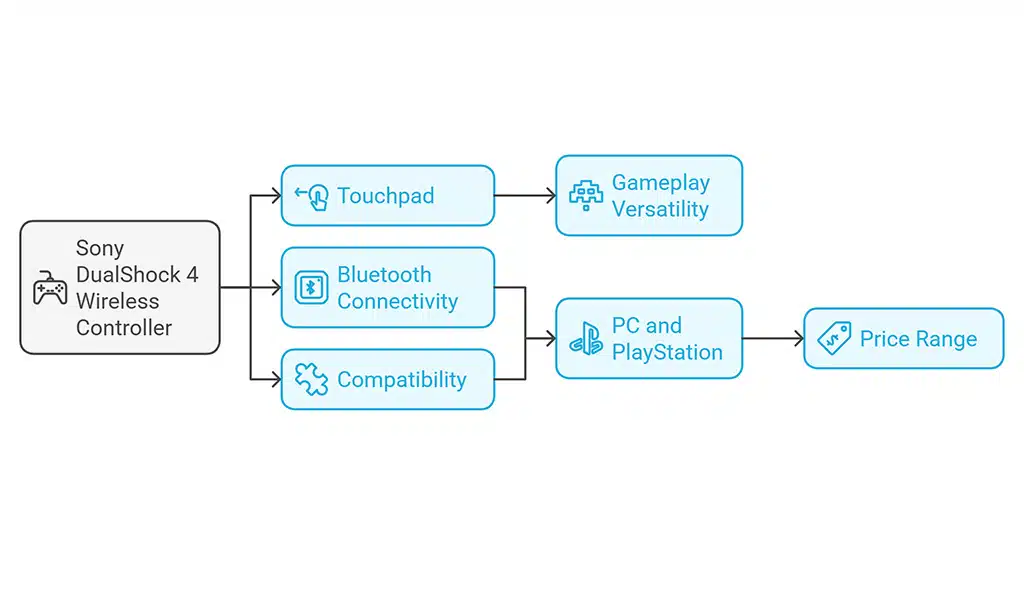
Renowned for its sleek design and advanced features, the Sony DualShock 4 offers an immersive gaming experience.
The integrated touchpad and motion sensors provide unique gameplay interactions, while its compact size suits gamers with smaller hands.
It’s a standout controller for cross-platform gaming, particularly for PlayStation and PC users.
| Feature | Details |
| Touchpad | Adds gameplay versatility |
| Connectivity | Bluetooth |
| Compatibility | PC, PlayStation |
| Price Range | $40 – $60 |
Pros and Cons
- Pros: High-quality build, motion controls, comfortable grip.
- Cons: Requires third-party software for optimal PC compatibility.
Real-Life Insight:
A reviewer highlighted how the motion sensors enhanced their VR gaming experience, especially in interactive puzzle games.
3. 8BitDo Pro 2
The 8BitDo Pro 2 is a retro-inspired controller with modern features. It’s perfect for gamers who value customization, offering fully remappable buttons and compatibility with PC, Switch, and mobile devices.
Its retro aesthetic appeals to nostalgia while delivering cutting-edge functionality. This controller for cross-platform gaming is an excellent choice for creative gamers.
| Feature | Details |
| Customizable Buttons | Fully remappable |
| Connectivity | Bluetooth |
| Compatibility | PC, Switch, Mobile |
| Price Range | $30 – $50 |
Pros and Cons
- Pros: Wide compatibility, customizable features, retro design.
- Cons: Lacks advanced features like adaptive triggers.
Notable Feature:
The controller supports firmware updates, ensuring it stays compatible with newer platforms and games.
4. Logitech F310
An entry-level option for PC gamers, the Logitech F310 is designed for simplicity. Its plug-and-play functionality eliminates setup hassles, making it ideal for beginners.
Though it lacks wireless connectivity, it’s a reliable wired controller for cross-platform gaming that delivers consistent performance.
| Feature | Details |
| Connectivity | Wired |
| Compatibility | PC |
| Design | Lightweight |
| Price Range | $30 – $40 |
Pros and Cons
- Pros: Affordable, durable, no setup required.
- Cons: Wired-only limits mobility.
Tip for Gamers:
Pair it with an extension cable to increase flexibility and reach.
5. PowerA Enhanced Wired Controller

This licensed Xbox accessory combines affordability with functionality.
The PowerA Enhanced Wired Controller includes an audio jack and vibrant design options, making it a practical choice for gamers on a budget.
Its reliability makes it a dependable controller for cross-platform gaming.
| Feature | Details |
| Connectivity | Wired |
| Compatibility | PC, Xbox |
| Extra Features | Audio jack |
| Price Range | $40 – $60 |
Pros and Cons
- Pros: Vibrant designs, lightweight, budget-friendly.
- Cons: Wired connection only.
6. Hori Split Pad Pro
Designed for handheld gaming on the Nintendo Switch, the Hori Split Pad Pro offers an ergonomic alternative to Joy-Cons.
It’s ideal for lengthy gaming sessions, especially in RPGs and adventure games. As a specialized controller for cross-platform gaming, it enhances handheld performance.
| Feature | Details |
| Design | Ergonomic, handheld |
| Compatibility | Nintendo Switch |
| Price Range | $50 – $60 |
Pros and Cons
- Pros: Comfortable for extended use, enhances handheld experience.
- Cons: Limited to Nintendo Switch.
7. PDP Gaming Wired Controller
Combining style and affordability, the PDP Gaming Wired Controller features LED lighting and enhanced audio controls.
It’s a great option for gamers looking to personalize their setup. As affordable controllers for cross-platform gaming, it’s both functional and visually appealing.
| Feature | Details |
| Connectivity | Wired |
| Compatibility | PC, Xbox |
| Extra Features | LED lighting, audio controls |
| Price Range | $37 |
Pros and Cons
- Pros: Stylish design, affordable, great audio integration.
- Cons: Wired-only connection.
Choosing the perfect and affordable controllers for cross-platform gaming doesn’t have to be overwhelming.
Here are some actionable tips:
- Define Your Gaming Needs: Identify the platforms you use most often and prioritize compatibility.
- Consider Future Compatibility: Opt for controllers that can adapt to emerging platforms or games.
- Leverage User Reviews: Online communities and reviews provide valuable insights into real-world performance.
- Test Ergonomics: If possible, test the controller’s comfort before buying.
Takeaways
Investing in reliable and affordable controllers for cross-platform gaming can transform your gaming sessions.
From the robust Xbox Core Wireless Controller to the customizable 8BitDo Pro 2, there’s a perfect option for every gamer.
By weighing factors like compatibility, design, features, and price, you can make an informed decision that suits your gaming style.
Are you ready to upgrade your gaming experience? Explore these options and choose the best controller for cross-platform gaming to elevate your play!































