
Law firms handle highly sensitive information every day, from confidential client records and legal documents to financial details and case files. Without proper security measures, this data can become a target for cybercriminals. As cyber threats continue to evolve, protecting client information is essential for maintaining trust and meeting legal obligations.
The right cybersecurity tools can help law firms detect threats, prevent unauthorized access, and keep confidential data secure. In this article, we explore eight cybersecurity tools that can help law firms strengthen their data protection strategies.
What Cybersecurity Tools Do Law Firms Need to Protect Client Data?
Law firms need a layered set of tools that cover devices, networks, identity, communications, and backups, because attackers typically target the weakest link rather than a single system. No firm is fully protected by one product alone.
The core categories include:
- Endpoint detection and response (EDR) or managed detection and response (MDR) on every laptop, desktop, and firm-issued phone.
- Encryption for files stored on servers, laptops, and mobile devices, plus encryption for data moving between systems.
- Multifactor authentication and identity and access management (IAM), including conditional access rules that block logins from unusual locations.
- Email security and anti-phishing filtering, since email remains the most common entry point for attackers targeting legal professionals.
- Immutable, offsite backups that ransomware cannot alter or delete.
- Centralized monitoring (SIEM or a managed threat detection platform) to catch suspicious activity around the clock.
- Mobile device management (MDM) with remote-wipe capability for lost or stolen phones and laptops.
- Secure collaboration and document-sharing tools with built-in ethical-wall enforcement for conflict-sensitive matters.
A mid-size litigation firm handling trade secret disputes, for example, needs stronger ethical-wall controls than a solo estate-planning attorney. The right mix depends on practice area, client base, and how much sensitive data the firm stores.
The 8 Cybersecurity Tools That Can Help Law Firms Protect Client Data
These eight tool categories form the baseline stack that most legal technology consultants recommend for firms of any size. Each one addresses a distinct attack path, so skipping any single category leaves a gap attackers can exploit.
| Tool category | What it protects against | Who needs it most |
|---|---|---|
| Endpoint protection (EDR/MDR) | Malware, ransomware, compromised devices | Every firm with attorney laptops or remote staff |
| Encryption (full-disk and in-transit) | Stolen devices, intercepted communications | Firms handling financial, medical, or privileged records |
| Phishing-resistant MFA/IAM | Stolen passwords, account takeover | All firms, especially those using cloud email |
| Email security/anti-phishing | Business email compromise, malicious attachments | Firms that send wire instructions or settlement funds |
| Immutable backups/disaster recovery | Ransomware, accidental deletion, system failure | Every firm, regardless of size |
| SIEM/centralized threat detection | Slow-moving intrusions, insider threats | Firms with 20+ attorneys or sensitive practice areas |
| Mobile device management | Lost or stolen phones, unmanaged BYOD risk | Firms allowing remote work or personal devices |
| Secure collaboration/ethical walls | Conflict breaches, unauthorized file access | Firms with multiple practice groups or lateral hires |
Two additional layers deserve a mention even though they didn’t make the top eight: vendor-risk management for cloud and AI services, and ongoing security awareness training with dark-web monitoring. Both are increasingly treated as table stakes rather than extras, especially as firms adopt generative AI tools that can leak confidential text into third-party systems if misconfigured.
How Do Law Firms Protect Client Confidential Data Beyond These Tools?
Tools alone do not protect confidential data; firms also need written policies, trained staff, and tested procedures that turn software settings into actual practice. A firewall configured correctly but never reviewed again is not protection, it’s a false sense of security.
Practical steps that pair with the tools above include:
- Running quarterly phishing simulations so staff recognize real attacks before clicking.
- Limiting file access by role, so a paralegal in one practice group cannot open files from an unrelated matter.
- Logging and reviewing who accesses sensitive files, not just whether access was granted.
- Requiring encrypted channels for any client communication involving financial details or wire instructions.
Best Password Managers for Law Firms
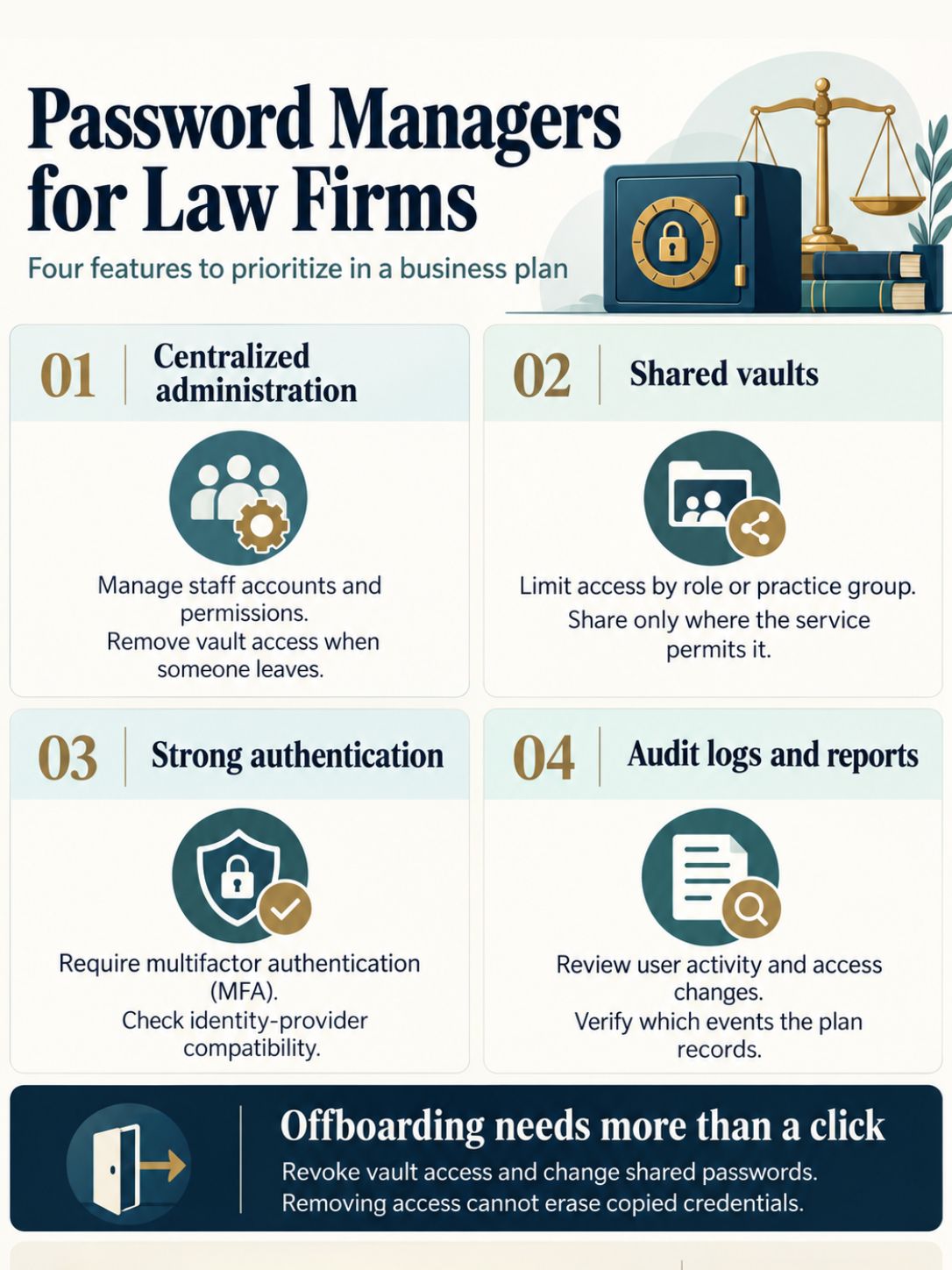
A business-grade password manager with shared vaults, audit logs, and admin-level deprovisioning is the right choice for law firms, not a personal, consumer version. Attorneys and staff juggle dozens of logins across court systems, billing software, and client portals, and weak or reused passwords remain one of the easiest ways in for attackers.
Look for these features when comparing options:
- Centralized administration so IT can revoke access instantly when someone leaves the firm.
- Shared vaults for practice groups that need to access the same case management or billing credentials.
- Built-in MFA support or integration with an existing identity provider.
- Audit logging that shows who accessed which credential and when, which matters for compliance reviews.
Choose a business-tier password manager over a free consumer tool if more than two people share logins, if the firm handles trust accounting, or if a bar regulator has ever asked about the firm’s data security practices. Products built for enterprise or law firm use (several major vendors market specifically to legal and compliance teams) typically cost between $3 and $8 per user per month, a small line item compared to the cost of a single compromised credential.
Do Law Firms Need Encryption Software?
Yes. Encryption is one of the few controls that protects data even after a device is lost or a network is breached, which makes it close to non-negotiable for any firm holding privileged information. Full-disk encryption on laptops, combined with encrypted email and encrypted backups, covers the three places data is most often exposed.
Encryption matters most in these situations:
- A laptop is lost or stolen from a car, a courthouse, or an airport.
- Email containing settlement terms or financial account numbers is sent over an unsecured network.
- A backup drive is stored offsite and could be accessed by someone outside the firm.
Modern operating systems include built-in full-disk encryption at no extra cost, so the barrier to adoption is usually policy and enforcement, not price. Firms that skip encryption and later lose an unencrypted device face a far harder conversation with clients and regulators than firms that can show the device was encrypted and the data was never actually exposed.
VPN or Firewall: What’s the Difference for Law Offices?
A firewall controls what traffic can enter or leave the firm’s network, while a VPN creates an encrypted tunnel so remote staff can safely connect to firm systems from outside the office. They solve different problems and most firms need both, not one instead of the other.
| Feature | Firewall | VPN |
|---|---|---|
| Main job | Blocks unauthorized network traffic | Encrypts a remote connection to the firm network |
| Where it sits | Edge of the office network | Between a remote device and firm systems |
| Best for | Stopping intrusion attempts, filtering traffic | Protecting attorneys working from courthouses, hotels, or home |
Cybersecurity Tools for Small Law Firms vs Large Firms
Small firms and large firms need the same eight tool categories but implement them at very different scale and cost. A solo practitioner can meet most requirements through bundled cloud security suites, while a 200-attorney firm typically needs dedicated IT security staff and a formal governance program.
- Small firms (1 to 10 attorneys): Rely on managed service providers for EDR/MDR, cloud-based email security, a business password manager, and automated cloud backups. Most of this can run under $150 per user per month combined.
- Mid-size firms (10 to 75 attorneys): Add centralized identity management, formal MFA enforcement across all systems, and a basic SIEM or managed detection service.
- Large firms (75+ attorneys): Build dedicated security operations, run vendor-risk reviews for every cloud and AI tool, and maintain a tested incident response plan with outside counsel and forensic vendors on retainer.
How Much Does Legal Practice Cybersecurity Cost?
Basic cybersecurity for a small law firm typically runs $50 to $200 per employee per month when bundled through a managed service provider, while larger firms with dedicated IT security staff and enterprise monitoring tools can spend well into six figures annually. Cost scales with firm size, data sensitivity, and whether tools are managed in-house or outsourced.
Rough cost ranges by category:
- Endpoint protection (EDR/MDR): $3 to $10 per device per month
- Business password manager: $3 to $8 per user per month
- Email security add-on: $2 to $6 per mailbox per month
- Managed backup and disaster recovery: $50 to $300 per month depending on data volume
- Managed detection and response (SIEM-backed): often bundled into managed IT contracts starting around $1,000 to $3,000 per month for small firms
Why Do Law Firms Get Hacked, and How Can They Prevent It?
Law firms get hacked mainly because they hold valuable, concentrated data (settlement funds, trade secrets, merger details) while often under-investing in the security controls that protect it. Attackers know a single compromised email account can expose an entire case file.
The most common attack paths include:
- Phishing emails impersonating clients, courts, or opposing counsel to steal login credentials.
- Business email compromise, where attackers redirect wire transfers tied to real estate closings or settlements.
- Unpatched software, especially practice management or document management systems running outdated versions.
- Weak or reused passwords, particularly on email and remote access tools.
Is Multifactor Authentication Required for Lawyers?
Multifactor authentication is not mandated by a single federal law for all lawyers, but it is increasingly treated as part of the “reasonable efforts” standard required under ABA Model Rule 1.6 and many state bar ethics opinions. Several state bars and cyber-insurance carriers now effectively require MFA as a condition of coverage or compliance.
Microsoft has reported that MFA can block more than 99% of account compromise attacks, based on Microsoft’s own security research. Given that email and case management logins are the most targeted credentials in a law firm, skipping MFA is one of the easiest-to-fix and highest-impact gaps a firm can close. Phishing-resistant forms, such as hardware security keys or passkeys, offer stronger protection than SMS-based codes, which attackers can intercept through SIM-swapping.
What Happens if a Law Firm Has a Data Breach?
A law firm data breach triggers legal, ethical, and financial consequences that typically unfold in the first 72 hours and continue for months. Firms face state breach notification laws, potential bar disciplinary review, client notification duties, and direct financial costs from forensic investigation and recovery.
Immediate steps firms must take generally include:
- Containing the breach (isolating affected systems, resetting credentials).
- Engaging a forensic investigator to determine scope and cause.
- Notifying affected clients, often required by state law within a set window.
- Reporting to cyber insurance carriers and, in some cases, law enforcement.
- Reviewing ethical obligations, since several state bars have issued opinions requiring disclosure to affected clients under confidentiality rules tied to Model Rule 1.6.
Reputational damage often outlasts the technical recovery. Clients, especially corporate clients with their own security requirements, may require proof of remediation, a new security assessment, or evidence of cyber insurance before continuing the relationship.
Can Law Firms Use Free Antivirus Software?
Free antivirus software can catch basic malware but generally lacks the centralized management, encryption integration, and compliance reporting that law firms need, making it a poor fit beyond a single solo practitioner’s personal device. It’s a gap-filler, not a real control.
Free antivirus typically falls short because it:
- Cannot be centrally managed across multiple attorney devices.
- Offers no audit trail for compliance or insurance purposes.
- Usually lacks EDR-style behavioral detection that catches ransomware before it spreads.
- Provides no support guarantee if something goes wrong during an active incident.
How Often Should Law Firms Update Their Security Tools?
Law firms should apply security patches within days of release, review tool configurations quarterly, and reassess the entire security stack at least once a year or after any major change, such as opening a new office or adopting a new case management platform. Outdated software is one of the most preventable causes of a breach.
A practical update cadence looks like this:
- Daily to weekly: Automatic patching for operating systems and browsers.
- Monthly: Review of MFA enrollment and access logs for anomalies.
- Quarterly: Phishing simulation tests and firewall rule review.
- Annually: Full security assessment, vendor-risk review, and incident response plan test.
Firms that only update software when something breaks are, in effect, running on expired protection for months at a time without realizing it.
What Cybersecurity Compliance Do Lawyers Need to Follow?
Lawyers must follow a mix of ethical rules and, depending on their clients, industry-specific regulations, but the baseline standard across the US is the “reasonable efforts” requirement found in ABA Model Rule 1.6 on confidentiality and the technology competence duty in Comment 8 to Model Rule 1.1. Many state bars have issued their own guidance building on this foundation.
Depending on the client base, firms may also need to comply with:
- State data breach notification laws, which vary by state and trigger specific notice timelines.
- HIPAA, if the firm represents healthcare clients and handles protected health information.
- GDPR or similar frameworks, if the firm represents clients with European Union data.
- Contractual security requirements imposed by corporate clients, sometimes stricter than any regulation.
Are Cloud Storage Services Safe for Attorney-Client Privilege?
Cloud storage can be safe for privileged material, but only when the firm controls encryption keys, enforces strict access permissions, and signs a vendor agreement that explicitly addresses confidentiality and data handling. Using cloud storage without those protections can create real privilege and ethics exposure.
Before storing privileged files in the cloud, confirm:
- The provider offers encryption at rest and in transit, ideally with client-managed keys.
- Access logs exist and are reviewed, so the firm can prove who accessed a file and when.
- The vendor contract states how data is handled, retained, and deleted, and where it is physically stored.
- Multifactor authentication is enforced on every account with cloud storage access.
Major legal-specific cloud platforms are generally built with these protections, while generic personal cloud accounts (a free consumer file-sharing app, for instance) are not designed for privileged legal material and should be avoided for client files.
Final Thoughts: Building a Realistic Cybersecurity Stack
Law firms don’t need every security product on the market, but they do need the eight categories covered in this guide, applied consistently and reviewed on a schedule. The cybersecurity tools that can help law firms protect client data work best as a connected system: encryption protects data at rest, MFA protects the login, backups protect against ransomware, and monitoring catches what slips through.
Start with a gap assessment. List the eight tool categories, mark which ones the firm already has, and set a 90-day plan to close the biggest gaps first, usually MFA and backups, since both are affordable and high-impact. Pair the technical rollout with a short policy update and one staff training session, since most breaches still start with a person, not a piece of software. A firm that takes these steps now is in a far stronger position than one that waits for a breach to force the issue.