Digital portals, learning apps, and virtual classrooms have transformed how children learn. While technology can enrich education, the accompanying language often feels overwhelming. Schools frequently send home updates filled with technical jargon that makes simple educational concepts sound unnecessarily complex.
Understanding these edtech buzzwords empowers parents to advocate for their children, track academic progress, and support learning at home effectively. Cutting through the jargon helps you understand what is actually happening in your child’s classroom.
Here are 15 common educational technology terms decoded into simple, everyday language.
15 Common EdTech Buzzwords Decoded
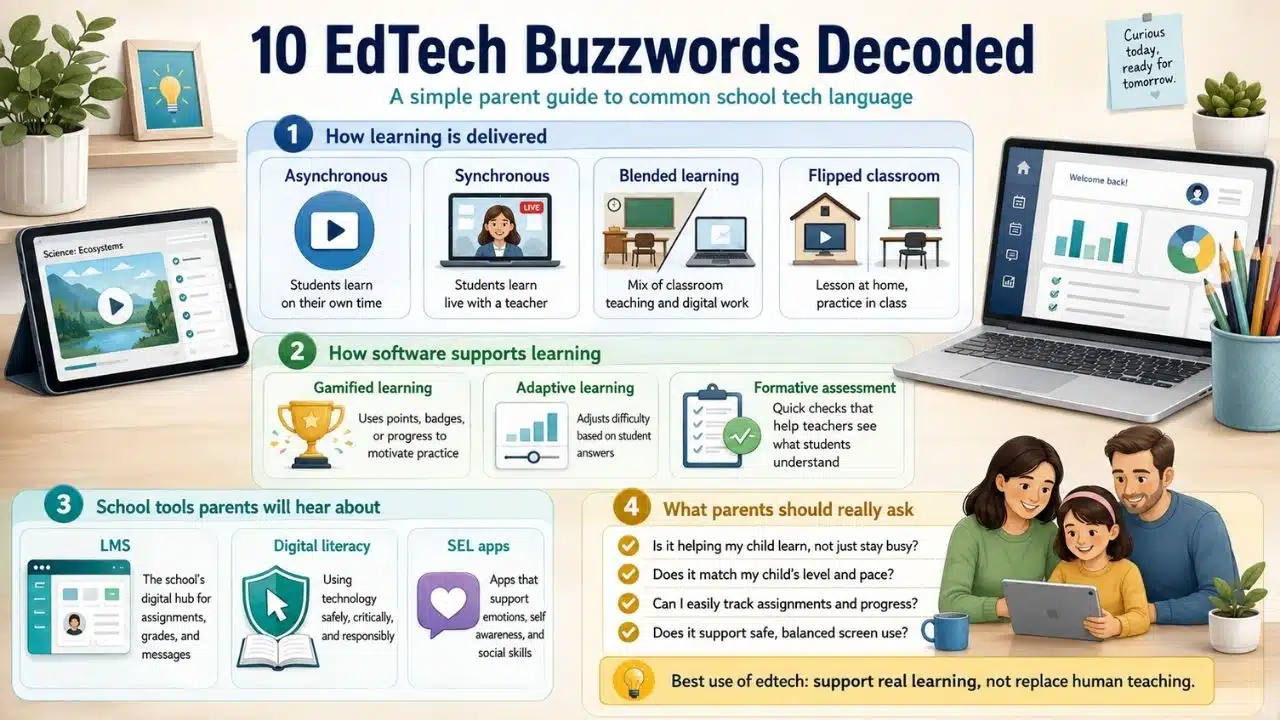
1. Gamified Learning
Gamification means taking game design elements (such as points, badges, leaderboards, or progress bars) and applying them to educational tasks.
Instead of completing a traditional paper drill, a student might earn digital points and level up by solving math problems. This approach aims to boost student engagement and make repetitive skill practice feel enjoyable.
2. Asynchronous Learning
Asynchronous learning occurs when students complete schoolwork independently at different times, rather than learning simultaneously with a teacher.
Examples include watching pre-recorded video lectures, completing online quizzes, or participating in digital discussion boards on their own schedule. It offers flexibility for students to process information at their own pace.
3. Adaptive Learning
Adaptive learning software automatically adjusts difficulty levels in real-time based on a student’s responses.
If a child answers a question correctly, the program presents a more challenging problem. If they struggle, the system offers simpler prompts or guided hints. This ensures children work at their individual skill level without feeling bored or overwhelmed.
4. Synchronous Learning
Synchronous learning happens live in real-time. It requires students and teachers to interact at the exact same time, whether in a physical classroom or through a video conference call.
Live group discussions, real-time virtual tutoring, and interactive video lectures are common examples of synchronous instruction.
5. Blended Learning
Blended learning combines traditional face-to-face classroom teaching with digital online instruction.
Rather than relying solely on physical textbooks or exclusively on laptops, teachers use face-to-face instruction for core concepts while incorporating software for practice, research, and collaborative projects.
6. Flipped Classroom
In a flipped classroom, traditional lesson structures are inverted.
Students review new instructional content (like watching a short video lecture) at home for homework. Classroom time is then reserved for hands-on projects, group discussions, and guided problem-solving with the teacher present to help.
7. Learning Management System (LMS)
A Learning Management System (such as Google Classroom, Canvas, or Seesaw) is a centralized digital hub used by schools.
Teachers use an LMS to post daily assignments, share learning resources, track grades, and communicate with parents and students in one secure online location.
8. Digital Literacy
Digital literacy goes beyond basic computer mechanics like typing or using a mouse.
It refers to a child’s ability to find, evaluate, create, and communicate information safely and responsibly using digital devices. It includes learning online safety, detecting fake information, and practicing good digital citizenship.
9. Formative Assessment
Unlike major end-of-unit exams (summative assessments), formative assessments are quick, informal checks for understanding conducted during the learning process.
EdTech tools like digital polls or exit tickets give teachers immediate data on student comprehension so they can adjust daily instruction immediately.
10. Social-Emotional Learning (SEL) Apps
SEL software focuses on building emotional intelligence, mindfulness, and interpersonal skills alongside core academic subjects.
These apps guide children through exercises in self-awareness, emotion management, empathy, and positive decision-making through interactive stories or reflection prompts.
11. Microlearning
Microlearning breaks complex academic concepts down into short, highly focused learning modules that take only three to five minutes to complete.
Digital flashcard decks, short instructional video clips, and brief practice quizzes are classic examples. By delivering information in small bursts, microlearning prevents cognitive overload and allows students to practice skills efficiently during short study windows at home.
12. Digital Citizenship
Digital citizenship teaches children how to navigate digital environments safely, ethically, and responsibly.
Rather than just learning technical computer skills, students learn about cyberbullying prevention, digital footprint management, online privacy protection, and copyright ethics. It aims to help children build healthy online habits that protect their safety and reputation.
13. Open Educational Resources (OER)
Open Educational Resources are high-quality teaching and learning materials made available to the public at no cost.
Unlike expensive commercial textbooks, OER tools can be legally downloaded, shared, and adapted by teachers. Schools use these open platforms to ensure every student has equal access to learning materials without placing financial burdens on families.
14. Educational Scaffolding Software
Scaffolding software provides temporary digital supports that guide a student through new, challenging academic content step by step.
As the child demonstrates mastery, the software gradually removes hints, audio reads, and visual prompts until the student can perform the skill unassisted. This built-in support system helps children tackle complex topics with confidence.
15. Student Data Privacy Safeguards (COPPA and FERPA)
Data privacy safeguards refer to the legal and technical protocols required to keep your child’s personal information safe when using school software.
Federal regulations such as COPPA (Children’s Online Privacy Protection Act) and FERPA (Family Educational Rights and Privacy Act) restrict what information educational apps can collect. Legitimate platforms must ensure student data is encrypted and never sold to third-party advertisers.
How to Ask Teachers About EdTech During Conferences
Knowing what these edtech buzzwords mean is only half the battle. You also need to know how to discuss classroom technology with your child’s teachers without feeling overwhelmed.
Here are four targeted questions to ask during your next parent-teacher meeting:
Which platforms are mandatory versus optional?
Ask the teacher to identify the primary LMS and core subject apps so you know where to focus your attention at home.
How much total daily screen time is expected?
Clarify how much time your child should spend on digital homework versus traditional offline reading and writing.
Should I intervene when adaptive apps get tough?
Find out if you should help your child when they struggle on adaptive software, or if doing so confuses the program’s ability to assess their true skill level.
How can I track my child’s progress inside these apps?
Request parent portal access or email digest summaries so you can view completed tasks without needing to log in as your child.
What Most EdTech Guides Get Wrong
Many educational resources frame digital tools as complete replacements for traditional teaching or parent involvement. In reality, software is a tool, not a substitute for human instruction.
Understanding these edtech buzzwords allows parents to evaluate whether an app offers genuine educational value or merely distracts children with colorful screen time. The goal of educational technology should always be enhancing comprehension, not replacing meaningful human interaction.
EdTech Terminology Quick-Reference Matrix
Use this matrix to quickly translate common classroom technology terms:
| Buzzword | Simple Definition | Practical Example |
| Gamified Learning | Using game mechanics for instruction | Earning digital badges in a reading app |
| Adaptive Learning | Software adjusting difficulty automatically | A math app offering simpler hints after wrong answers |
| Flipped Classroom | Learning concepts at home, doing work in school | Watching a short video lecture for homework |
| Microlearning | Bite-sized lessons completed in minutes | A 3-minute vocabulary quiz on a phone |
| Scaffolding Software | Temporary digital supports that fade with mastery | Audio hints that turn off as accuracy improves |
| LMS | A school’s central digital portal | Google Classroom, Canvas, or Seesaw |
Final Thoughts on EdTech Buzzwords
Navigating modern school technology does not require a degree in computer science. By understanding basic edtech buzzwords, you can easily communicate with teachers, monitor your child’s academic progress, and ensure digital tools support meaningful learning at home.
Frequently Asked Questions (FAQs) About EdTech Buzzwords
Why do schools use so many complex edtech buzzwords?
Education technology has expanded rapidly, and schools adopt technical terminology to describe new teaching methods precisely. While these terms help educators categorize software features, they can sound confusing to parents until translated into everyday language.
How can I check what edtech tools my child uses in school?
Ask your child’s teacher for a list of approved digital platforms and request access to the school’s Learning Management System (LMS). Most schools provide parent portal accounts so you can review assignments, software usage, and announcements directly.
Is adaptive learning better than traditional practice worksheets?
Adaptive learning offers the benefit of immediate feedback and personalized difficulty adjustments, which traditional paper worksheets cannot provide. However, a balanced approach combining digital practice with tactile writing and reading remains ideal for well-rounded skill development.