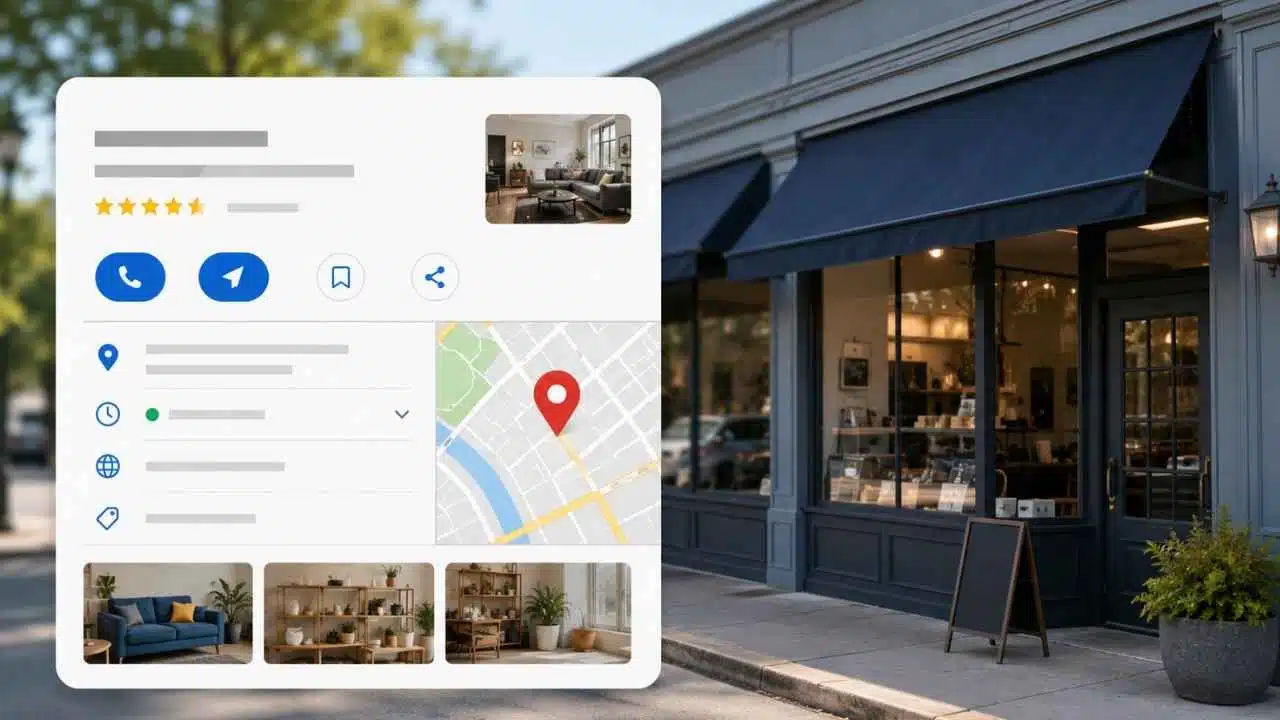
A Google Business Profile is a free digital listing that allows physical storefronts and service-area businesses to manage their presence across Google Search and Google Maps.
Before a customer ever visits a company website, a verified profile displays essential operational details—including opening hours, customer reviews, high-resolution photos, turn-by-turn directions, offered services, and direct click-to-call or booking buttons.
By keeping a profile complete and current, businesses reduce consumer friction and capture high-intent local queries right at the point of search. While maintaining a listing does not guarantee top local rankings or replace an official website, an accurate profile ensures potential clients can find, trust, and contact the business instantly.
What Can Appear on a Google Business Profile?
The exact features depend on the business category, country, device, and profile eligibility. Common information includes:
- Business name and category
- Address or service area
- Regular and special opening hours
- Phone number and website
- Directions and map location
- Photos and videos
- Customer reviews and owner responses
- Services, menus, products, or booking links
- Updates, events, and offers
- Attributes such as accessibility, parking, and payment options
A restaurant may show menu or reservation links. A service business may list individual services and, where supported, prices. A hotel, clinic, shop, and plumber will not all receive the same fields.
That is worth remembering when comparing profiles. A missing feature is not always a setup mistake; it may simply be unavailable for that category or market.
The profile can appear when someone searches for the company by name, but its larger marketing value comes from discovery searches such as “emergency plumber near me” or “Italian restaurant open now.” In those cases, the customer has a need but may not have chosen a business.
Who Qualifies for a Google Business Profile?
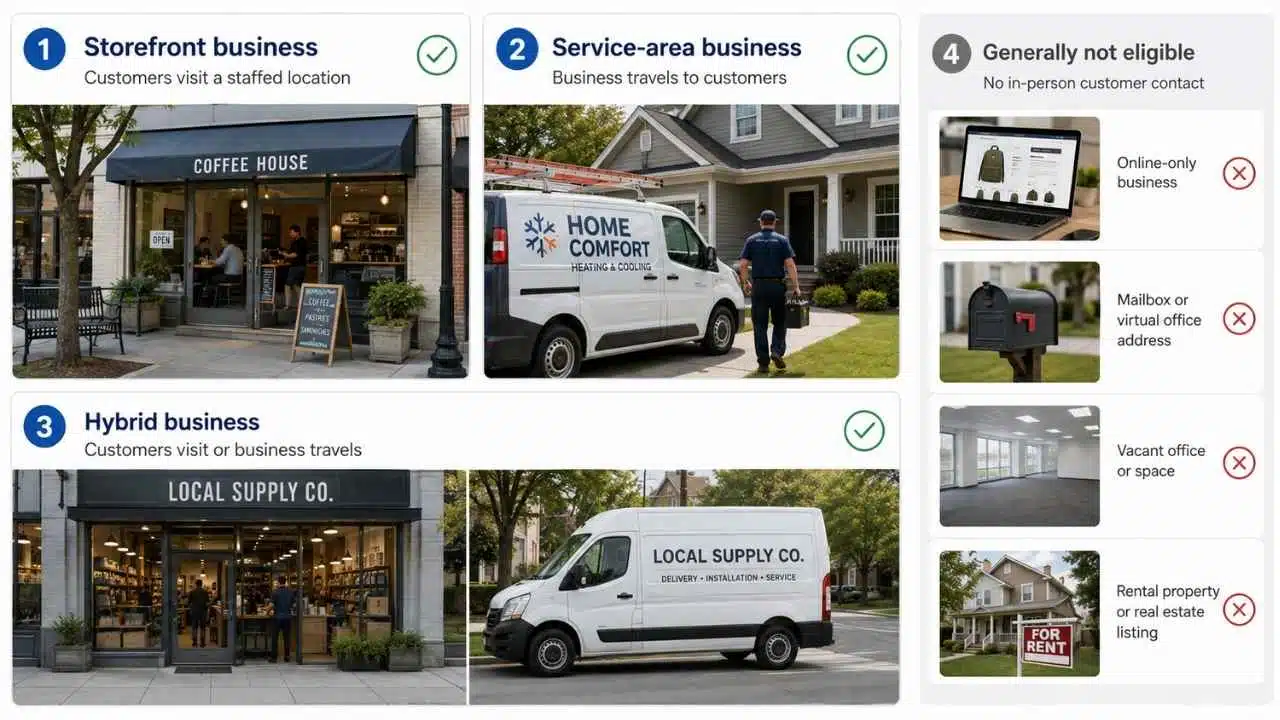
A business generally qualifies when it has genuine face-to-face contact with customers during its stated operating hours.
That usually means one of three operating models:
- Storefront business: Customers visit a staffed location, such as a restaurant, shop, clinic, or office.
- Service-area business: The company travels to customers instead of receiving them at its address. Plumbers, mobile mechanics, cleaners, and electricians are common examples.
- Hybrid business: Customers can visit the premises, but the company also delivers or travels to them.
Online-only businesses without in-person customer contact generally do not qualify. A company does not become eligible merely because it has a registered office, website, mailbox, or legal business address.
Properties being sold or rented are not eligible simply because they have a physical location. Google also lists limited exceptions for certain public-facing facilities, automated services, and recurring seasonal operations, so unusual business models should be checked against the latest eligibility rules before creating a profile.
Address Rules Cause More Trouble Than They Should
The address shown on the profile should match how customers actually interact with the business.
A storefront can normally display its address when the location is staffed, has appropriate permanent signage, and receives customers during its published hours.
A service-area business should hide its operating address when customers are not served there. It can instead list the areas it visits. A plumber working from home, for example, should not present the house as a public shop merely to obtain a visible map pin.
Hybrid businesses can show a customer-facing address and add the areas they also serve.
Virtual offices, mailboxes, borrowed addresses, and unattended workspaces are risky shortcuts. They may look like an easy way to appear in another city, but they can mislead customers and create verification or suspension problems.
For most businesses, the correct address strategy is not the one that produces the most map pins. It is the one that accurately reflects where customers can meet the business.
Why a Google Business Profile Matters to Customers
Local searches are often practical and immediate.
A person may want to know:
- Is the business open now?
- Is it close enough to visit?
- Does it provide the required service?
- Can I call, book, or get directions immediately?
- Do recent reviews suggest that it is reliable?
- Does the entrance look easy to find?
- Is the information consistent with the company website?
A complete profile answers those questions without forcing the customer through several pages.
The small details matter. Incorrect holiday hours can send someone to a locked door. A misplaced map pin can direct drivers behind the building. An old phone number can lose an urgent enquiry. A booking link that leads to an error page makes the business look less dependable than it may actually be.
These are not minor SEO imperfections. They are customer-service failures happening inside search results.
Google Business Profile and Local Rankings
Google describes local rankings through three broad factors: relevance, distance, and prominence.
Relevance
Relevance concerns how closely the business matches the search. The primary category, additional categories, services, website content, and complete profile information can help Google understand what the company offers.
Distance
Distance considers how far the business is from the searcher or from the location named in the query.
This creates a limit that local SEO advice often ignores. A well-maintained profile cannot erase geography. A business may rank strongly near its location and barely appear for someone searching from the other side of the city.
Prominence
Prominence reflects how well known and established the business appears. Google references information such as reviews, ratings, links, and wider web signals as part of this assessment.
There is no single permanent local ranking that every user sees. Results can change by search term, location, device, and competitive context.
Businesses also cannot pay Google for a better organic Maps position. Advertising can create paid visibility, but it does not purchase a stronger organic local ranking.
The Primary Category Is More Important Than Frequent Posting
The primary category tells Google what the business mainly is. It is one of the most consequential fields on the profile.
A specialist pizza restaurant should normally use a specific category such as “Pizza restaurant” rather than relying only on a broader restaurant label. Additional categories can describe genuine secondary parts of the business.
Adding every category that is loosely connected to the company is not useful optimization. It can make the profile less precise and may create problems if the selected categories do not match the real operation.
Google advises businesses to use the fewest categories needed to describe the company accurately. Category changes can also trigger another verification request.
For most profiles, choosing the right category deserves more attention than publishing another promotional post.
Do Not Turn the Business Name Into an SEO Field
The profile name should match the name customers see on the business’s permanent signage, website, invoices, stationery, and other real-world materials.
A company called “Northfield Plumbing” should not change its listing to “Northfield Plumbing Best 24 Hour Emergency Plumber” simply to target more keywords.
Keyword-stuffed names sometimes appear to rank well, which keeps the tactic popular. It is still unstable. The wording may be edited by users or Google, and the profile may face restrictions if the name does not reflect the real business.
A legitimate profile should be easy to defend during verification or review. If the company cannot show that the listed name is genuinely used in the real world, the name is probably wrong.
Verification Proves Management, Not Reputation
Verification confirms that the person managing the profile is authorized to represent the business. It does not mean Google endorses the company, confirms every professional licence, or guarantees service quality.
Google determines which verification methods are available. Depending on the profile, the process may involve phone, text, email, mail, video recording, live video, or more than one method.
Video verification may require evidence such as:
- The surrounding location
- Permanent business signage
- Equipment or branded vehicles
- Access to staff-only areas
- Documents or systems connecting the manager to the business
The required evidence differs between storefront and service-area operations.
Businesses should correct the name, category, address, and operating model before beginning verification. Changing major details during or shortly after the process can delay approval or lead to another check.
Manufacturing signage or using an address that customers cannot visit is not a sensible workaround. It creates a profile that is difficult to verify because it does not match the real business.
Reviews Affect Trust and Local Prominence
Reviews are one of the first profile elements customers notice. They show recent experiences, common complaints, service patterns, and how the business responds when something goes wrong.
Verified owners can reply publicly. The strongest responses are usually brief and specific. They acknowledge the issue, avoid disclosing private information, and offer a reasonable next step.
Businesses can report reviews that violate Google’s policies. They cannot have a review removed simply because it is negative, disputed, or uncomfortable.
Buying reviews, asking employees to post as customers, offering rewards for positive ratings, or pressuring people to change criticism is prohibited. A sudden block of vague five-star reviews may also look less trustworthy to customers, even before Google takes any action.
A steady flow of genuine feedback is more valuable than chasing a perfect rating. Customers often expect to see some criticism. What matters is whether the overall pattern looks credible and whether the business handles complaints professionally.
Photos and Services Help Customers Judge the Business
Photos should answer practical questions rather than merely decorate the listing.
A restaurant can show current food, seating, and the exterior. A clinic can make the entrance and reception easier to recognise. A contractor can show completed work, vehicles, and equipment. A hotel should represent rooms and shared facilities accurately rather than relying on old or heavily edited images.
Customer-submitted photos may appear alongside owner uploads, so businesses do not control every image shown.
Eligible profiles may also support services, descriptions, prices, menus, products, booking links, updates, offers, and events. Availability varies.
These features can improve the profile, but they are secondary. Publishing posts every week will not compensate for incorrect opening hours, a vague category, or a disconnected phone number.
Google May Change Profile Information
Claiming a profile gives the business significant control, but it does not make the owner the only source of information.
Google may use the company website, licensed data, owner submissions, user reports, reviews, photos, and other public sources to update local details. Suggested or automated changes can therefore appear after verification.
That makes routine checking necessary. Businesses should review:
- Regular and holiday hours
- Address and map-pin accuracy
- Phone and website links
- Suggested edits
- Customer-uploaded photos
- Duplicate profiles
- Temporary or permanent closure labels
- Ownership and manager access
- Reviews that need a response
A profile is not finished when verification succeeds. It remains a public business record that can drift out of date.
Duplicate Profiles Create Unnecessary Risk
Google generally allows one profile for each eligible business.
Creating several listings for the same company can split reviews, confuse customers, and cause one or more profiles to be marked as duplicates.
When a business moves, updating the existing profile is usually better than starting again. When someone else already controls the correct listing, the owner should request access rather than create a competing version.
Separate profiles at the same address can be appropriate for genuinely distinct businesses or qualifying practitioners. They should not be created to manufacture extra local coverage.
Duplicate cleanup deserves care. Removing or merging the wrong profile can affect reviews, managers, and business information that should have been preserved.
Multi-Location Businesses Need Local Accountability
Each genuine branch can have its own eligible profile, but local accuracy cannot be managed entirely from a brand-level template.
Every location needs correct:
- Address and map pin
- Opening and special hours
- Contact details
- Available services
- Branch photographs
- Local landing page
- Closure or relocation information
Google provides bulk-management tools for organizations with larger location sets. Team members and agencies should receive individual access rather than share one account password.
The more difficult issue is ownership. Someone must be responsible for updating holiday hours, removing former employees, checking suggested edits, and confirming that each branch still reflects the real operation.
Without that responsibility, multi-location profiles gradually become inconsistent even when they were set up correctly.
Measure Actions, Not Impressive-Looking Numbers
Profile performance reports may include search terms, views, direction requests, call-button clicks, website clicks, bookings, messages, or menu interactions. The available metrics depend on the business and enabled features.
These figures need context.
A call metric records a click on the call button, not a completed or qualified conversation. A direction request does not prove that the person arrived. A website click does not confirm a lead or sale.
Raw visibility can be useful for spotting trends, but it should not be treated as revenue.
The better measurement question is whether profile activity corresponds with more qualified calls, completed bookings, store visits, or enquiries. Where possible, businesses should connect profile actions with call tracking, booking records, website analytics, and customer-reported discovery sources.
What to Fix First
Businesses often begin with posts, products, or speculative ranking tactics. A more reliable order is:
- Confirm that the business is eligible.
- Find and claim the correct existing profile.
- Remove duplicate and address-policy risks.
- Use the real-world business name.
- Choose the most accurate primary category.
- Set the correct storefront address or service area.
- Complete the verification method Google provides.
- Correct regular and special hours.
- Test the phone, website, booking, and direction links.
- Add useful services and current photos.
- Build a policy-compliant review process.
- Check access, suggested changes, and performance regularly.
This order is deliberately practical. Customers need correct information before they need another update, offer, or promotional image.
Final Thoughts
A Google Business Profile matters because it often appears at the exact point when a local customer is ready to choose, call, book, or visit. It can support visibility, but it cannot eliminate distance, guarantee rankings, or make an ineligible address legitimate. It also cannot compensate for poor service or inaccurate information.
The strongest profiles are not necessarily the ones using every available feature. They are the ones customers can trust: the name is real, the category is precise, the location makes sense, the hours are current, and the contact routes work.
Treat the profile as an operating asset rather than a one-time marketing task. Check it regularly, especially before holidays, after a move, when staff access changes, or when the business adds or removes services.
A profile that remains accurate throughout the year will usually create more value than one that looks heavily optimized but cannot be relied upon.