

The year 2020 changed everything, but 2026 is about perfecting it. For decades, the “college experience” meant one thing: sitting in a lecture hall. Today, that definition has shattered. We are no longer in emergency remote teaching mode. We have entered the era of the intentional hybrid campus.
In this new landscape, the classroom isn’t just a physical room with four walls; it is a flexible ecosystem that connects students sitting in the front row with peers joining from across the globe. This isn’t just about convenience anymore—it is about survival, enrollment growth, and equity. But what does a truly successful hybrid education model look like in 2026? How do you move beyond “Zoom in a room” to create a seamless educational experience?
This guide breaks down everything university administrators, IT directors, and faculty need to know about hybrid classrooms in higher education—from the tech stack to the teaching strategies that actually work.
Why Hybrid is the “New Normal”
The debate is over: Hybrid is here to stay. But why?
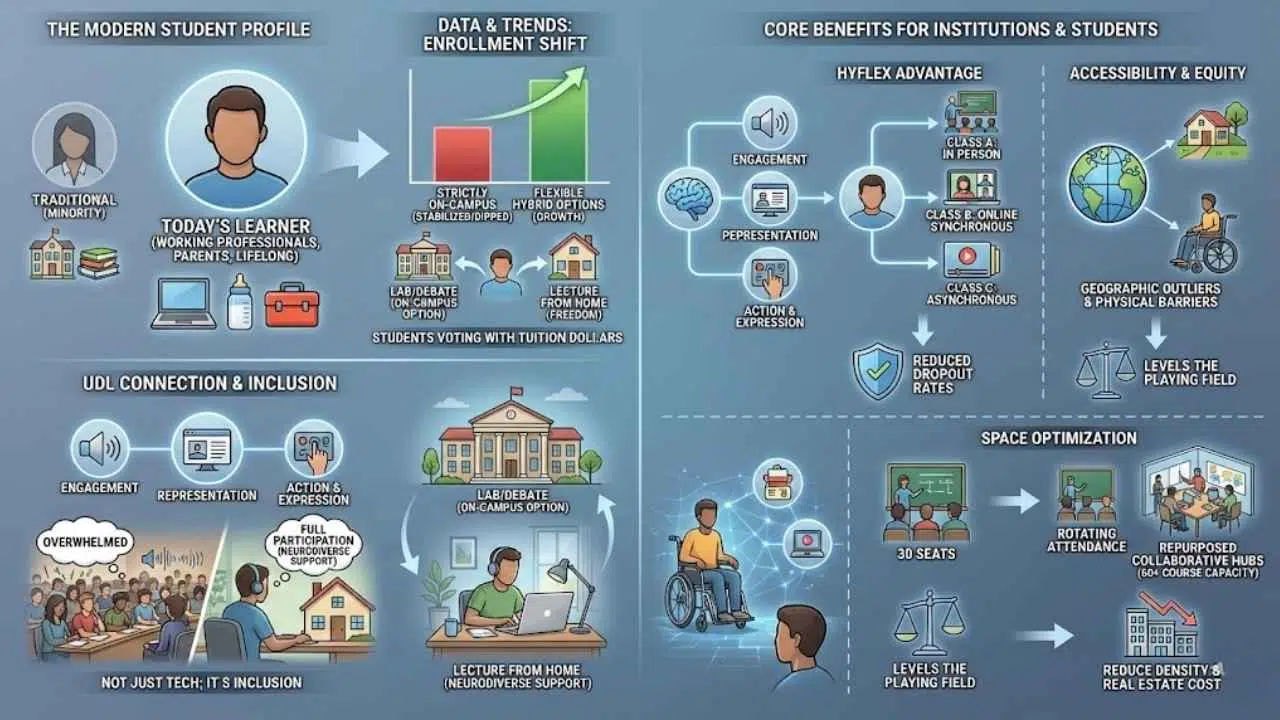
It comes down to who the modern student is. The “traditional” student—an 18-year-old living in a dorm with zero job responsibilities—is becoming the minority. Today’s higher ed demographic includes working professionals, parents, and lifelong learners who need education to fit their lives, not the other way around.
Recent enrollment data paints a clear picture. While strictly on-campus enrollment has stabilized or dipped for many mid-tier institutions, programs offering flexible hybrid options are seeing growth. Students are voting with their tuition dollars. They want the option to come to campus for a lab or a debate, but the freedom to attend a lecture from home when life gets in the way.
The Universal Design for Learning (UDL) Connection
This shift is also deeply rooted in Universal Design for Learning (UDL). UDL is a framework to improve and optimize teaching and learning for all people based on scientific insights into how humans learn.
Hybrid learning naturally supports UDL by providing multiple means of engagement and representation. It allows a neurodiverse student who might be overwhelmed by a crowded lecture hall to participate fully from a quiet, controlled environment at home. It’s not just tech; it’s inclusion.
The Core Benefits for Institutions and Students
Adopting hybrid classrooms in higher education isn’t just a concession to students; it’s a strategic advantage for the university.
- The “HyFlex” Advantage: The gold standard right now is HyFlex course design. In a HyFlex model, the university doesn’t dictate the mode; the student does. A student might attend Class A in person, Class B online synchronously, and catch up on Class C asynchronously because they had a shift at work. This flexibility reduces dropout rates significantly.
- Accessibility & Equity: Hybrid models democratize education. They open degree programs to geographic outliers—students living in rural areas or different countries who cannot relocate. It levels the playing field for students with physical disabilities or chronic health issues who physically cannot get to class every single day.
- Space Optimization: University real estate is expensive. By rotating attendance or allowing hybrid options, a classroom meant for 30 people can essentially service a course of 60, provided they don’t all show up on the same day. This allows campuses to reduce density and repurpose underutilized space for collaborative hubs rather than passive lecture halls.
Essential Technology for a Seamless Hybrid Experience
You cannot teach a 2026 hybrid class with 2019 technology. The “webcam on a laptop” approach is dead.
To make synchronous vs asynchronous learning feel cohesive, you need an ecosystem where the remote students feel just as “present” as the physical ones. This requires specific investments in hardware.
1. The Audio Ecosystem (The Most Critical Element)
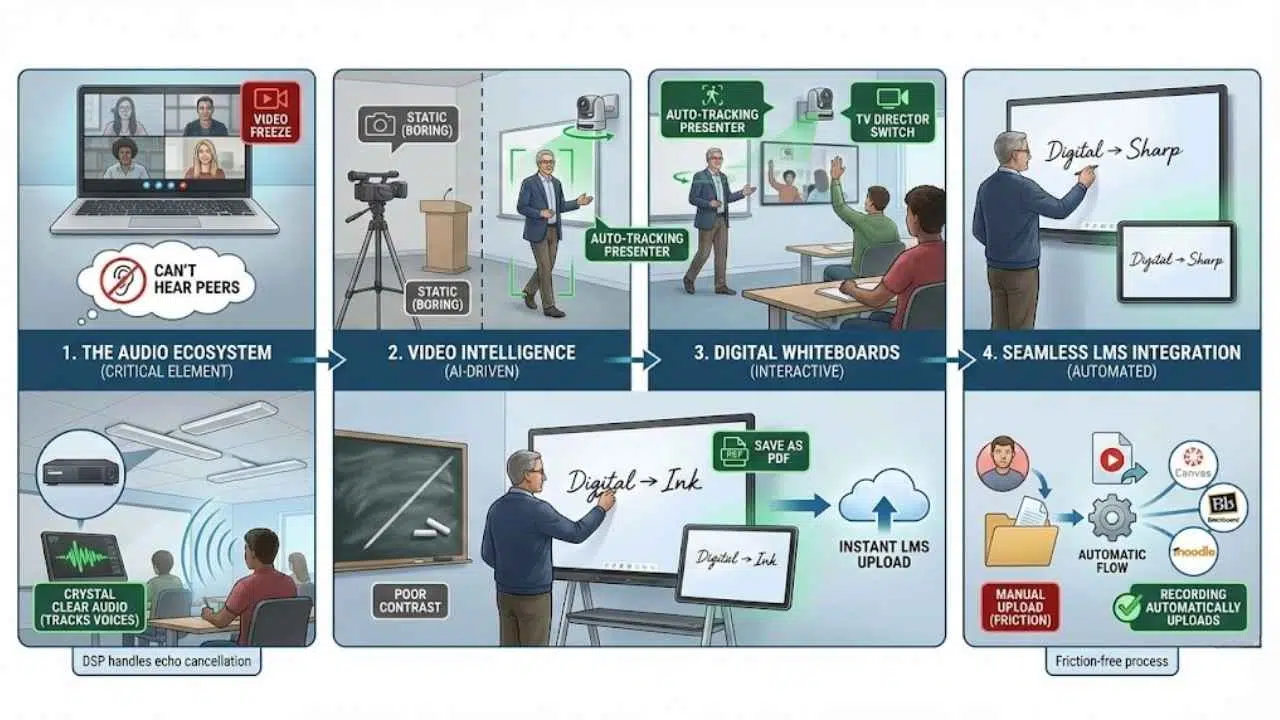
If video freezes, class continues. If audio fails, class stops.
The biggest complaint in early hybrid attempts was that remote students could hear the professor, but they couldn’t hear the questions asked by students in the room. This made them feel like they were watching TV, not participating in a class.
- The Solution: Ceiling beamforming microphones (like those from Shure or Sennheiser). These intelligent mics track voices in the room. When a student in the back row asks a question, the mic focuses on them, and the remote students hear it crystal clear.
- DSP (Digital Signal Processing): You need a processor to handle echo cancellation so the in-room audio doesn’t feed back into the microphones.
2. Video Intelligence
Static cameras are boring. If a professor walks to the whiteboard and leaves the frame, the remote student is looking at an empty podium.
- The Solution: AI-driven PTZ (Pan-Tilt-Zoom) cameras. These cameras auto-track the presenter. If the professor moves left, the camera follows smoothly. Some systems act like a “TV Director,” automatically switching views between the professor and the audience depending on who is talking.
3. Digital Whiteboards
Writing on a physical chalkboard is a nightmare for hybrid setups—the camera rarely captures the contrast well.
- The Solution: Touch displays (like Vibe or Microsoft Surface Hub). When a professor writes on these, the “ink” is digital. It appears perfectly crisp on the remote students’ screens, and the notes can be instantly saved as a PDF and uploaded to the LMS (Learning Management System).
4. Seamless LMS Integration
Your physical classroom tech must talk to your digital classroom hub. Whether you use Canvas, Blackboard, or Moodle, the recording of the live session should upload automatically. Friction causes failure; if a professor has to manually upload a massive video file, they won’t do it.
Pedagogical Strategies: Teaching to Two Audiences
Technology is only 50% of the equation. The other 50% is pedagogy.
A common pitfall is “Room Bias.” This happens when a professor engages naturally with the smiling faces in the front row and completely forgets the 20 students represented by black boxes on a Zoom screen.
To combat this, faculty need new strategies.
The “Digital Deputy” Role
It is cognitively difficult to lecture, write on the board, and check the Zoom chat for questions simultaneously.
- Strategy: Assign a student in the room to be the “Digital Deputy” (or Chat Monitor) for the day. Their job is to raise their hand when a remote student has a question in the chat. This bridges the gap and empowers students to help manage the learning environment.
The Flipped Classroom Model
Don’t use valuable synchronous class time for a monologue.
- Strategy: Record the lecture ahead of time (asynchronous). Students watch it before class. Then, use the live class time (synchronous) for debate, problem-solving, and Q&A. This maximizes the value of being together, whether virtually or physically.
Equitable Engagement
- Strategy: If you ask a question, look at the camera lens, not just the room.
- Strategy: Require “digital hand raising” for everyone, even those in the room, using their phones. This puts everyone in the same queue and prevents the loud students in the front row from dominating the conversation.
Overcoming “Zoom Fatigue” and Isolation
Staring at a screen for three hours is exhausting. This is “Zoom fatigue,” and it kills learning outcomes.
- Gamification: Use tools like Kahoot! or Slido to inject energy. A quick 5-minute quiz breaks the monotony and wakes everyone up.
- Mixed Breakout Rooms: This is a game-changer. Don’t put all remote people in one group and all in-person people in another. That creates “us vs. them.”
- BYOD (Bring Your Own Device): Ask in-person students to bring laptops or phones. Create breakout groups that mix them—two people in the room paired with two people on Zoom. This forces interaction between the two cohorts.
Challenges and Solutions in Implementation
Transitioning to this model isn’t easy. Here are the most common friction points and how to solve them.
| Challenge | The Solution |
| Audio Feedback Loops | This happens when in-room laptops pick up in-room audio. Fix: Strictly enforce a “Mute Speakers and Mic” rule for student laptops inside the physical room. Only the room’s main system should broadcast audio. |
| Faculty Burnout | Professors aren’t IT technicians. Fix: Install standardized control panels (like Crestron/Extron) with a simple “Start Class” button. One touch should turn on the projector, dim lights, and launch the Zoom room. |
| The “Ghost Town” Effect | Remote students keep cameras off, making the professor feel isolated. Fix: Create a “Camera Optional but Audio Mandatory” culture, or use avatars. Focus on active participation (polls, chat) rather than policing video feeds. |
| Privacy Concerns | Recording classes raises privacy issues. Fix: Establish clear FERPA-compliant policies. Notify students when recording is active and focus recordings on the instructor, not the student gallery. |
The Future of Hybrid: AI and VR in 2026
We are just getting started. As we look toward the end of the decade, higher education classroom design trends are becoming sci-fi reality.
AI-Driven Learning Summaries
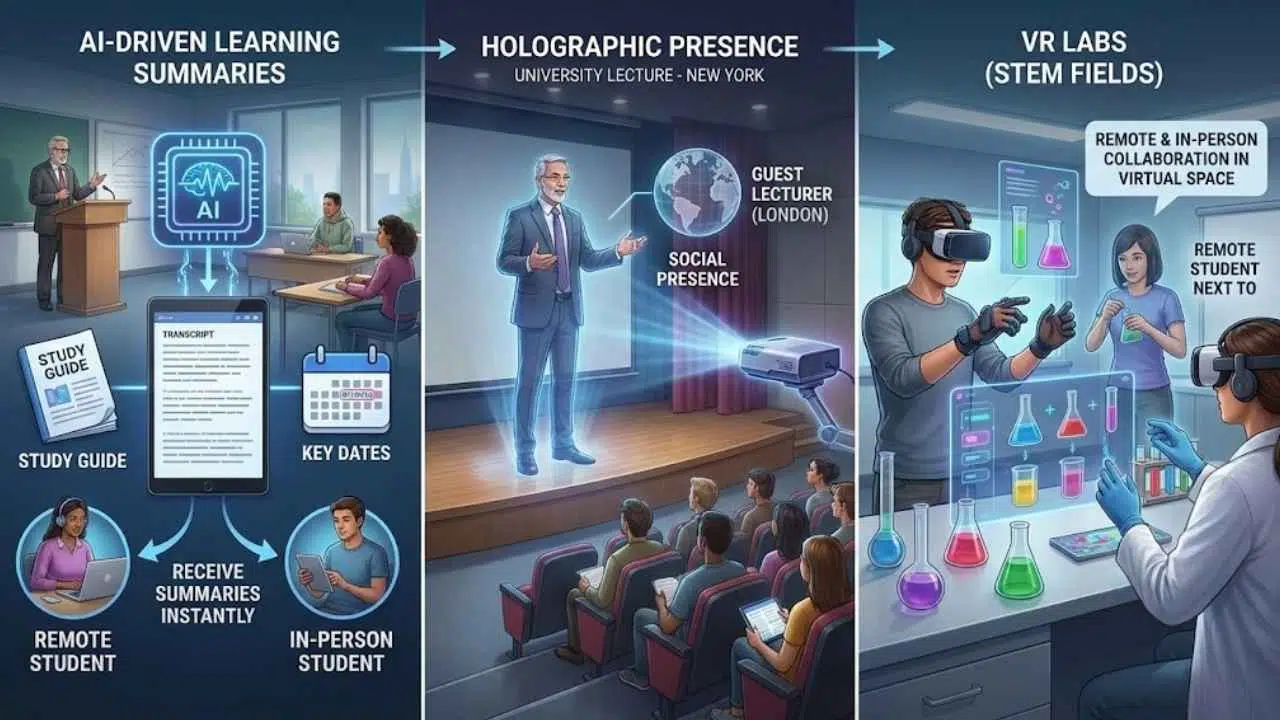
Imagine an AI that sits in the hybrid class, listens to the lecture, and automatically generates a study guide, a transcript, and a list of key dates for every student immediately after class ends. This is already happening with tools integrated into Teams and Zoom.
Holographic Presence
Early pilots are testing holographic projection. A guest lecturer from London can appear as a life-size 3D hologram in a classroom in New York. This increases “social presence”—the feeling of being with another real human—far more than a 2D flat screen ever could.
VR Labs
For STEM fields, hybrid has been hard. How do you do a chemistry lab remotely?
By 2026, VR labs will be standard. Remote students will put on a headset and handle volatile chemicals in a virtual space, standing “next to” their lab partner who is physically on campus.
Final Thoughts
Hybrid classrooms are not a temporary patch for a crisis; they are the infrastructure of the future university. For the student, it means life no longer has to pause for education. They can work, care for family, and still sit in the front row. For the university, it means resilience. It means a campus that can weather storms, pandemics, or shifting demographics without closing its doors.
The “New Normal” isn’t about technology replacing teachers. It’s about technology extending the reach of great teaching. The universities that master this mix—balancing high-tech delivery with high-touch humanity—will be the leaders of 2026 and beyond.





















