

In an increasingly connected world, the ability to communicate seamlessly across different platforms is no longer a luxury, it’s a necessity. Apple’s FaceTime is widely regarded as one of the most reliable and high-quality video-calling platforms available, known for its crisp audio and smooth performance. For years, this technology was locked within the Apple ecosystem, creating a barrier for those who wanted to connect with friends, family, or clients who used Android devices.
However, the landscape shifted with the release of iOS 15. Apple introduced a way for Android and Windows users to join FaceTime calls, albeit with a unique workaround. If you are an Android user wondering how to connect with your iPhone-using contacts, this guide will walk you through the process step by step. We will cover the prerequisites, the joining process, the limitations, and the alternatives, ensuring you have all the information you need to make your virtual connections as smooth as possible.
Understanding How FaceTime Works on Android
Before diving into the “how,” it is crucial to understand the “what.” You cannot download a “FaceTime app” from the Google Play Store. Apple has not created a native application for Android. Instead, Apple utilizes a web-based approach.
When an iPhone user creates a FaceTime call, they can generate a shareable link. This link, when opened on an Android device, launches a web browser that connects to the FaceTime call. Essentially, the Android user is not running the software; they are accessing a secure, temporary web portal that interfaces with Apple’s servers.
This distinction is important because it sets the expectations for the user experience. You are a guest in the Apple ecosystem, and the functionality reflects that.
Prerequisites: What You Need to Get Started
To successfully join a FaceTime call on an Android device, the following conditions must be met:
- An Invitation Link: You cannot initiate a FaceTime call from an Android device. An Apple user (running iOS 15 or later, or macOS Monterey or later) must create the call and send you the link via Messages, Mail, or any other messaging app like WhatsApp or Telegram.
- A Modern Web Browser: The call runs through WebRTC (Web Real-Time Communication) technology. For the best experience, use the latest version of Google Chrome or Mozilla Firefox on your Android device.
- Your Name: You will be prompted to enter your name before joining. This is how you will be identified to other participants on the call.
- A Stable Internet Connection: As with any video call, a strong Wi-Fi or 5G/4G connection is required for optimal audio and video quality.
Step-by-Step Guide: How to Join a FaceTime Call on Android
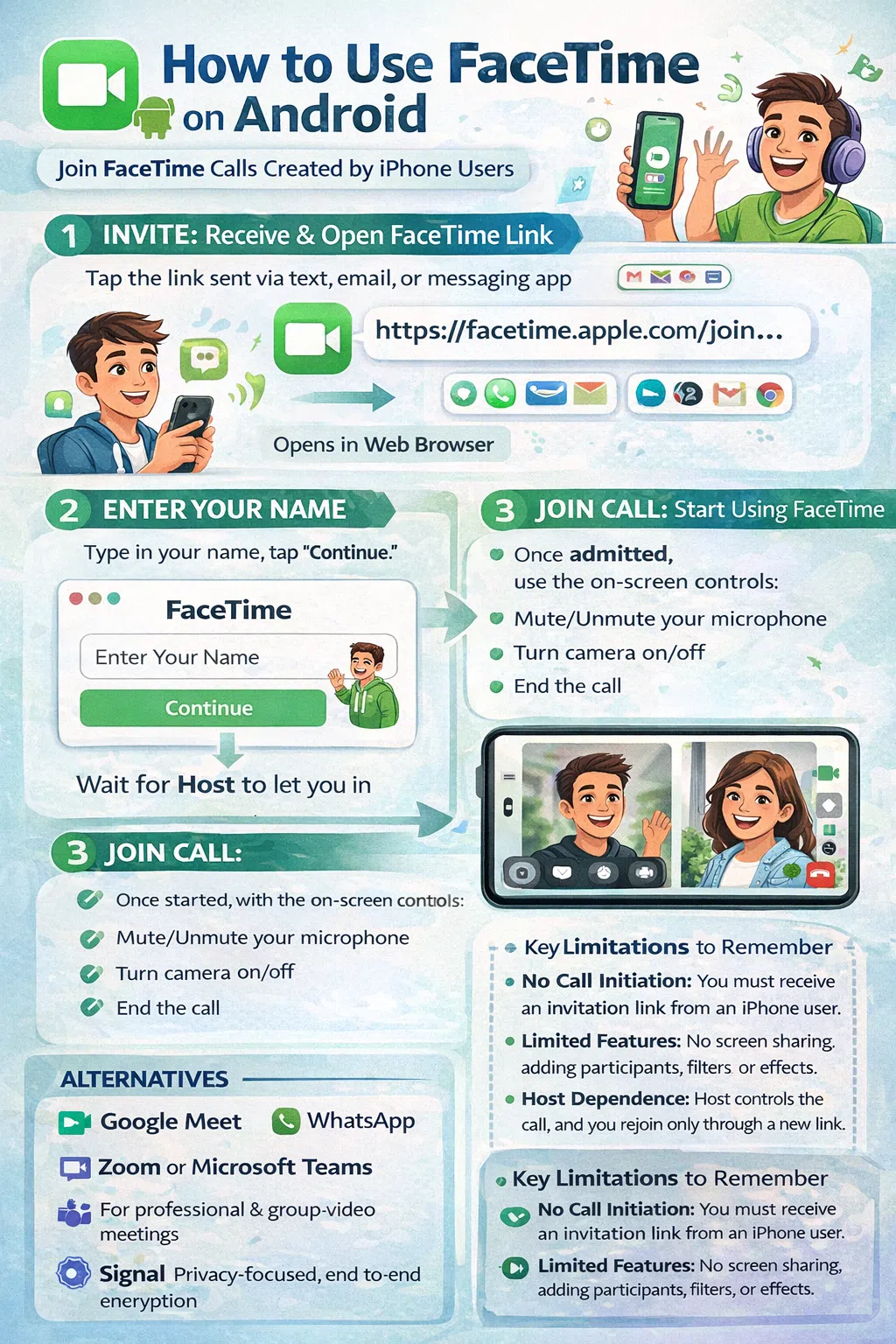
Once the Apple user on the other end has generated a link and sent it to you, follow these steps to join the conversation.
Step 1: Receive and Open the Link
Locate the FaceTime invitation link in your chosen messaging app (e.g., a text message, WhatsApp chat, or email). Tap on the link. This action will automatically open your default mobile web browser, directing you to the FaceTime web portal.
Step 2: Enter Your Name for Identification
You will be greeted by a webpage that mimics the FaceTime interface. You will see a field prompting you to “Enter Your Name.” Type in the name you wish to display to other call participants. This step is purely for identification purposes during this specific call.
Step 3: Click “Continue”
After entering your name, tap the Continue button. The browser will then begin negotiating the connection with the FaceTime servers. You may see a “Connecting…” or “Waiting to be let in” screen.
Step 4: Wait for the Host to Admit You
Unlike a standard FaceTime call where participants can join instantly, calls initiated via a link place the host in control. The Apple user who created the call will receive a notification that you are waiting. They must manually tap the checkmark or “Accept” button on their device to admit you to the call. Once they do, the connection will establish.
Step 5: Control Your Audio and Video
Once admitted, the call interface is straightforward. You will have on-screen controls to:
- Mute/Unmute your microphone.
- Turn your camera on or off.
- End the call.
The User Experience: What Android Users Should Expect
Joining a FaceTime call from an Android device is a functional experience, but it differs from using a native app. Understanding these nuances ensures a smooth interaction.
Interface and Functionality
The web interface is clean and responsive. You will see the video feeds of other participants, and they will see yours. The audio quality is generally excellent, on par with standard FaceTime calls, thanks to the efficiency of WebRTC.
Key Limitations to Keep in Mind
While the web-based solution is ingenious, it does not offer the full native experience. Android users should be aware of the following limitations:
- No In-Call Controls for Others: You cannot add new people to the call, turn on captions, or use Memoji/Animoji effects.
- Screen Sharing: You cannot share your screen from an Android device.
- Picture-in-Picture (PiP): While some browsers support it, the PiP functionality may not be as stable or reliable as it is on native Apple devices.
- Dependence on the Host: The call effectively ends when the host leaves, and you cannot rejoin without a new link.
Privacy and Security Considerations
Apple has built the web-based FaceTime experience with privacy in mind. Because the interaction happens entirely within an encrypted browser session, the content of your communication is secured.
However, there is an important privacy aspect to note: you are not identifiable to Apple as a user. You do not need an Apple ID to join. The host only sees the name you entered in Step 2. This provides a layer of anonymity, but it also means you have no persistent identity within the FaceTime ecosystem. The link generated by the Apple user is unique to that call and should not be shared publicly to avoid unwanted guests, a concept known as “Zoombombing.”
Alternatives to FaceTime for Cross-Platform Video Calls
While using FaceTime on Android is possible, it is not always the most convenient option for cross-platform communication, primarily because Android users cannot initiate calls. If you frequently communicate with mixed groups, consider these universally accessible alternatives that offer feature parity across all devices:
- Google Meet: Pre-installed on most Android devices and freely available on iOS. It offers high-quality video calls, screen sharing, and real-time captions.
- WhatsApp: With end-to-end encryption by default and a massive global user base, WhatsApp video and voice calls are a reliable standard for personal and business communication.
- Zoom / Microsoft Teams: These are the industry standards for professional environments. They offer robust features like calendar integration, breakout rooms, and recording, working seamlessly on both Android and iOS.
- Signal: For users prioritizing privacy and security, Signal offers high-quality video and voice calls with best-in-class encryption across all platforms.
Frequently Asked Questions
Can I download the FaceTime app from the Google Play Store?
No. Apple does not offer a FaceTime app for Android. The only way to use FaceTime on an Android device is via a web browser link sent by an Apple user.
Can I start a FaceTime call from my Android phone?
No. Android users cannot initiate FaceTime calls. The feature is designed as a “guest” access method. You must wait for an invitation link from someone with an Apple device.
Is the video quality as good on Android as it is on iPhone?
Generally, yes. The video and audio quality are highly dependent on your internet connection and the camera quality of your Android device. The underlying WebRTC technology is very efficient, typically delivering a smooth, high-resolution experience.
Is my FaceTime call encrypted if I join from Android?
Yes. Apple has stated that calls made via the web link are end-to-end encrypted, meaning no one outside of the call participants can access the data, provided the link is not compromised.
Why does it say “Waiting to be let in”?
This means the host (the Apple user) has not yet admitted you to the call. They may be finishing another conversation or have not seen the notification. You must wait for them to manually accept your entry.
Bridging the Gap Between Ecosystems
The ability to use FaceTime on Android represents a significant shift in Apple’s approach to connectivity, acknowledging that communication should not be hindered by hardware preferences. While the method relying on web links and waiting for host approval is not as seamless as native, platform-agnostic apps, it provides a vital bridge for users who prefer Apple’s ecosystem but need to connect with those who don’t.
For Android users, it is a reliable tool to have in your back pocket for specific situations, such as joining a family gathering or a business call where the host is an Apple user. For daily, flexible cross-platform communication, exploring alternatives like Google Meet or WhatsApp may provide a more balanced and feature-rich experience.
Ultimately, the goal is clear communication. Whether you are joining via a browser link on your Android device or using a dedicated app, the technology is now robust enough to ensure you stay connected with your network, regardless of the device in their pocket.





















