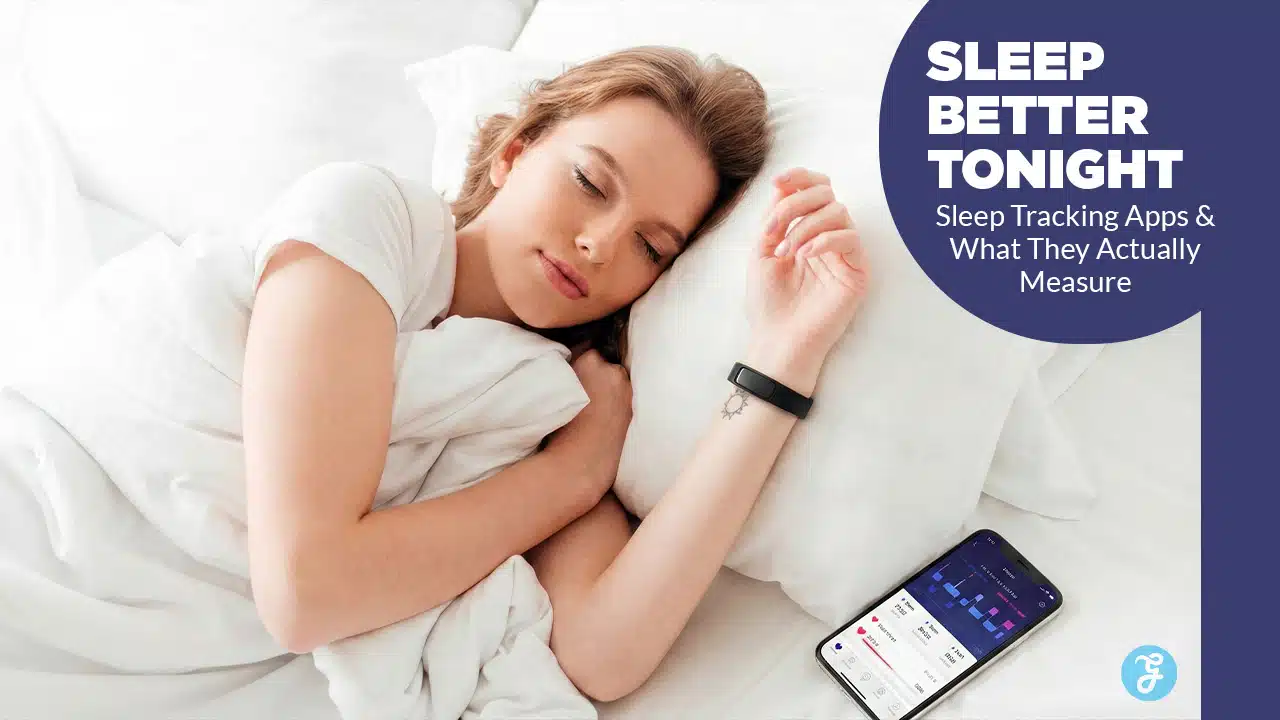
It is the morning paradox we all know too well. Your alarm goes off, and you feel like you have been hit by a truck. You wearily reach for your phone to check your sleep stats, only to be greeted by a cheerful green graph saying you had “100% Sleep Quality.” It’s a funny thing, isn’t it? We have managed to turn the most natural human instinct, shutting our eyes and drifting off, into a data-driven performance review. Science-backed sleep tracking apps claim to bridge that gap, using validated sensors, clinical models, and long-term data patterns to turn raw signals into insights you can actually trust.
It is January 2026. The days of basic pedometers guessing when we are asleep are long gone. We have entered the era of the “health concierge,” where AI-driven apps and smart rings (like the new Oura Gen 4) promise to fix our rest. But with over 5,000 sleep apps currently flooding the app stores, the noise is deafening. How do you distinguish between a medical-grade tool and a random number generator?
The truth is, not all trackers are created equal. Some use military-grade sonar to monitor your breathing, while others just guess based on how often you touch your phone. If you are looking for science-backed sleep tracking apps that actually provide actionable data, you have come to the right place. We have cut through the marketing hype to find the tools validated by data, clinical studies, and sleep science principles.
The Methodology: How We Chose “Science-Backed” Apps
Before we list the apps, it is important to understand our selection criteria. We didn’t just pick the most popular apps; we picked the ones with scientific rigor.
- Clinical Validation: Does the app have white papers or peer-reviewed studies comparing it to Polysomnography (PSG)?
- Technology Used: Moving beyond basic movement tracking to Sonar, Audio Analysis, and HRV (Heart Rate Variability).
- Expert Endorsement: Apps developed in partnership with sleep scientists or medical boards.
- Data Transparency: Does the app explain how it calculates your score, or is it a “black box”?
How Do Sleep Apps Actually Work? (The Technology)
Understanding the “how” is crucial before you trust the data. Most people assume their phone or watch knows exactly when they fall asleep. In reality, these devices are making educated guesses based on specific sensors. They are looking for proxies of sleep—like stillness or a drop in heart rate—rather than measuring sleep directly like a lab would.
Comparison of Tracking Technologies
The table below breaks down the three main technologies used in 2026.
| Technology | How It Works | Best For | Accuracy Rating |
|---|---|---|---|
| Actigraphy (Accelerometer) | Detects movement. If you are still, it assumes you are asleep. | Basic duration tracking. | Low (often mistaken for sleep). |
| Sonar (Echolocation) | Uses sound waves (ultrasound) to detect chest movement and breathing rates. | Non-wearable tracking; detecting sleep stages. | High (comparable to some wearables). |
| PPG (Wearable Sensors) | Uses green/red LEDs to measure blood volume changes (heart rate & HRV). | Recovery, detailed sleep stages, and health vitals. | Very High (gold standard for consumer tech). |
Actigraphy (Movement Tracking)
This is the oldest and most common form of tracking. Your phone or watch uses an accelerometer to detect motion. The logic is simple: if you are moving, you are awake. If you are still, you are asleep. While this technology has improved, it is prone to errors. If you lie perfectly still while reading a book or watching a movie, a basic actigraphy app will likely log that time as “sleep.”
Sonar and Audio Analysis
This is where things get interesting in 2026. Apps like SleepScore and Sleep Cycle have refined the use of sonar technology. By emitting silent sound waves (ultrasound) from your phone’s speakers, they can detect the reflection of those waves off your chest. This allows the app to measure your breathing rate and body movement without you ever wearing a device. It is essentially bat echolocation for your bedroom.
Photoplethysmography (PPG) & Wearables
If you wear an Oura Ring or an Apple Watch, you are using PPG sensors. These are the green or red lights you see flashing on the back of the device. They measure the reflection of light against your blood vessels to determine your heart rate and Heart Rate Variability (HRV). Since your heart rate drops and becomes more rhythmic during different sleep stages, PPG sensors offer a much deeper look into your internal state than simple movement trackers.
Top 10 Science-Backed Sleep Tracking Apps
We have tested and researched the leading options on the market. These selections are based on their underlying technology, validation studies, and adherence to sleep science principles like the “Two-Process Model” or CBT-I.
1. SleepScore (Best Standalone Accuracy)
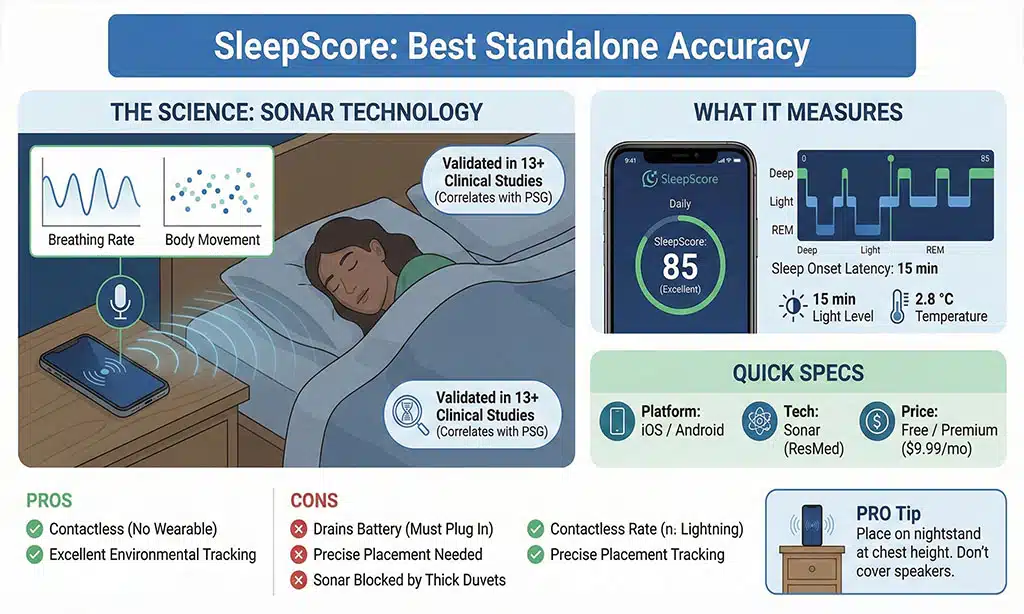
SleepScore is widely considered the most accurate non-wearable tracker available today. Unlike standard apps that rely on your phone’s accelerometer (which requires you to place the phone on your mattress), SleepScore utilizes patented sonar technology from ResMed, a global leader in medical sleep equipment.
The Science: Validation studies published in scientific journals have shown its sonar algorithms correlate highly with polysomnography (PSG)—the gold standard of clinical sleep measurement. The app sends silent sound waves from your phone’s speakers that bounce off your body. The microphone picks up the echo, allowing the algorithm to detect your breathing rate and minute body movements.
What It Measures: It tracks your breathing rate, sleep onset latency (how long it takes to fall asleep), and environmental factors like light and temperature levels in your bedroom. It combines these into a daily “SleepScore” (0–100).
Quick Specs:
- Platform: iOS / Android
- Tech: Sonar (ResMed)
- Price: Free / Premium ($9.99/mo)
| Pros | Cons |
|---|---|
| Validated in 13+ clinical studies. | Drains battery (must stay plugged in). |
| Contactless (no wearable needed). | Phone placement must be precise. |
| Excellent environmental tracking. | Sonar can be blocked by thick duvets. |
Pro Tip: Place your phone on your nightstand at roughly chest height. Do not cover the speakers with books or glasses, as this blocks the sonar waves.
2. Rise Science (Best for Energy Management)
Rise is different from every other app on this list. It doesn’t care about your “sleep stages” because it argues that consumer tech can’t track them accurately enough to be useful. Instead, it focuses entirely on “Sleep Debt” and Circadian Rhythms.
The Science: Rise is built on the “Two-Process Model of Sleep Regulation,” a scientific framework that has been validated for over 40 years. This model posits that your alertness is determined by two things: your Sleep Homeostat (pressure to sleep) and your Circadian Rhythm (internal clock).
What It Measures: It calculates your accumulated sleep debt over the last 14 days relative to your biological need (e.g., if you need 8 hours and get 6, you have 2 hours of debt). It also predicts your daily energy peaks and dips.
Quick Specs:
- Platform: iOS / Android
- Tech: Actigraphy and Circadian Modeling
- Price: Subscription ($60/year)
| Pros | Cons |
|---|---|
| Actionable energy advice (when to work). | No detailed nightly stats (snoring/HR). |
| Focuses on long-term habits. | Can feel repetitive if you have a fixed schedule. |
| Integrates with other wearables (Oura/Apple). | Subscription only (no free tier). |
Pro Tip: Use the “Energy Window” notifications to schedule your hardest tasks during your morning peak and your shallow work during your afternoon dip.
3. Sleep Cycle (Best for Smart Waking)
A veteran in the space, Sleep Cycle is famous for its “Smart Alarm.” While many apps wake you up at a specific time, Sleep Cycle uses audio and vibration analysis to find the optimal moment to wake you up within a 30-minute window.
The Science: The app relies on the concept of sleep inertia. Waking up during deep (slow-wave) sleep leaves you feeling groggy and disoriented because your brain is in a low-frequency state. Waking up during light sleep makes you feel refreshed.
What It Measures: It tracks your sleep cycles in wave formats and logs snoring consistency. It also allows you to add “Sleep Notes” (like “drank coffee” or “stressful day”) to see how lifestyle choices impact your sleep quality over time.
Quick Specs:
- Platform: iOS / Android
- Tech: Sound & Vibration Analysis
- Price: Freemium
| Pros | Cons |
|---|---|
| “Smart Alarm” genuinely reduces grogginess. | Sleep staging is less accurate than sonar. |
| Huge database of global sleep stats. | Microphone use raises privacy concerns for some. |
| Easy-to-read trends. | Requires phone on bed (if using accelerometer). |
Pro Tip: If you sleep with a partner, use the “Apple Watch Link” feature if possible, or place the phone on your side of the bed to avoid picking up their movements.
4. SnoreLab (Best for Snoring & Apnea Indicators)
If your partner complains about your noise, or if you wake up with a dry mouth and a headache, this is the app you need. SnoreLab focuses entirely on audio frequency analysis to visualize your snoring.
The Science: SnoreLab does not guess your sleep stages. It focuses on one thing: noise. It visualizes the intensity (decibels) and frequency of snoring events throughout the night. It allows you to tag “remedies” (like a nasal strip, wedge pillow, or no alcohol) to see if they actually reduce your Snore Score.
What It Measures: It calculates a “Snore Score,” tracks total time spent snoring, and classifies snoring into “Light,” “Loud,” and “Epic.” Crucially, it records audio samples of your loudest moments.
Quick Specs:
- Platform: iOS / Android
- Tech: Audio Frequency Analysis
- Price: Freemium / Premium
| Pros | Cons |
|---|---|
| Provides concrete audio evidence for doctors. | Does not track sleep stages. |
| Helps test if anti-snoring products work. | Can be scary to listen to yourself! |
| Very simple interface. | Not a full “sleep tracker” (needs a companion app). |
Pro Tip: Listen to your “Epic” snore recordings. If you hear gasping, choking, or long pauses in breathing, book an appointment with a specialist immediately—these are classic signs of Sleep Apnea.
5. Oura (App + Ring Gen 4) (Best Wearable Comparison)
The Oura Ring Gen 4 (released late 2025) remains the gold standard for form factor. Because it is a ring, the sensors sit on the finger arteries, which provide a stronger signal than the wrist capillaries used by watches.
The Science: It packs research-grade infrared PPG (photoplethysmography) sensors and negative temperature coefficient (NTC) sensors. It is heavily validated for its accuracy in tracking Heart Rate Variability (HRV) and temperature deviations.
What It Measures: It provides three daily scores: Readiness, Sleep, and Activity. It tracks HRV balance, Body Temperature trends (which can predict sickness days before symptoms appear), and “Restorative Time.”
Quick Specs:
- Platform: iOS / Android + Hardware
- Tech: Infrared PPG + Temp Sensors
- Price: $299+ Hardware + $5.99/mo Sub
| Pros | Cons |
|---|---|
| Unbeatable form factor (comfortable ring). | Expensive hardware + mandatory subscription. |
| High accuracy for HRV and temperature. | No real-time display (no screen). |
| 7-day battery life. | The sizing kit process takes time. |
Pro Tip: Pay close attention to the “Restorative Time” metric. If it’s low, you might be sleeping physically, but your body isn’t recovering (often due to alcohol or late meals).
6. Caffeine Break Calculator (Best for Bio-Hacking & Sleep Hygiene)
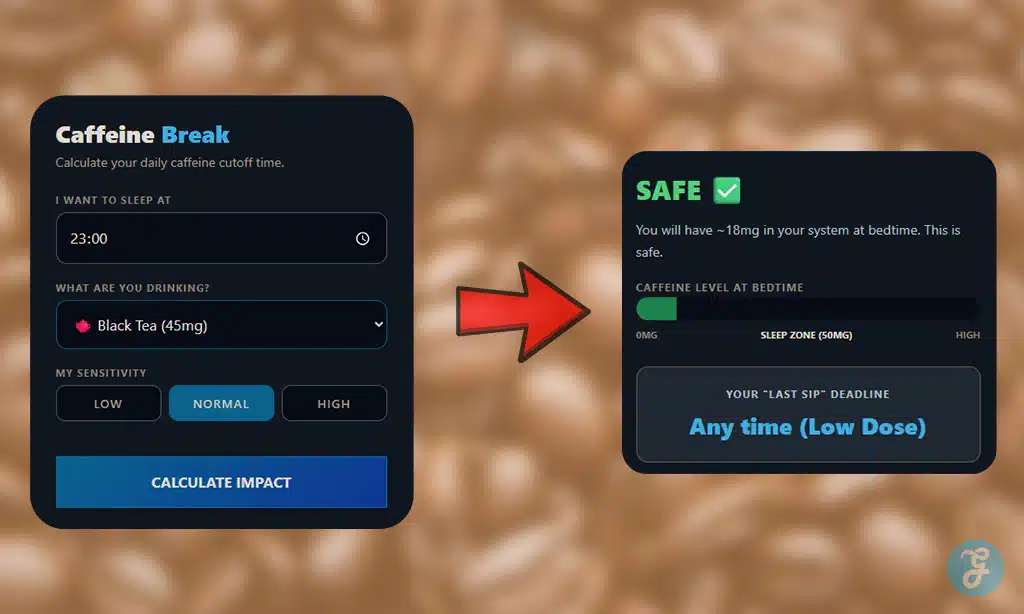
This isn’t just a timer; it’s a pharmacokinetic projection tool. While most trackers tell you how you slept, the Caffeine Break Calculator tells you why you aren’t sleeping. It’s designed for the “high-performance” sleeper who wants to use stimulants during the day without paying the “sleep debt” at night.
The Science: It utilizes the biological math of Caffeine Half-Life (the ~5 hours it takes for your body to eliminate half of the substance). It calculates the “Adenosine War” in your brain—ensuring that your caffeine levels drop below the 50 mg sleep threshold by your target bedtime so your brain can actually enter deep, restorative REM stages.
What It Measures: It doesn’t use a wearable; it uses metabolic modeling. You input your target bedtime, your drink of choice (from a 30 mg green tea to a 300 mg pre-workout), and your metabolic sensitivity. It then provides a “Last Sip” deadline—a hard curfew for your central nervous system.
Quick Specs:
- Platform: Web / Mobile Browser
- Tech: Pharmacokinetic Modeling (Bio-math)
- Price: Free
- Pros/Cons:
| Pros | Cons |
| Identifies the root cause of sleep latency. | Manual entry (no auto-sync with smart mugs). |
| Customizable based on your metabolic speed. | Doesn’t track actual sleep stages. |
| Zero hardware or subscription costs. | Requires discipline to follow the “Curfew.” |
Pro Tip: If you’re a “slow metabolizer” (high sensitivity), your caffeine half-life can be up to 10 hours. Use this calculator to find your personalized “Caffeine Curfew”—you might discover that your 2:00 PM latte is the reason you’re staring at the ceiling at midnight.
7. Pillow (Best for Apple Watch Users)
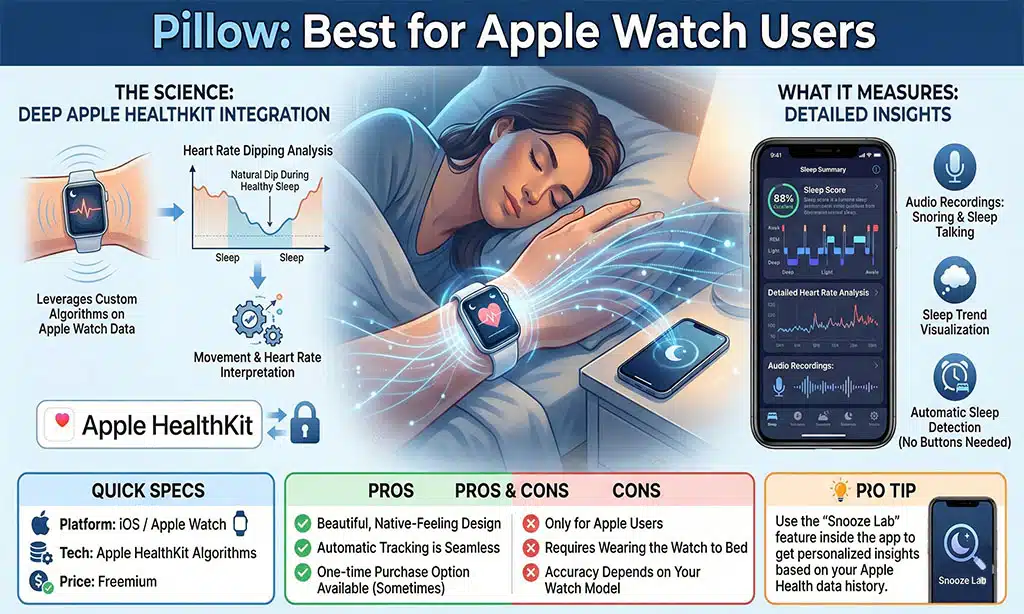
Pillow integrates deeply with the Apple ecosystem, using the raw data from Apple HealthKit to provide more detailed analysis than the native Apple Sleep app.
The Science: It uses custom algorithms to interpret the movement and heart rate data from the Apple Watch. Specifically, it looks for heart rate “dipping”—the natural drop in blood pressure and pulse that occurs during healthy sleep.
What It Measures: It tracks audio recordings of sleep talking/apnea, detailed heart rate analysis, and trend visualization. It automatically detects when you fall asleep, so you don’t have to press any buttons.
Quick Specs:
- Platform: iOS / Apple Watch
- Tech: Apple HealthKit Algorithms
- Price: Freemium
| Pros | Cons |
|---|---|
| Beautiful, native-feeling design. | Only for Apple users. |
| Automatic tracking is seamless. | Requires wearing the watch to bed. |
| A one-time purchase option is available (sometimes). | Accuracy depends on your watch model. |
Pro Tip: Use the “Snooze Lab” feature inside the app to get personalized insights based on your Apple Health data history.
8. Whoop (App + 5.0 Band) (Best for Athletes)
Whoop is a screen-less wearable focused entirely on 24/7 recovery. It is popular among pro athletes for a reason: it treats sleep as a performance tool.
The Science: Whoop places a massive emphasis on the Autonomic Nervous System (ANS). It calculates strain vs. recovery to tell you exactly how hard you can push your body today. The 5.0 sensor is smaller and now includes blood pressure monitoring.
What It Measures: It tracks Recovery Score (0-100%), Respiratory Rate, HRV, Sleep Performance (hours obtained vs. hours needed), and Disturbances. It differentiates between “Restorative Sleep” and “Light Sleep” to give you a clearer picture of physical repair.
Quick Specs:
- Platform: iOS / Android + Hardware
- Tech: PPG + Accelerometer
- Price: Monthly Subscription Only ($30/mo)
| Pros | Cons |
|---|---|
| Best-in-class recovery metrics for athletes. | You never own the device (subscription model). |
| Screen-less design reduces anxiety. | Can be uncomfortable on the wrist 24/7. |
| Respiratory rate is a great illness predictor. | No smart features (notifications/GPS). |
Pro Tip: Wear the band on your non-dominant hand or use the “Whoop Body” apparel (underwear/shorts) to get even more accurate data by moving the sensor to your waist or torso.
9. ShutEye (Best for Sleep Talk & Sounds)
ShutEye uses AI to recognize and categorize different types of sleep sounds, separating environmental noise from human noise.
The Science: It uses machine learning models trained on thousands of hours of sleep audio to distinguish between a snore, a talk, a cough, and a grinding tooth. This categorization allows you to identify specific disruptors that other apps might miss.
What It Measures: It tracks “Sleep Talk” episodes, bruxism (teeth grinding), and ambient noise levels. It provides a “Sleep Quality” score based on these disturbances.
Quick Specs:
- Platform: iOS / Android
- Tech: AI Sound Recognition
- Price: Freemium
| Pros | Cons |
|---|---|
| Fun and entertaining (recordings). | High battery usage. |
| Medically useful for Bruxism (grinding). | Upsells premium features aggressively. |
| Includes a huge library of sleep sounds. | Limited “recovery” data. |
Pro Tip: If the app detects “Bruxism” (grinding) consistently for a week, show the data to your dentist. You may need a night guard to protect your enamel.
10. Bearable (Best for Correlation/The Big Picture)
Bearable is not a sleep tracker in the traditional sense. It is a “life tracker” that imports sleep data to help you find patterns and correlations.
The Science: It uses data correlation analysis. It looks for statistical relationships between your inputs (variables) and your outcomes (sleep). It serves as a centralized dashboard for your health experiments.
What It Measures: It tracks how caffeine, medication, weather, stress levels, bowel movements, and screen time impact your sleep quality (imported from Apple Health or Google Fit).
Quick Specs:
- Platform: iOS / Android
- Tech: Data Aggregation & Stats
- Price: Freemium
| Pros | Cons |
|---|---|
| Finds the “why” behind your sleep score. | Requires manual data entry. |
| Highly customizable. | Can be overwhelming for casual users. |
| Great for people with chronic conditions. | UI is text-heavy. |
Pro Tip: Run 7-day experiments. For one week, tag “Magnesium” every night and see if your imported sleep quality score trends upward.
Decoding Your Data: What These Metrics Actually Mean
Having the data is one thing; understanding it is another. Many users get discouraged because they don’t know which numbers actually matter.
Healthy Ranges for Key Metrics
The table below helps you understand if your numbers are normal.
| Metric | Definition | Healthy Range (Adults) | What if it’s “bad”? |
|---|---|---|---|
| Sleep Efficiency | % of time in bed actually spent sleeping. | > 85% | You might be spending too much time in bed awake. |
| Sleep Latency | How long it takes to fall asleep. | 10–20 mins | <5m = Sleep Deprived. >30m = Potential Insomnia. |
| Deep Sleep | Physical restoration phase. | 13–23% | Avoid alcohol and heavy meals before bed. |
| REM Sleep | Mental restoration/memory phase. | 20–25% | Manage stress and keep a consistent schedule. |
| HRV | Nervous system balance (higher is better). | 30–100 ms (Highly individual) | If dropping, you need rest/recovery. |
Buying Guide: How to Choose the Right App
Selecting an app depends entirely on your goals. Use this decision matrix to find your match.
| If you are a… | And you want to… | Choose this App: |
|---|---|---|
| Minimalist | Track accuracy without wearing anything. | SleepScore |
| Productivity Guru | Maximize energy and work performance. | Rise Science |
| Heavy Sleeper | Wake up feeling refreshed/less groggy. | Sleep Cycle |
| Partner of Snorer | Prove they snore / screen for Apnea. | SnoreLab |
| Athlete | Optimize physical recovery and training. | Whoop/Oura |
| Insomniac | Actually fix your inability to sleep. | Sleep Reset |
| Data Nerd | Find correlations between habits and rest. | Bearable |
Final Thoughts
Technology is a mirror, not a cure. The best science-backed sleep tracking apps are the ones that help you change your behavior, not just track it. If you have been feeling tired, downloading one of these apps is a great first step to understanding your baseline.
However, do not let the data rule your life. Use the insights to make small adjustments—like going to bed 30 minutes earlier to pay off sleep debt or avoiding alcohol to boost your deep sleep.
Ready to finally understand your rest? We recommend starting with SleepScore if you want a free, accurate baseline, or Rise Science if you want to focus on energy. Download one tonight, set your alarm, and see what the data says tomorrow morning.
Sleep tracking apps offer insights into patterns and trends, not medical diagnoses, and accuracy can vary by device, sensors, and user behavior. This article is for informational purposes only and does not replace professional medical advice.