


Choosing the right amount of storage for your Virtual Private Server (VPS) can be confusing. Too little storage, and your site or app might crash. Too much, and you might pay for space you’ll never use. So, how much storage do you really need in a VPS? In this article, we’ll break it down for you in simple terms.
We’ll look at what VPS storage is, how it works, the types of storage (SSD vs HDD), what factors affect your needs, and how to calculate the ideal amount. This guide will help you choose the best plan for your website or business, without overspending or facing performance issues.
Understanding VPS Storage: SSD vs HDD
VPS storage plays a vital role in your server’s overall performance. It determines how quickly your data can be read and written, directly impacting website speed, responsiveness, and reliability. Two main types of storage are commonly offered: SSD and HDD.
What Is VPS Storage?
VPS storage refers to the disk space allocated to your virtual private server. It is where your operating system, files, databases, emails, and applications live. It’s a critical component of your VPS plan.
SSD vs HDD – Which One Should You Choose?
| Feature | SSD (Solid-State Drive) | HDD (Hard Disk Drive) |
| Speed | Much faster | Slower |
| Reliability | More durable, less risk of failure | Mechanical parts can wear out |
| Cost | More expensive | Less expensive |
| Ideal For | High-traffic websites, apps | Simple sites with low demand |
SSD storage is faster and more reliable, making it the best choice for most modern websites and applications. HDDs are still useful for archival or low-demand setups, but SSDs have become the industry standard for performance-oriented hosting.
Factors That Affect VPS Storage Requirements
Every VPS user has different storage needs. The amount of space you need depends on several variables including your website’s content, traffic, number of domains hosted, and backup requirements. Let’s explore the main influencing factors.
1. Type of Website or Application
Different websites need different amounts of storage. A simple blog might only need a few gigabytes, while a video-sharing platform needs hundreds.
| Website Type | Average Storage Needed |
| Static Website | 1 – 2 GB |
| WordPress Blog | 5 – 10 GB |
| E-commerce Site | 20 – 50 GB |
| SaaS Application | 50 – 100+ GB |
2. Number of Hosted Websites
If you plan to host multiple websites on a single VPS, your storage needs will increase. Each site requires files, databases, and backups.
| Number of Sites | Recommended Storage |
| 1 | 10 GB |
| 2 – 5 | 20 – 40 GB |
| 6+ | 50+ GB |
3. File Types and Media Usage
High-resolution images, videos, and audio files consume more space. If your site is media-rich, you need more storage.
| File Type | Approximate Size per File |
| Image (HD) | 1 – 2 MB |
| Audio (MP3) | 5 – 10 MB |
| Video (1080p) | 100 – 200 MB per minute |
4. Database Size and Frequency of Backups
Large databases and frequent backups can quickly eat up storage.
| Feature | Storage Impact |
| Database (MySQL) | 100 MB – 5 GB+ |
| Daily Backups | 1 – 10 GB per backup |
Your storage choice should account for both current database size and future growth.
VPS Storage Calculations Made Simple

Calculating your storage needs may sound technical, but it’s actually quite easy with the right method. You just need to understand what makes up your total usage.
How to Estimate Your VPS Storage Needs
Let’s say you run a small blog with WordPress. Here’s a rough breakdown:
- WordPress Core Files: ~1 GB
- Theme & Plugins: ~500 MB
- Media (Images, Videos): ~3 GB
- Database: ~1 GB
- Backups (weekly): ~4 GB
Total estimated VPS storage needed: 10 GB
For larger businesses, use this formula:
(Estimated file size per content piece x total number of pieces) + (Database size) + (Backup size)
This helps create a storage buffer that accommodates current needs and future growth.
Tools and Metrics You Can Use
To get an accurate understanding of your disk usage, try the following tools:
- du command in Linux to check disk usage
- cPanel/Plesk dashboards for graphical insights
- AWStats or Webalizer for file and traffic analysis
Choosing the Right VPS Plan Based on Storage
Choosing the best VPS plan is about balancing your storage needs with your budget and future growth. Storage directly impacts your performance, so this isn’t an area to underestimate.
Common VPS Storage Tiers
| Tier | Storage | Suitable For |
| Basic | 20 – 40 GB | Blogs, small business sites |
| Standard | 50 – 100 GB | E-commerce, portfolio sites |
| Premium | 100+ GB | SaaS, hosting multiple sites |
These tiers provide flexibility. Many VPS providers also offer scalable storage add-ons that allow you to expand as your needs grow.
How to Avoid Under or Overestimating
- Too little storage: site crashes, errors, no space for backups
- Too much storage: higher monthly costs, unused resources
Tip: Start with a modest plan and scale as needed. Always monitor usage and upgrade before hitting your limits.
Expert Tips to Optimize VPS Storage Usage
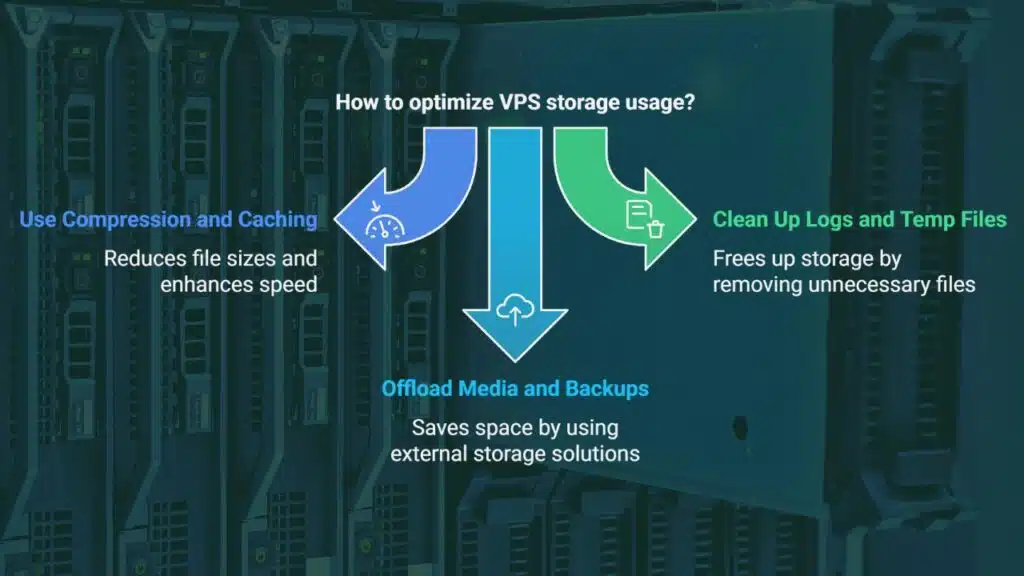
Getting the right VPS is only the beginning. You also need to optimize your storage to make the most of your resources.
Use Compression and Caching
Compressing files reduces their size without losing quality. This is especially useful for images, CSS, and JS files.
- Enable Gzip or Brotli compression via server or CMS
- Use caching plugins (e.g., W3 Total Cache, WP Super Cache)
- Server-side caching like Varnish or Redis can enhance speed
Clean Up Logs and Temp Files Regularly
Server logs and temporary files can quietly build up over time. If not cleared, they can consume gigabytes of storage.
- Use logrotate for automated log cleanup
- Set up cron jobs to delete temporary and unused files
- Regularly clear your CMS cache (WordPress, Magento, etc.)
Offload Media and Backups to Cloud Storage
Offloading helps free up precious VPS space while keeping data secure.
- Use Amazon S3, Google Drive, or Dropbox integrations
- Store backups and large media files externally
- Automate backup scheduling to offsite storage daily or weekly
Real-World Examples: VPS Storage Use Cases
Understanding real-world scenarios can help you make smarter decisions. Let’s look at common user types and their storage requirements.
Bloggers & Personal Sites
- Typically includes posts, images, and a basic database
- Total usage: ~8 – 12 GB
- Recommended Plan: 20 GB SSD VPS with weekly backups
Small Business & E-commerce Stores
- Product images, inventory databases, and customer data can add up fast
- Total usage: ~30 – 50 GB depending on catalog size
- Recommended Plan: 50 – 100 GB SSD VPS with daily backups and media offloading
Agencies & Developers Hosting Multiple Clients
- Each client website includes themes, plugins, content, and backups
- Total usage: 100 – 200 GB for 10+ clients
- Recommended Plan: 100+ GB SSD VPS with scalable storage and automated scripts for cleanup
FAQs – VPS Storage Questions Answered
Q1: Can I upgrade VPS storage later?
Yes, most hosting providers allow you to upgrade your storage without migrating data.
Q2: What happens if I run out of disk space?
Your website or app may slow down or stop working. Some providers send warning alerts before that happens.
Q3: Is VPS storage different from bandwidth?
Yes. Storage refers to disk space; bandwidth refers to data transfer between server and users.
Q4: Does SSD storage improve SEO or performance?
Yes. Faster loading times improve user experience and may boost SEO rankings.
Takeaways
To sum up, how much storage do you need in a VPS? It depends on your project type, media usage, database size, and number of websites. For most users, 20 – 50 GB SSD is enough. For large projects, go for 100 GB+ SSD.
Always choose scalable plans. Monitor your usage, and optimize storage with tools and external services. By making smart decisions, you’ll get the performance you need without wasting money.






















