Google Core Web Vitals have become an essential factor in website performance and search engine rankings.
If you run a WordPress site, optimizing it for these vitals can significantly enhance user experience and visibility on Google.
In this comprehensive guide, we will explore 10 ways to optimize your WordPress website for Google Core Web Vitals, ensuring better performance, speed, and overall user satisfaction.
Understanding Google Core Web Vitals
Google Core Web Vitals play a crucial role in determining how users interact with your website. These performance metrics assess loading speed, interactivity, and visual stability, directly impacting user experience and search engine rankings. To stay competitive, it is essential to optimize your WordPress site for these key factors.
What Are Core Web Vitals?
Core Web Vitals are a set of metrics that measure the overall performance and user experience of a website. Google prioritizes these metrics to determine how fast and interactive a site is. The three primary Core Web Vitals are:
- Largest Contentful Paint (LCP): Measures loading performance; should be under 2.5 seconds.
- First Input Delay (FID): Evaluates interactivity; should be less than 100 milliseconds.
- Cumulative Layout Shift (CLS): Assesses visual stability; should be under 0.1.
How to Measure Core Web Vitals?
There are multiple tools available to check your WordPress site’s Core Web Vitals:
| Tool | Functionality |
| Google PageSpeed Insights | Analyzes page speed and Core Web Vitals scores |
| Lighthouse | Provides lab-based performance testing |
| Chrome DevTools | Offers detailed debugging and performance insights |
| Web Vitals Chrome Extension | Real-time monitoring of Core Web Vitals |
Now, let’s dive into the top 10 ways to optimize your WordPress website for Google Core Web Vitals.
10 Ways to Optimize Your WordPress Website for Google Core Web Vitals
Optimizing your WordPress website for Google Core Web Vitals is crucial to improving search rankings and enhancing user experience. A well-optimized site loads faster, offers seamless navigation, and ensures visitors stay engaged. Below, we outline the most effective ways to boost your site’s Core Web Vitals performance.
1. Optimize Your Hosting for Faster Performance

Your hosting provider plays a crucial role in website speed. A slow server increases LCP, directly impacting Core Web Vitals. Investing in a high-performance hosting service can significantly reduce loading times and enhance website responsiveness.
Poor hosting choices can lead to downtime, slow database queries, and inefficient server resource allocation, ultimately affecting user experience and search rankings.
Optimization Tips:
- Choose a managed WordPress hosting service like Kinsta, SiteGround, or WP Engine.
- Use a Content Delivery Network (CDN) like Cloudflare to distribute content efficiently.
- Upgrade to VPS or dedicated hosting for better performance.
2. Use a Lightweight and Fast WordPress Theme
Themes loaded with unnecessary elements can slow down your site. A bloated theme can include excessive animations, large background images, and unnecessary scripts that increase load times. Choosing a well-coded, lightweight theme ensures that your WordPress website meets Google Core Web Vitals’ performance standards.
Best Lightweight Themes:
- Astra
- GeneratePress
- OceanWP
These themes are optimized for speed and minimal bloat, ensuring better LCP and FID scores.
3. Optimize Images for Faster Load Times
Large images significantly slow down page speed, affecting Core Web Vitals. High-resolution images take longer to load, increasing LCP and reducing user engagement. By optimizing images, you can improve website speed without sacrificing visual quality.
Image Optimization Strategies:
- Compress images using plugins like Smush or ShortPixel to reduce file size without losing quality.
- Convert images to WebP format for better compression and enhanced performance.
- Use lazy loading to only load images when they enter the viewport, reducing initial page load times.
- Implement responsive images to ensure appropriate sizes load based on screen resolution and device type.
- Optimize image dimensions before uploading to avoid unnecessary resizing by the browser.
4. Enable Caching for Faster Page Speed
Caching reduces load time by storing static versions of your site, reducing server workload and enhancing page load speed. When a user visits your site, cached content is served instead of dynamically generating the page every time, which improves performance and reduces latency. Effective caching enhances both LCP and FID scores, ensuring a seamless browsing experience for users.
Recommended Caching Plugins:
- WP Rocket – Offers advanced caching, file compression, and lazy loading.
- W3 Total Cache – Provides object, database, and browser caching options.
- WP Super Cache – Generates static HTML files to reduce processing load.
Configuring these caching plugins properly will drastically improve your website’s responsiveness and boost its Core Web Vitals metrics.
Implementing caching improves LCP and reduces server response times.
5. Minimize and Optimize CSS, JavaScript, and HTML
Render-blocking resources, such as unoptimized CSS and JavaScript files, delay page rendering by preventing content from being displayed until these resources are fully loaded.
This negatively impacts Core Web Vitals, especially LCP and FID, leading to slower page speeds and decreased user engagement. Optimizing these resources ensures that crucial content loads first, improving performance and user experience.
Optimization Steps:
- Minify CSS and JavaScript with Autoptimize.
- Defer unused JavaScript files.
- Remove unnecessary HTML elements.
6. Implement Lazy Loading for Images and Videos
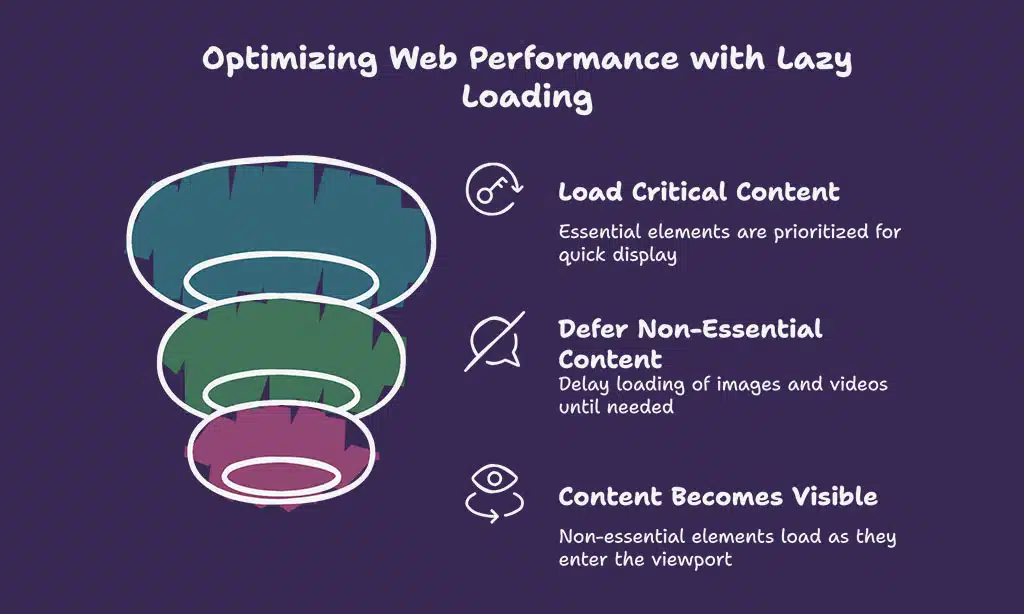
Lazy loading delays loading non-essential content until it’s needed, reducing initial page load time and conserving bandwidth. By deferring the loading of images, videos, and iframes until they are visible in the user’s viewport, lazy loading significantly improves LCP and CLS scores. This method ensures that critical content loads first, leading to a faster and more responsive experience for users.
Implementation:
- Use native lazy loading (loading=”lazy” attribute for images).
- Utilize WP Rocket or Lazy Load by WP Rocket plugin.
7. Optimize Fonts for Faster Rendering
Excessive font files increase page load time and negatively impact CLS and LCP scores. When too many font variants are loaded, it adds unnecessary weight to the page, delaying rendering and causing layout shifts. Optimizing font usage ensures faster loading, improved visual stability, and a better user experience.
Best Practices:
- Preload essential fonts using <link rel=”preload”>.
- Use system fonts for faster rendering.
- Avoid Google Fonts when possible.
8. Reduce Server Response Time (TTFB Optimization)
Time to First Byte (TTFB) is a critical factor in LCP performance as it measures the duration between the user’s request and the server’s first response. A high TTFB can result from slow server processing, network latency, or inefficient hosting configurations. Reducing TTFB is essential for improving overall page load speed and delivering a better user experience.
Solutions:
- Optimize database queries.
- Use a high-performance DNS provider.
- Implement object caching with Redis or Memcached.
9. Eliminate Render-Blocking Resources
Render-blocking elements, such as JavaScript and CSS files that are not optimized, prevent your page from loading efficiently by delaying the rendering of crucial content. These elements can significantly impact user experience and Core Web Vitals, leading to longer load times and lower search rankings. Addressing these issues by optimizing scripts and styles can enhance page speed and overall performance.
Fixing Render-Blocking Resources:
- Defer JavaScript files.
- Load CSS asynchronously.
- Use plugins like Async JavaScript.
10. Optimize Database and Remove Bloat
A bloated database can slow down your WordPress site by increasing query execution time, consuming excessive server resources, and leading to higher Time to First Byte (TTFB).
Over time, unused data, post revisions, spam comments, and transient options accumulate, causing inefficiencies. Regular database maintenance and optimization can help improve website speed, enhance performance, and ensure a smoother user experience.
Database Optimization Tools:
- WP-Optimize
- Advanced Database Cleaner
- WP-Sweep
Regular cleanup ensures your database remains lightweight, improving overall website speed.
Monitoring and Continuous Optimization
Consistently optimizing your WordPress website for Google Core Web Vitals is crucial for maintaining peak performance and user satisfaction. Even after implementing the recommended optimizations, continuous testing and adjustments ensure long-term success. Regular audits and updates help keep your website in line with the latest Google ranking factors.
Regularly Test Core Web Vitals Scores
Regular performance audits help maintain an optimized website by identifying potential issues, improving load times, and ensuring compliance with Google Core Web Vitals standards. These audits help track site performance over time, making it easier to pinpoint bottlenecks and implement necessary improvements for an optimal user experience.
Keeping Plugins and Themes Updated
Outdated themes and plugins can negatively impact website performance and security by introducing vulnerabilities, increasing load times, and causing compatibility issues. Regular updates ensure optimal functionality, security patches, and improved efficiency, helping maintain a smooth and responsive WordPress experience.
Best Practices for Ongoing Optimization
- Monitor PageSpeed Insights regularly.
- Conduct performance audits every month.
- Implement performance best practices consistently.
Takeaways
By implementing these 10 ways to optimize your WordPress website for Google Core Web Vitals, you’ll enhance your site’s speed, user experience, and search engine rankings. Regular monitoring and continuous improvements will ensure long-term performance success. Start optimizing today and keep your WordPress site ahead of the competition!