Many site owners feel swamped by chores that eat time. They type form data, send emails, and move info to spreadsheets by hand. That slows work and kills creativity. Webhooks push data with an HTTP request.
They work faster than polling with get requests.
This guide shows 10 Ways To Automate Your Website With Webhooks And Zapier. You will catch hooks, send post requests to a google sheet, and ping your team chat app. You will learn zapier integrations for marketing automation, link shortening, and QR codes.
You will save hours, cut errors, and win with workflow automation. Ready to see how it works?
Key Takeaways
- Zapier uses Webhooks to catch form inputs in real time. You can send data to Google Sheets, MySQL, MailChimp, or Salesforce. A deduplication key stops duplicate entries.
- You can auto-send email alerts or Slack notifications for new PayPal sales, WooCommerce orders, or form submissions. Catch Hooks, Raw Hooks, SMTP, and SMS steps speed up your team updates.
- You can post new RSS feeds or blog entries to Twitter, Facebook, LinkedIn, and Pinterest. Built-in delays and filters keep your social feeds fresh and flood-free.
- Multi-step Zaps turn form data into Google Calendar events, Trello cards, CRM leads, and e-commerce workflows. Premium features like batch adds, filters, and delays refine each automation.
Capture Leads with Webhooks
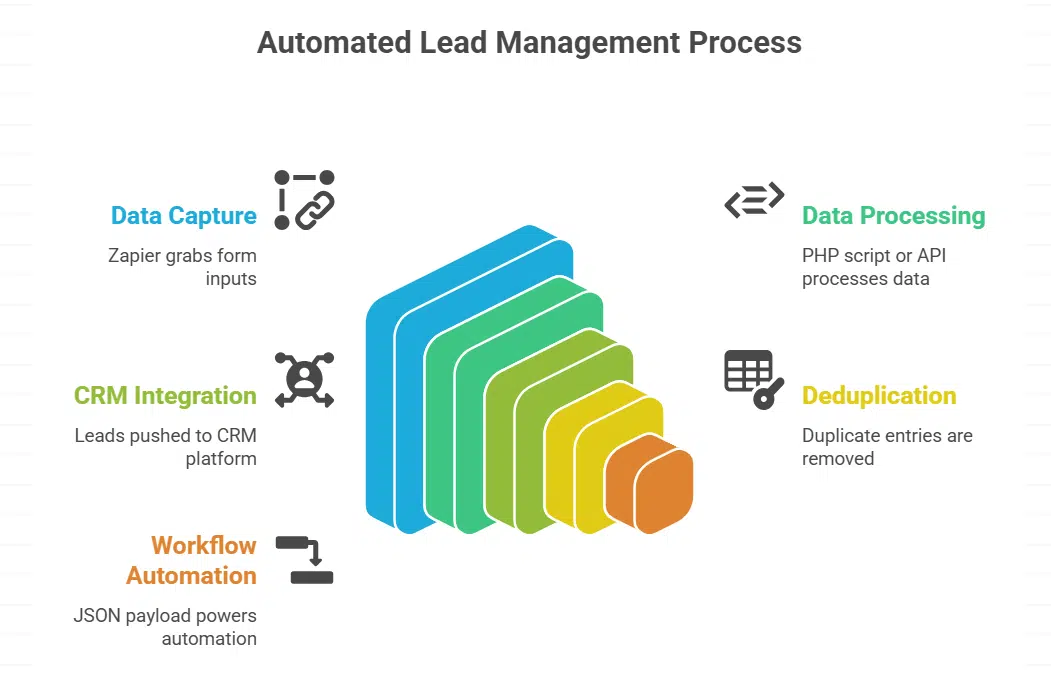
Zapier catch hook grabs form inputs in real time. It posts a get request or catch raw hook to your website address. That flow runs a PHP script or API that pushes leads to your customer relationship management platform.
The system can also send webhooks for new PayPal sales to lead management systems. Each sale triggers a HTTP request method call. A deduplication key stops duplicate entries. Webhooks by Zapier cut out manual data entry.
Zapier integrations link form apps to Google Sheets or MySQL in seconds. The pipeline delivers a JSON payload that serializes all fields and powers workflow automation. No typing saves time.
A smart filter can block viruses in user inputs. You win marketing automation with minimal setup. You gain premium features and learning resources for future tasks.
Automate Email Notifications
Webhooks by Zapier catches new data with a Catch Hook trigger on the web, then sends an email alert within seconds. It uses a deduplication key to prevent repeat pings. A small online store fetches PayPal IPN messages, tags each notification, and fires order updates to staff.
Users can handle GET requests, use a Catch Raw Hook for raw JSON, and forward details in a personalized email. Zapier integrations work without code, even from the command line.
Marketing teams adore this simple boost in marketing automation. It turns complex payment alerts into clear, playful memos. You tap into streamlined workflow automation without manual checks.
Learning resources in the Zapier docs walk you through these automation tools. Premium features deliver real automation wins, with filters, multi-step flows, and links to Google Sheets or CRM tools.
Sync Form Submissions to Google Sheets
Form data can update Google Sheets automatically. You skip manual entry with webhooks by zapier.
- Trigger a webhook POST request from Gravity Forms into a webhooks by zapier catch hook to update google sheets automatically.
- Assign a catch raw hook in Zapier to accept the full POST payload from your site.
- Map form fields to google sheets columns to create new rows fast, skipping manual copy.
- Add a deduplication key in your zap to block duplicate entries when visitors hit submit twice.
- Insert a get request step for test data and confirm your zap posts correctly in the spreadsheet.
- Turn on premium features like filters to sort entries by lead source or campaign tag for workflow automation and marketing automation.
- Tag rows with e-mail statuses so your team sees which contacts need follow-up without extra steps.
- Link Formstack or your survey platform with zapier integrations for advanced surveys, and push results to your sheet.
- Review your spreadsheet log daily to spot errors or missing fields and fix mapping in seconds.
- Explore learning resources in the Zapier help docs to fine-tune multi-step workflows and share your automation wins.
Post Updates to Social Media Automatically
Your site can post new content without lifting a finger. Webhooks by Zapier open doors to real-time posts on your social feeds.
- Kick off workflow automation with a catch hook for your RSS feed, and fire a get request to send a Twitter update in seconds.
- Set up a zap that spots new blog entries, then push the title and link to a Facebook Page via zapier integrations.
- Launch a catch raw hook for Instagram, so each image and caption goes out with no extra steps.
- Use a deduplication key in your zap, so LinkedIn sees each article just once and your audience stays happy.
- Unlock premium features like built-in delays, and space out tweets to avoid flooding followers.
- Tap into Pinterest automation, so each new pin shows up on your board without manual upload.
- Add a filter step to skip social posts on weekends, because even automated feeds need a rest.
- Log each update in Google Sheets, and watch marketing automation wins build on a live dashboard.
- Test each webhook step with a sample RSS get request before you flip the switch, then trust automation tools to handle the rest.
- Browse learning resources from Zapier to fine-tune content, timing, and error handling like a pro.
Notify Your Team via Slack
Webhooks by Zapier send site events to chat apps fast. Teams get real time alerts on new orders and page visits.
- Start setting a catch hook URL in your Zapier dashboard. Paste it into site code or WooCommerce notifications to push new order alerts.
- Link Slack channel through zapier integrations. Pick the right channel for order pings and submission updates.
- Map form fields onto message text. Insert order ID, customer name, or custom tags for quick scans.
- Add a deduplication key to each hook. Stop repeat alerts and keep channels tidy.
- Test a get request call from your site. Confirm Slack gets correct payload so no data hides.
- Enable catch raw hook in premium features. Grab full JSON body if you need all hidden values.
- Apply marketing automation filters in Zap. Trigger only top priority alerts and cut extra noise.
- Log every real time alert to google sheets as backup. Track time stamps, user IDs, links, and automation wins.
- Share the link to learning resources in Slack. Keep new hires up to speed on workflow automation tips.
Create Calendar Events from Website Activity
Zapier can turn your form data into Google Calendar entries. A catch raw hook grabs each get request, then pushes an event in seconds.
- Set up a catch raw hook in Zapier to catch form posts.
- Link the hook URL on your site so webhooks by Zapier trigger on submission.
- Map form fields like start date, end time, and title to Google Calendar fields.
- Test your zap with sample inputs to fix mapping errors early.
- Activate the zap to send each new form hit straight to your calendar.
- Use a deduplication key to drop repeat entries when users refresh.
- Enable premium features, like recurring event support, to score automation wins.
Add Subscribers to Email Marketing Platforms
Webhooks by Zapier grab signups in real time, no manual work. You link each catch hook to MailChimp or ActiveCampaign, then watch your list grow.
- Pick Webhooks by Zapier as your trigger; copy the catch hook URL and paste it into your signup form so each new entry rolls in.
- Assign a deduplication key to each email; this stops repeats, so contact lists stay clean.
- Map form fields to your email tool; set Email Address, Name, and any custom tags your campaign needs.
- Pick a marketing automation tool like MailChimp, ActiveCampaign or ConvertKit in your Zap; let workflow automation feed each signup straight to your list.
- Activate premium features like batch adds or tag presets; these extras speed up bulk uploads, and boost list power.
- Enable catch raw hook if you need extra metadata; push custom notes, referral codes or plan choices into your email feed.
- Test the Zap; watch zapier integrations fill your email tool and spot any errors before you go live.
- Add a Google Sheets step for backup; this archive gives you a simple audit log in case you want a manual view.
Update CRM Systems with New Website Data
Zapier moves fresh site leads straight into your CRM. You cut data errors and speed up your pipeline.
- Set up a catch hook in webhooks by zapier to grab new sign ups. This triggers on each form fill.
- Validate inputs with a get request against your API. You catch bad emails and flag duplicates.
- Parse the raw payload with catch raw hook to pull fields. Name, email, phone end up in the zap.
- Map those fields to a CRM platform like Salesforce. The pipeline stage moves with each new lead.
- Enable marketing automation tags in the CRM. You label leads as MQL or SQL for your team.
- Activate zapier integrations for workflow automation beyond basic tasks. Premium features let you push multiple contacts.
- Test each zap with sample data to spot mapping errors. You’ll catch mistakes and boost accuracy before they hit the database.
- Turn on the zap and watch new rows appear in the CRM instantly. You’ll see immediate boosts in lead capture.
- Check the log in Zap history for timeouts or errors. A quick look helps you keep the system healthy.
Trigger Custom Workflows for E-Commerce Orders
You can speed up order tasks with webhooks by zapier. Each sale can trigger a distinct chain of actions.
- Catch order events. Use a catch hook in webhooks by zapier to trigger on new sales in your payment gateway. This zapier integration grabs order details as soon as a customer checks out.
- Parse data. Map key fields in a GET request to your invoice tool. The zap sends product info, price and buyer address for billing.
- Generate invoice. Send an HTTP GET request to your invoice generator once a sale completes. You get a PDF in seconds, ready to email.
- Update inventory. Push a request to your stock tracker so your counts adjust in real time. This stops oversells and keeps numbers accurate.
- Fulfill order. Trigger a task in your shipping app after invoice creation. Workflow automation speeds up each fulfillment run.
- Record sale. Add a new row in google sheets for each order. Your team can review data and run simple reports on demand.
- Notify team. Drop a message in Slack so staff never miss an order. This chat alert cuts delays and speeds up packing.
- Archive data. Send order info to your CRM to power marketing automation. You can send a follow up email or run loyalty campaigns with premium features.
Send Real-Time Alerts for Specific Events
Your site needs quick alerts for key events. Webhooks make that possible in real time.
- Set up a catch hook in webhooks by zapier to grab real-time event data.
- Add a get request to pull details like buyer name, amount, or timestamp.
- Filter sales to catch only new charges in a payment gateway, such as PayPal.
- Use workflow automation features to route alerts where you need them, boosting your marketing automation.
- Dispatch a message to a team chat app, such as Slack, instantly, enabling rapid response, so no sale slips by.
- Trigger an email through an SMTP action, packing order details in seconds for your staff.
- Send an SMS via a texting service to grab attention faster than a blinking light.
- Record each alert in google sheets to track events over time and spot trends.
- Tap into zapier integrations to feed alerts into CRMs or custom dashboards.
Generate Trello Cards for Website Tasks

Webhooks by Zapier catch hook signals and send a get request. This setup logs site tasks into a task board as new cards.
- Link a catch hook in Zapier to your website’s form or button.
- Use a get request to grab task details automatically.
- Map site fields like title and description to Trello card and note fields.
- Name each card with clear titles for quick scans.
- Add labels and due dates on the project board for priority views.
- Run sample data tests in Zapier integrations to spot mapping errors.
- Activate the zap to trigger workflow automation on every site event.
- Scale your task board as orders or requests grow with no extra work.
Populate Databases Automatically
Your site can fill a SQL database in real time. It uses catch hook triggers and HTTP get requests.
- Zapier catch hook steps grab form entries instantly, syncing form submissions to databases via webhooks and cutting manual work.
- You map each input to a column in a SQL database, and webhooks by zapier push that data live without extra typing.
- Testing the HTTP call helps you watch real rows flow, as the get request logs test entries in seconds.
- Automate a zap that cleans duplicates and adds new leads to a NoSQL store, so you skip manual database updates and copy-paste blues.
- Linking a cloud sheet platform tracks each record change, and zapier integrations log every move for easy audits.
- Monitoring error alerts lets you fix broken records fast, slashing debugging time and keeping data fresh.
Integrate with Non-Zapier-Compatible Apps
Webhooks by Zapier let you link apps that lack a built in connector in your workflow automation. You pick the Catch Hook trigger in Zapier. Then you point your app’s post or a get request to that URL.
Zapier pulls the payload as JSON. You can make your workflow automation adapt to any tool.
Nonstandard apps like a legacy order portal or an on premise database get in on workflow automation too. Zapier uses webhooks to bridge the gap between a REST endpoint and your tool.
You can push new order records, form data, or error alerts from that portal. This free flow of data builds custom workflows and keeps your team in sync.
Manage Content Updates Automatically
Site pages stay fresh with real-time edits. It uses webhooks by Zapier with a catch hook to grab new RSS feed items fast.
- Trigger on RSS feed: set up a catch hook in webhooks by Zapier to grab new RSS feed items, then push each link to your content management system via its API.
- Link your CMS with real-time content synchronization and workflow automation, so pages update the instant you publish.
- Alert editors in a chat tool: push titles and URLs to a team channel, so teammates review posts without delay.
- Sync new posts to cloud storage: drop each article draft as a markdown file into your Drive folder for backup.
- Create or update Google Docs drafts: send feed data to Docs, so writers can refine posts with template sections.
- Send new content to Mailchimp: add blog headlines to your newsletter list automatically, for quick email blasts.
- Refresh Airtable entries: update a table with post titles, dates, and authors, keeping your databank current.
- Clear stale pages after update: use a webhook step to archive items older than thirty days in your CMS.
Streamline Error Reporting with Webhooks
Webhooks by Zapier send error alerts to monitoring platforms in real time. You spot website malfunctions fast and cut down response delays. A code glitch triggers a programmatic call that heads to an error tracker.
That system logs the fault and fires off an instant message to a communication app, like Slack.
Your engineering team sees each alert as soon as it pops up. Manual checks vanish, thanks to streamlined workflow automation. The chain from event to fix takes seconds. You handle bugs before they cause user headaches.
Improve Workflow Efficiency with Multi-Step Zaps
Multi-step Zaps chain many actions in a single flow. They call webhooks by zapier and apply logic rules. You can pack multiple webhook links in one request. This trick cuts manual work and shrinks errors.
Zapier’s multi-step Zaps can automate complex workflows seamlessly. You can test a form entry and tag a lead in a CRM. Zapier can ping Slack and add a row in a sheet. This tactic builds optimized processes and cuts errors.
Teams save time and stay in sync.
Takeaway
Your site now talks to apps, without you lifting a finger. This magic box, Zapier, links webhooks to tools like a spreadsheet app and team chat. You will see leads flow into sheets, alerts pop in Slack, tasks spin into Trello.
These 10 hacks save time, cut errors, free you for big ideas. Now take your new toolset, flip the switch, and watch your site hum.
FAQs on Ways To Automate Your Website Using Webhooks And Zapier
1. What exactly are webhooks and how do they help automate my blog site?
A webhook is like a doorbell on your blog site. When someone rings it, Zapier picks up the sound, and runs actions you set. It can post to your social feed, send emails, or update spreadsheets.
2. How do I link my contact form to Slack using Zapier webhooks?
Pick Webhooks by Zapier as a trigger, then choose Catch Hook. Copy the hook URL into your form tool. Next, add Slack as an action, pick a channel, map your form fields. Test once, then watch messages roll in.
3. Can Zapier adjust my shop stock when orders come in?
Yes, you can fire a webhook on each sale. Zapier grabs that data, updates your shop inventory sheet or your store stock count. That way, you skip the tedious manual updates.
4. What steps keep my automation clear and bug free?
Give each Zap a clear name. Group them by task, add filters to skip wrong info, and test after changes. I once found a typo in a filter that stopped all Zaps cold.