Finding the right host feels like staring at a sea of confusing web hosting providers. Many graphic designers hit roadblocks with slow site builders or hidden fees. Adobe Portfolio links to Adobe Creative Cloud to showcase your work with ease.
Inside, we show drag and drop ease, key features, pros and cons, and affordable pricing tips for seven top portfolio hosting platforms. Read on.
Key Takeaways
- Wix offers a no-code drag-and-drop builder and AI-driven ADI. It includes SEO tools, free HTTPS, and shared hosting. Wix powers over 11 million sites. Its free plan shows Wix ads and a wixsite.com URL. Paid plans unlock custom domains at affordable rates.
- Squarespace uses a block-based Fluid Engine editor and dozens of mobile-responsive templates. It hosts 5,474,585 live sites. Squarespace plans start at $16 per month when billed yearly. All plans include hosting, SSL, and a custom domain. You can try it free for 14 days.
- WordPress is an open-source CMS with a free core. You pay for hosting and domains separately. It supports over 60,000 plugins and themes. Elementor powers 16 million sites with drag-and-drop design. WordPress scales with CDNs, caching, and hosting upgrades to handle traffic spikes.
- Adobe Portfolio comes free with an Adobe Creative Cloud plan. It integrates with Behance, Lightroom, and Photoshop. You get responsive photo grids and custom domains. The Photography plan costs $9.99 per month. It has a limited template library and no built-in e-commerce.
- Hostinger costs $2.69 per month and offers 99.9% uptime. It gives a free domain and email for 12 months and unlimited storage. It includes an AI site kit and a 30-day money-back guarantee. Journo Portfolio has a built-in CMS, e-commerce, SEO tools, and job board sync for writers. Crevado offers free drag-and-drop hosting, custom domains, and password-protected galleries but may face slow loading and downtime on its free plan.
Wix: Best for Customization
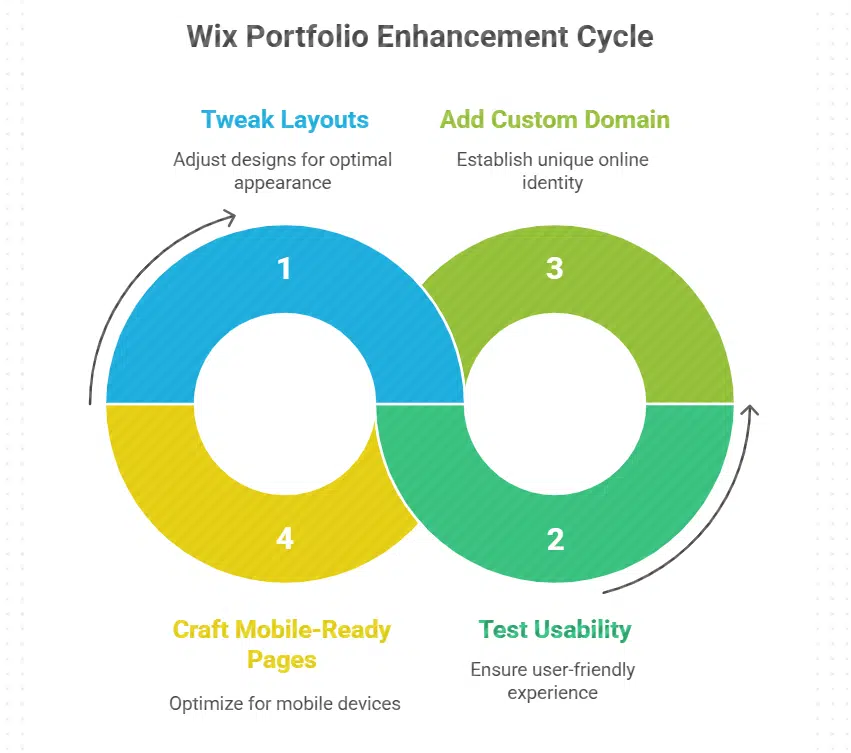
You can tweak layouts and test usability on the fly with Wix’s Editor X. It even lets you add a custom domain and craft mobile-ready pages, so your portfolio shines on every gadget.
Key Features of Wix for Portfolio Websites
Wix mixes site building and portfolio hosting into one platform. It gives creative professionals a no-code path and built-in hosting.
- Drag-and-drop website builder crafts sites for graphic designers, lets them move images and text in real time.
- Wix ADI uses AI to build portfolio showcases, it asks simple questions then sets up a layout.
- SEO tools add meta tags, alt text, and mobile views, they push your work up in Google ranks.
- Shared hosting keeps your work in data centers, it adds free HTTPS encryption and handles traffic spikes.
- Free plan adds Wix ads on your pages and a wixsite.com URL, you can test portfolios without cost.
- Custom domain service gives you a pro URL, it connects to your brand and runs at affordable pricing.
- Marketing apps link blogs, Instagram feeds, an online store, or a job board, they fit any content marketing plan.
Pros & Cons of Using Wix
Dear reader, here’s a quick peek at Wix pros and cons for your portfolio site:
| Pros | Cons |
|---|---|
|
|
Squarespace: Best for Sleek and Minimalist Designs
Squarespace acts like a painter’s palette for your site, with an editor that keeps each layout clean. You can grab a custom domain, boost your user experience, and let your portfolio shine in built-in collections.
Key Features of Squarespace for Portfolio Websites
This website builder helps you craft sleek portfolio sites fast. It packs stylish layouts, hosting and signup in a single flow.
- Template library: It offers dozens of portfolio templates for creative professionals, from graphic designers to photographers. The guided signup helps you enable all in one hosting and secure a custom domain in minutes.
- Visual editor: The website builder uses a block based Fluid Engine editor, it lets you move blocks, drop images and text where you want. Users see real time changes as it adapts for smartphones, tablets and laptops.
- Domain setup: You link a custom domain with a few clicks, you host the site in one dashboard, you avoid managing servers, databases or FTP client. The step by step guide keeps the process simple.
- Commerce options: You add online stores or a job board to your site, you list services or sell prints. The integrated marketing tools handle email campaigns and social media strategy.
- Creative community: The platform connects you to a network of artists and web designers, you share tips on user experience and content marketing. You promote your site via an instagram account to drive traffic.
- SEO tools: You edit page titles and meta tags, you track performance with basic analytics, you boost discoverability. The built in content marketing features support your portfolio showcasing goals.
Pros & Cons of Using Squarespace
Squarespace packs style and power for your portfolio website.
| Pros | Cons |
|---|---|
|
|
WordPress: Best for Flexibility and Scalability
WordPress acts like a Swiss Army knife. It adapts to any project, even massive traffic surges, and you tweak themes, boost speed with a content network, and add features through the block editor and plugin pack.
Key Features of WordPress for Portfolio Websites
This platform adapts to every need. You gain full control over your portfolio.
- Developers use the open-source code to tweak PHP files and manage MySQL databases, giving full creative control over site behavior.
- Themes supply a huge library of customizable templates, you adjust fonts, colors, and layouts to match your personal brand.
- Plugins come from a rich plugin library with over 60,000 options, you add galleries, contact forms, job boards, or online stores in minutes.
- Hosting plans require you to pick external hosting, you compare affordable pricing from shared to dedicated servers for reliable website hosting.
- Domains link to your site fast, you register a custom domain to boost brand recall and support portfolio showcasing.
- Scalability lets you handle traffic spikes, you upgrade servers or add CDNs and caching tools for faster page loads.
- SEO plugins boost search rankings, you optimize titles, meta tags, and XML sitemaps to drive content marketing success.
- Support comes from a global community of web developers and graphic designers, you find help on support forums, GitHub, and tutorial sites.
Pros & Cons of Using WordPress
Folks, weigh the perks and pitfalls of WordPress for your portfolio site.
| Pros | Cons |
|---|---|
| Open-source CMS; free core, only hosting and domain cost apply. | Hosting and domain cost extra beyond free core. |
| Elementor powers 16 million websites; you get drag and drop design. | Beginners face a steep curve with PHP, MySQL and theme tweaks. |
| Extensive customization via themes, plugins and widgets. | Frequent updates demand time for testing and backups. |
| Block editor (Gutenberg) for native page building. | Security gaps appear without proper hardening and security plugins. |
| Huge community; rich tutorials and support in forums. | Unoptimized installs may lead to slow page loads. |
Adobe Portfolio: Best for Creative Professionals
Adobe Portfolio links with Creative Cloud apps like Photoshop or InDesign so you post your best work fast. Many graphic designers and photographers love its drag-and-drop layout, saying it feels like a slick online gallery.
Key Features of Adobe Portfolio for Portfolio Websites
This platform suits creative professionals well. It comes with Creative Cloud access for smooth web development.
- Responsive photo grids adapt to phones, tablets, and desktops with clear layouts, so your shots pop, no pixel left behind.
- Integration with Behance, the creative community hub, lets graphic designers import work into Adobe Portfolio instantly, boosting ease of use, so you skip all the fiddle and fuss.
- Inclusion in the Adobe Creative Cloud suite gives members full access at no extra cost, cutting down on budget strain, so you can spend cash on shiny new gear instead.
- Custom domain support allows a personal website address, strengthening brand identity and boosting SEO, so clients find you with ease.
- Drag and drop website builder uses pre built templates to simplify website design, so you craft pages without breaking a sweat.
- Seamless sync with Lightroom and Photoshop in the Adobe suite links new projects in minutes, letting you share fresh work before you even grab a coffee.
- Dedicated hosting on secure servers powers fast page loads, so you sidestep lag during content marketing campaigns.
Pros & Cons of Using Adobe Portfolio
Adobe Portfolio links to your Adobe Creative Cloud plan at no extra cost. It hooks into Behance for quick portfolio showcasing. You can set a custom domain for a pro look. The photography plan starts at $9.99 a month if you need images only. Many graphic designers and creative professionals praise its portfolio hosting tools.
Few templates limit design flair. The platform lacks a built in job board or online stores. It locks you into Adobe’s ecosystem and may not suit deep custom coding. You can’t add many advanced widgets. Some users move to WordPress or Wix for extra freedom.
Hostinger: Best for Budget-Friendly Hosting

Hostinger brings you solid hosting for pennies, with a friendly interface and 99.9% uptime. You get a free security certificate, a drag-and-drop page creator, and round-the-clock help, so you can focus on your art instead of server woes.
Key Features of Hostinger for Portfolio Websites
Affordable plans bring serious perks. Pros get strong tools and constant help.
- Free domain and email for 12 months saves you cash, and it boosts your brand on day one.
- Unlimited store space and traffic lets your portfolio hosting scale with viewers.
- AI-driven site kit suggests layouts to polish your portfolio showcasing.
- E-commerce modules allow you to sell prints or downloads without fuss.
- File transfer tool handles large images with ease, speeding design swaps.
- Secure lock on each page reassures clients, and it helps SEO rank.
- Control panel holds developer tools and content marketing add-ons for extra reach.
- Fast engine cuts load times, and it keeps your site snappy on any screen.
- Remote shell link grants deep code edits, so you tweak any template.
Pros & Cons of Using Hostinger
Hostinger costs $2.69 per month. This low rate shows its affordable pricing for new sites. Cybernews gives it a 4.9 rating. It ranks high among portfolio hosting platforms. The plan includes a website builder, fast servers, and SSL. You get templates for portfolio showcasing. They suit graphic designers and creative professionals. A 30-day money-back guarantee comes with all plans. You can test it risk free.
The basic plan limits email accounts and storage. Renewal fees can rise after the first term ends. Support takes longer to respond during busy hours. Some regions see slower load times, so visitors may wait.
Journo Portfolio: Best for Writers and Journalists
Journo Portfolio feels like a digital newsroom in your pocket, with a custom domain, content marketing hooks, and an analytics tool waiting in the wings. You can embed a news feed, update your portfolio showcasing, and connect to job boards, all with a smooth website builder interface.
Key Features of Journo Portfolio for Portfolio Websites
Writers value clear layouts and simple tools. This platform outpaces other portfolio hosting platforms.
- Adaptive layouts adjust to desktops, iPads, and mobile devices for smooth portfolio showcasing.
- Built-in CMS offers a rich text editor to power content marketing on your site.
- Seamless publishing tool lets you post articles, essays, and case studies on demand.
- Powerful e-commerce integration lets you sell books, prints, and subscriptions directly.
- Smart SEO tools within Journo Portfolio link with Google Analytics to tweak metadata and boost search rankings.
- User-friendly drag and drop editor needs no code and cuts design time in half.
- Direct job board sync links your samples to open calls, boosting work chances.
Pros & Cons of Using Journo Portfolio
Journo Portfolio ranks high among portfolio hosting platforms for writers and journalists. It offers simple templates that anybody can tweak, no code needed. You can sell ebooks and other items with built in e-commerce tools. Its SEO tools boost content marketing reach. You can link a custom domain in minutes. It loads fast on phones and tablets.
It has fewer themes than some website builders. You may miss advanced photo or artwork galleries. It lacks built in vacancy listings for freelance gigs. It may not tie into certain design apps like Adobe Creative Cloud. The plan fee can feel steep for part time writers.
Crevado: Best for Simple and Free Portfolio Hosting
Crevado offers a free site builder that makes portfolio showcasing a breeze. You can add a custom domain, track simple analytics, and share your work with ease.
Key Features of Crevado for Portfolio Websites
Crevado offers a simple, free hosting solution for portfolios. It works for users with no coding background.
- It runs at zero cost, making it one of the most affordable pricing models among portfolio hosting platforms, unlike Adobe Portfolio that ties to an Adobe Creative Cloud plan.
- It uses a drag and drop website builder so graphic designers and writers launch pages without any HTML or CSS.
- It applies responsive design, making images and text adjust on smartphones, tablets, and desktops.
- It features customizable templates that let creative professionals tweak fonts, layouts, and color schemes.
- It integrates multimedia support, so users can embed photos, videos, and audio tracks for deeper portfolio showcasing.
- It lets you set up multiple portfolios under one login, so you can separate photography, design, or content marketing samples, or add links to a job board.
- It offers password protection for private galleries, so clients alone can view drafts or exclusive work.
- It allows a custom domain connection, so your portfolio can use a branded URL instead of a subdomain.
- It builds a creative community vibe with simple social icons and sharing options, even though it does not include full online stores.
Pros & Cons of Using Crevado
The free plan gives simple portfolio hosting, a drag-and-drop editor, and a clean layout for portfolio showcasing. You can add a custom domain and test designs with device preview modes. The user friendly panel helps beginners skip code. It also links you to a creative community for tips and templates.
Users may face slow loading, downtime, or security gaps on free servers. Sites can lose stability under heavy traffic. The lack of server upgrades may harm brand trust.
Takeaway
You can choose from seven top portfolio sites. One platform offers point-and-click site creator features. Creative pros show work with design sets and add-ons. Grab your own URL in minutes.
Affordable plans keep content marketing goals on budget. Pick a showcase platform that matches your style.
FAQs on Top Hosting Platforms for Portfolio Websites
1. What are the top portfolio hosting platforms for creative professionals?
Adobe Portfolio ranks high, as do smaller sites made for artists and makers. They let you show art, photos, or designs with style. These portfolio hosting platforms offer simple tools for portfolio showcasing. They run on phones and tablets too. Plans start at low cost for affordable pricing.
2. How do I link a custom domain with a website builder?
Pick your site tool, like a website builder from adobe creative cloud. Go to domain settings, paste your custom domain, and hit save. This tip helps graphic designers get a pro look fast.
3. Can I find gigs or join a creative community on my portfolio site?
Yes, some sites add a job board or a creative community hub. I once used Journo Portfolio, posted my resume, and got a quick lead. That brought in a free project, so I could buy a coffee. You can link with adobe creative clouds too for more tools.
4. Can I sell my work through portfolio hosting online stores?
Yes, many portfolio hosting sites let you run online stores. You upload art files, set a price, and set shipping. Some also give simple content marketing guides to help the sale. It feels like a mini shop on your site.
5. How can I use content marketing in portfolio showcasing?
You can add a blog, so your work lives with your story. Write tips, insights, and steps. Then share your process, from start to end. This draws fans, and may get you press or a sale.