


Hey there, are you stressing over your website crashing as more visitors flood in? Did you know that scaling your hosting can stop those annoying downtimes and keep your site speedy? In this post, I’ll share 10 easy tips to boost your website performance and handle growing website traffic like a pro.
Stick around, let’s fix this!
Key Takeaways
- Monitor traffic with tools like Google Analytics to catch issues early.
- Upgrade to VPS or dedicated hosting for more power as visitors grow.
- Use a CDN to speed up content delivery and reduce server strain.
- Set up auto-scaling on platforms like AWS or Google Cloud for traffic spikes.
- Optimize images and code to boost site speed and handle more users.
Monitor Your Website’s Traffic and Performance

Keeping an eye on your website’s traffic is a must, folks. You’ve gotta know how many visitors are swinging by and how your site holds up under pressure. Tools like Google Analytics and server logs are your best pals here.
They show you the raw numbers on website traffic and point out where things slow down. Think of it as a health check for your online space, catching issues before they turn into big headaches.
Spotting bottlenecks is the name of the game, my friends. Look for slow database queries or high CPU usage that can drag your site’s performance down. Track metrics like loading times and resource usage to see where the hiccups hide.
It’s like being a detective, piecing together clues to keep your website running smooth for everyone browsing through. Stick with these habits, and you’ll stay ahead of any trouble.
Optimize Your Current Hosting Environment
Let’s talk about making your current hosting setup work harder for you. With a few smart tweaks, you can boost your website performance without jumping to a new plan right away.
- Start by optimizing images on your site, since heavy files slow down load times. Compress those pictures without losing quality, and watch your pages load faster for better user experience. This small step can cut bounce rates and keep visitors happy.
- Next, minify your CSS and JavaScript to shrink file sizes. Smaller code means quicker loading, which is a win for website optimization and search engine rankings. It’s like trimming the fat off a meal, keeping only what you need.
- Clean up your databases to ditch unused data clogging the system. A tidy database runs smoother, helping with website traffic spikes. Think of it as decluttering your desk for a clearer mind.
- Use caching solutions like Varnish or Memcached to store frequently accessed data. These tools reduce server load, speeding up content delivery for your audience. It’s akin to having your go-to snacks ready on the counter.
- Focus on web content delivery by streamlining how data reaches users. Fast delivery improves user satisfaction and supports SEO efforts. You’re basically paving a quicker path for your visitors to arrive.
- Check your hosting setup for any outdated plugins or scripts dragging you down. Remove or update them to keep things running slick, especially as traffic grows. It’s like fixing a leaky pipe before the flood hits.
- Test your site speed with tools like PageSpeed Insights from Google. These insights reveal weak spots in website performance, guiding your next moves. Consider it a report card showing where to improve.
- Reduce server strain by limiting dynamic content if it’s not needed. Static pages load faster, easing the burden during high website traffic moments. Imagine swapping a heavy backpack for a light tote on a long walk.
Upgrade to a Higher Hosting Plan
Hey there, if your website traffic is spiking, it’s time to think about a better hosting plan. Moving from shared hosting to a VPS or dedicated hosting can give you more power and control.
You’ll get extra resources like a faster CPU and expanded memory to handle those growing visitor numbers. This switch means your site won’t slow down when things get busy, keeping your audience happy.
Think of it like upgrading from a small car to a big truck; you’ve got more room to carry the load. With options like cloud hosting from providers such as AWS, Google Cloud, or DigitalOcean, you can scale resources on the fly.
So, as your website performance needs a boost, these plans adapt to meet customer demands without breaking a sweat.
Implement Load Balancing for Traffic Distribution
Got a website with growing traffic? Let’s talk about load balancing, a neat trick to keep things running smooth. It’s like having a traffic cop for your servers, directing visitors to different spots so no single one gets overwhelmed.
Using load balancers, as we’ve got in our key tips, helps spread out website traffic evenly. This boosts reliability and keeps your site from crashing when tons of folks show up at once.
Think of it as sharing the load, kind of like passing out snacks at a party so one tray isn’t empty while others sit full. With load balancing, you dodge slow load times and keep your visitors happy.
It works hand-in-hand with ideas like vertical scaling and fits right into cloud services. So, set this up and watch your website performance soar, even on the busiest days.
Leverage Auto-Scaling Features
Hey there, folks, let’s talk about a neat trick to manage website traffic spikes. Auto-scaling is like having a powerful tool for your hosting. It increases computing power by adding servers or enhancing CPU and RAM when your site gets busy.
Think of your website as a party; if more guests arrive, auto-scaling simply adds extra tables without any effort on your part.
Now, envision this with cloud hosting leaders like AWS, Google Cloud, or DigitalOcean. These platforms can quickly boost your resources, ensuring your website performance stays seamless.
No crashes, no slowdowns, just effortless handling of customer demands. So, configure auto-scaling, relax, and see your site manage the web rush like a pro.
Consider Switching to a VPS or Dedicated Server
Switching to a VPS or dedicated server can be a game-changer for your website. As your traffic grows, shared hosting might not cut it anymore. A Virtual Private Server, or VPS, gives you more control and resources.
It’s like moving from a crowded apartment to your own private space. You get a slice of the server just for your site. This means better speed and handling of website traffic.
Going for a dedicated server takes it up a notch. You rent an entire machine, no sharing at all. Think of it as owning a house instead of renting a room. This option, much like cloud infrastructure, offers top power for high traffic.
It’s perfect if you’re seeing a big spike in visitors. Plus, with more disk space and control, you can tweak everything to boost website performance. Let’s chat about how this fits your needs, okay?
Use a Content Delivery Network (CDN)
Hey there, let’s chat about a game-changer for your website. Using a Content Delivery Network, or CDN, can seriously boost your site’s speed. It works by spreading out static assets like images, CSS, and JavaScript to servers in multiple spots around the globe.
This cuts down on latency, meaning your pages load faster for everyone, no matter where they are.
Guess what else? A CDN also eases the strain on your main server. With less pressure, your website performance stays top-notch, even as website traffic spikes. So, if you’re aiming to scale up and keep users happy, tap into this tool.
It’s like giving your site a fast lane on the internet highway!
Explore Multi-Server Architecture for Redundancy
Think about your website as a busy kitchen. If one stove breaks, you don’t stop cooking, right? That’s the idea behind a multi-server setup for redundancy. It means splitting your site’s jobs across different machines.
For instance, keep web apps on one server, databases on another, and emails on a third. If one fails, the others keep running, saving your website performance from a total crash. This approach boosts reliability, especially when website traffic spikes.
Now, let’s chat about microservices architecture, a neat trick for scaling. Picture it like a team of chefs, each handling a specific dish. You can scale just the parts that need it, like a busy database, without touching the rest.
This setup, paired with solid server software, helps manage customer demands and keeps your site smooth. Plus, it ties into website optimization by cutting downtime risks. Stick with this plan, and watch your digital presence grow strong on platforms like Google Search!
Regularly Maintain and Update Your Hosting Setup
Hey there, let’s talk about keeping your hosting setup in top shape. Regular maintenance is key to handling growing website traffic without a hitch.
- First off, update your server software often to avoid glitches. This means installing the latest versions of your CMS, plugins, and security patches as soon as they drop. Outdated systems can slow down your website performance and leave holes for scammers to sneak through. Stay ahead by checking for updates weekly.
- Next up, keep an eye on resource usage like CPU, memory, disk space, and network traffic. Tools like New Relic or Nagios can help you spot issues before they blow up. If your hard drive or solid state drive is maxing out, it’s a sign to act fast and upgrade.
- Also, patch up security flaws to protect your site as traffic spikes. Use anti-malware software to guard against threats that target busy sites. A safe setup boosts trust and keeps your search engine optimization efforts from tanking due to hacks.
- Don’t skip routine checks on your hosting environment, folks. Set a schedule to review logs and fix small bugs before they mess with customer behavior. A smooth site means better click-through rates for your online marketing game.
- Lastly, stay proactive with your hosting provider for quick fixes. If something funky happens with your server, having 24/7 support can save your bacon. It’s like having a trusty sidekick when website optimization is on the line.
Tighten Security to Handle Increased Traffic Safely
Growing website traffic is exciting, pals. But, with more visitors, your site becomes a bigger target for nasty attacks.
Here’s how to lock down your hosting and keep things safe as your audience grows:
- Start by updating server software often. Don’t skip patches for your CMS, plugins, or security fixes. These updates close gaps that hackers love to sneak through. Think of it as fixing a hole in your fence before the foxes get in.
- Keep an eye on resource usage with tools like New Relic or Nagios. Track CPU, memory, disk space, and network traffic closely. If something spikes oddly, it might signal a cyber threat. Stay ahead by spotting trouble early.
- Set up strong firewalls to guard your site. This acts like a bouncer at the door, only letting in the good folks. It’s a must for protecting against unwanted visitors as website traffic climbs.
- Use secure passwords, and change them regularly. Make them tough to guess, like a riddle no one can crack. Weak passwords are an open invite to trouble, especially with more eyes on your site.
- Back up your data every day. If an attack hits, you’ll have a safety net to bounce back fast. Store backups off-site to keep them safe from server crashes or hacks.
- Limit access to your hosting environment. Only give admin rights to trusted team members. It’s like handing out keys to your house; fewer hands mean less risk.
- Scan for malware often to catch sneaky threats. Use solid tools to sniff out bad code before it harms your site or visitors. With higher traffic, you can’t afford to slack on this.
- Encrypt data with SSL certificates for safety. This keeps info secure as it travels between your site and users. It builds trust, a big deal for brand awareness and customer demands.
- Watch login attempts to stop brute force attacks. Block IPs after too many failed tries. It’s like locking the gate after a stranger keeps knocking too much.
- Work with a hosting provider focused on security. Pick one that offers built-in protection and quick support. As website performance matters in digital marketing, a safe site keeps visitors coming back.
Leverage Analytics to Identify Traffic Patterns
Spotting how your website traffic moves can be a game-changer, folks. Explore tools like Google Analytics to get the complete view. This incredible platform reveals who visits, when they arrive, and which pages capture their interest.
Monitor metrics like website traffic and loading speeds to stay in the lead. Think of it as a guide, pointing you to where your audience spends the most time. With this information, you can adjust your site for improved results and address customer needs directly.
Now, let’s talk about going further with server logs and performance monitoring software. These resources help track resource usage and identify peak times on your site. Picture yourself as a detective, assembling insights about your visitors.
Use this knowledge to enhance your SEO and refine your social media approach. Noticed a surge in visits from Instagram or Twitter? Direct your efforts there to expand that audience.
Analytics is your reliable partner, supporting you in making informed decisions to boost website traffic every day.
Partner with a Scalable Hosting Provider
Teaming up with the right hosting provider can make a huge difference as your website traffic grows. Look at companies like UltaHost, which offer automated hosting functions to keep things running smoothly.
They help you handle spikes in visitors without breaking a sweat, much like having a trusty sidekick in a tough spot.
Picking a scalable option, such as cloud hosting with AWS, Google Cloud, or DigitalOcean, lets your resources grow on demand. This means your site stays fast and reliable, even when website performance is tested by a flood of users.
Stick with a provider that supports your digital marketing goals and keeps customer demands in check, no matter how big your audience gets.
Optimize Your Website’s Code and Database
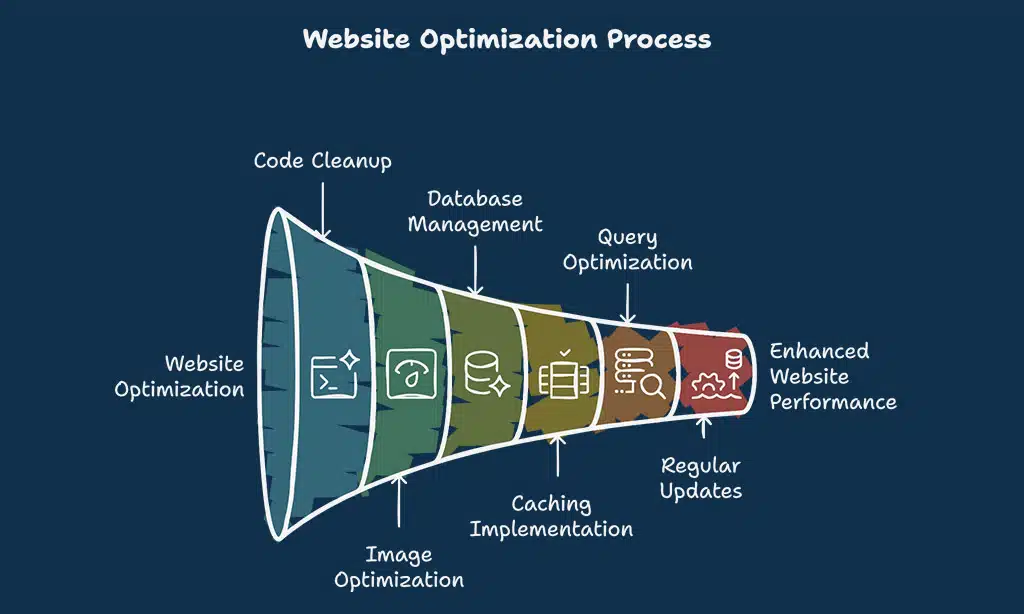
Hey there, let’s talk about making your website run smoother. Optimizing your code and database can boost website performance and handle growing traffic like a champ.
- Start by cleaning up your website’s code to improve speed. Trim down messy HTML, CSS, and JavaScript files. Minify CSS and JS to cut extra spaces and comments, making files smaller and faster to load. This helps search engines rank your site better and keeps visitors happy with quick page loads.
- Next, tackle image sizes for better website optimization. Compress large images without losing quality. Optimized visuals load quicker, saving server space and improving user experience. It’s like packing light for a trip, less baggage means a smoother journey.
- Move on to your database, it needs love too. Clean up old data, remove unused tables, and fix broken links. A tidy database runs faster, helping with website traffic spikes. Think of it as decluttering your desk, everything just works better.
- Use caching tools like Varnish or Memcached for a speed boost. These store frequent data requests, easing the load on your database. It’s a smart trick for better website performance, especially during busy times.
- Check your database queries to spot slow ones. Optimize them to fetch data quicker, cutting wait times for users. This step ties into SEO practices by ensuring your site doesn’t lag, keeping folks from bouncing off.
- Keep code updates regular to avoid glitches. Old scripts can slow things down or break under heavy traffic. Staying current with clean code supports digital marketing goals by maintaining a reliable site.
- Finally, test changes before going live on your site. A small tweak in code or database can mess things up if not checked. Testing keeps your target audience happy, preventing crashes during peak visits.
Use Caching to Reduce Server Load
Caching is a game-changer for your website’s speed, folks. Think of it like keeping a quick snack handy instead of cooking a full meal every time you’re hungry. By using tools like Varnish or Memcached, you store bits of data that don’t change often.
This means your server doesn’t have to work hard for every single visitor. The result? Reduced latency and less strain on your system, keeping things smooth even when website traffic spikes.
Now, think of this as a shortcut for better website performance. Grab a built-in plugin if you’re on a platform like WordPress, and watch the magic happen. It’s like having an extra pair of hands during a busy day.
With caching, you cut down server load big time, and your visitors get faster load times. Stick with this trick, and you’ll handle more users without breaking a sweat.
Implement Compression for Faster Load Times
Hey there, folks, let’s talk about boosting your website’s speed with compression. It’s like packing a suitcase tight to fit more in; compression reduces your site’s files, so they load faster for your visitors.
Think of images, CSS, and JavaScript getting trimmed down without losing quality. This leads to improved website performance and satisfied users who aren’t kept waiting.
Now, explore tools like Gzip to shrink those files on your server. Combine this with optimizing images and reducing CSS or JS, as these actions slash load times significantly. Your website visitors will appreciate it, especially when browsing on smartphones.
So, try it out, and see your site speed take off!
Minimize Downtime with Cloud-Based Hosting Solutions
Cloud-based hosting can be your greatest ally in maintaining your site’s operation. Imagine it as a backup generator during a storm, prepared to activate. Options like AWS, Google Cloud, and DigitalOcean allow you to adjust resources instantly.
So, when website traffic surges, you’re not caught off guard. These platforms adapt seamlessly, aligning with your requirements effortlessly.
Got a sudden influx of visitors? No problem, my friend. Set up auto-scaling on these services to manage the demand. They increase servers or enhance CPU and RAM as necessary. This approach prevents downtime, ensuring your site runs without interruption.
Plus, it bolsters your website performance objectives in the dynamic sphere of digital marketing. Choose cloud solutions, and see those issues disappear.
Integrate Third-Party Tools for Better Scalability
Hey there, let’s talk about enhancing your website’s growth. Using third-party tools can simplify scaling as your traffic surges.
- To start, pick tools for marketing and sales to manage larger audiences. These useful aids, like email marketing platforms, make tasks easier and keep up with customer needs. Imagine them as additional support, handling lead generation effortlessly.
- Next, explore customer service solutions for improved support. As website traffic increases, quick responses are essential to keep users satisfied. Tools like live chat systems are like a helpful friend, always available to assist.
- Also, integrate email marketing software to maintain connections. It’s a powerful way to reach your audience with updates or promotions. With relevant hashtags, you boost your social media reach and attract more visitors.
- Don’t overlook analytics tools like Google Analytics for valuable insights. They monitor website performance and reveal traffic sources. It’s like having a guide to identify the busiest paths on your site.
- Lastly, connect with platforms for smooth operations. Many third-party logistics tools integrate with your hosting setup, resolving supply chain issues. Envision them as a reliable partner, ensuring everything runs smoothly.
Conduct Stress Tests to Identify Weak Points
Let’s chat about making your website tough as nails. Stress tests can save you from a digital meltdown when website traffic spikes.
- First off, stress tests push your site to the limit, showing where it cracks under pressure. They mimic crazy high website traffic to spot bottlenecks like slow database queries. If your server can’t keep up, you’ll see it plain as day before real users do.
- Start by using tools like Apache JMeter to hammer your site with fake visitors. This helps uncover high CPU usage issues that drag down website performance. Fix these weak spots before they become a headache.
- Don’t skip testing during traffic spikes, like holiday sales or big marketing campaigns. If digital marketing brings a flood of users, you need to know if your hosting can handle it. It’s like training for a marathon, not a sprint.
- Focus on slow database queries that choke your system when under stress. These sneaky problems kill website optimization if ignored. Patch them up to keep things running smooth as butter.
- Check how your site reacts with auto-scaling setups in place. Configuring auto-scaling to add servers or boost CPU and RAM during tests is key. It shows if your plan works when push comes to shove.
- Use Google Analytics to track real user data alongside stress test results. This combo paints a clear picture of how traffic patterns mess with performance. You’ll know exactly where to beef up your setup.
- Run these tests often, not just once in a blue moon. Website traffic grows with SEO tricks or social media presence, so stay ahead. Keep testing to dodge nasty surprises down the road.
- Lastly, grab a tool like LoadRunner for deeper insights into weak links. It pinpoints where your site struggles under heavy loads. That way, you can shore up defenses before a crash steals your thunder.
Ensure 24/7 Technical Support Availability
Hey there, having a team ready to help at any hour is a game-changer for your website. As traffic grows, issues can pop up out of nowhere, and you don’t want to be stuck waiting for a fix.
Partnering with a provider like UltaHost, which offers automated hosting functions, means you’ve got backup whenever disaster strikes. It’s like having a trusty sidekick who’s always on call, day or night.
Think about this, folks. With cloud hosting options like AWS or Google Cloud, you’re not just scaling resources; you’re also tapping into top-notch support for website performance.
If something goes haywire at 2 a.m., you need quick help to keep things smooth. A solid support crew keeps your site running, boosts customer trust, and saves you from pulling your hair out.
Stick with a host that’s got your back around the clock.
Takeaways
Wrapping up, scaling your hosting as traffic grows is like tuning a car for a long trip. Keep tweaking with tools like Google Analytics to track website performance. Don’t let spikes catch you off guard; stay ready with smart upgrades.
Got a growing crowd? Chat with your hosting provider, and keep that site running smooth!
FAQs
1. How can I handle more website traffic as my site grows?
Hey, if your website traffic is spiking, start by upgrading to a solid state drive, or SSDs, for faster loading. It’s like giving your site a turbo boost. Also, keep an eye on Google Analytics to track those visitor numbers and tweak your website performance accordingly.
2. Does SEO really help with scaling my hosting needs?
Absolutely, pal, SEO, or search engine optimization, is your secret weapon. It pulls in organic clicks through keyword research and long-tail keywords, helping increase website traffic without breaking the bank.
3. Can social media presence impact my hosting scale?
You bet it can! A strong social media strategy, with tweets and LinkedIn articles, builds brand awareness and drives folks to your landing page, pushing you to optimize website performance for the rush.
4. How do retargeting ads fit into growing traffic?
Well, retargeting ads are like a friendly nudge to folks who’ve visited before. They pop up via Google Ads or paid media, luring visitors back and boosting website traffic, so your hosting must keep pace with those returning clicks.
5. What role does email marketing play in traffic growth?
Email marketing, my friend, is like a direct line to your audience’s inbox. It’s a powerhouse for lead generation and keeps customer demands in check by driving repeat visits to your site.
6. Should I worry about visual content when scaling hosting?
Hey, don’t sleep on visual content; it’s a game-changer for engagement. Whether it’s snazzy images or videos shared via social media marketing or content aggregators, it draws crowds, meaning your hosting has to handle the surge in website traffic.






























