

Finding the right minimalist WordPress theme can feel tricky, especially if you care about speed and clean design. Here’s a quick fact to ground you: Astra hits a 93 out of 100 on mobile speed in PageSpeed Insights. In this guide, you’ll see seven lightweight WordPress themes that make websites look sharp and load fast.
Writers, creatives, and online stores will find simple choices that get out of the way and let your content shine.
Key Takeaways
- Astra tops the list with a 93/100 PageSpeed mobile score and a 2.1 second load time, making it the quickest theme we tested for 2025.
- GeneratePress, Neve, and Hello Elementor keep page size under 1 MB and load in about 2.2 to 2.9 seconds, which helps SEO and user experience.
- Minimalist options like Blocksy, Hestia, and OceanWP support the Gutenberg editor, WooCommerce compatibility, responsive design, and simple visual controls, no coding needed.
- Strong hosting, like SiteGround or Kinsta with built-in caching, can boost performance for these fast-loading themes.
- Smarter setup matters. Compress images, limit plugins, remove unused CSS, and use tools like WP Rocket to chase a 98/100 score in PageSpeed Insights.
What makes Astra lightweight and customizable?

Astra loads fast and stays lean. The full page weighs about 892 KB and uses only 12 HTTP requests, which means the browser, your web app that shows pages, fetches fewer files to build each page. On mobile tests, it scored 93 out of 100 in PageSpeed Insights, Google’s speed test that grades sites from 0 to 100. Total load time hit 2.1 seconds.
That mix makes Astra a favorite for anyone focused on Core Web Vitals, Google’s set of speed and stability metrics, and smooth user experience. It also ships with a large library of pre-built templates, so you can launch faster.
Customization is straightforward. Switch header or footer layouts, tune spacing, and pick clean typography without touching code. It pairs well with the Gutenberg editor, WordPress’s block builder, and it works with Beaver Builder if you prefer drag and drop. Need a store? WooCommerce, the shopping plugin for WordPress, plays nicely here.
Why is GeneratePress ideal for speed and performance?
GeneratePress focuses on performance from the start. Its code skips extra weight, so each page makes only 14 HTTP requests. That light build helps it score 87/100 on mobile and load in about 2.9 seconds. The whole page is around 990 KB, which helps on both desktops and phones.
Writing and editing also feel fast. GeneratePress works neatly with the Gutenberg editor, so bloggers and creative teams can publish without fuss. WooCommerce compatibility is built in, so you can grow into a store later.
Because the theme avoids bloat, sites often test well on SEO tools like PageSpeed Insights. You get better Core Web Vitals and a responsive design that holds up on big screens and small ones.
How does Blocksy offer modern design and customization?
Blocksy brings a modern look with bold headings, plenty of white space, and crisp images. The design feels clean and flexible, which suits minimalism.
You get handy tools like live previews in the WordPress Customizer, drag-and-drop options, and pre-built templates. No coding needed. Just pick a layout, adjust colors and fonts, and publish.
Speed stays strong even with the visual polish. Blocksy supports the Gutenberg editor and works with WooCommerce, so you can style product grids while keeping pages light. It gives web designers the dials they want, and writers a page that is easy to read.
What are Neve’s features for fast and flexible websites?
Neve is known for speed. A fresh install is tiny, about 28 KB, which helps keep things quick. Pages load in around 2.2 seconds, thanks to minimal JavaScript and clean semantic HTML, code that uses the right tags so browsers and assistive tech understand the structure.
Mobile scores are strong, with a 92/100 on PageSpeed Insights in many tests. Fewer than ten HTTP requests per page keep bottlenecks away. That helps both user experience and rankings in search.
It is flexible too. Launch a blog, a portfolio, or an online store using pre-built templates that work with the Gutenberg editor and Beaver Builder. Neve includes mobile responsiveness by default, so layouts look right on phones and wide monitors.
Why choose Hello Elementor as a minimalist theme?
Hello Elementor is a blank canvas for the Elementor page builder. It uses very little memory, about 6 KB in some setups, which helps it load fast. Sites often score 91/100 on mobile with load times near 2.3 seconds and around 13 HTTP requests.
Writers and bloggers who want words to lead will like this approach. The theme adds almost no design of its own, so your layout decisions stand out.
If you want full control in Elementor, this is your playground. Add sections and widgets as needed, then publish. Stores are possible too. WooCommerce compatibility works, and you can shape a responsive design that looks great on any screen. For accessibility, add alt text, short image descriptions for screen readers, and test with assistive technologies.
What makes Hestia perfect for sleek one-page sites?
Hestia keeps one-page sites simple and stylish. It is used by well over 100,000 users and does well on phones and laptops. Pages can load in about 2.5 seconds, with a mobile speed score around 89/100 and only ten HTTP requests.
That light footprint helps portfolios, agencies, and service pages feel quick. A full page can be around 687 KB, which is easy for browsers to handle. Typography is clean and steady, so your message is easy to scan.
Hestia supports WooCommerce for quick store sections. Add services, products, or case studies without heavy code. The single-page flow keeps visitors moving instead of getting lost in menus.
How does OceanWP balance features and performance?
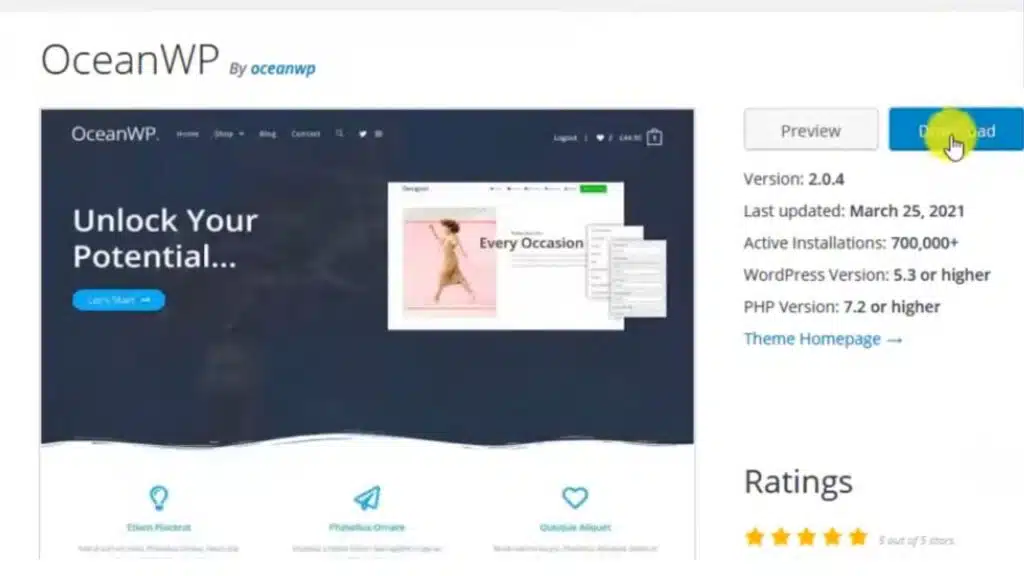
OceanWP blends useful features with speed. A typical page is about 937 KB, with 14 HTTP requests and an 87/100 mobile score. That keeps Core Web Vitals healthy, including fast load, quick interaction, and stable layout.
It is responsive out of the gate. Whether you sell products or show client work, the design adapts to screen size. WooCommerce support is deep, and Elementor or Beaver Builder can handle page layouts without a fight.
Need help? OceanWP Academy offers clear guides and support. That reduces guesswork and helps you launch faster while staying light.
Key Features to Look for in Minimalist WordPress Themes
Minimalist WordPress themes should feel quick, clean, and easy to use. These features help your site look sharp and stay fast.
- Lightweight code that loads fast, so pages feel snappy even on slow phones.
- Responsive design that adapts to phones, tablets, and desktops without extra work.
- Support for the Gutenberg editor and Beaver Builder, so editing is simple for writers and bloggers.
- Google Fonts and clean typography choices that are easy to read and quick to load.
- WooCommerce compatibility for stores that do not break your minimalist design.
- Pre-built templates in themes like Blocksy, Neve, and Hestia to speed up setup.
- Header and footer controls that let you add branding or links to places like Instagram.
- SEO-friendly layouts that help search engines understand your pages.
- Strong mobile responsiveness for smooth taps and swipes, with touch targets that feel right.
- Clear documentation and active support when you get stuck or need answers.
How do I choose the best minimalist WordPress theme?
Picking a theme is part speed test, part taste test. Focus on fast, stable, and simple. Then match the look to your brand and content. If you publish often, ease of editing matters more than tiny style tweaks.
- Check mobile speed in PageSpeed Insights. Astra hits 93/100 and Neve reaches 92/100, so aim high.
- Compare real load times. Astra lands around 2.1 seconds, Neve about 2.2 seconds. Faster sites lose fewer visitors.
- Make sure your theme supports your builder of choice, like Beaver Builder or Elementor, for smoother editing.
- Look at installs and ratings. Hestia has 100,000-plus users, which often signals stable updates.
- Confirm WooCommerce compatibility if you plan to sell anything.
- Pick themes with clean typography and Google Fonts options for clear reading across devices.
- Choose options with frequent updates and helpful support. Slow support can stall your project.
- Test demos on phones and laptops. Good responsive design should be obvious, not just promised.
- Match features to your use case. Writers need a clean blog, agencies want bold layouts, shops need clear product pages.
- Pick SEO-friendly themes that work well with the Gutenberg editor and pre-built templates.
- Keep it simple. Extra features add weight and can defeat minimalism.
What are the best tips to optimize minimalist themes for speed?
Speed is your secret weapon. A quick site keeps readers happy and helps search rankings. Start with a light theme, then fine-tune these areas.
- Use a performance plugin like WP Rocket. It can cut load time from 4.1 to 2.1 seconds and push mobile scores near 98/100.
- Reduce HTTP requests. Limit plugins and third-party scripts to what you truly need.
- Pick lightweight WordPress themes such as Neve or Hestia, which start small out of the box.
- Compress images before uploading. Turn on lazy loading so images below the fold wait their turn.
- Remove unused CSS, minify code, and delay non-critical JavaScript so the first screen loads fast.
- Test with Google PageSpeed Insights and GTmetrix. Make changes, then test again to see real gains.
- Choose hosting tuned for minimalism. SiteGround, Kinsta, and Bluehost offer caching and helpful features.
- Stick to responsive design patterns. Simple columns and clear spacing often render faster.
- Limit custom fonts. Use a small set from Google Fonts, and load only needed styles.
- Keep WooCommerce add-ons to a minimum. Fewer add-ons mean fewer files and faster pages.
Which hosting providers work best with minimalist WordPress themes?
Great hosting makes a fast theme feel even faster. The providers below pair well with minimalist wordpress themes because they offer caching, modern PHP, and solid support.
| Hosting Provider | Key Features for Minimalist Themes | Why It’s a Good Fit | Extras Worth Mentioning |
|---|---|---|---|
| SiteGround |
|
|
|
| Kinsta |
|
|
|
| WP Engine |
|
|
|
| Cloudways |
|
|
|
| Flywheel |
|
|
|
Takeaways
Clean, fast sites win attention. These seven minimalist wordpress themes deliver speed, mobile responsiveness, and simple controls that help you publish without friction.
Pick a theme that fits your workflow, then add a few speed boosts. A caching plugin, smaller images, and fewer plugins can make a big difference. If you want more, try WP Rocket or a tuned host to stretch your Core Web Vitals even further.
Good design plus strong performance creates better user experiences. Now take your favorite theme for a spin and build something that loads fast and looks great.
FAQs
1. What makes minimalist WordPress themes a smart pick for writers and bloggers?
Minimalist WordPress themes focus on clean typography, mobile responsiveness, and lightweight design. These features help your words stand out without clutter. Writers and bloggers love how these themes keep readers focused on the story, not distractions.
2. How do core web vitals relate to fast-loading WordPress themes?
Core web vitals measure site speed and user experiences across the web. Lightweight WordPress themes like Astra or Hello Theme are built with performance in mind; they load quickly, keeping visitors happy and search engines smiling.
3. Are minimalist WordPress templates good for online stores using WooCommerce?
Absolutely! Many minimalist options offer WooCommerce compatibility right out of the box. This means creative agencies or shop owners can set up sleek online stores that look sharp while staying easy to navigate.
4. Can I use pre-built templates with Gutenberg editor in these themes?
Yes, most modern minimalist designs support Gutenberg editor integration along with pre-built templates you can tweak as needed. You get flexibility plus an intuitive editing experience—no coding headaches required.
5. Do these SEO-friendly themes work well on phones and tablets too?
They sure do! Responsive design is baked into top choices like Beaver Builder-based layouts or those using Google Fonts for crisp text everywhere you go online; your site will shine whether viewed from a laptop or a phone tucked in someone’s pocket.




























