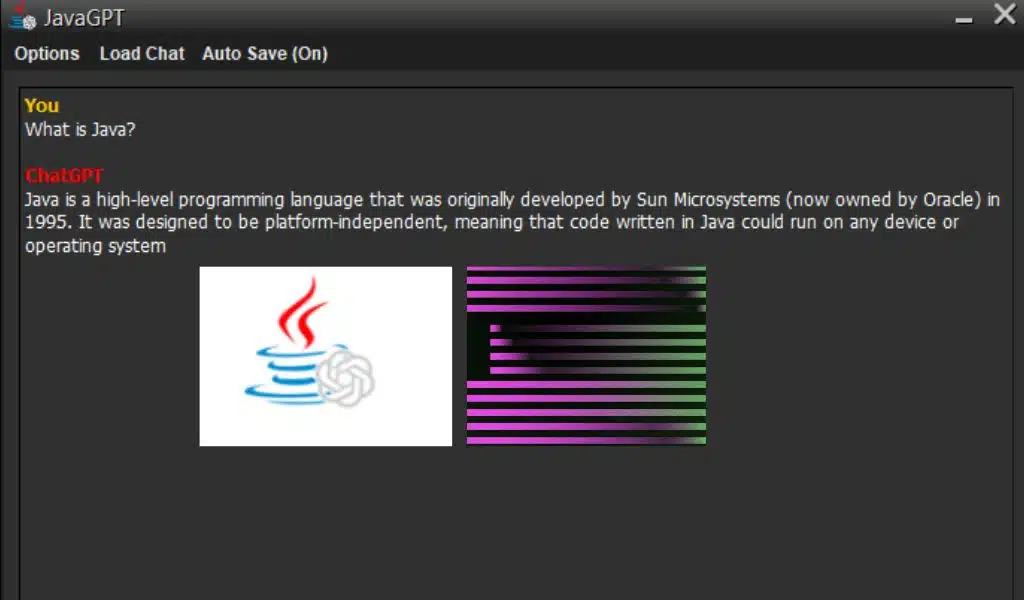
JavaGPT Brings ChatGPT for Windows Older Versions

JavaGPT Brings ChatGPT for Windows Older Versions

Listen to the Podcast:

ChatGPT is the latest trend in technology, but did you know that you don’t need to have a new device to use the OpenAI chatbot?

In this article, you’ll discover how a ChatGPT client called JavaGPT is compatible with a wide variety of operating systems, including those dating back to 1998!

Compatibility with old Windows

JavaGPT is an open source project that is available through GitHub. It is compatible with Windows 98, ME, 2000, XP, Vista, 7, 8, 10, and 11, making it highly accessible for users with older operating systems.

While compatibility with Windows 11 is likely to be more practical than working with older versions of Windows, JavaGPT offers a solution for those who haven’t upgraded their operating system yet.

Outstanding Features

  1. Live Chat Broadcast: Generate responses instantly, just like on the ChatGPT website.
  2. Chat History: This allows you to interact with previous chats just like on the website.
  3. Revert Chats feature: void previous chat messages and replies.
  4. HTML Viewer: View chat content in HTML and support Markdown language syntax.
  5. Chat Title Generator: Automatically create titles based on the context of the chat. They can be manually changed as desired.
  6. Import of prefabricated notices
  7. function to save chats in a file.
  8. Dark mode and right-click copy, edit, and paste functions
  9. support for ChatGPT 4 and all models of ChatGPT 3.5.
  10. Available across platforms.
  11. Build size is only 6 MB.

Feature Description

  • JavaGPT has a number of useful features for its users, including real-time chat streaming, which ensures that responses are generated instantly.
  • Furthermore, the chat history allows users to interact with previous chats in the same way as on the ChatGPT website. The revert chat feature is also very useful, allowing you to undo previous chat messages and responses.
  • The HTML viewer is another outstanding feature, as it allows you to view the chat content in HTML format, which is compatible with the Markdown language syntax.
  • Additionally, JavaGPT features a chat title generator that automatically creates titles based on the chat context, saving the user time. They can also be changed manually if desired.
  • The import of pre-made announcements and the function to save chats to a file are very useful for users who want to keep track of their chats.
  • JavaGPT also features a dark mode and right-click copy, edit, and paste functions, making it easy to edit messages.
  • JavaGPT is compatible with ChatGPT 4 and all models of ChatGPT 3.5, ensuring that users have access to the latest chatbot technology.
  • Furthermore, JavaGPT is available cross-platform, which means that users can use it on different operating systems.
  • Finally, it should be noted that JavaGPT has a build size of only 6 MB, which makes it lightweight and easy to use.

How JavaGPT Works?

JavaGPT is easy to use and can be configured to use the desired ChatGPT model through the JavaGPT configuration. It also supports Markdown and has right-click copy, edit, and paste functions.

In short, JavaGPT is a highly functional and convenient solution for those who want to use ChatGPT on older operating systems.

It offers a solution for those who want to use ChatGPT on old operating systems. With its outstanding features and ease of use, JavaGPT is a great choice for those looking for a chatbot solution on older operating systems.

Find out how you can use OpenAI ChatGPT on older Windows with JavaGPT.


Subscribe to Our Newsletter

Related Articles

Top Trending

Post-Study Work Visa
The "Post-Study Work Visa" Guide For UK, Canada, And Australia [Unlock Your Future]
Most Innovative Fintech Startups
The 10 Most Innovative Fintech Startups of 2026: The AI & DeFi Revolution
Best Staking Platforms
Best Staking Platforms 2026: Top 6 Picks for Passive Income
Best SaaS security tools
Top 10 Cybersecurity Tools For SaaS Protection In 2026
Ergonomics for Hybrid Workers
7 Ways To Improve Office Ergonomics For Hybrid Workers

Fintech & Finance

Most Innovative Fintech Startups
The 10 Most Innovative Fintech Startups of 2026: The AI & DeFi Revolution
Best alternatives to Revolut and Wise
Top 5 Best Alternatives To Revolut And Wise In 2026
credit cards for airport lounge access
5 Best Cards for Airport Lounge Access in 2026
Best credit monitoring services 2026
Top 6 Credit Monitoring Services for 2026
Best automated investing apps
Top 6 Apps for Automated Investing and Micro-Savings

Sustainability & Living

best durable reusable water bottles
Top 6 Reusable Water Bottles That Last a Lifetime
Ethics Of Geo-Engineering
Dive Into The Ethics of Geo-Engineering: Can We Hack the Climate?
Eco-friendly credit cards
7 "Green" Credit Cards That Plant Trees While You Spend
top renewable energy cities 2026
10 Cities Leading the Renewable Energy Transition
Editorialge Eco Valentine T-shirts
Wear Your Heart Green: Editorialge Eco Valentine T-Shirts & Hoodies Review

GAMING

Upcoming game remakes 2026
7 Remakes And Remasters Confirmed For 2026 Release
The 5 Best VR Headsets Under $500 January 2026 Guide
The 5 Best VR Headsets Under $500: January 2026 Buying Guide
Do Mopfell78 PC Gamers Have An Advantage In Fortnite And Graphic-Intensive PC Games
Do Mopfell78 PC Gamers Have An Advantage in Fortnite And Graphic-Intensive PC Games?
Esports Tournaments Q1 2026
Top 10 Esports Tournaments to Watch in Q1 2026
Web3 games launching 2026
7 Promising Web3 Games Launching in 2026

Business & Marketing

15 SaaS Founders to Follow on LinkedIn for 2026 Insights
15 SaaS Founders to Follow on LinkedIn: 2026 Growth & AI Trends
Best Business Credit Cards for Ecommerce
Top 5 Business Credit Cards for E-commerce Owners
Top 6 Marketing Automation Tools With Best AI Integration
Corporate Social Responsibility
Corporate Social Responsibility: Why Employees Demand Action, Not Words
8 SaaS Trends Watching Out for in Q1 2026
8 Defining SaaS Trends to Watch in Q1 2026

Technology & AI

Best alternatives to Revolut and Wise
Top 5 Best Alternatives To Revolut And Wise In 2026
The 5 Best VR Headsets Under $500 January 2026 Guide
The 5 Best VR Headsets Under $500: January 2026 Buying Guide
15 SaaS Founders to Follow on LinkedIn for 2026 Insights
15 SaaS Founders to Follow on LinkedIn: 2026 Growth & AI Trends
best hosting python nodejs apps
Top 5 Hosting Solutions for Python and Node.js Apps
Top 5 Bitnami Alternatives in 2026

Fitness & Wellness

Modern Stoicism for timeless wisdom
Stoicism for the Modern Age: Ancient Wisdom for 2026 Problems [Transform Your Life]
Digital Disconnect Evening Rituals
How Digital Disconnect Evening Rituals Can Transform Your Sleep Quality
Circadian Lighting Habits for Seasonal Depression
Light Your Way: Circadian Habits for Seasonal Depression
2026,The Year of Analogue
2026: The Year of Analogue and Why People Are Ditching Screens for Paper
Anti-Fragile Mindset
How to Build an "Anti-Fragile" Mindset for Uncertain Times? Thrive in Chaos!