

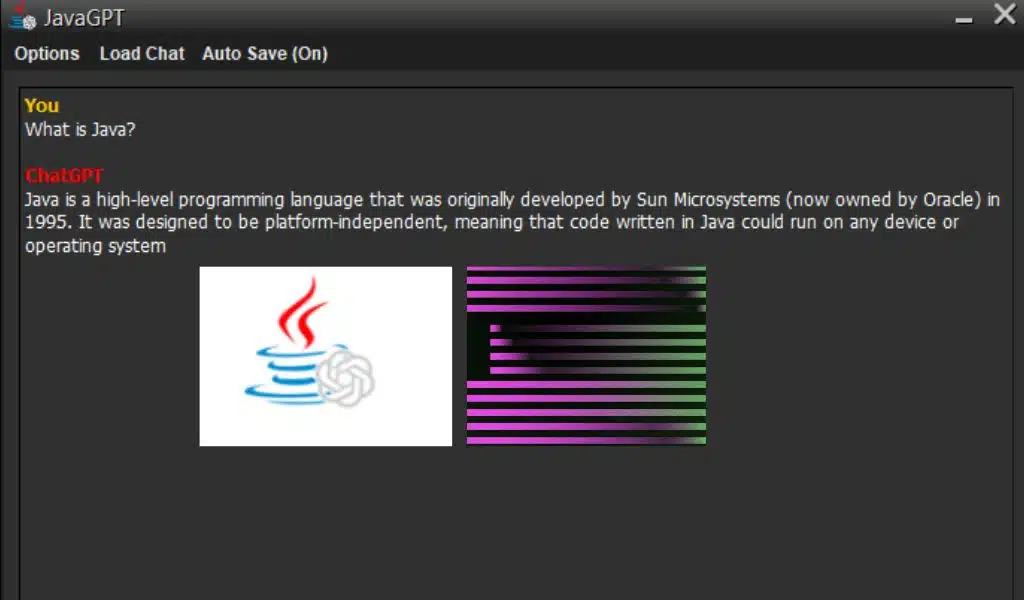
JavaGPT Brings ChatGPT for Windows Older Versions

JavaGPT Brings ChatGPT for Windows Older Versions

Listen to the Podcast:

ChatGPT is the latest trend in technology, but did you know that you don’t need to have a new device to use the OpenAI chatbot?

In this article, you’ll discover how a ChatGPT client called JavaGPT is compatible with a wide variety of operating systems, including those dating back to 1998!

Compatibility with old Windows

JavaGPT is an open source project that is available through GitHub. It is compatible with Windows 98, ME, 2000, XP, Vista, 7, 8, 10, and 11, making it highly accessible for users with older operating systems.

While compatibility with Windows 11 is likely to be more practical than working with older versions of Windows, JavaGPT offers a solution for those who haven’t upgraded their operating system yet.

Outstanding Features

  1. Live Chat Broadcast: Generate responses instantly, just like on the ChatGPT website.
  2. Chat History: This allows you to interact with previous chats just like on the website.
  3. Revert Chats feature: void previous chat messages and replies.
  4. HTML Viewer: View chat content in HTML and support Markdown language syntax.
  5. Chat Title Generator: Automatically create titles based on the context of the chat. They can be manually changed as desired.
  6. Import of prefabricated notices
  7. function to save chats in a file.
  8. Dark mode and right-click copy, edit, and paste functions
  9. support for ChatGPT 4 and all models of ChatGPT 3.5.
  10. Available across platforms.
  11. Build size is only 6 MB.

Feature Description

  • JavaGPT has a number of useful features for its users, including real-time chat streaming, which ensures that responses are generated instantly.
  • Furthermore, the chat history allows users to interact with previous chats in the same way as on the ChatGPT website. The revert chat feature is also very useful, allowing you to undo previous chat messages and responses.
  • The HTML viewer is another outstanding feature, as it allows you to view the chat content in HTML format, which is compatible with the Markdown language syntax.
  • Additionally, JavaGPT features a chat title generator that automatically creates titles based on the chat context, saving the user time. They can also be changed manually if desired.
  • The import of pre-made announcements and the function to save chats to a file are very useful for users who want to keep track of their chats.
  • JavaGPT also features a dark mode and right-click copy, edit, and paste functions, making it easy to edit messages.
  • JavaGPT is compatible with ChatGPT 4 and all models of ChatGPT 3.5, ensuring that users have access to the latest chatbot technology.
  • Furthermore, JavaGPT is available cross-platform, which means that users can use it on different operating systems.
  • Finally, it should be noted that JavaGPT has a build size of only 6 MB, which makes it lightweight and easy to use.

How JavaGPT Works?

JavaGPT is easy to use and can be configured to use the desired ChatGPT model through the JavaGPT configuration. It also supports Markdown and has right-click copy, edit, and paste functions.

In short, JavaGPT is a highly functional and convenient solution for those who want to use ChatGPT on older operating systems.

It offers a solution for those who want to use ChatGPT on old operating systems. With its outstanding features and ease of use, JavaGPT is a great choice for those looking for a chatbot solution on older operating systems.

Find out how you can use OpenAI ChatGPT on older Windows with JavaGPT.


Subscribe to Our Newsletter

Related Articles

Top Trending

girls in STEM strategies with visible results
Encouraging Girls in STEM: Strategies That Work and Build Real Confidence!
Best Online Courses to Learn Advanced SEO Metrics
From GA4 to AI Search: Best Courses to Upgrade Your SEO Skills
Green Hydrogen Fuel
The Rise Of Green Hydrogen As A Clean Fuel Source
energy-efficient LED lights and appliances
Benefits of Using Energy-Efficient LED Lights and Appliances
Check Your Real Internet Speed
How to Check Your Real Internet Speed and Detect ISP Throttling

Fintech & Finance

HONOR 600 Pro vs HONOR 600 Lite 5G
HONOR 600 Pro vs HONOR 600 Lite 5G: Full Comparison with Expected India Pricing
How to Dispute a Credit Card Charge Successfully
How To Dispute A Credit Card Charge Successfully
How to Protect Yourself from Financial Scams
Financial Scam Prevention Tips to Protect Your Money
The Truth About Buy Now Pay Later Services
best UK current accounts 2026
9 Best UK Current Accounts with the Highest Interest and Best Perks in 2026

Sustainability & Living

Green Hydrogen Fuel
The Rise Of Green Hydrogen As A Clean Fuel Source
energy-efficient LED lights and appliances
Benefits of Using Energy-Efficient LED Lights and Appliances
Wind Power Global Energy Markets
How Wind Power Is Reshaping Global Energy Markets
Circular Economy Basics
Circular Economy Explained: Why Waste Is A Design Flaw
Eco-Friendly Bathroom Plan
Eco-Friendly Bathroom: My 30-day Conversion Plan With Products [Join the Challenge]

GAMING

Custom Mechanical Keyboard
DIY: Build a Custom Mechanical Keyboard That Feels Like Yours
open-world games done right
The 9 Best Open-World Games Done Absolutely Right
best couch co-op games
10 Best Couch Co-Op Games Worth Playing Together With Family and Friends
best story driven games
13 Best Story-Driven Games That Stay With You In Your Memories
multiplayer games worth playing
The 8 Best Multiplayer Games Worth Playing With Friends

Business & Marketing

The Truth About Buy Now Pay Later Services
Guest Posting In 2026
Guest Posting In 2026: Is It Worth It? And How To Do It Right
New Zealand social media marketing
13 Critical Facts About How New Zealand's Small Market Forces Brands to Be Creative on Social Media
Cold Email in 2026
Cold Email In 2026: What Works, Lands In Spam, And What Converts
Entrepreneurial Spirit Promotes Social Change

Technology & AI

Check Your Real Internet Speed
How to Check Your Real Internet Speed and Detect ISP Throttling
Custom Mechanical Keyboard
DIY: Build a Custom Mechanical Keyboard That Feels Like Yours
My Image Search Techniques
Mastering Image Search Techniques: Your Ultimate Guide To Reverse Image Search
AI in modern classrooms
How AI in Modern Classrooms Is Transforming Learning
Tikcotech
The Power of Tikcotech: Your All-in-One Solution For TikTok Success

Fitness & Wellness

beginner home workouts
9 Beginner Home Workouts to Try for Real Results: Start Your Fitness Journey!
setting realistic fitness goals
Setting Realistic Fitness Goals: A Beginner’s Practical Guide That Actually Works
best home workouts guide
39 Home Workout Routines for Every Fitness Level to Get Fit Without a Gym
beginners fitness guide
Beginner’s Complete Fitness Guide: A Practical Beginners Fitness Guide for Real Life
DIY Ergonomic Home Office Setup
How I Changed My Home Office After Three Spine Surgeries


























