How to Share a YouTube Video on Instagram as a Post or Story

How to Share a Youtube Video on Instagram

Listen to the Podcast:

Instagram has become a fashionable social network. It has become more popular than Facebook. Instagram added new features like reels, videos, short stories, resharing, music, and more to give users a new dimension of experience. This post will show you how to share a YouTube video on Instagram and Instagram story.

Moreover, these features open a doorstep to earn through posting content. Whether you make from Instagram or use it for recreation purposes, you need to share videos on your Instagram. So, without further ado, let’s move on to the topic.

How to share a YouTube video on Instagram story?

Since the launch of Instagram, its growth has not stopped, although it is complicated to guide users from this platform to a web page through a link. The problem is the restrictions on including links to all posts or stories.

There are currently two ways to include a direct link to YouTube on your Instagram profile:

  1. Having a store on Facebook: For this, it is necessary to meet all the requirements to sign up for Instagram shopping subsequently.
  2. Have over 10,000 followers: After exceeding this number, the option to include links to your shared stories will be activated.

How to put a link to YouTube on Instagram?

If you still don’t know how to put a YouTube link on Instagram, don’t worry; throughout this article, we will explain everything you need to do so that your Instagram followers go directly to your YouTube account and thus increase follower traffic quickly.

First, you need to know how to put a link to YouTube in your Instagram profile bio so that people who visit your profile can quickly find the link and go to your YouTube channel.

From a mobile device:

Most people have the Instagram application on their mobile devices, so knowing all the mobile version options is essential.

  • Enter the Instagram application.
Enter the Instagram application
  • Access your profile and press the ”Edit profile” button.
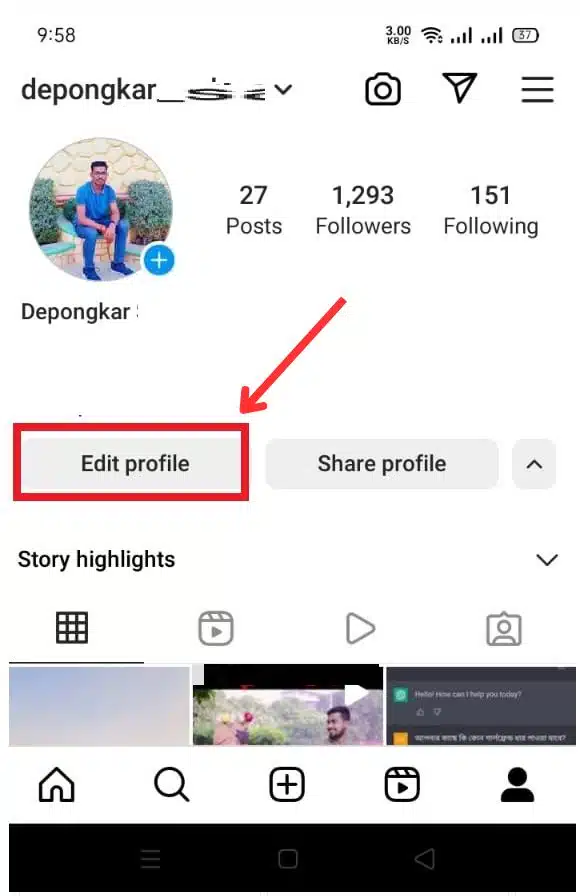
Press the Edit profile
  • Below your username, the description of your profile will be displayed, where you must paste the link to your YouTube account or the video you want more people to see.
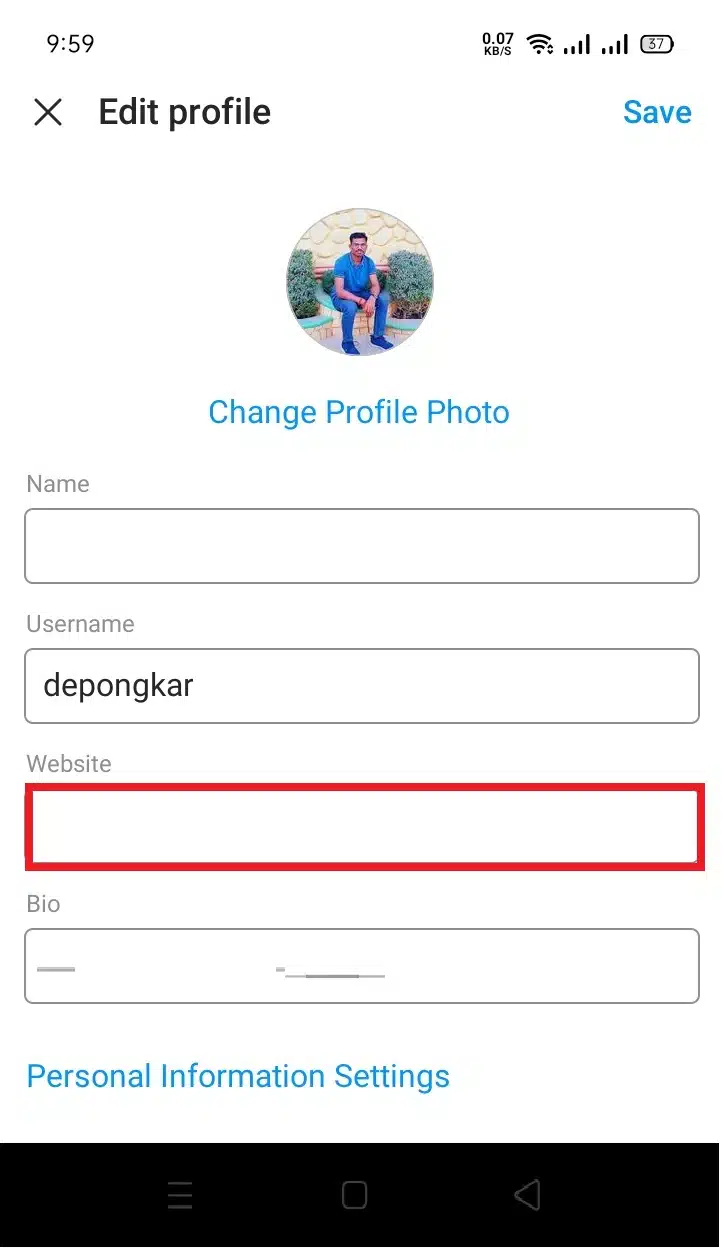
Paste the link to your YouTube account
  • Finally, click on the confirmation icon to save the changes.
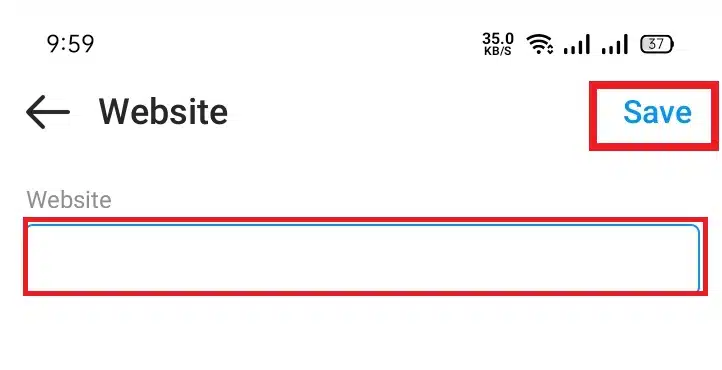
Save the changes
Save the changes

Now all your followers can find the link to your YouTube channel or the video of your choice. They will only have to click on the link to be able to view it, and that’s it.

From the desktop version:

If you don’t have a mobile device and still want to add the link to your YouTube video or account, don’t worry, the procedure is effortless and similar to that of a mobile device.

  • Enter the official Instagram page from your browser.
  • Click on your profile photo, which is located in the upper right of the screen.
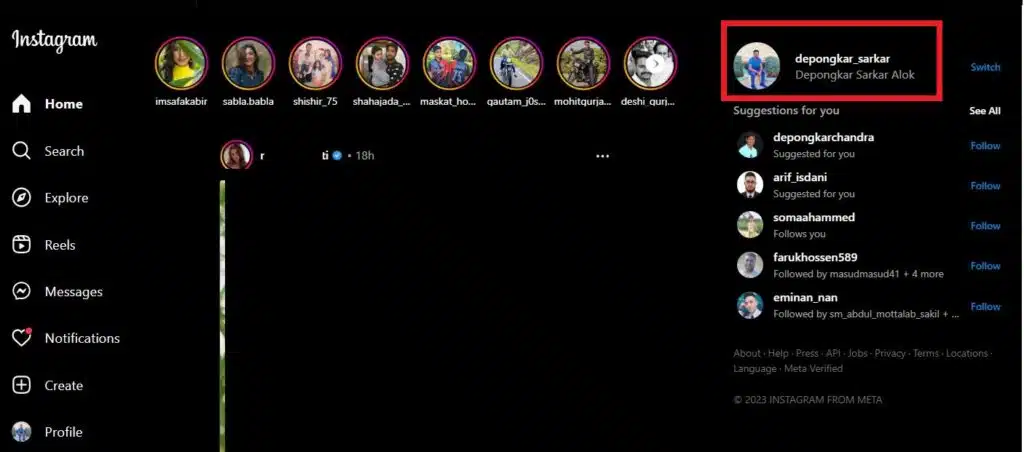
Click on your profile photo
  • In the next window, press ”Edit profile”.
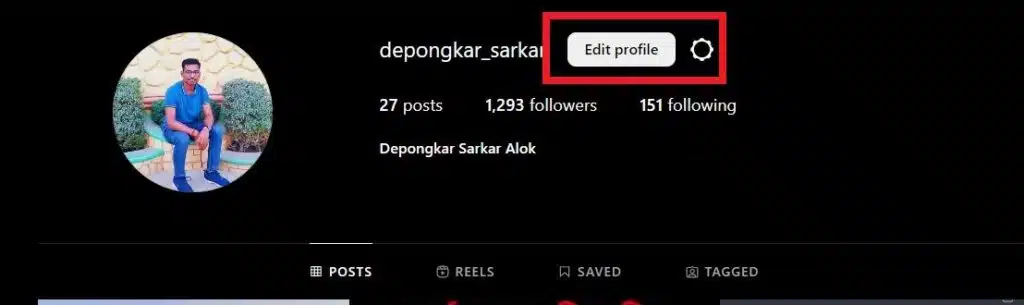
Press Edit profile
Press Edit profile
  • In the ”Website” section, you must paste the link to your YouTube video”.
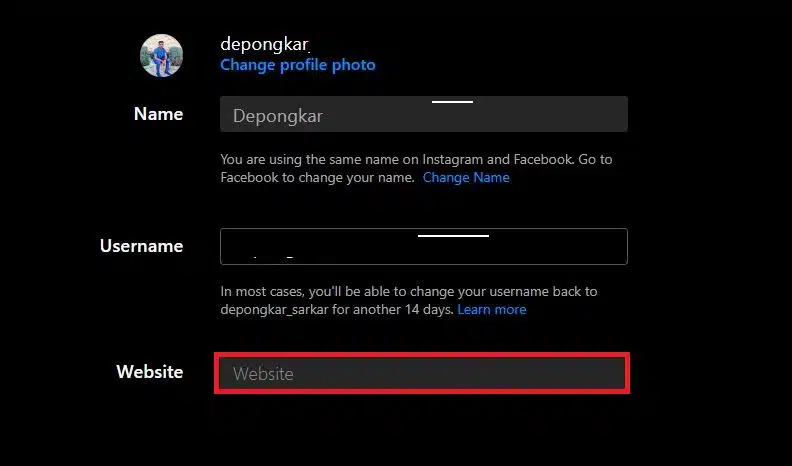
Paste YouTube video link on Website section
Paste the YouTube video link on the Website section.
  • Once you have copied the link from the YouTube platform, press the ”Paste” button in the Instagram application.
  • Finally, you only have to press the blue button to save the changes and finish.
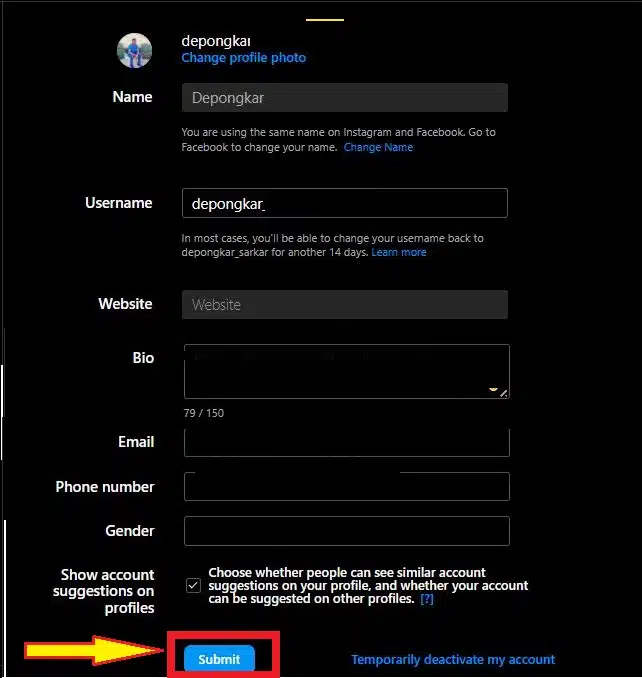
Save the changes and finish

Now you know how to put a link to YouTube in the biography of your Instagram profile from PC. As you can see, the procedure is effortless and does not require other external applications.

How to put a YouTube link in Instagram stories?

Now that you know how to share a YouTube link in your Instagram biography, it’s time to understand how to place it in your stories. While it’s true that you can’t share a YouTube link to Instagram stories if you have fewer than 10,000 followers, here’s another way to share your video.

YouTube link on Instagram Stories

Accounts with over 10,000 followers or meeting the requirements to be a Facebook store have the “Swipe Up” option. With this feature, viewers viewing your story will only have to swipe up on the story to access YouTube or the video directly.

  • To create a Swipe Up, you must carry out the following steps:
  • Enter the Instagram application from your mobile device.
  • Tap the camera icon at the top left of the screen.
  • Create the story you want to share.
  • An icon of a chain will be displayed at the top of the screen; press it.
  • Another window will automatically open, where you must press the ”+ Web Link” button.
  • Paste the YouTube video or channel link.
  • View your story in ”Preview” to check that everything went well, and finally, press ”Finish” to publish your story.

When you publish your story, it will be kept for 24 hours. During that time, all users who view it can directly access your YouTube video or channel, making it one of the best ways to promote your channel through another social network and make it grow rapidly.

Put YouTube videos in your Instagram stories

If you don’t meet the requirements to place a YouTube link in your Instagram stories, we will show you another way to advertise your videos. You need to download the video you want to share and then upload them to your accounts.

When we see a video within the YouTube platform that we like and want to share, direct messages are the only option it does not give. But here, we will show you how you can upload the video to your stories so that other people can see it easily.

Download the video to your mobile device. You can use other tools like Y2mate to get the mp4 file.

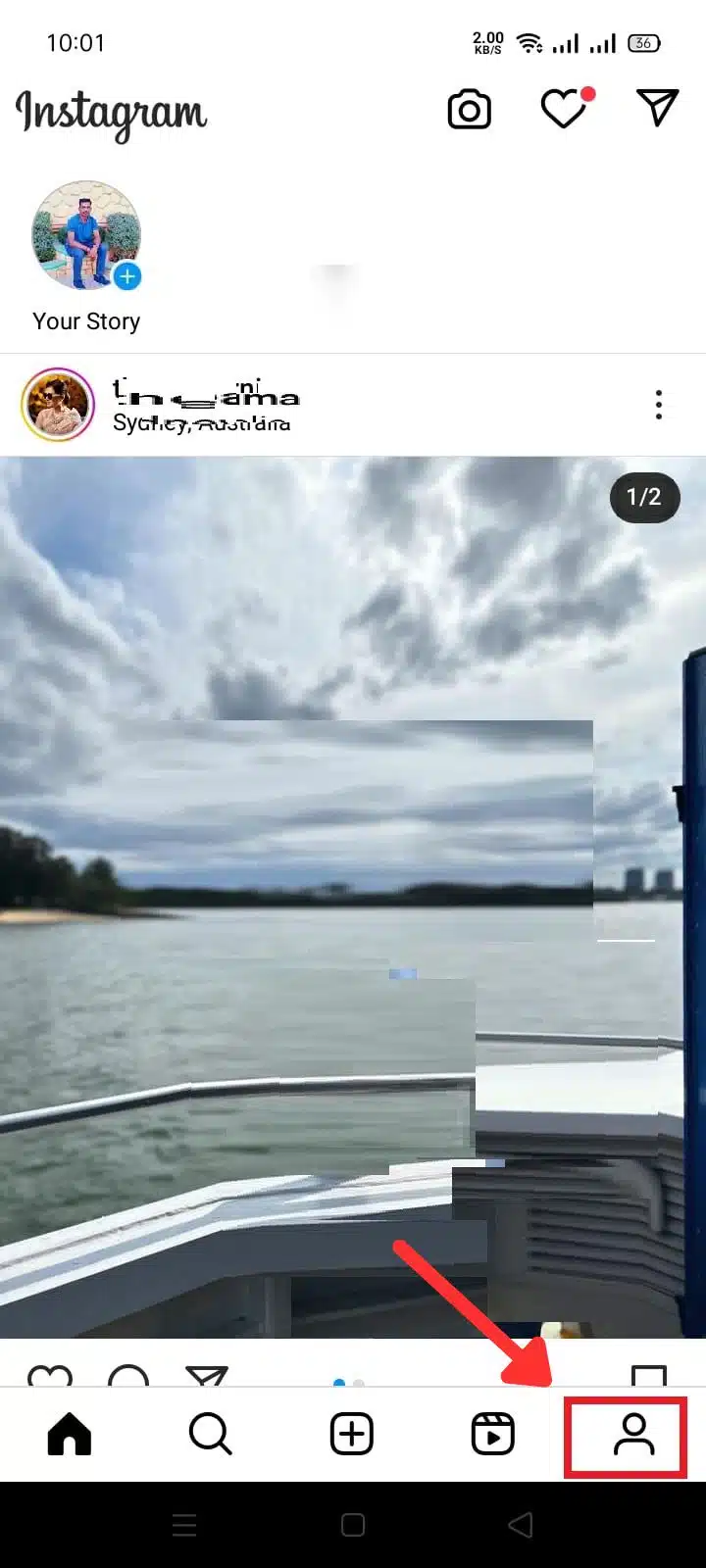
  • Enter your Instagram profile from your mobile device.
  • Press the ”+” button at the bottom of the screen.
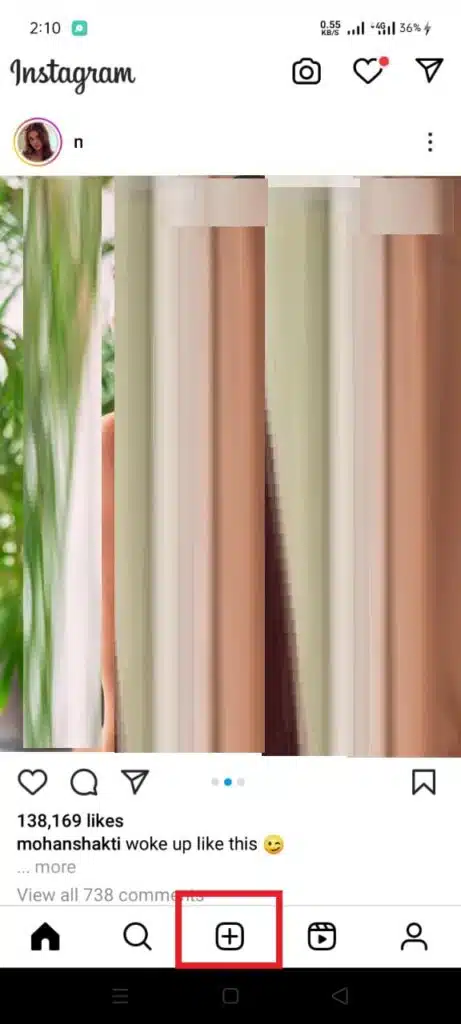
Press the ''+'' button
Press the ”+” button
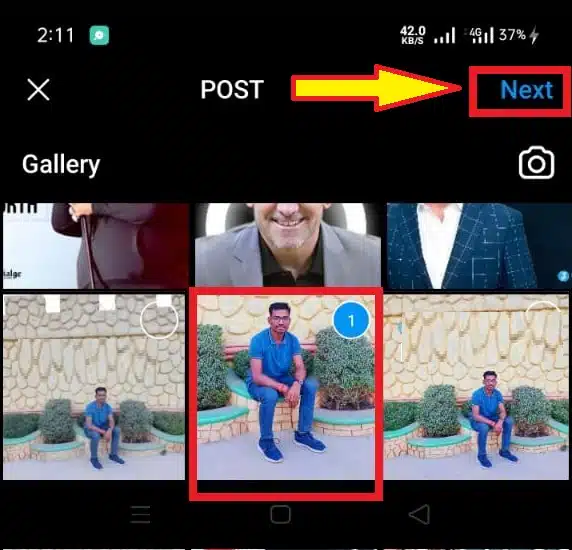
  • Go to the ”Gallery” section to find the video.
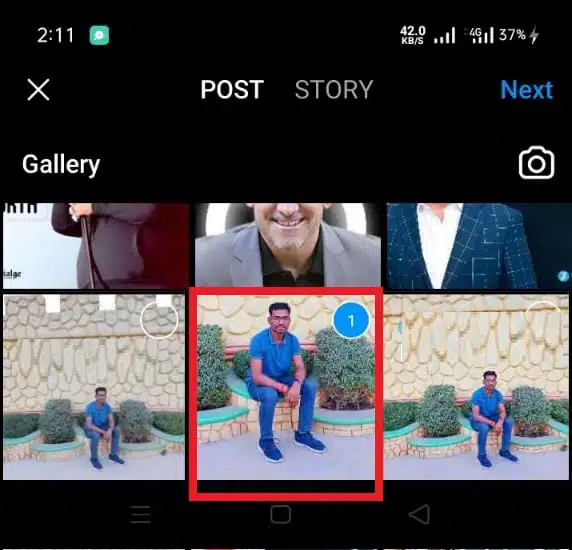
Find the video
Find the video
  • Select your video and press ”Next”.
Select your video and press Next
  • Now you can put a filter on the video, select the cover and add a title.
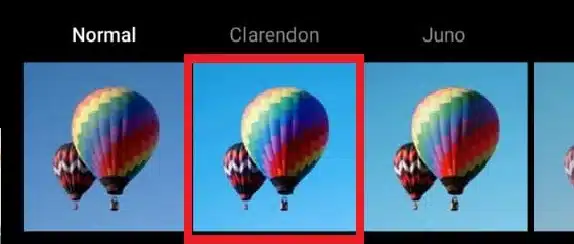
Now you can put a filter on the video
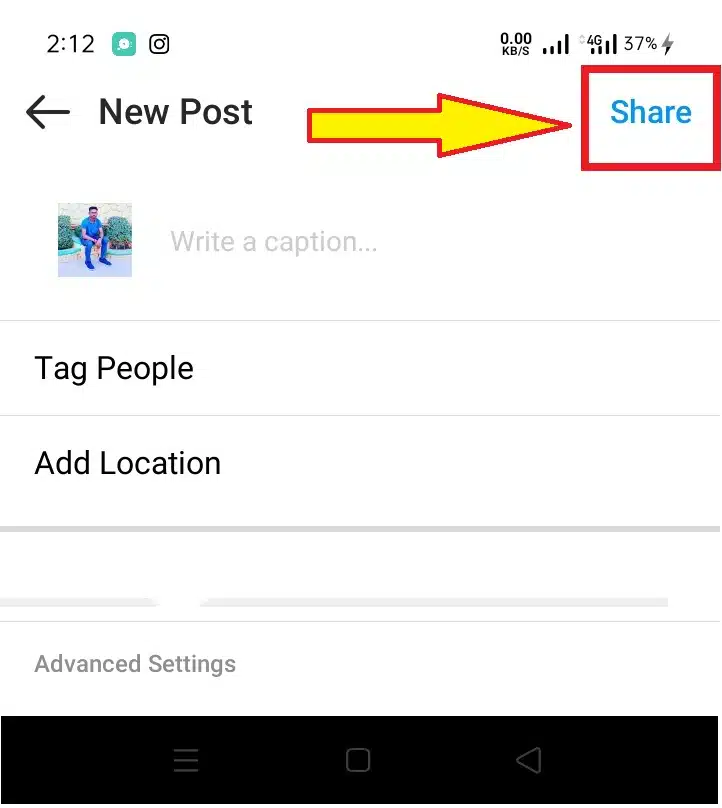
  • Hit post.
Share Post
Share Post

In this way, you will have published your video on your Instagram profile so any follower can view it.

If you want to share the video with your stories, you can do it directly from the video post in your feed by pressing the share icon and then on the story. With this option, you invite your users to enter your profile and watch the video from there.

Subscribe to Our Newsletter

Related Articles

Top Trending

Niragi vs Chishiya
Niragi vs. Chishiya: Why Chaos Will Always Lose to Logic [The Fatal Flaw]
Does Chishiya Die?
Does Chishiya Die? Why His Survival Strategy Was Flawless [Analysis]
Gold vs Bitcoin Investment
The Great Decoupling: Why Investors Are Choosing Bullion Over Blockchain in 2026
North Sea Wind Pact
The Hamburg Declaration: How the North Sea Wind Pact is Redrawing Europe’s Power Map
Tiny homes
Tiny Homes: A Solution to Homelessness or Poverty with Better Branding?

Fintech & Finance

Gold vs Bitcoin Investment
The Great Decoupling: Why Investors Are Choosing Bullion Over Blockchain in 2026
Why Customer Service is the Battleground for Neobanks in 2026
cryptocurrencies to watch in January 2026
10 Top Cryptocurrencies to Watch in January 2026
best travel credit cards for 2026
10 Best Travel Credit Cards for 2026 Adventures
Understanding Credit Utilization in the Algorithmic Age
What Is Credit Utilization: How Credit Utilization Is Calculated [Real Examples]

Sustainability & Living

Tiny homes
Tiny Homes: A Solution to Homelessness or Poverty with Better Branding?
Smart Windows The Tech Saving Energy in 2026 Skyscrapers
Smart Windows: The Tech Saving Energy in 2026 Skyscrapers
The Environmental Impact of Recycling Solar Panels
The Environmental Impact Of Recycling Solar Panels
Renewable Energy Trends
Top 10 Renewable Energy Trends Transforming the Power Sector in 2026
Eco-Friendly Building Materials
10 Top Trending Eco-Friendly Building Materials in 2026

GAMING

Esports Fatigue How Leagues Are reinventing Viewership for Gen Alpha
Esports Fatigue: How Leagues Are Reinventing Viewership For Gen Alpha
Exploring the Future of Online Gaming How New Platforms Are Innovating
Exploring the Future of Online Gaming: How New Platforms Are Innovating
The Economics of Play-to-Own How Blockchain Gaming Pivoted After the Crash
The Economics of "Play-to-Own": How Blockchain Gaming Pivoted After the Crash
Why AA Games Are Outperforming AAA Titles in Player Retention jpg
Why AA Games Are Outperforming AAA Titles in Player Retention
Sustainable Web3 Gaming Economics
Web3 Gaming Economics: Moving Beyond Ponzi Tokenomics

Business & Marketing

Billionaire Wealth Boom
Billionaire Wealth Boom: Why 2025 Was The Best Year In History For Billionaires
ESourcing Software The Complete Guide for Businesses
ESourcing Software: The Complete Guide for Businesses
The End of the Seat-Based License How AI Agents are Changing Pricing
The End of the "Seat-Based" License: How AI Agents are Changing Pricing
Best Citizenship by Investment Programs
The "Paper Ceiling": Why a Second Passport is No Longer a Luxury, But an Economic Survival Kit for the Global South
cryptocurrencies to watch in January 2026
10 Top Cryptocurrencies to Watch in January 2026

Technology & AI

zero-water data centers
The “Thirsty” Cloud: How 2026 Became the Year of Zero-Water Data Centers and Sustainable AI
The End of the Seat-Based License How AI Agents are Changing Pricing
The End of the "Seat-Based" License: How AI Agents are Changing Pricing
the Great AI Collapse
The Great AI Collapse: What the GPT-5.2 and Grokipedia Incident Actually Proves
green web hosting providers
10 Best Green Web Hosting Providers for 2026
Blockchain gas fees explained
Blockchain Gas Fees Explained: Why You Pay Them and How to Lower Transaction Costs

Fitness & Wellness

Mental Health First Aid for Managers
Mental Health First Aid: A Mandatory Skill for 2026 Managers
The Quiet Wellness Movement Reclaiming Mental Focus in the Hyper-Digital Era
The “Quiet Wellness” Movement: Reclaiming Mental Focus in the Hyper-Digital Era
Cognitive Optimization
Brain Health is the New Weight Loss: The Rise of Cognitive Optimization
The Analogue January Trend Why Gen Z is Ditching Screens for 30 Days
The "Analogue January" Trend: Why Gen Z is Ditching Screens for 30 Days
Gut Health Revolution The Smart Probiotic Tech Winning CES
Gut Health Revolution: The "Smart Probiotic" Tech Winning CES