Picking the right CRM often feels like trying to choose a new phone plan, doesn’t it? There are endless options, and every single company claims to have the “best features” or the latest tech. You might be worried about paying for a complex system that your team never uses, or conversely, picking something so simple that you outgrow it in six months.
Here is a number that might help you focus: for every $1 you spend on a CRM, the average return is $8.71, according to 2026 data from CRM.org. That means this isn’t just a cost; it’s an investment that pays you back almost nine times over. But that only happens if you choose the right one.
In this guide, I’m going to walk you through exactly how to choose a CRM in 2026. We will look at the new battle between flashy AI tools, like Salesforce’s Agentforce and HubSpot’s Breeze, and the core features that actually get the job done.
What is a CRM?
Think of a CRM (Customer Relationship Management) as the brain of your business. It is the central place where you store every client interaction, deal, and conversation. Instead of sticky notes or messy spreadsheets, everything lives in one organized digital headquarters.
A CRM handles the heavy lifting. It tracks your sales leads, logs your emails, and even reminds you when to call a client back. By 2025, reports showed that 91% of companies with more than 10 employees were already using one. Why? Because it stops leads from falling through the cracks.
Modern platforms connect with the tools you already use, like Gmail, Outlook, or Slack. This saves you from constantly switching tabs and ensures that if a customer emails you, your entire sales team can see it instantly.
Key Factors to Consider When Choosing a CRM in 2026
Selecting a CRM is a lot like buying a house. You need to look past the fresh coat of paint and check the foundation. What works for a massive enterprise will likely crush a small creative agency.
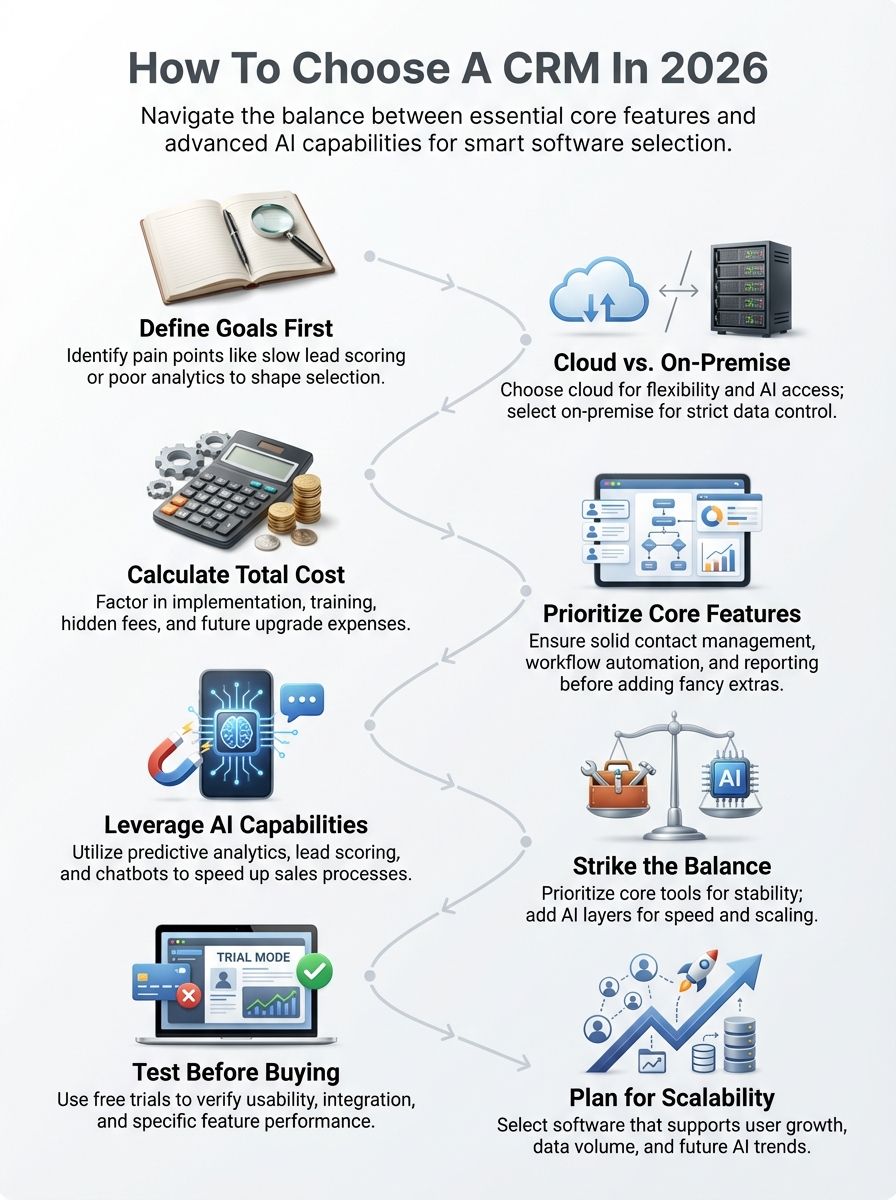
Define your business goals and pain points
Before you even look at software, you need to look at your team. What is currently broken? Maybe your sales reps are spending too much time entering data manually; reports from 2025 suggest reps spend only about 30% of their time actually selling. That is a huge problem that a CRM can fix.
Are you trying to scale your sales efforts or just organize your customer support tickets? If your goal is “Revenue Operations” (RevOps), aligning sales, marketing, and service, you will need a platform that supports all three.
“Set the course before you sail, not after you’re lost at sea.”
Write down your top three “pain points.” If you don’t, you risk buying a Ferrari when all you needed was a reliable pickup truck.
Decide on deployment: cloud-based vs. on-premise
Once you know your business objectives, you have to decide where this software lives. In 2026, this debate is largely settled for most businesses, with over 87% of companies choosing cloud-based solutions.
However, depending on your industry, you might still need to consider the pros and cons carefully.
| Cloud-Based CRM (SaaS) | On-Premise CRM |
|---|---|
|
|
Establish a budget and calculate the total cost of ownership
Here is the secret that vendors rarely tell you: the license fee is just the tip of the iceberg. A good rule of thumb from implementation experts at Avidly is the “60/40 rule.” You should budget about 40% of your first-year spend on the software license and 60% on implementation, training, and data migration.
For example, if you buy a Salesforce Enterprise license at roughly $165 per user/month, you must also budget for the consultant who sets it up. If you choose a simpler tool like Pipedrive or Zoho, your implementation costs might be lower, but they are never zero.
Watch out for hidden fees. These often include charges for extra data storage, “API call” limits (connecting to other apps), or premium support. Always ask for the “fully loaded” price before you sign.
Core Features to Look for in a CRM
It is easy to get distracted by shiny objects, but a CRM must do the basics perfectly. If it can’t manage your contacts efficiently, no amount of AI will save it.

Contact and lead management
This is the bread and butter of the system. You need a “360-degree view” of your customer. This means when you pull up a name, you see every email they opened, every call they made, and every product they bought.
Look for tools that offer “automatic enrichment.” For instance, HubSpot can often pull a contact’s job title and company revenue automatically just from their email address. This saves your team hours of boring typing.
Speed is critical in 2026. You should be able to assign a hot lead to a salesperson with a single click. If you are using no-code tools, you can even set rules to do this automatically based on the lead’s location or industry.
Workflow automation
Workflow automation is your secret weapon against busywork. Think of it as a digital assistant that handles the boring stuff. You can set up “Triggers and Actions”, for example, “If a customer signs a contract (Trigger), then send a welcome email and create a task for the onboarding team (Action).”
Tools like Zapier can connect your CRM to thousands of other apps if the built-in automation isn’t enough. The goal is to let your humans focus on being human, while the software handles the process.
Simple CRMs for small businesses often include pre-built automation recipes. This means you don’t need to hire a developer just to send an automated birthday email.
Reporting and analytics
You can’t improve what you don’t measure. Great CRM software gives you a dashboard that works like a car’s speedometer. You need to see metrics like “Pipeline Velocity” (how fast deals close) and “Customer Acquisition Cost” (CAC).
Imagine logging in on a Monday morning and seeing exactly which marketing campaign brought in the most revenue last month. That is the power of good analytics.
Be careful, though. Some platforms gate their best reporting tools behind expensive “Professional” or “Enterprise” tiers. Always check which reports are included in your specific plan.
Integration with existing tools
Your CRM cannot live on an island. It must play nicely with your other software. At a minimum, it needs a rock-solid integration with your email (Gmail/Outlook) and your calendar.
Beyond that, think about communication. Does it integrate with Slack or Microsoft Teams? Can you receive a notification in your team chat the second a VIP client visits your pricing page?
If you run an e-commerce store, integration with Shopify or WooCommerce is non-negotiable. Data syncing should be real-time, not something you have to upload manually at the end of the week.
The Role of AI in Modern CRMs
This is where things get exciting. In 2026, AI isn’t just a buzzword; it’s a teammate. The major players have all launched dedicated AI suites: Salesforce has Agentforce, and HubSpot has Breeze.
Predictive analytics and lead scoring
Old-school lead scoring required you to guess how many points to give a lead for opening an email. AI tools like Salesforce Einstein now do this for you. They analyze years of data to predict which leads have the highest “propensity to buy.”
This stops your sales team from chasing “wild goose chases.” The AI basically taps your rep on the shoulder and says, “Call Sarah first, she is ready to buy. Ignore Dave, he is just browsing.”
AI-powered automation and chatbots
We aren’t talking about those annoying chatbots from 2020 that got stuck in loops. Modern AI agents can hold full conversations, book meetings, and answer complex support questions 24/7. Intercom’s “Fin” and HubSpot’s chatbots can resolve up to 50% of support queries without a human ever touching the keyboard.
This allows your team to go home at 5 PM while the bot keeps working. It ensures your customers get instant answers, whether it is 2 PM or 2 AM.
Sentiment analysis for customer insights
Have you ever wondered if a sales call went well? AI tools integrated into CRMs can now “listen” to recorded calls and analyze the tone of voice. Platforms like Gong (often integrated with CRMs) can tell you if the customer sounded frustrated or excited.
This is a game-changer for coaching. A manager can filter for calls with “negative sentiment” to help train reps on how to handle objections better.
AI Capabilities vs. Core Features: Striking the Right Balance
So, do you need the Ferrari with the AI engine, or the reliable sedan? It comes down to your stage of growth.
When to prioritize core features
If you are a small business or a startup, focus on the core. You likely don’t have enough data for predictive AI to work effectively yet; AI needs thousands of data points to be smart. If you have 50 customers, an AI lead score won’t tell you much.
Focus on a CRM that is easy to use. Adoption is the biggest hurdle; if your team finds the software confusing, they won’t use it. Tools like Pipedrive or Monday CRM excel here because they are visual and intuitive.
When AI capabilities make the difference
If you are scaling fast or have a large volume of leads, AI becomes essential. When you have 10,000 leads coming in a month, no human can sort through them manually. That is when you need AI lead scoring to bubble the best ones to the top.
Similarly, for large customer service teams, AI agents can save massive amounts of money by deflecting simple tickets. If efficiency at scale is your goal, the extra cost for AI features is easily justified by the labor hours you save.
Steps to Evaluate and Select the Right CRM
Ready to shop? Follow this simple roadmap to avoid “buyer’s remorse.”
Shortlist vendors based on your requirements
Don’t just Google “best CRM.” Go to review sites like G2 or Capterra and filter by your company size. Read the 3-star reviews—they often tell the most honest story about what breaks or is annoying.
- For Small Biz: Check out HubSpot Starter, Zoho, or Pipedrive.
- For Mid-Market: Look at HubSpot Professional or Monday CRM.
- For Enterprise: Salesforce and Microsoft Dynamics are the heavyweights.
Test through demos and free trials
Never buy software without driving it first. Sign up for a free trial and, this is crucial, upload real data. Don’t just play with the fake “sample data.” You need to see how your actual messy customer list looks inside the system.
Ask your most skeptical sales rep to try it out. If they hate it during the trial, they will hate it even more when you force them to use it daily.
Consider scalability and future-proofing
Will this software still work when you double your revenue? Check the “API limits” and the cost of the next tier up. Moving CRMs is a painful process, so you want a tool that can grow with you for at least the next 3-5 years.
Look for “ecosystems.” Salesforce and HubSpot have massive marketplaces of third-party apps. This means if you need a specific niche tool later, someone has probably already built a plugin for it.
Common Mistakes to Avoid When Choosing a CRM
I have seen many companies fail at this. Here are the traps to avoid so you don’t become a statistic.
- Ignoring “Dirty Data”: If you import bad data (duplicates, old emails) into a new CRM, you just get a new, expensive mess. Clean your data before you migrate.
- Chasing “Vaporware”: Don’t buy a CRM based on a feature the sales rep says is “coming next quarter.” Buy it for what it does today.
- Forgetting Mobile: Your sales reps are on the road. If the mobile app is clunky or slow, they won’t update their deals.
- Underestimating Training: You can’t just send a login email and expect people to figure it out. Plan for at least 2-3 formal training sessions.
- Skipping the Pilot: For larger teams, run a 90-day pilot with a small group before rolling it out to everyone.
- Buying for the CEO, not the User: The system needs to work for the person entering the data, not just the person reading the reports.
- Over-customization: Don’t try to rewrite the software code immediately. Stick to standard features first to keep complexity low.
- Ignoring Support Costs: Check if phone support costs extra. When the system goes down on the last day of the quarter, you will want a phone number to call.
- Not defining “Success”: Decide what metrics prove the new CRM is working (e.g., “Calls logged increased by 20%”).
- Neglecting Security: Ensure the vendor is SOC 2 compliant, especially if you handle sensitive customer data.
Wrapping Up
Choosing a CRM in 2026 comes down to knowing yourself. If you are a nimble startup, grab a cloud-based tool with great core features and focus on speed. If you are a growing enterprise, lean into the AI capabilities like Agentforce or Breeze to help you scale without drowning in data.
Remember, the best CRM is simply the one your team actually uses. Start with a free trial, involve your team early, and focus on solving your specific pain points. You have got this!