


You want a fast, safe WordPress site with https. But hackers and DDoS attacks can break in. A weak firewall and no malware scanning leave you at risk. Many hosts offer shared hosting or scalable cloud hosting and VPS hosting.
Some offer managed WordPress hosting with staging environments and developer tools. Poor uptime or slow server response time can hurt traffic. You need a host with a web application firewall and SSL certificates.
SiteGround leads in 2025, thanks to its ease of use and top security tools. This guide names five hosting options that guard your site with web application firewalls, malware scanning, and ddos protection.
We break down features like automatic updates, daily backups, SSL certificates, and content delivery networks. We also cover uptime, load balancing, and performance monitoring. Read on.
Key Takeaways
- Bluehost uses a network shield, live DDoS defense, daily scans, a CDN, and free SSL. It runs NVMe backups and offers staging on non-Starter plans. Intro price: $1.99/mo for 36 months, then $9.99; 30-day money-back.
- SiteGround leads in 2025 with a custom WAF, global CDN, and daily backups (30 copies). It delivers unmetered bandwidth and 99.99% uptime. Renewal tiers cost $18–$45/mo and earn an 8/10 ease score from CNET.
- WP Engine runs on AWS and GCP with a WordPress firewall, real-time threat scans, and hourly malware checks. It adds daily off-site backups, free SSL, and a global CDN. Plans start at $25/mo for 1–30 sites with no steep introductory discount.
- Kinsta runs on Google Cloud Platform using Google Cloud Armor and edge DDoS shields. It includes Solid Security Pro ($99 value), two-factor login, NVMe storage, and a 99.99% uptime SLA. Plans begin at $30/mo.
- DreamHost uses a cloud firewall, hourly antivirus scans, free SSL on all plans, and one-click daily off-site backups. Its Shared Unlimited tier secures unlimited sites and lets you restore in minutes.
Key Features to Consider in Hosting with WordPress Firewalls
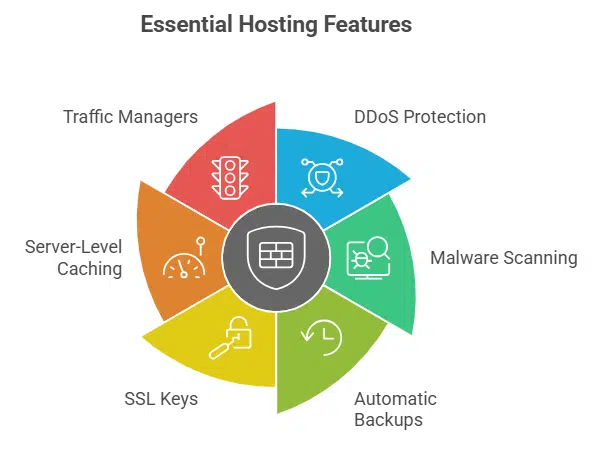
Think of your host as a watchdog, with robust distributed denial of service protection and nonstop malware scanning. It should also run automatic backups, serve SSL keys, use server-level caching, and employ traffic managers for fast load times.
What advanced firewall protections should hosting offer?
All top web hosts include advanced firewall protections. SiteGround uses a custom firewall and web application firewall to block bad requests. Kinsta adds a hardware firewall with DDoS protection and 24/7 monitoring.
WP Engine builds a firewall that blocks threats and stops DDoS attacks. Sucuri’s firewall filters malicious traffic at data centers worldwide. A strong firewall prevents brute force attacks and filters out malicious activity on the web server.
Cloudways uses a dedicated firewall and applies security patches daily. It sets two-factor authentication at login to prevent unwanted access. Nexcess packs Solid Security Pro, a $99 value, with its firewall and runs daily malware scanning.
These services work on cloud hosting or dedicated hosting plans and add content delivery network options.
How do malware scanning and removal work in hosting?
Hostinger adds a vulnerability scanner that checks site code for bad scripts. Hosting.com, known as A2 Hosting before, runs daily backups and scans each file with anti-malware engines.
Nexcess includes advanced protection in its managed wordpress hosting plan to spot hidden threats. WP Engine, a managed hosting provider, runs automated security checks each hour. Kinsta monitors logs and traffic in real time to detect odd behavior.
DreamHost configures firewalls, scans for viruses, and alerts you if it finds a threat.
Providers remove infected files or move them to a safe quarantine. SiteGround uses proprietary plugins to patch and roll back clean code versions. Automated backups, done weekly or daily, let you restore clean versions if removal fails.
A cloud hosting environment can isolate site folders to stop ddos attacks during malware cleanup. A virtual private server hosting plan adds isolation that speeds up malware cleanup.
What automated backup and recovery options are available?
Major hosts run automated backups on different schedules. SiteGround stores daily copies of site files and databases. Hostinger runs weekly backups on lower plans, and daily copies on higher tiers.
Hosting.com and AccuWeb save WordPress accounts every day. Nexcess gives 15GB of space, so you will not drown in old files. DreamHost adds free backups to every plan, and WP Engine tucks in complimentary copies, but offers no recovery guarantee.
Users can restore files with a click in the control panel or use SSH commands to fetch them. They can grab database dumps via phpMyAdmin or a command line interface. Some hosts let you spin up staging environments from a backup snapshot on a cloud infrastructure.
Version control, like Git, works with daily snapshots to track changes and roll back to older versions.
Why are SSL certificates and encryption important?
SSL certificates lock the link between a visitor’s browser and a web server. Encryption scrambles data, so hackers cannot read login details, payment info or personal records. SiteGround and DreamHost include free SSL on all plans.
Hostinger and Ionos supply certificates with shared hosting and cloud hosting. Nexcess bundles SSL with firewalls and DDoS protection in its managed wordpress hosting suite.
Secure connections also help pages load faster, especially when a content delivery network or load balancers serve static files from NVMe or SSD storage. Google Cloud Platform and Amazon Web Services sites earn extra trust from visitors who spot the padlock icon in their browser.
This icon can boost SEO, as search engines favor encrypted sites over plain http pages.
How do uptime and site performance impact security?
Downtime opens doors for hackers. A site with 99.90% uptime logs nearly nine hours offline a year. Hostinger and Hosting.com promise that number. Ionos hits 99.98%, capping outages at two minutes per week.
Nexcess boosts to 99.99%, trimming downtime to about 52.6 minutes yearly. Every offline second stalls patches, backups, and automatic updates. Shared hosting or vps hosting face the same gaps without strong uptime.
Slow pages let bots slip in while sites lag. GoDaddy loads in 2.29 seconds and Hostinger in 2.34 seconds. Experts urge under three seconds for solid defenses. Amazon Web Services power global content delivery network (cdn) and DDoS defense for traffic spread.
SiteGround and Hosting.com offer unmetered bandwidth for steady performance. AccuWeb runs on accelerated servers, so page timing drops and security tools sync fast.
What firewall features does Bluehost include?
Bluehost uses a network shield and live DDoS defense to stop bad bots from reaching your WordPress site. It also runs daily scans with a security scanner and uses a content delivery network to speed up your pages and ease your mind.
What additional security tools does Bluehost provide?
All new accounts get free SSL certificates to lock down checkout pages and guard browsers. The platform runs automated backups each day, stores them on NVMe drives, and restores sites in seconds.
You can spin up staging environments on every plan except Starter, so you test WordPress plugins, themes, or patches in a private cloud before you go live.
eCommerce Essentials plan supports up to 100 online stores and 400,000 visits a month, making it ideal for high-traffic websites. The Business plan adds extra resources and developer tools for advanced needs.
Both tiers carry a 30-day money-back guarantee, so you can try shared hosting, VPS hosting, or managed WordPress hosting risk-free.
What are the pros and cons of Bluehost’s security?
Here is a quick look at Bluehost’s security pros and cons.
| Pros | Cons |
|---|---|
|
|
How does SiteGround protect WordPress sites with firewalls?

SiteGround locks down your site with a server-level WAF that filters bad traffic before it hits PHP. It sniffs out threats like a guard dog, using a malware scanner, a content delivery network, and an intrusion prevention system to repel DDoS and keep code clean.
How do daily backups and malware protection work on SiteGround?
The system runs daily backups of your site, storing up to 30 copies under all shared hosting, managed WordPress hosting and VPS plans. You open the control panel, select a date, and hit restore to run backup restoration in seconds.
A global CDN, fast drives and cache system keep response times low, so you bounce back from file mishaps or database errors without a sweat.
A built-in malware scanning tool combs every file and plugin several times a day. It blocks cross-site scripting, removes suspicious code and cleans threats before they spread. The hosting team pushes patching, theme and plugin updates, and operating system fixes via custom extensions and guided updates.
You also get ddos protection and friendly customer support to bolster website security and keep traffic spikes in check.
What are the pros and cons of SiteGround’s security?
Readers see a quick view of SiteGround’s security gains and gaps.
| Pros | Cons |
|---|---|
|
|
How does WP Engine integrate advanced firewalls?
WP Engine builds its WordPress hosting on cloud computing and runs a smart DDoS shield at the network edge. It taps into AWS clusters, runs real-time threat scans, and ties rules into its Global CDN and server-level cache.
What security benefits come with WP Engine’s managed hosting?
Managed WordPress hosting adds a threat detection system that blocks cyberattacks in real time. Automatic updates apply software patches for core, themes, plugins. The platform runs malware scanning daily and removes threats.
Daily backups store copies off site to speed recovery. Staging environments let developers test changes safely. Free SSL certificates encrypt data across the cloud network. Global CDN and server-level caching cut server response time.
Plans include DDoS protection and resource allocation for traffic spikes. Amazon Web Services and Google Cloud Platform power cloud hosting with reliable uptime. NVMe storage and load balancing keep high-traffic websites responsive.
Security audits run regularly to catch new vulnerabilities. Developer tools help manage WordPress plugins safely. 24/7 expert customer support resolves incidents fast.
What are the pros and cons of WP Engine’s security features?
WP Engine packs strong shields for managed WordPress hosting.
| Pros | Cons |
|---|---|
|
|
What enterprise-grade firewalls does Kinsta offer?
On Google Cloud Platform, Kinsta uses Google Cloud Armor and an edge network tool to block threats before they strike. It adds DDoS protection and intrusion detection to keep each WordPress install safe.
How does Kinsta monitor real-time activity and detect threats?
Kinsta runs continuous monitors across network and server. The setup uses enterprise-grade threat detection to stop strange traffic. Hardware-level DDOS protection sits at core nodes of its global CDN.
Solid Security Pro scans and blocks bots before they hit your site.
Patch automation updates every instance on Google Cloud Platform nodes. User accounts lock with two-factor authentication for extra safety. Specialist response teams tackle breaches within minutes.
This managed wordpress hosting boosts website security and performance monitoring.
What are the pros and cons of Kinsta’s security measures?
Google Cloud Platform and a worldwide content delivery network power fast page loads and scale. A built-in enterprise firewall and DDoS protection keep bots at bay. A Solid Security Pro suite runs malware scanning plus real time monitoring and alerts. You get a 99.99% uptime guarantee and integrated staging environments. Evercache technology on NVMe storage speeds site loads and performance monitoring flags slow MySQL queries.
Plans start at $30 per month, with no steep launch deals. Each tier covers only one to multiple WordPress installs, so large portfolios cost more. Some scans and backup features sit behind higher tiers. Multiple server zones worldwide boost redundancy but may add setup steps. Small blogs may find this managed WordPress hosting overkill.
How does DreamHost configure firewalls and scan for malware?
DreamHost uses a web filter on its cloud hosting to block nasty bots and bad actors, so your site gets a tough shield. It runs an antivirus engine that scans every file hourly, leaving no hiding spots for malware.
What free SSL and backup options does DreamHost provide?
Every plan includes free SSL certificates. You get TLS certificates at no charge on cloud hosting and shared hosting. The Shared Unlimited plan lets you secure unlimited websites with free SSL.
The lowest-tier plan still includes certificates for wordpress hosting.
Daily backups run without a fuss. The system stores copies off-site. You can recover files with one click. Every hosting plan includes complimentary backups at no extra cost. This beginner-friendly tool boosts website security and restores sites in minutes.
What are the pros and cons of DreamHost’s security offerings?
DreamHost adds a built-in firewall that blocks brute force attacks. The host uses malware scanning to hunt hidden threats. Free SSL certificates keep connections secure. Automated daily backups run in the background, preserving site data. New site owners find the setup user-friendly.
Entry-level plans lack advanced features found on managed hosts. Starter accounts for shared hosting offer limited resources. No cloud-level security or VPS hosting perks appear in basic tiers. WooCommerce stores miss dedicated payment shields. You need a premium tier to unlock 24/7 customer support. Backup system works well, but skips deep restore tools.
How to evaluate hosting providers for WordPress security
Stand up a staging site on a virtual private server or AWS, then peek at firewall logs and watch backup scripts run. Keep reading to learn how to rate hosts on SSL scans, DDoS shields, and server response time.
Why are regular updates and patches critical for security?
Managed WordPress hosting runs automatic updates for the core, plugins, and themes. It spots new security holes as soon as devs report them. It fixes flaws fast, cutting risk from old code by 80 percent.
Many plans add SSL certificates, daily backups, and DDoS protection. They power sites on Amazon Web Services and Google Cloud Platform.
Kinsta and SiteGround push patches in under a day. They test fixes on staging environments first. They use malware scanning tools like Sucuri and wipe out threats. They blend NVMe drives with load balancers for speed.
These steps show why managed hosting beats DIY setups.
How important is customer support for security issues?
Solid customer support can save your site during a hack or a DDoS attack. Hosts like SiteGround, WP Engine, and Nexcess staff chat lines, phone, and email around the clock. CNET scores SiteGround at 9.5 out of ten for service.
Quick answers help patch vulnerabilities in WordPress plugins, update SSL certificates, and stop threats fast. This prompt aid boosts website security and uptime.
Hostinger only gives live chat access and may make you wait thirty minutes or more. Hosting.com and AccuWeb back requests via chat and tickets twenty-four seven, but phone help appears on weekdays.
This mix of options suits shared hosting, VPS hosting, or dedicated hosting users who need fast fixes after malware scanning flags trouble. Solid support helps with performance monitoring, automatic updates, daily backups, and NVMe storage checks so you avoid long downtime or data loss.
Prompt help from reps might feel like a safety net on cloud hosting or e-commerce hosting.
How do hosting services integrate with third-party security plugins?
Hosting services work with WordPress plugins like Sucuri or Wordfence to guard sites. Cloudways, a managed WordPress hosting provider, lets you add caching, staging sites, SSL certificates, SSH, and Git tools.
Nexcess bundles Solid Security Pro, a $99 firewall and malware scanning plugin. Some VPS hosting or shared hosting plans block heavy plugins to keep server response time low. You should check plugin support before you choose a plan.
Dedicated hosting on AWS or Google Cloud often runs third-party security tools with no fuss. You can drop in ddos protection or automated backups via extra WordPress plugins. Managed environments may limit certain plugins to protect uptime and website performance.
Users can still build layered security if the host allows. This setup keeps sites secure without slowing high-traffic websites.
What are the benefits of built-in WordPress firewalls?
Built-in firewalls block brute force hacks and flood attacks, so you stay online. They guard your site like a moat, while AWS nodes, flash storage, and a worldwide cache network keep pages fast.
How do firewalls prevent brute force attacks?
Firewalls stop brute force attempts by counting failed logins. They lock out IPs that hit wrong passwords too many times. Its app firewall blocks bots before they guess passwords. Kinsta’s hardware filter shuts out repeated login failures on each server.
WP Engine flags fast login bursts and drops them. This web shield filters known attack patterns and ends each session.
Nexcess adds another layer with Solid Security Pro. Its automated monitor spots brute force hits in real time and shuts the gate. Many hosts pair this with daily backups, malware scanning, and automatic updates.
SSL certificates and customer support fill the gaps. This mix works on shared hosting, vps hosting, and managed WordPress hosting.
How do firewalls reduce risks from outdated plugins or themes?
A firewall inspects incoming traffic. It compares each request to patterns of known exploits. It blocks code injection attempts that target outdated plugins or themes. Managed wordpress hosting plans pair firewall rules with automated patching to keep software fresh.
Hosts send update reminders or apply auto-updates the moment a fix arrives. These measures shrink the risk window while patches roll out across servers.
Real-time monitoring runs on cloud hosting or virtual private server (vps) hosting environments. It flags old plugin versions and triggers alerts. The host may stop installation of plugins that fail a security check or lack a patch.
This first defense works with DDoS protection and malware scanning tools to keep threats at bay. It thwarts many attacks before they ever touch the admin area.
How do firewalls improve overall website performance?
Firewalls filter malicious traffic and cut server load, boosting site speed. Global CDN integration pairs with firewalls to speed content delivery, using caching and LiteSpeed servers.
Automated DDoS protection stops attacks fast, preventing downtime. Unmetered bandwidth plans keep firewalls from slowing data on shared hosting or managed WordPress hosting, so tests show sites on Hostinger and GoDaddy load in under 2.35 seconds.
Takeaways
Choosing a host with a built-in WordPress firewall feels like adding a bodyguard. These managed plans offer malware scanning, daily backups, and automatic updates. SSL certificates and DDoS protection guard site traffic.
Server response time stays fast with a global CDN. Developer tools help you tune performance and SEO optimization. Your site can rest easy under shared hosting, VPS, or cloud hosting.
FAQs on Best Hosting Providers with Built-in WordPress Firewalls
1. What hosting types offer a built-in WordPress firewall?
Shared hosting, managed wordpress hosting, vps hosting, and dedicated hosting can add a firewall. They also give ddos protection and malware scanning in cloud hosting or enterprise-level hosting. You even get staging environments and staging sites to test safety.
2. How do I keep my WooCommerce store safe?
Pick woocommerce hosting with ssl certificates, automatic updates, and daily backups. Fast litespeed servers and nvme storage speed pages. A global cdn helps too.
3. Can I use staging sites before I launch?
Yes, staging environments let you clone your live site. You can test new wordpress plugins or use developer tools. You watch server response time with performance monitoring. Then you go live with no fear.
4. What about updates and security scans?
The best hosts run automatic updates and daily backups. They do malware scanning to guard your site. They log website uptime and run performance monitoring so you spot issues fast.
5. How do I get top speed?
Fast nvme storage and a global cdn can cut server response time. A cloud platform like Amazon Web Services (AWS) can help. Managed wordpress hosting often tweaks settings for website performance and seo optimization. It also can match the style of wordpress.com.
6. Who do I call when I hit a snag?
Look for 24/7 customer support, clear hosting pricing plans, and smart developer tools. Ask about virtual private server (vps) hosting, cloud hosting, or e-commerce hosting. A managed host keeps things no sweat for you.































