

Are you considering investing in the all-new Google Pixel Tablet? The decision can be hard, with many factors to consider before pulling the trigger. Fear not – I’ve got you covered on the topic of Google Pixel Tablet Review!
I spent hours researching and testing this tablet and have put together what you need to know about its design, performance, features, and hardware capabilities so that your purchase is informed.
So if you are looking for a comprehensive review of the world’s first Google-made tablet – The New Google Pixel Tablet – then check out what we can tell you below!
- The Google Pixel Tablet has a 10.95-inch HD screen with thin bezels for optimum viewing. It runs on a powerful Tensor G2 chipset that ensures smooth performance and speedy multitasking operations.
- It can capture high-quality images using 8MP rear and 8MP front cameras and features like Magic Eraser for photo editing.
- Its docking capability allows the device to transform into a smart display and offers an enhanced audio experience via additional wireless speakers.
- The Google Pixel retails at $499 (USD) but provides an abundance of features making it worth the value
Google Pixel Tablet Design and Display
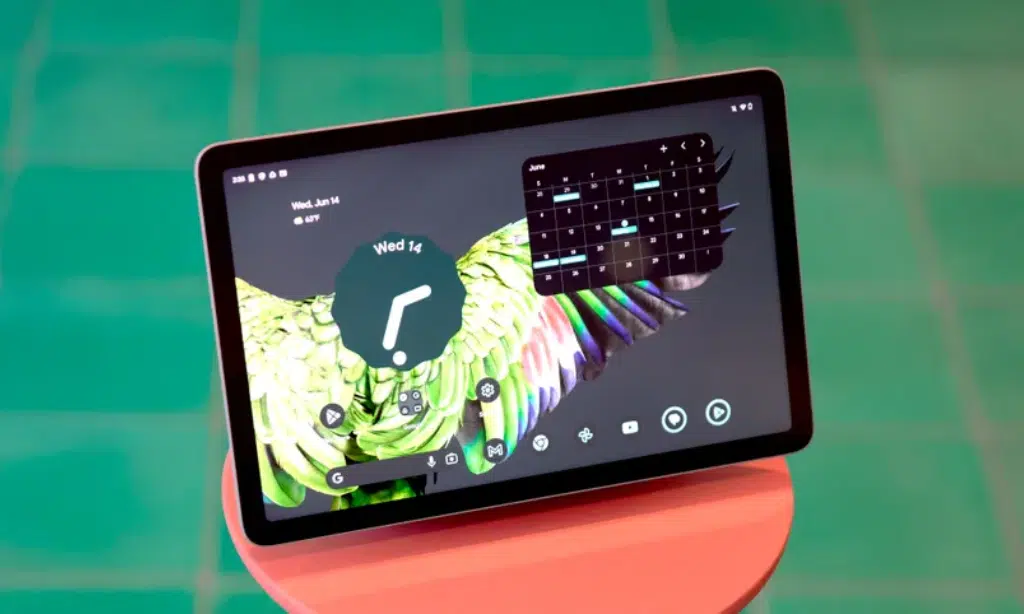
Personally, I think it comes with a simple, sleek design featuring an 11-inch HD screen along with thin bezels.
Simple Design with a 10.95 Inch Screen
The Google Pixel tablet comes with a sleek and lightweight design for optimal portability. It measures 10.95 inches diagonally, making it easy to fit into any carry bag or backpack. Its thin bezels help to maximize viewing area while keeping the device’s dimensions small.
This makes the perfect device for watching videos, browsing your favorite websites, or playing immersive games without having to feel cumbersomely large in your hands during regular usage.
The slim aluminum enclosure is further reinforced with nano-ceramic coating, which provides an ergonomic grip when carrying around in various places like on train rides or by simply using one hand.
I would love to thank its light weight of just 493 grams, it can easily slip into any desired pocket, whereas one could even forget that there’s something inside. All these features come together from the Google Pixel Tablet’s high-quality display featuring Full HD resolution and 500nits brightness making visuals crystal clear and vivid beyond deductions.
Thin Bezels
The Google Pixel Tablet has thin bezels measuring only half-inch thick on all sides of the device. They are designed using rounded edges, giving it a classic look familiar to other Google products.
The thin frame of the bezels helps create space for more immersive viewing and makes interacting with the 11-inch screen even easier. It also allows you to place your thumb right near the edges without obstructing any part of the display for comfortable use while holding it in one hand or keeping it in portrait mode.
Such slim borders create an almost edgeless touch experience, which is highly attractive to users who prefer scrolling through pages with minimal obstruction from the bordering outlines of their devices.
Google Pixel Tablet Performance
[Video Credits @Marques Brownlee]
Powered by a Tensor G2 chipset, the performance of this device is smooth and allows for efficient browsing.
Powered by Tensor G2 Chipset
The Google Pixel Tablet is equipped with a custom-designed Tensor G2 chipset. This state-of-the-art piece of technology has been designed specifically for the tablet and delivers high performance, significantly boosting speed and machine learning capabilities by up to 35%.
With this next-generation processor, I experienced faster navigation and smoother multitasking processes. The sheer power of the Tensor G2 chip, along with its numerous advantages, makes for an incredible user experience on the Pixel Tablet – meaning tasks are completed faster and more efficiently than ever before!
Smooth Performance
The Google Pixel Tablet lives up to its reputation for smooth performance. Powered by the Tensor G2 processor, it runs seamlessly and allows you to accomplish tasks quickly without any lags.
Browsing, streaming videos on YouTube, or playing a game are high-quality experiences without buffering delays. The reviews speak volumes about the reliability of this tablet’s smooth performance no matter the task at hand and even in docked mode with smart displays and charging stations.
The fact that such large files do not seem to faze this device adds to its impressive features, ensuring consistent, top-notch results over time when other products tend to suffer in time after multiple updates.
Browsing Capabilities
The Google Pixel Tablet features a powerful Tensor G2 chipset which delivers optimized browsing capabilities. I found no issues there. Whether you’re visiting a web page, reading an article or book, streaming video content, or managing multiple tasks with the split-screen functionality – it offers a smooth and trouble-free performance.
Compared to some other tablets, the vertical screen space seems slightly cramped in landscape mode for web browsing; however, when switching to portrait orientation, it provides ample viewing room for comfortable reading experiences.
Google Pixel Tablet Camera
The Google Pixel Tablet features an 8MP rear and 8MP front camera, allowing me to take stunning pictures with vibrant colors and sharp details.
Camera Capabilities
The Google Pixel Tablet takes pictures like a pro. It’s equipped with two 8MP cameras – one on the front and one on the back. The rear camera has an ultra-wide 84° field of view that captures three times more content, perfect for landscapes or group shots.
The fixed-focus feature ensures clarity without worrying about setting up focus settings every time you take a photo. With advanced image processing capabilities, photos look crystal clear even in low lighting conditions.
Google also added a special camera feature called “Magic Eraser,” which lets you edit out sections of your photos with ease so images look pristine without any editing expertise needed! Video callers can also enjoy natural-looking lighting during conversations since the pixel tablet adjusts accordingly!
For photography enthusiasts wanting to capture night scenes, there’s an impressive night vision camera that allows photographers to shoot amazing evening and nighttime shots as well as get closeup details in bright light conditions during daytime hours.
Quality of Photos
The Google Pixel Tablet is renowned for its ability to take high-quality photos and utilize excellent photo editing capabilities. With features such as the Magic Eraser, it’s easy to erase undesired elements from an image with just one tap.
The Photo Unblur tool also allows you to enhance blurry images or videos taken in low-light settings. Additionally, the advanced photo editing tools make it simpler than ever to manipulate your photos like a pro.
From blurring effects to sharpening items, everything is much easier with dedicated sliders right inside the app for quick adjustments of contrast, brightness, and other aspects of an image.
In addition, the split screen function on the tablet improves multitasking efficiency while working on two different processes simultaneously.- This lets users switch between functions quickly in order to speed up their workflow when post-processing: whether that means resizing images or adding text – they can do this seamlessly without hindering performance or losing quality. If you’re interested, then read Magch review
Google Pixel Tablet Features
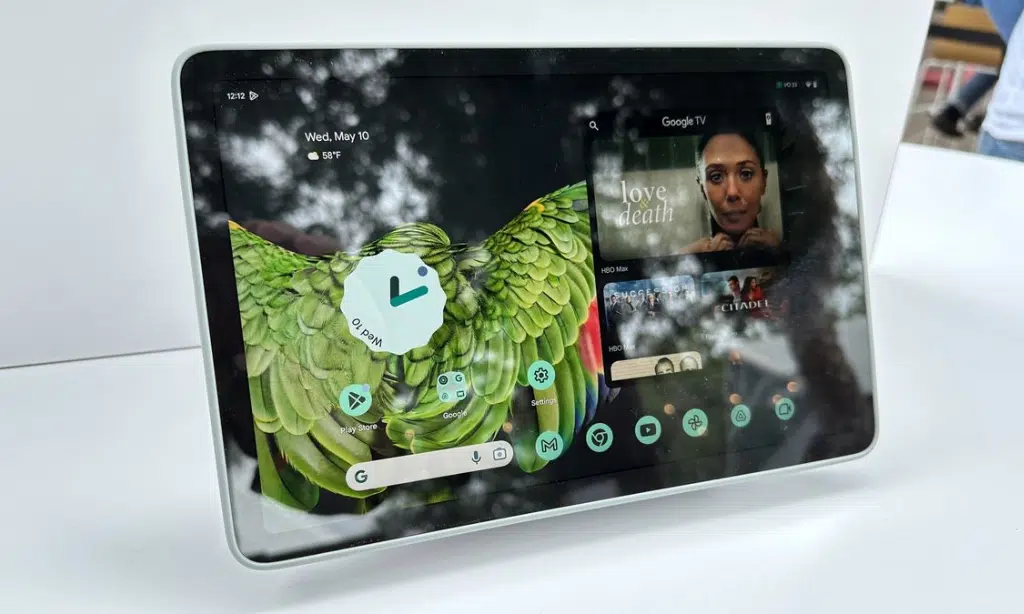
The Pixel Tablet offers integration with Google Nest Hub, allowing you to connect it with a larger smart display. In addition, it also has dockable capabilities and great speakers for an enhanced audio-visual experience.
| Feature | Google Pixel Tablet |
|---|---|
| Screen Size | 10.95 inches diagonally |
| Display Resolution | 2650×1600 pixels (Full HD) |
| Display Brightness | 500 nits |
| Build Material | Slim aluminum with nano-ceramic coating |
| Weight | 493 grams |
| Processor | Tensor G2 Chipset |
| Rear Camera | 8MP with ultra-wide 84° field of view |
| Front Camera | 8MP |
Table: Google Pixel Tablet Features
Integration with Smart Display
The Google Pixel Tablet makes it easy to combine your digital and physical life with seamless integration of the device’s intelligent assistance. With its personalized help, you can pair any number of devices—like Pixel smartphones or other supported devices—and easily multitask through its powerful split-screen mode.
And since it features a smart home docking station that turns the tablet into a smart display, you get an enhanced experience by making use of voice commands. It offers many convenient functions like personalized assistance, device pairing, multi-window capability, interactive display, and effortless multitasking – so everything runs faster and smoother even when undertaking complicated tasks.
Docking Capabilities
The Google Pixel Tablet allows you to enhance your tablet experience by taking advantage of its docking capabilities. When placed on its charging dock, the Pixel Tablet can enter Hub Mode.
This mode turns your tablet into a smart display with features like a digital photo frame and smart home controls, allowing you to take control of all your connected devices right from the table screen.
Plus, when docked and locked in place, the tablet will also offer hands-free help from Google Assistant if needed – meaning fewer distractions for multitasking. The pixel tablet’s dock offers even more powerful speakers than those found inside the device itself; this provides users with room-filling sound quality and seamless control over their compatible smart home appliances too.
Speakers
The Google Pixel Tablet comes with a unique speaker dock that enhances its audio output. This feature is one of the most significant differentiators as compared to other tablets in the market, which generally come with only embedded speakers.
The Pixel tablet’s speaker system goes beyond – not just having improved bass, midrange, and treble ranges but also providing wireless connectivity for enhanced user experience.
You can easily connect your own Bluetooth devices, such as headphones or earphones, for the best sound quality without any additional setup hassle. Furthermore, you can enjoy complete integration with existing smart displays, enabling streaming of music from apps directly through these speakers, ensuring a powerful home entertainment experience.
Google Pixel Tablet Price and Release Date
The pricing information and release date of the Pixel Tab are yet to be announced, so stay tuned for further updates!
Pricing Information
The Google Pixel Tablet is available at an affordable starting price of $499. The device comes with three color options – Hazel, Porcelain, and Rose – so you can pick the option that best suits your style.
| Storage | Price (USD) |
|---|---|
| 128GB | $499 |
| 256GB | $599 |
Table: Google Pixel Tablet Pricing
Additionally, you have up until December 15th to activate your tablet in order for your savings. After this date, any unclaimed units will go back on sale at full-priced offers, so don’t miss out on this great deal!
Release Date
The Google Pixel Tablet was officially launched on May 10, 2023, during the virtual event at Google I/O for the year and was released just about a month later, on June 20, 2023.
Not only does this mean rapid turnaround time in between announcements and market releases, but it also means a considerably high level of traction with eager fans who either preordered or scrambled to secure one when it dropped on release day.
Fans had anticipated much from this device, and they did not have to wait long before getting their hands on them either!
Google Pixel Tablet Battery Life
I am so happy with the Li-Po 7020 mAh non-removable battery. Boasting a battery life of up to 12 hours, the Google Pixel Tablet provides great longevity for those who are on the go.
Battery Performance
The Google Pixel Tablet’s battery life has been praised, and it certainly shows. One of its standout features is the ability to go all day long on a full charge, making it great for those who are often busy or out and about.
To recharge this device from 0-100%, you can use the included charger, which only takes 2 hours and 40 minutes. However, if you get yourself a dock, then the charging time decreases significantly – down to just 2 hours! Compared with other devices in its class, the Pixel tablet’s battery endurance sits somewhere between them, providing solid performance throughout its lifespan.
With these impressive specs, there won’t be any need for worry over needing to plug in your tablet during your workday either, as there should always be enough juice to power through until home again!
Longevity
The Google Pixel Tablet offers an impressive battery life, My thanks go to its modern battery protection system. This feature prevents the device from fully charging and automatically limits the charging process to about 70-80%, ensuring that it remains in optimal health over time.
Moreover, this system even allows for heavy usage without losing too much life expectancy as compared to regular devices. What’s more, while the external dock charges up to 90% by default – a custom setting can also be enabled in order for users to want full charge at all times. It is important to note that deep discharging of batteries may cause faster degradation, so prudent users ought to take care when considering recharging their tablets often or leaving them on the charger all night long.
All in all, thanks mainly to its advanced battery optimization techniques and comprehensive protection system combined with good design practices – The Google Pixel Tablet scores high marks when it comes to extending its overall lifespan and performance over time, enabling end users the great value of investment made.
Google Pixel Tablet Operating System
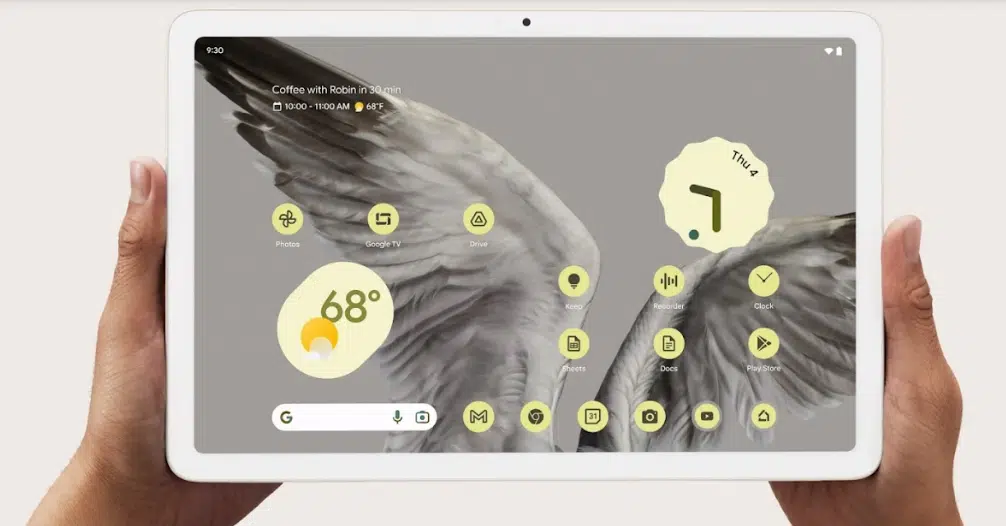
The tablet runs a full version of Android with all the latest updates, providing lots of features and functionality that users are expecting.
Android OS
The Android OS is one of the most popular operating systems used in a variety of devices, including smartphones and tablets. Google’s latest smartphone operating system is its 13th version, Android 13.
I found this powerful software offers an intuitive user interface and seamless app performance on the Google Pixel Tablet device. It provides users with enhanced features to enjoy a faster browsing experience with improved security patches.
Moreover, it allows integration between different smart home appliances, such as televisions or speakers, for better cross-communication. Thanks to its simple design language, extremely well-thought-out APIs & SDKs (software development kits), and timely updates from Google itself – users can trust their activities are safeguarded while maximizing device functionality with each new release of Android OS.
OS Updates
- Regular software updates for Google Pixel Tablet are a critical part of keeping your tablet secure and up-to-date with the latest features.
- The Pixel Tablet is the first Android tablet in years that can be trusted to receive timely and reliable operating system updates and security patches.
- Every OS update comes with enhancements, bug resolutions, improved performance, and new functionalities.
- With each new Android version update, users can access additional features such as themes engine, user interface improvements, or system updates.
- Installing OS updates is beneficial as it reduces the risk of security threats by patching discovered vulnerabilities with every major version release.
- Keeping your OS updated also allows you to take advantage of new features as they become available, improving user experience.
Read also: iOS 17 Review
Google Pixel Tablet Pros and Cons
After careful analysis, some of the key advantages of the Google Pixel Tablet include powerful performance, great camera capabilities, and integration with smart displays. However, it is important to note that there are a few disadvantages, such as limited platform options and small storage capacity.
Advantages
The Google Pixel Tablet offers many advantages that make it stand out from other tablets. It is a powerful device, capable of providing users with strong performance in everyday tasks or activities. Its combination of tablet and smart display capabilities provides convenience and versatility for users who want to do more on their devices.
The Pixel Tablet’s dock feature allows it to function like a laptop, which further adds to its usefulness. In addition, the tablet is loaded with new Android features and AI capabilities that enhance user experience. With improved app selection for Android tablets, the Pixel Tablet is an ideal choice for those who want the functionality of a tablet and a smart display in one device.
Disadvantages
The Google Pixel Tablet suffers from a few drawbacks that are worth noting. Its 11-inch display has a slower refresh rate than other devices, making it less ideal for tasks such as reading. It also fails to match up in some areas compared to specialist tablets, like the lack of standout features or its subpar visual experience when viewing apps on the device.
Its interface performance does shine for opening apps not designed specifically for tablets, but there’s still room for improvement here too. The hybrid design also means sacrifices have been made in certain aspects in order to straddle both product categories successfully – sometimes, meaning the device falls short in either one area or another.
Takeaway
The Google Pixel Tablet is an impressive tablet in many ways. Its design, display, performance, and features are all great and make it a strong contender against Apple’s iPad Pro lineup.
The Pixel has a sleek design with thin bezels housing its 10.95-inch screen with a resolution of 2560×1600, providing bright and clear visuals. It runs on Google’s custom Tensor G2 chipset, making the device smooth to operate while also giving users access to an improved version of Android OS.
As far as features go, the integration with smart display is convenient while the inclusion of docking capabilities allows for easy charging and connections to larger devices like Google Nest Hub Max or other monitors.
In terms of price and release date, the Pixel retails at $499(USD) but offers value due to its performance level, making it appealing to those who want more from their tablet experience than just streaming content alone.
All in all, based on its technical specifications along with software improvements that take full advantage of optimizations made available by the Chrome OS operating system ––the Google Pixel Tablet provides good overall performance headlined by long battery life that gives plenty of runtime so you can do even more on your device without worrying about running out too fast.
Frequently Asked Questions (FAQs)
Now here are some FAQs on Google Pixel Tablet Review!
1. What is the Google Pixel Tablet?
The Google Pixel Tablet is an Android tablet device that runs on Google’s operating system, with high-end hardware and cutting-edge features.
2. What does this tablet offer some unique features?
Some unique features found on this tablet include a 5MP rear camera, front-facing dual speakers with Dolby Audio Plus Surround sound technology, and unlimited photo storage through Google Photos plus free access to millions of songs on the Google Play Music All Access subscription plan.
3. What is the price of the Google Pixel Tablet
The Google Pixel Tablet price starts at $499 USD. Whether it’s worth the investment depends on your needs and preferences. The Pixel Tablet offers impressive performance, a sleek design, and a high-resolution display, making it a strong competitor in the tablet market, particularly against Apple’s iPad Pro lineup.






























