
Choosing between FreeCAD vs. LibreCAD can feel complicated, but the decision is actually quite simple once you understand their core purpose. Both are powerful, free, and open-source tools for creating technical drawings. However, they are built for fundamentally different tasks.
One is a true 3D modeler, perfect for designing real-world objects, while the other is a fast and efficient 2D drafting tool, ideal for creating flat plans and schematics. This guide will break down the essential differences and provide clear, data-driven advice to help you select the right tool for your project in 2025.
What are FreeCAD and LibreCAD?

FreeCAD and LibreCAD are two of the most popular open-source Computer-Aided Design (CAD) programs available. While both are free to use, they serve very different engineering and design needs.
Definition of Each Tool
FreeCAD is a parametric 3D modeling program. This means you design real-world objects in three dimensions, and you can change any dimension to automatically update the entire model. It is built on a powerful geometry kernel called Open CASCADE Technology (OCCT), which allows for complex 3D operations.
LibreCAD, on the other hand, is a dedicated 2D drafting application. It was created as a fork of another popular tool, QCAD. Its primary focus is creating flat, technical drawings like architectural plans, schematics, or mechanical part diagrams with high precision.
Core Features and Capabilities
The primary difference lies in their dimensionality. FreeCAD is designed for 3D work, while LibreCAD is optimized for 2D. FreeCAD’s capabilities are organized into modules called “Workbenches.” Each workbench provides a specialized set of tools. Some of the most important include:
- Part Design Workbench: The core workbench for creating 3D solid objects from 2D sketches.
- Sketcher Workbench: Used to draw constrained 2D shapes that form the basis of 3D models.
- BIM Workbench: In the latest versions of FreeCAD, the Arch and BIM workbenches were merged to provide tools for Building Information Modeling.
- Path Workbench: Generates G-code instructions for CNC machines to manufacture your designs.
LibreCAD excels at 2D-specific tasks. It provides a clean and efficient interface for drafting that many users find similar to older versions of AutoCAD. Its key strengths include robust layer management, the ability to create and insert blocks (reusable components), and precise drawing tools that are essential for professional schematics.
What Platforms Do They Support?
Both FreeCAD and LibreCAD are cross-platform, making them accessible to a wide range of users. They offer official support for:
- Windows
- Mac OS X
- Linux
This flexibility ensures you can work on your designs regardless of your operating system. While the core software is desktop-based, your project files can be stored in any cloud service like Google Drive or Dropbox for access anywhere. You can also explore other design tools like TinkerCAD for browser-based 3D modeling.
FreeCAD vs. LibreCAD: What Are the Key Differences?
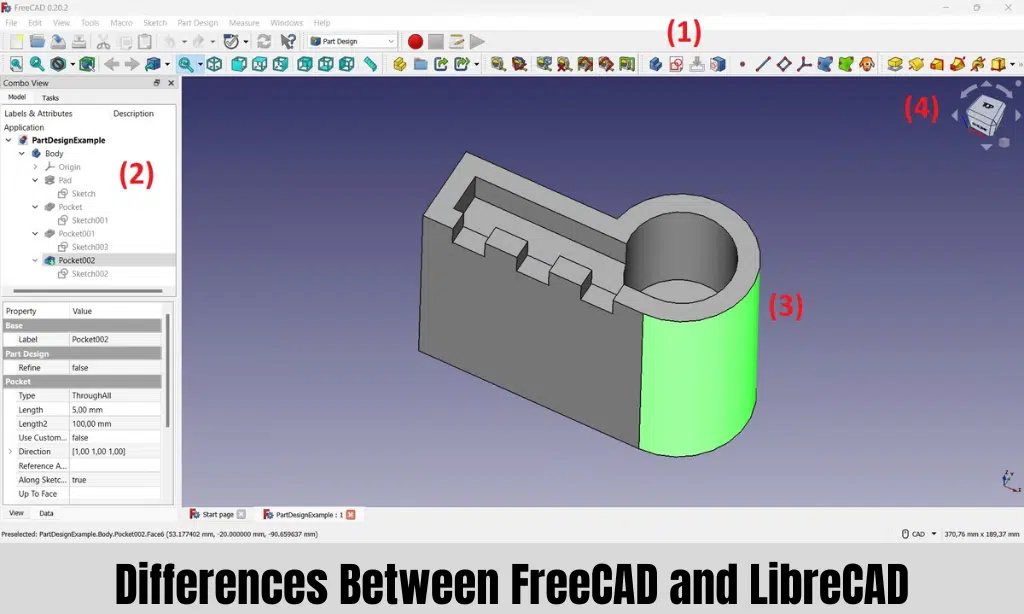
The main differences between FreeCAD and LibreCAD come down to their design philosophy, user interface, and intended purpose. One builds objects in 3D space, while the other draws plans on a 2D canvas.
| Feature | FreeCAD | LibreCAD |
|---|---|---|
| Primary Dimension | 3D Parametric Modeling | 2D Drafting |
| Best For | Mechanical parts, 3D printing, product design, basic simulations (FEM) | Floor plans, schematics, laser cutting profiles, technical drawings |
| Learning Curve | Steeper, requires understanding parametric concepts and workbenches | Easier, especially for users with prior 2D CAD experience |
| License | LGPLv2+ (more permissive) | GPLv2 |
| Core File Formats | FCStd (native), STEP, IGES (for 3D exchange), STL (for 3D printing) | DXF (primary format), experimental DWG support |
License Type
Both programs are free, but they use different open-source licenses. FreeCAD is released under the LGPLv2+ license, which is generally more permissive. It allows the software to be used freely for any purpose, including commercially, and for its code to be integrated into other applications.
LibreCAD uses the GPLv2 license. This also guarantees it is free to use, modify, and distribute, ensuring it will always remain an open-source tool for the community.
Interface and Usability
The user experience in each program is tailored to its specific function.
LibreCAD offers a clean, practical interface that will feel familiar to anyone who has used 2D drafting software before. Its layout, featuring toolbars, layers, and a command line, is often compared to AutoCAD’s 2D environment, which can significantly reduce the learning curve for experienced drafters.
FreeCAD’s interface is organized around a system of workbenches. This modular approach is powerful but can be confusing for beginners. As one user on Reddit noted, a common challenge is knowing which workbench to use for a specific tool, as you often need to switch between them to complete a model. This makes the initial learning curve steeper than LibreCAD’s.
Functions and Tools
FreeCAD’s power comes from its parametric 3D toolset. When you create a 3D object from a 2D sketch, every feature is linked. If you change a dimension in the original sketch, the entire 3D model updates automatically. This is critical for iterative product design. FreeCAD also includes advanced capabilities like the FEM Workbench for basic structural analysis and the Path Workbench for preparing models for CNC machining.
LibreCAD focuses on 2D precision and documentation. It provides a comprehensive suite of drafting tools for drawing lines, arcs, circles, and complex shapes. Its strengths lie in features essential for technical drawings, such as highly customizable layers, blocks for reusable components, and advanced snapping tools for perfect alignment.
Comparing FreeCAD and LibreCAD for Specific Industries
The best choice depends entirely on your industry’s primary output. Do you create physical products or printed plans?
Architecture, Engineering & Construction (AEC)
For modern architectural work, FreeCAD is the more capable choice. With its integrated BIM Workbench, you can create parametric 3D models of buildings, embed construction data, and export to the IFC format for interoperability with other professional BIM software.
LibreCAD remains an excellent tool for creating traditional 2D architectural drawings. It is perfect for drafting detailed floor plans, elevations, and site plans that will be printed or shared as PDF or DXF files. Its excellent DXF compatibility makes it a reliable tool for exchanging plans with colleagues who may use other software like AutoCAD.
Manufacturing & Product Design
This is FreeCAD’s home turf. Its parametric 3D modeling is ideal for designing mechanical parts that will be manufactured. You can model a complex part, ensure all dimensions are correct, and then use the Path Workbench to generate G-code for a CNC mill. For 3D printing, FreeCAD can directly export models in the required STL format, making it a favorite among the maker community.
LibreCAD is valuable in manufacturing for 2D-focused processes. It is often used to create precise cutting profiles for laser cutters, waterjets, and plasma cutters, where a simple DXF file is all that is needed.
Education
Both programs are fantastic free resources in educational settings. LibreCAD is a perfect tool for teaching the fundamentals of 2D technical drawing and engineering drafting. Its straightforward interface allows students to grasp core concepts without getting overwhelmed.
FreeCAD introduces students to the more advanced world of 3D parametric modeling and digital fabrication. It is used by some student groups, like FIRST Robotics teams, to design robot parts before manufacturing them. Students can design a custom part, 3D print a prototype, and test it in the real world.
Hobbyists and Makers
For the DIY community, the choice depends on the project.
If your project will be 3D printed or CNC machined, FreeCAD is the right tool. It’s widely used to design and share models on platforms like Printables and Thingiverse.
If you are creating plans for a woodworking project, designing a part to be laser cut, or mapping out a garden layout, LibreCAD is a fast, lightweight, and effective solution.
What Are the Similarities Between FreeCAD and LibreCAD?
Despite their differences, both applications are built on a shared foundation of being powerful, accessible, and community-driven design tools.
Open-Source Philosophy
The most significant similarity is that both are open-source software. This means they are completely free to download and use for any purpose, without subscription fees or licensing costs. This can save users hundreds or even thousands of dollars compared to commercial software. For example, an annual subscription to AutoCAD LT, a 2D competitor, costs over $500.
Focus on Precision
Both FreeCAD and LibreCAD are built for technical precision, not artistic expression. Unlike graphic design software like Adobe Illustrator, every line and point is defined by exact coordinates. This ensures that models and drawings can be used for accurate manufacturing, construction, and engineering analysis. Both support features like snap-to-grid and object snapping to maintain this precision.
Extensible and Community-Driven
Both projects are supported by active global communities of users and developers. If you encounter a problem, you can find help in dedicated forums and wikis. FreeCAD is also highly extensible through Python scripting and a vast library of community-created add-on workbenches, which add specialized functionalities for tasks like designing gears or sheet metal parts.
What Are the Deployment Options?
FreeCAD and LibreCAD are traditional on-premise, or desktop, applications. You download and install the software directly onto your computer.
This is a key advantage for users who need to work offline or want to maintain complete control over their data and software environment. Unlike cloud-based CAD solutions, you are not dependent on an internet connection or a company’s servers to access your work.
Both programs are available for Windows, macOS, and Linux, ensuring you can run them on your preferred operating system. This cross-platform support makes them highly versatile for individuals and organizations with diverse IT environments.
What Are Good Alternatives to FreeCAD and LibreCAD?
If neither FreeCAD nor LibreCAD is the perfect fit, several other excellent options are available, ranging from other open-source projects to powerful commercial software.
AutoCAD
AutoCAD by Autodesk is the industry standard for professional CAD work. It offers a massive suite of tools for both 2D drafting and 3D modeling. However, its professional power comes with a high price tag. For those focused on 2D, AutoCAD LT offers a more affordable, though still costly, alternative.
SketchUp
SketchUp is a 3D modeling program known for its intuitive “push-pull” interface, which makes it incredibly easy to learn. It is very popular in architecture and interior design for creating conceptual models and visualizations. It is available as a free, web-based version for hobbyists and a more powerful paid desktop version called SketchUp Pro.
QCAD
For users who like LibreCAD but need more features or professional support, QCAD is the logical next step. LibreCAD was originally based on QCAD, and they share a similar interface. QCAD offers a free community edition as well as a paid professional version that includes better DWG file support and advanced tools for a one-time fee of around $40.
SolveSpace
SolveSpace is a free and open-source parametric 3D modeler that is praised for being extremely lightweight and powerful. It excels at 2D and 3D constraint-based drawing and is particularly good for simulating mechanical linkages. It can be a great alternative to FreeCAD for users who find FreeCAD too complex for their needs but still want parametric control.
FreeCAD vs LibreCAD: Which Software Is Best for Your Project?
Choosing between FreeCAD and LibreCAD is not about which is “better,” but which is the right tool for your specific task.
Key Factors to Consider
- 2D or 3D? This is the most important question. If you need to design a 3D object, choose FreeCAD. If you are creating a flat drawing or schematic, choose LibreCAD.
- What is your final output? If you are sending a file to a 3D printer (STL) or CNC machine (G-code), FreeCAD is the correct choice. If you are creating a PDF floor plan or a DXF file for a laser cutter, LibreCAD is more efficient.
- How much time can you invest in learning? LibreCAD is generally easier to learn, especially if you have used 2D CAD before. FreeCAD has a steeper learning curve due to its parametric nature and workbench system.
When to Choose Each Program
Choose FreeCAD if you need to: Design a part for 3D printing, create a parametric 3D model of a mechanical assembly, perform a basic stress analysis, or design an architectural project in 3D.
Choose LibreCAD if you need to: Draft a precise 2D floor plan, create a 2D schematic for a woodworking project, design a profile for a laser cutter, or document an existing part with technical drawings.
Frequently Asked Questions (FAQs)
Here are answers to some common questions about FreeCAD and LibreCAD.
1. What is the main difference between FreeCAD and LibreCAD?
The core difference is dimensionality. FreeCAD is a parametric 3D modeler used to design physical objects. LibreCAD is a 2D drafting application used to create flat technical drawings like plans and schematics.
2. Can LibreCAD open AutoCAD DWG files?
LibreCAD’s native format is DXF. It has basic, experimental support for opening some older DWG files, but it is not always reliable. For the best results, it is recommended to convert DWG files to the DXF format before importing them into LibreCAD.
3. Are there better free alternatives to these applications?
For 2D drafting, QCAD is a strong alternative, offering a free version and a more powerful paid version. For 3D modeling, SolveSpace is a great lightweight parametric option. For students and hobbyists, Autodesk offers free personal-use licenses for powerful programs like Fusion 360, which is cloud-based.
4. How difficult is it to learn these programs?
It depends on your background. If you have experience with other 2D CAD programs, LibreCAD is very easy to learn. FreeCAD presents a greater challenge because you need to understand parametric modeling concepts and how to navigate its different workbenches. However, both have extensive online tutorials and active communities to help new users.
5. Which one is better for 3D printing?
FreeCAD is the clear choice for 3D printing. It is designed to create the solid 3D models that 3D printers require and can export directly to the STL file format used by slicing software.