
Speed is not just a “nice to have” in 2026. It impacts SEO, conversions, and how expensive your paid traffic becomes. The fastest managed WordPress hosts usually win because they combine a modern server stack with aggressive caching and smart edge delivery so your site loads quickly worldwide, not just near one data center.
This ranking focuses on managed WordPress providers that consistently show up in speed conversations, plus what actually makes them fast in practice.
How We Picked And Ranked These Hosts By Speed
A single speed test can be misleading, so this list prioritizes a mix of ongoing benchmark data and stack-level advantages that correlate strongly with real-world performance.
-
Benchmarks with Jan 2026 context: Long-running test sets and recent “fastest” takeaways (Rocket.net shows up as fastest “all time” in WPShout’s 2021–Jan 2026 dataset).
-
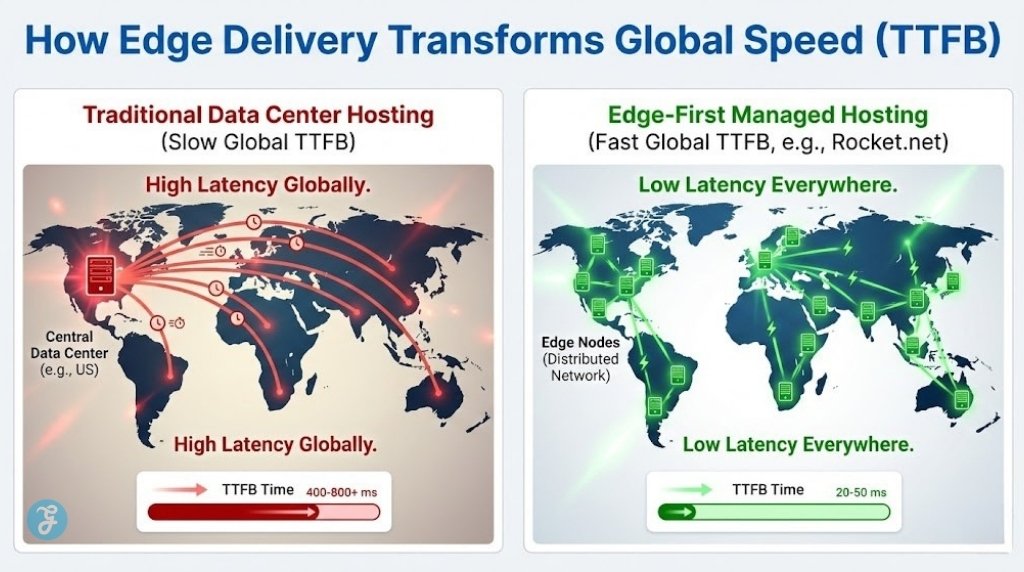
Edge caching and CDN integration: The best results often come from “cache at the edge” setups that reduce TTFB globally (Rocket.net, Pressable).
-
Compute performance and WordPress tuning: Faster compute tiers and tuned stacks help under load (Kinsta’s move to compute-optimized Google Cloud VMs is a good example).
-
Caching strategy for dynamic sites: WooCommerce and logged-in experiences need smart caching, not just static page cache (WP Engine’s EverCache/WooCommerce performance features).
Comparison Table of Managed WordPress Hosts
| Host | Best For | Speed Stack Highlight | Edge/CDN Angle | Main Watch-Out |
|---|---|---|---|---|
| Rocket.net | Fastest “out of the box” | Full-page caching on an enterprise edge network | Built-in enterprise CDN positioning | Premium pricing, fewer “budget” tiers |
| Kinsta | Premium speed and stability | Compute-optimized Google Cloud (C2) rollout | CDN included (varies by plan details) | Costs rise quickly as traffic grows |
| WP Engine | Teams, dev workflows, mature platform | Proprietary caching (EverCache) and performance tooling | CDN included in many plans | Not always the absolute fastest vs newer edge-first hosts |
| SiteGround | Speed-per-dollar for smaller sites | NGINX-based full-page caching (“Dynamic Cache”) | CDN options + optimizer tooling | Can be outpaced by edge-first premium hosts |
| Pressable | WordPress-native managed hosting | Platform-level caching controls | Pressable Edge Cache included | Not always #1 in raw benchmarks; it depends on the setup. |
Top 5 Managed WordPress Hosts Ranked by Speed (Feb 2026)
Here are 5 Fastest Managed WordPress Hosting [Jan 2026] picks, ranked with speed as the primary lens, plus the tradeoffs that matter after raw performance:
1) Rocket.net
Rocket.net is the most “speed-first” managed WordPress host in this list, and it’s called out as the fastest “all time” in WPShout’s dataset covering 2021 through January 2026. It’s built around an edge delivery approach designed to keep TTFB low globally with full-page caching at the network layer.
-
Best For: Agencies and businesses that want the fastest setup with minimal tuning
-
Pros: Edge-first performance approach; strong global delivery out of the box
-
Cons: Premium pricing; less appealing if you want a low-cost “starter” plan
2) Kinsta
Kinsta is a consistent top-tier performance pick for marketers who want speed plus a polished managed platform. One reason it stays competitive is its infrastructure focus, including moving to compute-optimized Google Cloud VMs (C2) to boost performance.
-
Best For: High-quality marketing sites and content brands that want premium managed performance
-
Pros: Strong infrastructure focus; reliable performance under typical marketing workloads
-
Cons: Can get expensive as you scale sites, visitors, and environments
3) WP Engine
WP Engine is often chosen for platform maturity, workflows, and stability, while still delivering strong performance through its caching stack and performance features (including EverCache and WooCommerce-oriented optimizations). It may not always win the “raw speed” race against edge-first providers, but it’s a strong pick when you want fast plus enterprise-grade tooling.
-
Best For: Teams that need staging, governance, and a mature managed WordPress platform
-
Pros: Strong caching and performance feature set; excellent managed workflow depth
-
Cons: Premium cost; speed can be slightly behind the very fastest hosts in some comparisons
4) SiteGround
SiteGround is a practical speed-per-dollar choice, especially for small-to-mid WordPress sites that want good performance without premium managed pricing. Its NGINX-powered Dynamic Cache (full-page caching) is enabled server-side, and the Speed Optimizer tooling gives you control over how caching behaves.
-
Best For: Smaller businesses, creators, and multi-site owners who want fast hosting with strong value
-
Pros: Server-level full-page caching; straightforward performance tooling
-
Cons: Edge-first premium hosts can still be faster globally, especially at higher traffic
5) Pressable
Pressable is a WordPress-native managed host that leans into WordPress-specific performance choices, including its own edge caching layer (Pressable Edge Cache). It’s a strong fit for teams that want managed speed with WordPress ecosystem alignment, especially when you value “set it and forget it” caching behavior.
-
Best For: WordPress-centric teams that want managed hosting with built-in edge caching
-
Pros: Edge cache included; practical caching controls for performance tuning
-
Cons: Final speed depends more on theme/plugins than people expect, so heavy builds may still need optimization
Speed Benchmarks Explained
Speed rankings make more sense when you know what the metrics actually represent.
-
TTFB: How fast the server starts responding (often improved by edge caching)
-
LCP: How quickly the main content becomes visible (often theme/image dependent)
-
INP: How responsive your site feels during interaction (often plugin/theme JS dependent)
-
Load Under Traffic: How well performance holds up during spikes (often CPU + caching strategy)
What Skews Speed Results Most
-
Theme weight: Page builders and heavy templates can erase hosting advantages
-
Image delivery: Uncompressed images and unoptimized fonts crush LCP
-
Plugin bloat: Too many overlapping “optimization” plugins can slow you down
-
Poor caching rules: Especially on WooCommerce, membership, and logged-in sites
How To Choose The Right Host If Speed Is Your Priority
A fast host is the foundation, but the best choice depends on your site type and how much you value “out of the box” results.
-
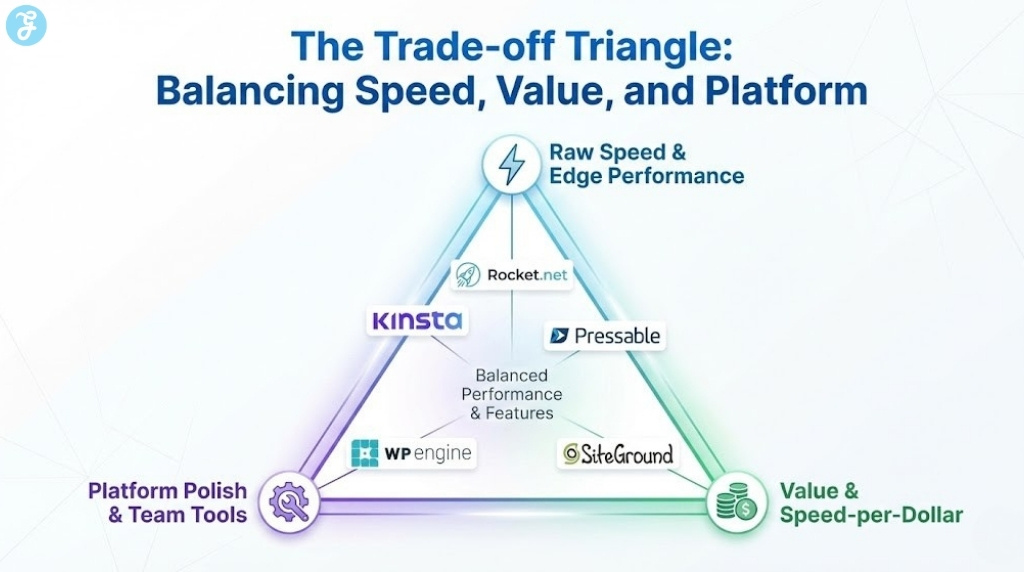
If you want the fastest without tweaking: Prioritize edge-first managed hosting
-
If you want premium speed plus platform polish: Pick a host known for managed workflows and strong infrastructure
-
If you want speed-per-dollar: Pick a host with strong server-side caching and good support
| If you need… | Start with… |
|---|---|
| Fastest global delivery | Rocket.net |
| Premium managed performance + stability | Kinsta |
| Strong platform tooling for teams | WP Engine |
| Best value for smaller sites | SiteGround |
| WordPress-native managed hosting + edge cache | Pressable |
Setup Tips To Maximize Speed
Even the fastest host can feel slow if the site is heavy. These are the highest-impact moves.
-
Theme: Choose a lightweight theme and avoid template bloat
-
Images: Compress and serve modern formats where possible
-
Fonts: Use fewer weights and preload only what matters
-
Plugins: Remove overlap and keep only what you need
-
Caching: Use the host’s built-in caching first before stacking extra plugins
Wrap-Up
If your goal is pure speed in January 2026, Rocket.net is the easiest “fastest by default” pick, backed by long-running benchmark positioning and an edge-first approach. If you want premium performance with a refined managed platform, Kinsta is a safe top-tier option. For teams that want speed plus mature dev workflows and platform features, WP Engine remains a strong contender, even if it’s not always the outright fastest in every test.