


Modernize your SME used to mean “go digital” and buy a few tools. In 2026, modernization means something more practical and more demanding. Customers expect fast responses, consistent quality, secure experiences, and content that actually helps. Teams expect systems that reduce repetitive work and make collaboration smoother.
This digital business blueprint 2026 is your master plan for modernizing an SME without turning your operations into a software maze. You will follow a clear roadmap, then apply six modernization pillars that cover AI, content production, search changes, SaaS cost control, remote readiness, and home office security.
You do not need a perfect stack. You need the right standards, the right order, and the discipline to simplify.
Why Should You Bother to Modernize Your SME in 2026
To modernize your SME is not about being “tech forward.” It is about making your business easier to run and harder to break. You modernize so your team can deliver consistent work without constant firefighting.
In 2026, most SMEs modernize for three reasons:
- Speed, because the market moves faster than your old processes
- Trust, because customers are more skeptical and more careful
- Resilience, because remote work and SaaS sprawl create more failure points
Modernization is also a leadership decision. If every department buys tools and sets rules on its own, you create chaos. If you build a shared system, you create leverage.
The 6 Pressure Points SMEs Face Right Now
These are the pressure points that make SMEs feel behind even when revenue is growing:
- AI is everywhere, but ungoverned AI can damage voice, accuracy, and trust
- Content production got easier, but standing out got harder
- Search results changed, and clicks behave differently than before
- SaaS costs creep, and duplication spreads quietly
- Remote teams rely on connectivity and mobile devices more than ever
- Home office security is now part of your business perimeter
If you fix these pressure points in the right order, you modernize without overwhelm.
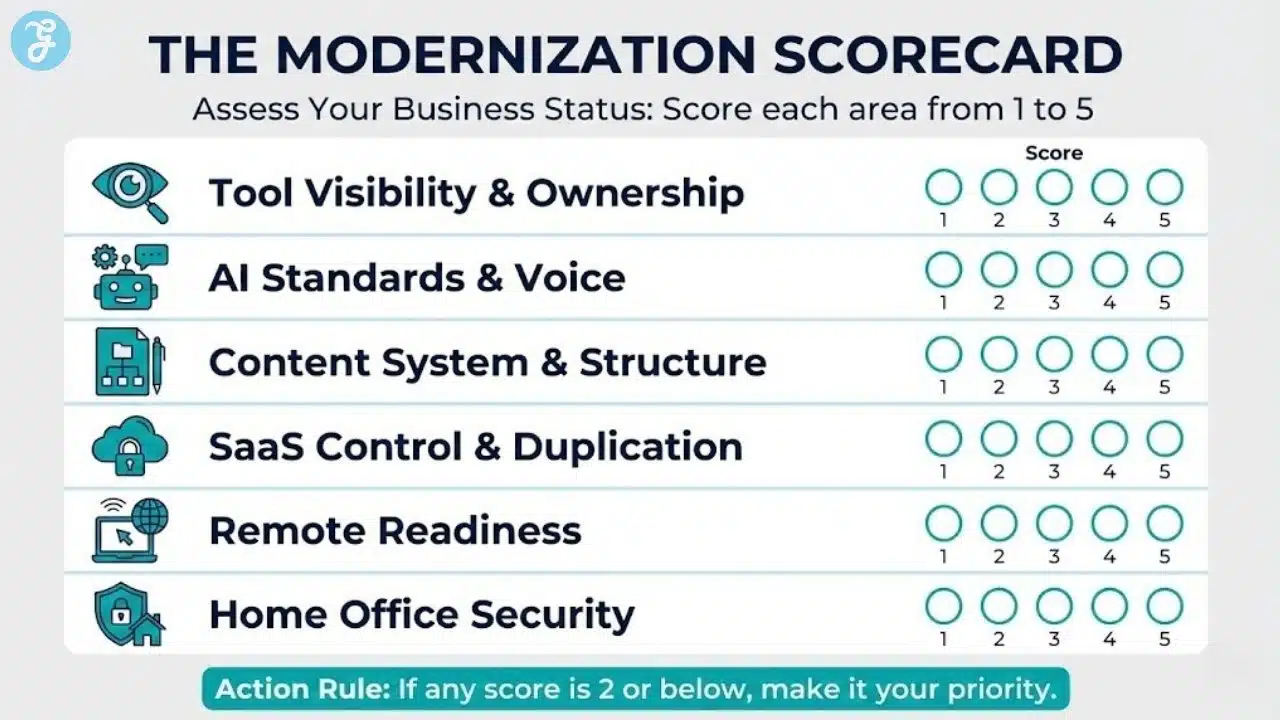
A Quick Self Check For 2026 Readiness
Use this to spot where you will get the fastest wins:
- You can list every tool you pay for and who owns it
- You have standard tools for communication, tasks, and file storage
- Your team uses AI with guardrails and human review
- Your content system is built around topics and intent, not random posts
- Your remote team has minimum device and access standards
- Your home office security baseline is documented and followed
If this list feels messy, that is normal. The roadmap fixes it.
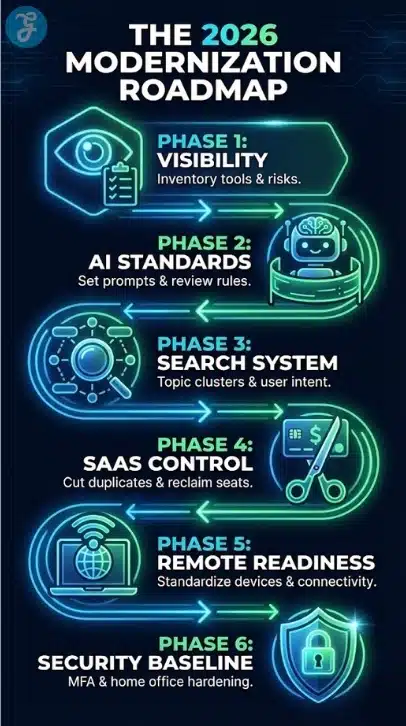
The 2026 Modernization Roadmap: A Simple 6 Phase Plan
This roadmap is designed for SMEs that cannot pause operations for a “digital transformation project.” You will modernize while you keep shipping work.
Each phase creates stability for the next. If you skip Phase 1, you will waste money and create confusion later.
The 6 Phase Roadmap
| Phase | Goal | What You Do | Outcome |
| 1 | Visibility | inventory tools, workflows, risks | clarity and control |
| 2 | AI Standards | guardrails, prompts, review rules | faster output with trust |
| 3 | Search System | topic clusters, structure, updates | visibility that converts |
| 4 | SaaS Control | cut duplicates, reclaim seats | lower costs, less chaos |
| 5 | Remote Readiness | standard devices, connectivity habits | fewer outages |
| 6 | Security Baseline | harden home office and access | reduced incident risk |
How To Use The Roadmap Without Burning Out
Run this roadmap like a series of small upgrades, not a massive renovation:
- Timebox Phase 1 to one week, even if it is not perfect
- Choose one pillar to improve per month
- Standardize first, optimize second
- If no one owns a tool or a process, it will drift back into chaos
This is the moment the roadmap becomes real. You stop guessing and start managing.
The Operating System Behind This Digital Business Blueprint 2026
Before you jump into the six pillars, lock in the rules that keep modernization from falling apart.
Rule 1: One Source Of Truth Per Workflow
Every core workflow needs one standard home:
- One place for tasks and project tracking
- One place for internal communication
- One place for files and documents
- One place for customer data and sales tracking
You can integrate tools, but you cannot allow multiple competing “homes.” That creates rework and confusion.
Rule 2: Every Tool Needs An Owner
Tool owners are not “IT only.” A tool owner is the accountable person who:
- Manages seats and access
- Reviews renewal value
- Sets basic configuration and permissions
- Tracks usage and adoption
When a tool has no owner, it becomes expensive and risky.
Rule 3: Measure Outcomes, Not Activity
Modernization is not “we installed tools.” Modernization is:
- Fewer dropped tasks
- Faster delivery
- Lower software waste
- Better conversion from content
- Fewer security incidents and near misses
If you measure the right outcomes, your decisions get easier.
How to Use AI Without Losing Authenticity
AI can make your team faster. It can also make your brand sound generic and increase accuracy risk. The goal is not to avoid AI. The goal is to use it like a power tool with safety guards.
If you want AI to scale your business, you need a voice system and a review system.
Where AI Helps Most In A Small Business
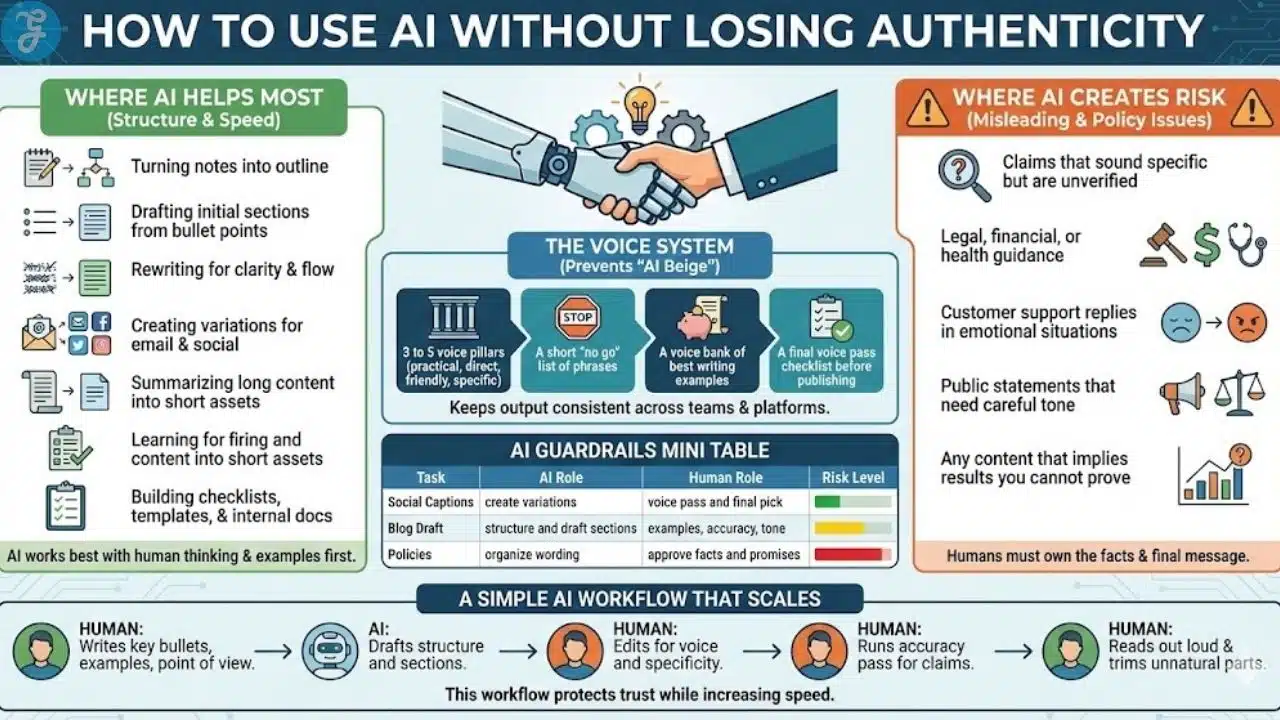
AI is strongest when it supports structure and speed:
- Turning notes into an outline
- Drafting initial sections from your bullet points
- Rewriting for clarity and flow
- Creating variations for email and social
- Summarizing long content into short assets
- Building checklists, templates, and internal docs
AI works best when your team provides the thinking and the examples first. Then AI helps with execution.
Where AI Creates Risk
AI becomes risky when the output can mislead or create policy issues:
- Claims that sound specific but are unverified
- Legal, financial, or health guidance
- Customer support replies in emotional situations
- Public statements that need careful tone
- Any content that implies results you cannot prove
AI can draft structure for these topics, but humans must own the facts and the final message.
The Voice System That Prevents “AI Beige”
Most AI content sounds generic because the brand voice is not defined. Fix that with a simple voice system:
- 3 to 5 voice pillars, like practical, direct, friendly, specific
- A short “no go” list of phrases you never use
- A voice bank of your best writing examples
- A final voice pass checklist before publishing
This keeps your output consistent across team members and platforms.
AI Guardrails Mini Table
| Task | AI Role | Human Role | Risk Level |
| Social Captions | create variations | voice pass and final pick | Low |
| Blog Draft | structure and draft sections | examples, accuracy, tone | Medium |
| Policies | organize wording | approve facts and promises | High |
A Simple AI Workflow That Scales
Use this workflow for content, emails, scripts, and internal docs:
- The human writes the key bullets, examples, and point of view
- AI drafts structure and sections
- Human edits for voice and specificity
- Human runs an accuracy pass for claims
- A human reads out loud and trims anything unnatural
This workflow protects trust while increasing speed.
Content Production And The Modern Tool Stack
Content is still one of the highest-leverage growth channels for SMEs. The challenge in 2026 is not publishing. The challenge is publishing content that earns attention, ranks, and converts.
Your stack should support the work, not distract from it.
The 5 Jobs Your Content Stack Should Cover
Build your tool stack around jobs, not features:
- Planning and research
- Briefing and outlining
- Drafting and editing
- SEO structure support
- Repurposing and distribution
If a tool does not support one of these jobs weekly, it will become clutter.
Feature Rank Pilot: A Practical Way To Choose Tools
Tool selection fails when it is emotional. Use a simple scoring method so decisions are consistent.
Score any tool from 1 to 5 on:
- Output quality, is it usable without heavy rewriting
- Control, can you shape structure and tone
- Brand voice fit, can it follow your rules
- SEO assist, does it support intent and structure
- Cost value, is it worth it for your team size
This keeps you from buying tools that look impressive but do not fit your workflow.
Feature Rank Pilot Mini Table
| Criteria | What You Look For In Practice |
| Output Quality | clear drafts that avoid fluff |
| Control | easy edits, strong rewriting tools |
| Brand Voice | follows your guidelines consistently |
| SEO Assist | helps with intent coverage and structure |
| Cost Value | saves time weekly, not monthly |
A Practical Content Production System For SME
A Practical Content Production System For SMEs
A reliable content system looks like this:
- One pillar topic per quarter
- Cluster posts that answer specific intents
- A refresh schedule for top pages
- Repurposing into email and social assets
- A simple performance review focused on leads and conversions
When you run content as a system, you stop depending on motivation.
Search Changed, But SEO Is Not Dead
Search still drives discovery, especially for SMEs with clear offers. What changed is the results page. It now includes more answer layers, more modules, and more ways for a user to get information without clicking.
Your job is to earn visibility and still give people a reason to go deeper.
What Changed In Search Behavior
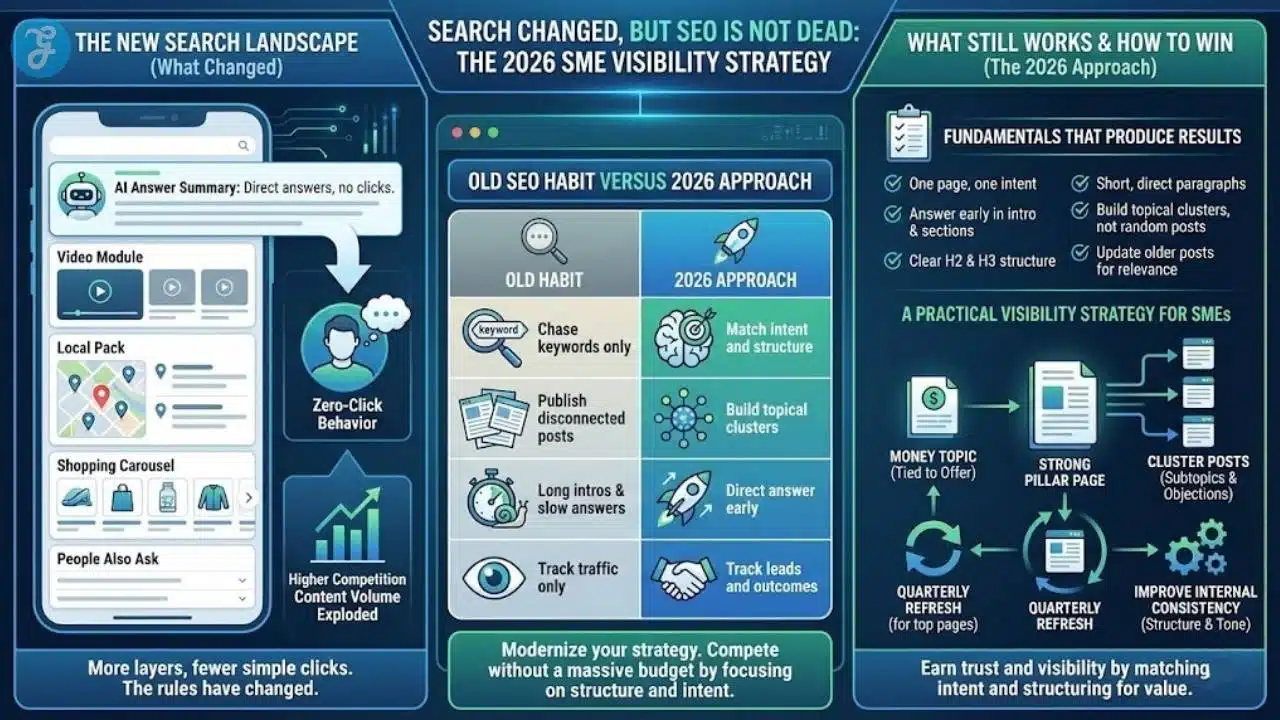
These shifts explain why many businesses feel stuck:
- More AI answer summaries and direct answer panels
- More SERP modules, video, local, shopping, questions
- More zero click behavior for simple informational queries
- Higher competition because content volume exploded
This does not kill SEO. It changes the rules.
What Still Works, And Works Well
These fundamentals still produce results when executed with clarity:
- One page, one intent
- Answer early in the intro and early in each section
- Use clear H2 and H3 structure
- Keep paragraphs short and direct
- Build topical clusters instead of random posts
- Update older posts to maintain relevance
If you do these consistently, you earn trust and visibility.
Old SEO Habit Versus 2026 Approach
| Old Habit | 2026 Approach |
| Chase keywords only | Match intent and structure |
| Publish disconnected posts | Build topical clusters |
| Long intros and slow answers | Direct answer early |
| Track traffic only | Track leads and outcomes |
A Practical Visibility Strategy For SMEs
If you want an execution plan:
- Choose one money topic tied to your offer
- Build one strong pillar page for the topic
- Publish cluster posts that cover subtopics and objections
- Refresh top pages quarterly
- Improve internal consistency in structure and tone
This is how you compete without needing a massive budget.
SaaS Sprawl And The Hidden Cost Trap
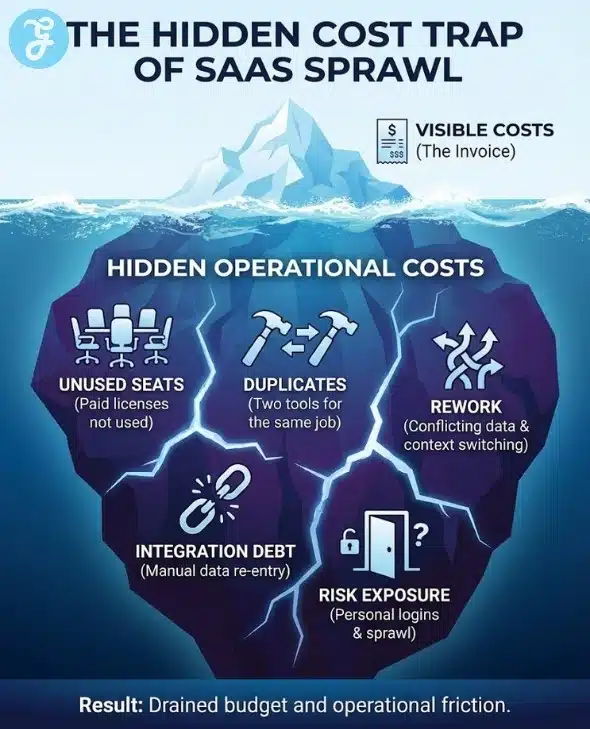
SaaS sprawl is one of the biggest modernization blockers in SMEs. It drains budget, increases security risk, and creates operational friction.
SaaS sprawl happens when tools are added faster than they are managed.
The Hidden Cost Categories That Matter
SaaS sprawl creates costs beyond subscriptions:
- Unused seats and shelfware
- Duplicate tools in the same category
- Time lost to context switching and rework
- Training overhead for new hires and contractors
- Integration debt from fragile automations
- Security exposure from unmanaged access and data sprawl
Many SMEs underestimate these costs because they do not show up as a single invoice.
SaaS Cost Table
| Cost Type | What It Looks Like | What To Fix First |
| Unused Seats | paid licenses not used | reclaim and downgrade |
| Duplicates | two tools for same job | standardize one |
| Rework | conflicting data and versions | define source of truth |
| Integration Debt | manual re entry of data | simplify and stabilize |
| Risk | personal emails, shared logins | enforce access rules |
The Fastest SaaS Control Wins
If you want quick wins in week one:
- Inventory tools and renewal dates
- Assign a tool owner for each
- Reclaim unused seats
- Identify duplicates and pick a standard
- Remove personal email access to business tools
This reduces waste fast and improves operational clarity.
Remote Readiness With Devices And Connectivity
Remote work is now normal, and that means device reliability is part of operations. A phone is not only personal tech. It is a hotspot backup and a meeting lifeline. Connectivity issues create real productivity loss.
Remote readiness is a modernization pillar because it directly impacts delivery.
What Matters Most For Remote Work Devices
Prioritize reliability over hype:
- Hotspot stability for laptop backup
- Battery life under real workload
- Strong microphones for calls
- Security update longevity
- eSIM flexibility for travel or backup networks
When you choose devices based on real work patterns, support becomes easier.
Role-Based Priority Table
| Role | Top Priorities | Why It Matters |
| Sales And Field | battery, hotspot, durability | travel and weak networks |
| Support And Ops | call quality, stability | high call volume |
| Creators | camera consistency, storage | capture and upload |
| Leadership | reliability, security | constant communication |
| IT Admin | update consistency, controls | policy and support |
A Simple Device Standard For SMEs
A practical policy that works:
- Standardize a shortlist of approved models
- Allow BYOD with minimum security rules for low-risk roles
- Issue company devices to roles with sensitive access
- Require the same setup checklist on every phone
This reduces support pain and security gaps.
Wrap Up And Next Steps
Modernization is not a one-time event. It is a set of standards and habits that make your business easier to run and harder to break. When you follow the roadmap and treat each pillar as a workstream, progress becomes predictable.
Use this digital business blueprint 2026 as your map. Start with visibility so you know what you pay for, what you rely on, and where your risk lives. Then build AI guardrails, upgrade your content and search system, control SaaS sprawl, standardize remote readiness, and lock in home office security baselines.
If you want one simple move to start today, do Phase 1. Inventory your tools, assign owners, and list renewal dates. Clarity creates momentum.
Frequently Asked Questions
Here are the most frequently asked questions people have about The Digital Business Blueprint 2026: The Ultimate Guide To Modernizing Your SME.
What Is A Digital Business Blueprint
A digital business blueprint is a practical plan that defines the systems, standards, and workflows your business uses to deliver work consistently. It helps you modernize without relying on random tools or heroic effort. It also makes it easier to scale because decisions become repeatable.
What Should I Modernize First In My SME
Start with visibility and control because it affects everything else. Create a tool inventory, assign owners, and list renewal dates so you understand where money and work are flowing. Then lock in MFA and password manager standards to reduce risk quickly.
How Long Does It Take To Modernize A Small Business
You can see real improvements within 30 days if you focus on quick wins and one pillar at a time. Full modernization can take several months, depending on complexity, team size, and how many workflows need standardization. The key is to keep changes small, consistent, and measurable.
How Do I Use AI Without Losing My Brand Voice
Define your voice rules and enforce a review step. Start with a voice bank of your best content, a short no go list, and a prompt library your team can reuse. Then, require a human voice pass and an accuracy pass before publishing anything.
Is SEO Still Worth It In 2026
SEO is still worth it because people still search when they research and compare options. The tactics changed because results pages show more answers and fewer clicks for simple queries. You win by matching intent, answering clearly, building topic clusters, and measuring leads instead of traffic alone.
How Do I Stop SaaS Costs From Creeping Up Every Month
Assign an owner to every tool, track renewals, review seat usage monthly, and consolidate duplicates. Most SaaS waste comes from unused seats, overlapping tools, and auto-renewals that no one reviews. Simple governance prevents sprawl from returning.
What Minimum Security Standards Should Remote Teams Follow
Remote teams should use MFA on all work accounts, a password manager, device encryption, automatic updates, and approved file storage with restricted sharing. These basics prevent the most common incidents without adding heavy bureaucracy. The key is consistency across every person and device.
Should SMEs Allow BYOD Or Issue Devices
A hybrid policy usually works best. Allow BYOD for low-risk roles with minimum security rules, and issue devices to roles with sensitive access like finance or admin. Standardize a shortlist of approved models so support and security are manageable.































