

Managing DeFi investments can feel like a maze. You juggle seed phrases, private keys and gas fees on many dApps. One wrong click can lock up your crypto assets forever.
Web3 wallets let you skip banks and use decentralized applications directly. This guide covers Web3 Wallets That Make Managing DeFi Investments Easy. We break down ten top picks, from MetaMask to Ledger Live, with details on mobile apps, hardware wallets and two-factor authentication.
Keep reading.
Key Takeaways
- The guide covers ten top Web3 wallets for DeFi needs. MetaMask has 30 million monthly active users and supports Ethereum, layer-2 and EVM chains.
- Mobile wallets like Trust Wallet (65+ blockchains, 4.5 million assets) and Coinbase Wallet (160+ tokens, email recovery) let you swap and stake in minutes.
- Phantom leads Solana users with fast, low-fee transactions, an in-app NFT gallery, Solana staking and MPC-based Ethereum and Polygon support.
- Binance Wallet and Rabby Wallet power BNB Chain and multi-chain swaps with built-in bridges, local key storage, two-factor authentication and batch transactions.
- Argent and ZenGo drop seed phrases for social recovery, MPC and biometrics, while hardware options like Ledger Flex ($249) and Trezor Safe 5 ($213) keep keys offline.
MetaMask: Best for Ethereum-Based DeFi
MetaMask stands out as a non-custodial crypto wallet that runs in your browser, it feels like a personal keychain for DeFi. It has over 30 million monthly active users, proof of its wide appeal.
It shows your assets in a portfolio dashboard, and lets you swap tokens with a few clicks. It stores your seed phrase and private key securely on your device. It even links to hardware wallet devices, so you can stash funds offline.
This wallet supports the main blockchain network, layer 2 networks, and other EVM-compatible chains. It lets you pay gas fees on Ethereum or sidechains without jumping through hoops.
It launches smart contracts with a DApp browser that pops up in your tab. It keeps you in control, with two-factor authentication and a self-custody model. It runs token swaps right inside, cutting steps and keeping you in the flow.
Trust Wallet: Ideal for Beginners and Multi-Chain Support
Trust Wallet greets new users with clear menus. You open it in just two taps. The app runs on Android and iPhone. A mobile-first design makes navigation easy. It supports over 65 blockchains and 4.5 million digital assets.
You swap tokens on a built-in decentralized exchange. A built-in decentralized app browser lets you use many decentralized finance sites. You stake tokens and join yield farming in seconds.
You keep all private keys on your device. This non-custodial wallet safeguards your seed phrase.
A desktop extension arrived this year. New users can link phone and browser. They get quick access to decentralized finance sites on Chrome or Brave. Precheck displays gas fees before you tap approve.
Users save on fees with batch transactions. Swapping across blockchain networks now runs smoother. We hit multiple blockchains without a separate bridge tool. Face id or fingerprint unlock adds extra security.
This seamless flow makes crypto fun. Even a first-time user can trade in minutes.
Coinbase Wallet: User-Friendly Option for DeFi Investors
Coinbase Wallet connects with Coinbase exchange for username and email recovery options. You skip the fear of losing a seed phrase in a dark corner. The wallet handles Bitcoin, Ethereum, Solana, plus over 160 digital tokens.
A simple interface guides you through DeFi gas fees and token swaps. You can add funds via a fiat on-ramp in minutes.
This crypto wallet behaves like a hot wallet with backup perks. 2FA and private key backups block phishing attacks on your crypto. Wallet security stays strong without extra gear like cold storage.
Phantom: Best for Solana Ecosystem Investments
Phantom ranks as the top web3 wallet for the Solana network. It leads the pack with fast transactions and low fees. The non-custodial wallet adds support for Ethereum and Polygon. It displays an NFT gallery inside the interface.
You swap tokens right in the app. A built-in Solana staking interface lets you earn rewards on SOL.
Builders launch dapps with a few clicks. NFT collectors show off rare art at a glance. Phantom uses a browser extension or mobile app to connect you to dapps. It stores your private key and seed phrase with MPC tech.
You keep full control, like holding your own vault key. This crypto wallet makes DeFi feel like a breeze.
Binance Wallet: Optimized for Binance Smart Chain Users
Binance Wallet links your web3 wallet to the Binance exchange. It supports Bitcoin, Ethereum, BNB Chain, and more. This non-custodial wallet stores your seed phrase and private key on your device.
A browser extension and phone software launch in seconds. Users secure access with two-factor authentication and password managers.
The wallet handles token swaps with low gas fees on BNB Chain. Smart contracts execute trades in milliseconds. Traders can stake BNB to earn rewards without leaving the wallet. Cross-platform sync keeps balances up to date on all devices.
Integration with Binance Bridge lets you move assets across chains in one click.
Argent: Advanced Security Features for DeFi Management
Argent drops the seed phrase, thanks to guardian based social recovery. This non custodial wallet uses friends as guardians and multi party computation to keep funds safe. You set a daily transaction limit, and you stop hackers from emptying your wallet.
The app adds two factor authentication without the fuss of codes.
The Web3 wallet works with Ethereum mainnet, StarkNet, zkSync Era and Optimism. It shows an integrated DeFi dashboard so you track token swaps and gas fees. You tap one-click staking to lock crypto for yields.
Argent uses cold storage keys and private key encryption to guard assets on dapps. This setup cuts complexity and boosts wallet security.
ZenGo: Simplified Wallet with Keyless Security
ZenGo web3 wallet skips seed phrases and private keys. It uses biometric authentication and multi-party computation for wallet recovery. Users face no private key worries. The non-custodial wallet still gives full control.
This platform supports Bitcoin, Ethereum, Polygon, Binance Smart Chain, Avalanche, and Solana. The built-in ClearSign firewall blocks phishing on browsers and dapps. You earn crypto rewards after each swap.
Security-conscious investors guard funds like a safe.
Ledger Live: Hardware Wallet with Seamless DeFi Integration
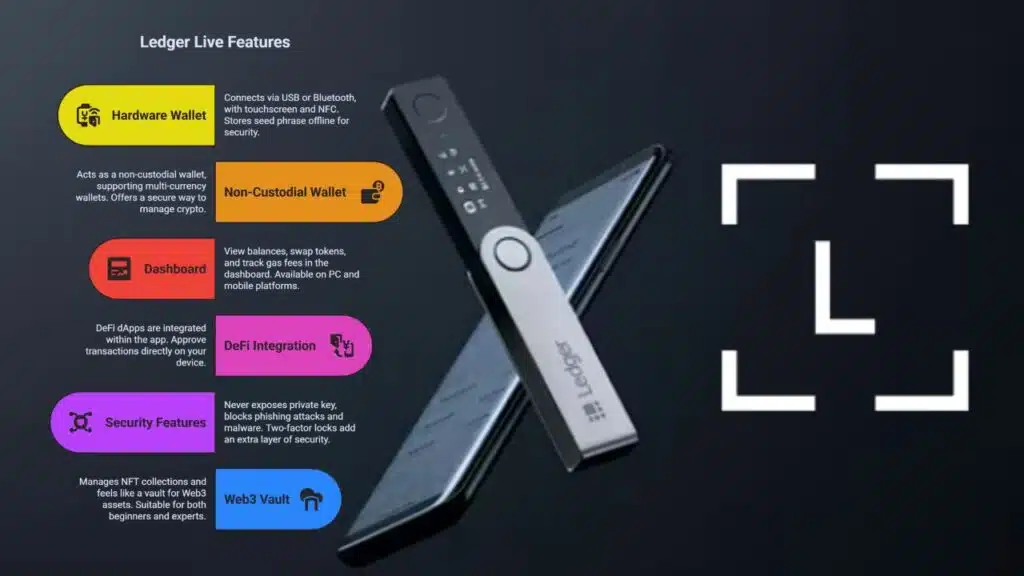
Ledger Live links to a hardware wallet called Ledger Flex. You plug it in or pair via Bluetooth. Flex sports a touchscreen and NFC. You store your seed phrase offline, like a cold wallet.
The device acts as a non-custodial wallet. Flex costs $249. It supports multi-currency wallets. Some hardware wallets, like the Trezor Safe 5, support more than 1,800 tokens and sell for about $213.
You view balances, swap tokens, and track gas fees in the dashboard. Ledger Live runs on PC and mobile. It uses a secured channel to send transactions.
DeFi dApps sit right inside the app. You tap approve on your device. This approach differs from hot wallets that keep keys online. The software never exposes your private key. It blocks phishing attacks and malware.
You stake cryptos, earn yields, or swap tokens on Uniswap, Aave, and other platforms. Two-factor locks add another shield. Live shows real time fees and pending transactions. You manage NFT collections too.
It feels like a vault for your Web3 assets. It suits both novices and experts.
Rabby Wallet: Multi-Chain Support for Smooth dApp Interaction
Rabby Wallet supports multi-chain functionality for seamless dApp interaction. It holds private keys locally, giving users full self-custody. Users can swap tokens, stake coins, or buy digital collectibles all in one place, without extra sign-ins.
You can earn passive income through staking or liquidity provision on DeFi platforms. The wallet uses integrated transaction previews and permission management to cut down on unwanted approvals.
Security stands strong with cold storage choices and multi-signature features. The web3 wallet logs gas fees and bundles transactions to save on costs. Developers release updates often so it works with new Web3 tools and self-executing contracts.
This design makes digital asset management smooth on Ethereum, Binance Smart Chain, and other chains.
Crypto. com DeFi Wallet: Comprehensive Features for DeFi Enthusiasts
Crypto.com DeFi Wallet puts you in charge of your private key and seed phrase while you tap into decentralized finance (defi). It acts as a non-custodial wallet and locks assets behind two-factor authentication.
You launch a built in web3 browser and connect to Aave or PancakeSwap dapps fast. You swap tokens for low gas fees on Ethereum, Binance Smart Chain, or Cronos.
Users stake CRO to reap crypto rewards in no time. The wallet batches transfers to cut down on gas fees. It links with the Crypto.com exchange so you shift assets with a simple tap.
Alerts flag every transaction so you dodge phishing attacks.
Key Features to Look for in a Web3 Wallet
Readers want simple, safe tools to handle crypto. A strong web3 wallet makes that possible.
- Multi-Chain Support: Wallet apps must link to Ethereum, Binance Smart Chain, Solana, and Polygon to let you move assets such as binance coin and btc in one spot.
- dApp Integration: Top crypto wallets run inside a web browser or mobile app. They link to decentralized applications for token swaps, crypto staking, and nfts.
- Two-Factor Authentication (2fa) and Multi-Party Computation: Software wallets use 2fa and split keys with MPC to guard your private key. This double shield stops a single breach from dumping your assets.
- Guardian-Based Social Recovery: A lost seed phrase can lock you out. Social recovery lets trusted contacts restore access without a central server.
- Transaction Batching: Gas fees can drain small trades on Ethereum. Batch sending bundles operations to slash fees on the internet.
- Biometric Authentication: Fingerprint or Face ID speeds unlocks. This cuts down typed passwords and blocks phishing attacks.
- Self-Custody Control: Non-custodial wallets let you hold a seed phrase or private key. Cold wallets, such as hardware wallets, keep keys offline to block hacks via emails or public key leaks.
- Gasless Transactions: Smart contract wallets can pay gas on behalf of users. That game changer helps newbies try dapps without ETH for fuel.
- Role-Based Permissions: A team chest needs tiered access. Permission tiers let staff deploy smart contracts or view balances without full control.
- Bridge Integration: A wallet with a built-in bridge, like binance bridge, eases cross-chain swaps. You shift tokens across chains without a separate cryptocurrency exchange or extra steps.
Tips for Securely Managing Your DeFi Wallet
Guard your private keys as if they were gold. Lock out threats with these tips.
- Store seed phrases and private keys offline, in a locked safe or on a paper backup.
- Enable two-factor authentication, with an authenticator app or hardware token.
- Deposit large amounts in a hardware wallet, like a USB device from Ledger or Trezor.
- Keep software wallets, such as Trust Wallet, Coinbase, and Kraken’s app, up to date to block exploits.
- Check every URL before you sign into a web3 wallet or dapp to dodge phishing attacks.
- Implement social recovery or multi-party computation, so you can regain access without a single point of failure.
- Batch token swaps and opt for gasless transactions on DeFi platforms to cut down on gas fees and network risk.
- Split funds between hot wallets for trades and cold wallets for long term, to balance access and security.
Takeaways
This guide shows top software wallets and cold devices for DeFi. A self-custody wallet puts private key control in your hands. Smart wallets use account abstraction to cut gas fees. Link a wallet to dapps and swap tokens fast. Seed phrase backups let you recover an account.
Two-factor access adds a strong second wall. Choose hardware storage to keep keys offline. Watch your DeFi portfolio grow with confidence.
FAQs
1. What is a web3 wallet and how does it help with defi?
A web3 wallet is a crypto wallet that talks to blockchain technology, and it holds your crypto coins and non-fungible tokens. You get a wallet address, a public key, and a private key or seed phrase. It links you to decentralized applications, so you can do crypto staking, token swaps, and play with smart contracts.
2. What types of wallets can I pick for my investments?
You have hot wallets that stay online and cold wallets that stay offline. You can use software wallets on your phone, or hardware wallets that look like a USB drive. Non-custodial wallets and self-custody wallets let you hold your own keys. Custodial wallets hold keys for you. Some use multi-party computation, and some use social recovery to bring back your access.
3. How can I keep my wallet safe from phishing attacks and high gas fees?
Guard your seed phrase like it is gold. Turn on two-factor authentication with each app. Watch out for fake links to stop phishing attacks. Try gasless transactions when you can. Or use transaction batching to cut down on gas fees. Smart wallet security habits work like a guard dog.
4. Which wallets make managing defi a breeze?
Kraken wallet and Binance wallet let you stake and swap in a snap. The Coinbase app adds a simple view for token swaps and defi tools. Exodus app keeps things neat, with clear charts for your crypto. Phantom key and Zengo key let NFT fans handle non-fungible tokens with a grin. Trust wallet plugs right into most dapps.
5. How do I link my wallet to dapps for staking or token swaps?
Click the connect button on the app or site. Grant permission for your wallet. You may see a prompt to approve smart contracts. Hit approve, and you are in. Wallet integration makes it feel like flipping a switch.
6. Can I store both crypto and nfts in one wallet?
Yes, most crypto wallets hold both coins and non-fungible tokens. Just open the NFT tab after you log in. You will see your nfts in the same spot you see your defi tokens. It works like two apps rolled into one.































