


Is your cloud spending out of control? Many businesses struggle with ever-growing cloud costs. It can be hard to manage your cloud resources and keep expenses down. Cloud cost management can help you reduce cloud spending a lot.
Cloud spending is projected to be over $723 billion in 2025. It shows how much companies rely on the cloud. This blog post will show you the best cloud cost management tools, which help with cost allocation, cost transparency, and real-time monitoring.
These programs can help you get the most from your cloud investment. Read on and learn how to save money!
Key Takeaways
- Cloud costs can be hard to manage. Tools can help lower cloud spending. Cloud spending may reach $723 billion in 2025.
- Key features include real-time tracking. They also include multi-cloud support. Look for cost visibility and alerts.
- CloudZero offers cost breakdowns. Apptio Cloudability helps with planning. Flexera One manages IT assets.
- ProsperOps automates Google Cloud savings. It can save over 40%. It manages $2.4 billion in spending. Densify optimizes cloud use with AI.
- Kubecost watches Kubernetes costs. Spot by NetApp automates cloud work. These tools help lower cloud costs.
Key Features to Look for in Cloud Cost Management Tools
Picking the right tools matters for Cloud Financial Management. What crucial features should your cloud solutions have for cost control?
Cost visibility and allocation
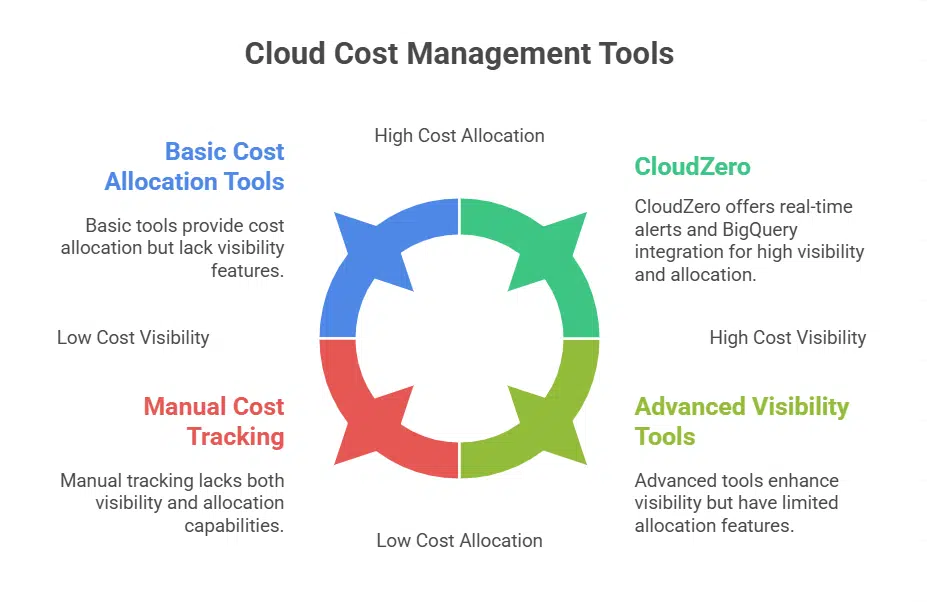
Seeing where your cloud money goes is key. Good tools show you this. They break down cloud costs. You can see who uses what. This is cost allocation. It helps engineers and finance teams.
They get enhanced resource visibility.
CloudZero is great for this. It offers real-time cost alerts. Plus, it works with BigQuery. Cost transparency helps a lot. You can tag costs. Use cost allocation tags to track cloud spending.
This makes cloud cost management easier.
Real-time monitoring and alerts
Cloud cost management tools must offer real-time tracking. These system resources help you see cloud spending as it happens. Cost visibility is key for quick action.
CloudZero features real-time cost alerts, which is good. Accurate real-time budgeting improves forecasting. It also improves planning. Spotting cost issues early can save money. Anomaly detection helps you keep cloud costs under control too.
Real-time monitoring is a must-have for good cloud financial management.
Integration with multiple cloud providers
Many businesses use more than one cloud platform. They need tools that work with all of them. These tools help manage costs across Amazon Web Services (AWS), Google Cloud Platform (GCP), and Microsoft Azure.
These platforms let you see all your cloud spending in one place. Spot by NetApp automates workload management using machine learning algorithms. ProsperOps helps with Google Cloud costs; they manage $2.4 billion in cloud expenditure and achieve savings over 40%.
A great tool integrates easily and shows your total cloud costs.
Budgeting and forecasting
Good tools let you plan your cloud spending. They help you see where your money goes. You can also guess future costs. These cloud cost management tools use machine-learning models, so you can make smart plans.
For example, Apptio Cloudability has budgeting, forecasting, and rightsizing to make your resources better.
Data helps you decide what to do. It shows which features and products make money. With cloud cost optimization, you can cut waste. You can also see how your cloud infrastructure performs.
Use cost analysis tools to make better choices.
Scalability and ease of use
Cloud infrastructure must grow with your org. Scalable tools help you handle more cloud computing as needed. Automation speeds up innovation. Engineers can focus on software development with automated tools.
Ease of use matters, too. A user-friendly tool saves time. It also helps teams work well. Look for tools that are easy to install. Cloud cost management should not be hard.
CloudZero
Want better cost visibility? CloudZero can help you see where your cloud money goes.
Features & Description (CloudZero)
CloudZero is a great tool for cloud cost management. It helps you see where your cloud spending is going. Cost allocation becomes much simpler. It also integrates with BigQuery.
The system gives real-time cost alerts to help you stay on track. CloudZero focuses on Google Cloud costs. This helps allocate costs with great accuracy. You can boost your cloud financial management with this platform.
Pros & Cons (CloudZero)
CloudZero helps businesses see and understand their cloud spending. Knowing the good and bad parts of any tool is vital.
Here are some points to consider:
- A strong point is its detailed cost breakdown. It shows where cloud money goes, even in complex systems.
- Users gain better cost visibility. Gross margins can be tracked to see how efficient your cloud use really is.
- Another advantage involves its focus on cloud-native technologies. It works well with Kubernetes clusters.
- It also supports savings plans and reserved instances. This can help lower cloud costs.
- Integration options may be limited for some. Companies using many different systems should test it out.
- The tool’s focus may be too narrow for some. It might not cover all cloud management needs.
- Cost could be a factor for smaller groups. The price might not fit every budget.
- A potential con is the learning curve. Fully using all its features takes some time and effort.
Apptio Cloudability
Apptio Cloudability is a strong tool. It helps you manage cloud expenses and investment.
Features & Description (Apptio Cloudability)
It focuses on visibility and governance. Apptio Cloudability offers budgeting, forecasting, and rightsizing. These features help optimize resources.
This tool gives you cost transparency. You can see where your cloud spending goes. Cost allocation helps, too. These features make cost optimization easier. This helps with cloud financial management.
Pros & Cons (Apptio Cloudability)
Apptio Cloudability offers tools for cloud financial management. Thinking about using it? See the good and bad parts.
- One major pro is its cost visibility. It offers a clear view of your cloud spending. You can easily see where your money goes in multi-cloud environments.
- Another benefit is its detailed cost allocation features. It helps you assign costs to different departments or projects. Cost allocation tags make this easier.
- Its budgeting and forecasting features are useful too. These cloud financial management tools allows you to plan future cloud spending.
- It also plays well with many cloud providers. Integration with multiple cloud providers helps centralize cost management.
- The platform gives cost-saving recommendations, too. This feature helps lower cloud spending. Spot instances and reserved instances can be managed better.
- On the con side, some users find it complex. Mastering all its features can take time.
- The tool’s price may be a concern for some. It might be too expensive for smaller firms.
- Apptio Cloudability’s user interface is sometimes criticized. A few users have said it is hard to use.
- Some reviews mention slow loading times. This can be frustrating; it is not always as fast as other tools.
- Setting it up can be tricky as well. Smooth integration can be hard in hybrid cloud setups.
Flexera One
Flexera One helps manage cloud spending. It offers key features for cost control.
Features & Description (Flexera One)
Flexera One helps manage cloud resources. It consolidates data across public and private environments. This offers complete cost visibility.
With Flexera’s cloud cost management tools, see where money goes. Know if any resources go to waste. Flexera’s findings showed a 20–30% cloud waste rate in 2024. With its cost allocation tags, the tool helps allocate costs correctly.
You can improve cloud financial management. The software also handles multi-cloud environments. This includes platforms like AWS, Azure, and Google Cloud.
Pros & Cons (Flexera One)
Flexera One offers complete IT asset management. It also integrates SaaS management for money management. Here are the upsides and downsides:
- Strong integration is a high point. Flexera One blends IT asset management and SaaS management. This gives complete financial governance.
- Costly prices can be a drawback. Some users find Flexera One expensive. It might not suit smaller companies with limited budgets.
- Its feature set is complete and thorough. Flexera One helps with cloud cost optimization, compliance, plus security. So, it provides a broad view.
- Its interface can feel hard to use. Some users say the interface is not easy. New users may need a learning period.
- Flexera One aids in cloud migration. It helps plan and execute moves to cloud platforms. That allows for smoother changes.
- Support can sometimes lag. Some clients have noted slow response times from support. This can cause delays in resolving issues.
- Flexera One boosts financial control. Its SaaS management aids cloud billing and spending. It is useful for overseeing cloud services.
- Reporting could be better. Some users seek more customizable reports. The current options might not always meet specific needs.
- It helps manage software licenses. Flexera One can track and fix software use. This helps avoid extra costs.
- Its setup is seen as complex. Setting up Flexera One can be hard. So, it may require expert help.
ProsperOps

ProsperOps uses automation for cost savings. It can help with discounts on cloud services.
Features & Description (ProsperOps)
ProsperOps helps with cloud cost optimization. This tool uses automation. It helps you manage cloud spending better. ProsperOps achieves over 40% savings on Google Cloud costs.
This platform focuses on commitment management. It uses data and algorithms. The goal is to automate savings plans and reserved instances. It manages $2.4 billion in cloud expenditure, improving cost efficiency.
Pros & Cons (ProsperOps)
ProsperOps helps you manage cloud commitment. It uses automation to boost your cloud savings.
Here are the pros and cons of ProsperOps:
- One big advantage is the high Effective Savings Rate, or ESR. It achieves over 45%. This can lead to major savings.
- The tool’s setup time is short. You can get going in just a few hours. This quick setup saves time.
- This software offers fully automated cloud cost optimization. It takes the work out of savings plans and reserved instances.
- It is a strong tool for commitment management. It helps companies get the most from cloud deals.
- The tool works well with AWS. It may not have as much support for other cloud service providers.
- You may need some cloud knowledge to use it well. It is best if you know about cloud financial management.
- Some users might want even more control. The automation means less hands-on work.
- It works best with Amazon EC2. So, know that.
Densify
Want to get more from your cloud setup? Densify can help you plan and save.
Features & Description (Densify)
Densify helps with cloud cost optimization. It optimizes Kubernetes resources and cloud instances. Machine learning also helps. This tool improves cost efficiency. It analyzes usage patterns.
Then, it offers advice on resource use.
Densify helps you plan your cloud needs. It uses AI to forecast future use. It also finds ways to save money. Often, companies want better cloud financial management. Densify helps with this goal on public clouds.
Pros & Cons (Densify)
Densify helps companies optimize their cloud resources. It uses machine learning to give advice on cloud workload optimization.
Here are the pros and cons of Densify:
- One big Pro is its machine-learning-driven recommendations. Expect great advice for cloud workload optimization.
- Another advantage is it helps improve cost efficiency. Save money by using resources in a smarter way.
- It also helps with cost optimization. Densify can help lower your cloud spending.
- A con is the complexity of the tool. It may take time to learn how to use all the features.
- Another con is the price. Densify might be too expensive for small businesses.
- It requires careful cloud cost management. You need to monitor its recommendations to get the best results.
- You can improve operational efficiency with this platform. Get more work done with the same resources.
- Densify offers data visualization. Look at your cloud use in graphs and charts.
- It also provides recommendations for reserved instances. You will know when to buy them to save even more.
- It can help manage your K8s clusters. Optimize your use of cloud-native technologies.
- It is useful for continuous-delivery. You will be able to release changes quickly.
- It is also useful for continuous integration. Integrate code changes smoothly.
- A disadvantage includes the need for integration with existing systems. Setting it up can take some effort to get it working with your current tools and workflows.
- One more downside is it might not support all cloud providers. Check if it works with your cloud environment.
- A final drawback is it needs constant monitoring to simulate. You can only get the best performance.
Kubecost
Kubecost helps you watch spending on Kubernetes clusters. It offers insight on costs and how to fix problems.
Features & Description (Kubecost)
Kubecost gives real-time monitoring for Kubernetes clusters. It helps teams see where their cloud spending goes. It works well with cloud-native technologies. The goal is clear cost transparency.
This platform helps to manage cloud cost management.
This platform reported a 50% reduction in marginal production costs for GKE users. You can use it to lower cloud spending. It supports cost allocation tags. Teams can also improve cost efficiency.
With Kubecost, you can gain cost visibility.
Pros & Cons (Kubecost)
Kubecost gives real-time cost monitoring for Kubernetes setups. It also helps engineering and finance teams work together.
- See your cloud spend by namespaces and deployments. Know where your money goes.
- It integrates with AWS, GCP, and Azure. This covers most cloud services.
- Get cost reports that are detailed. You can see where each team or product spends money. This helps with budgeting.
- The tool has cost allocation features. It also tracks how well you spend. Set up budget alerts to stay on track.
- Find resources you do not use fully. Optimize your cloud spend by fixing them.
- It helps teams understand costs better. This is good for cost transparency.
- Kubecost helps find cost issues. It also helps fix vulnerabilities.
- Accurate cost attribution is possible. Connect costs to certain products or teams.
- Cost allocation tags make tracking easier. It boosts cost efficiency.
- It works with Kubernetes clusters. It also works with Openshift.
- The tool lets you watch costs in real time. It is good for cost anomaly detection.
- It does not cover all cloud services well. It might miss some costs outside Kubernetes.
- Setting it up can be hard. You might need special skills.
- Managing it can be complex at times. It demands continuous delivery.
Spot by NetApp
Spot by NetApp helps you automate cloud infrastructure. It also finds and uses cheaper spot instances.
Features & Description (Spot by NetApp)
Spot by NetApp helps with cloud cost optimization. NetApp uses machine learning to manage workloads. This happens across different cloud providers. It automates workload management.
NetApp aims for cloud cost efficiency. This tool uses features like spot instances. It helps with managing cloud spending. NetApp lets you automate reserved instances.
Pros & Cons (Spot by NetApp)
NetApp’s Spot is a tool for cloud cost optimization. It helps automate workload management across different cloud providers.
Here are some pros and cons:
- It automates workload management using machine learning. This works across many cloud providers.
- The tool can find chances to save you money. It may reduce your cloud spending a lot.
- It works with all big cloud providers. This gives you options in cost management.
- There could be issues if you do not get good guidelines for scheduling resources. Insufficient guidance may make it harder to use.
- Getting real-time pricing can be tough. A lack of real-time costs can make cost optimization hard.
- It makes deployment and integration simple. This gives you better cost visibility with current workflows.
- Figuring out all its features can take time. The cloud can be complex, and it will take time to grasp all the tool’s power.
Takeaway
Cloud cost management is key. Now you know great tools for cloud environments. Use cost allocation tags, real-time monitoring, and more. You can reduce costs and get better ROI. Jump into these tools and improve your cloud spending!
FAQs on Best Tools To Optimize Cloud Cost Management
1. What is cloud cost management?
Cloud cost management helps you watch your cloud spending. It also helps with cost allocation. This means seeing where your money goes in multi-cloud environments.
2. Why do I need cloud cost optimization?
You want to get the best return on investment, or ROI. Cloud cost optimization helps you save money. It makes sure you are not wasting money on things like on-demand instances or disk capacity.
3. What are some cloud cost management tools?
There are many tools! AWS Cost Explorer, Azure Cost Management + Billing, and Spot by NetApp are some. Apptio Cloudability and CloudHealth by VMware are also good choices.
4. How do these tools help me save money?
These tools give you cost visibility. They help with budgeting and forecasting. They also offer cost-saving recommendations. Plus, they can find cost anomaly detection, which is like finding money leaks.
5. Can these tools help with Kubernetes clusters?
Yes, many of these tools work with Kubernetes clusters. They help you manage costs for cloud-native technologies. This is important for cost efficiency.
Real-time monitoring shows you what is happening now. Cost allocation tags help you track costs for different projects. This makes cloud financial management easier. You can also use savings plans and reserved instances to save even more.































