


Managing team projects feels like herding cats, especially when deadlines loom and tasks pile up. Most project managers spend over 100 hours testing different software solutions to find the right fit for their teams.
This guide breaks down the seven best project tracking software options that actually work for teams in 2025. Ready to stop the chaos?
Key Takeaways
- Hive offers unlimited automations and tasks for free up to 10 users, with paid plans starting at $12 monthly.
- ClickUp provides advanced project management features at $7 per user monthly with 7,000+ app integrations through Zapier.
- Monday.com’s visual workflow tools start at $12 per user monthly, earning 4.7/5 stars on G2 platform.
- Jira Software specializes in agile development workflows, costing $8.15-$10.75 per user monthly for software teams.
- Team size and project complexity determine software choice, with small teams benefiting from free plans under 10 users.
Hive: Flexible Project Tracking and Integrations

Hive stands out as a flexible project management software that adapts to your team’s workflow instead of forcing you into rigid templates. This platform connects with over 1,000 apps, making it a powerhouse for teams who rely on multiple collaboration tools and need seamless integration across their tech stack.
What are Hive’s key features for managing complex workflows?
Complex workflows need smart project management software that adapts to your team’s changing needs. Hive delivers powerful automation tools and flexible features that make managing intricate projects feel like a breeze.
- Unlimited automations streamline repetitive tasks – The Teams plan provides unlimited automations that handle routine work automatically. Your team saves hours each week by setting up smart triggers that move tasks forward without manual intervention.
- Advanced proofing features speed up review cycles – Complex document and asset review becomes simple with built-in proofing tools. Teams can mark up files, leave feedback, and track changes all in one place.
- Free plan supports unlimited tasks for small teams – Up to 10 users get unlimited tasks at no cost, making it perfect for growing teams. This generous free tier lets you test complex workflows before committing to paid plans.
- AI tools optimize workflow performance – Built-in artificial intelligence analyzes your project patterns and suggests improvements. Smart recommendations help teams work faster and catch potential bottlenecks early.
- Flexible integrations connect your existing tools – Connect with popular apps like Google Drive, Microsoft Teams, and Slack seamlessly. Your team keeps using familiar tools while gaining powerful project tracking capabilities.
- Gantt charts visualize project timelines clearly – Complex project dependencies become easy to understand with interactive timeline views. Drag and drop tasks to adjust schedules and see how changes affect deadlines instantly.
- Kanban boards organize tasks by workflow stages – Visual task management helps teams track progress from start to finish. Move cards between columns as work advances through different phases.
- Teams plan costs just $12 per user monthly – Annual billing makes advanced features affordable at $12 per user per month. Monthly billing runs $18 per user, giving flexibility for short-term projects.
Which teams benefit most from Hive’s adaptability?
Creative and marketing teams find Hive’s proofing and collaboration features perfect for their daily work. These teams can review designs, share feedback, and approve campaigns all in one place.
Small teams love Hive’s free plan, which supports up to 10 users and 10 projects without any cost. This makes it ideal for startups and growing businesses that need powerful project management tools on a tight budget.
Teams needing unlimited tasks and workflow flexibility get the most value from Hive’s adaptable system. Organizations seeking advanced automation without additional cost per automation save money while boosting productivity.
Mobile teams can stay connected through Hive’s iOS and Android apps, making remote collaboration simple. Businesses requiring scalable pricing can choose from Starter, Teams, or Enterprise plans as they grow larger.
ClickUp: Feature-Rich Project Tracking on a Budget
ClickUp packs advanced project management features into an affordable package that won’t break your budget. This platform offers customizable dashboards, detailed reports, and powerful automation tools that rival expensive enterprise solutions.
What customizable dashboards and reports does ClickUp offer?
ClickUp transforms how teams view their work through flexible dashboard options. These project management tools adapt to any workflow style or team preference.
- Multiple Project Views: Access kanban boards, gantt charts, calendar view, and list formats to match your team’s workflow preferences. Free plan users get full access to these customizable dashboards without paying extra fees.
- Custom Widget Creation: Build personalized dashboard widgets that track specific metrics, task progress, and team performance data. Drag and drop features make setup simple for any user skill level.
- Advanced Reporting Integration: Connect with 7,000+ apps through Zapier to pull data from gmail, google sheets, and other productivity tools. Paid plans starting at $7/user/month unlock expanded reporting capabilities.
- Cross-Platform Dashboard Access: View your customized dashboards on desktop computers, mobile apps, android devices, and iphone platforms. Real-time sync keeps all team members updated instantly.
- Automated Report Generation: Set up recurring reports that track task management features, resource allocation, and project timelines. Email delivery options send updates directly to team members’ inboxes.
- Security-Protected Access: Two-factor authentication protects dashboard data while maintaining ease of use for daily operations. User profiles control who sees specific project information and reports.
- Goal Setting Dashboards: Monitor progress toward team objectives with visual charts and progress bars. Marketing teams find these features especially helpful for campaign tracking.
- Time Tracking Integration: Built-in time tracking connects directly to dashboard reports for accurate project billing. Export data to spreadsheets or other task management software as needed.
Who should consider ClickUp for affordable advanced features?
Teams seeking advanced features at $7/user/month or $10/member/month (annual) find ClickUp cost-effective. Small to medium-sized businesses get the most value from this pricing structure.
Marketing teams love the custom workflows and task management features without breaking their budgets. Organizations that need wide integration options benefit from ClickUp’s 7,000+ apps for advanced workflows.
Businesses requiring compatibility across web, desktop, and mobile platforms should consider this project management software. Teams needing strong ratings for reliability can trust ClickUp’s G2 score of 4.7/5 and Capterra rating of 4.6/5.
Users wanting unlimited tasks and project views without high initial cost benefit from ClickUp’s free plan options. Companies looking for gantt charts, kanban boards, and time tracking tools get excellent value for money with this platform.
Monday. com: Custom Workflow Management Tools
Monday.com transforms chaotic projects into smooth operations with its visual workflow builder and colorful status boards. Teams can drag and drop tasks, set up automated notifications, and track progress through customizable dashboards that make even the most complex projects feel manageable.
How do Monday.com’s visual timelines and resource tools work?
Visual timelines on this platform work like a digital roadmap for your projects. Resource management tools help teams see who’s doing what and when they’re available.
- Visual timelines display project tasks in a calendar view format that shows start dates, deadlines, and task dependencies across your entire workflow.
- Resource allocation features track team member workloads and availability, preventing burnout by showing when people are overbooked or have capacity for more work.
- Standard plans starting at $12 per user monthly include these resource management capabilities, while Pro plans at $19 monthly unlock advanced visual tracking features.
- Timeline views connect to both web browsers and mobile apps for iOS and Android devices, letting teams check project status from anywhere.
- Gantt charts within the timeline feature show critical path analysis, helping project managers spot bottlenecks before they derail deadlines.
- Resource tools automatically calculate team capacity and send alerts when workloads exceed healthy limits, protecting productivity and team morale.
- Visual tracking integrates with task management features, updating timelines automatically when team members mark tasks complete or change due dates.
- Portfolio management becomes easier with timeline views that show multiple projects side by side, helping managers balance resources across different initiatives.
- Collaboration tools within timelines let team members comment directly on tasks, share files, and update progress without switching between different software platforms.
Which teams excel with Monday.com’s tailored tracking?
Large businesses with complex project management needs find Monday.com’s tracking features most valuable. Organizations with at least 3 users can take full advantage of the paid plan minimum structure.
Teams that need unlimited free viewers for read-only access benefit greatly from the transparency features. Marketing teams love the visual project boards and custom workflows that help track campaigns from start to finish.
Companies seeking high-rated solutions get excellent value, with Monday.com earning 4.7 out of 5 stars on G2 and 4.6 out of 5 on Capterra. Businesses requiring scalable plans up to Enterprise level find the resource management tools perfect for growing operations.
Cross-department teams excel with the collaboration tools that connect different groups working on shared goals. Resource allocation becomes simple when managers can see who’s working on what across multiple projects at once.
Asana: Collaboration Across Teams Made Easy
Asana breaks down walls between departments, making cross-team projects flow like clockwork. Teams can track task dependencies, set up workflow automation, and watch their collaboration tools bring everyone together in one organized workspace.
What task dependencies and automation features does Asana provide?
Task dependencies and automation features transform how teams manage complex projects. These tools help reduce manual work while keeping projects on track.
- Task Dependencies Link Work Sequences – Task dependencies connect related tasks so teams can see which work must finish first. This feature prevents team members from starting tasks too early and creates clear project timelines.
- Automated Task Assignments Save Time – Premium automation features assign tasks to team members based on custom rules. Teams can set up triggers that automatically move work to the right person when conditions are met.
- Workflow Automation Reduces Manual Updates – Automation tools update task status, move cards between project stages, and notify team members about changes. These features start at $10.99 per user each month in paid plans.
- Due Date Automation Keeps Projects Moving – Teams can automatically set due dates based on task dependencies and project milestones. This automation helps prevent bottlenecks and keeps work flowing smoothly through the pipeline.
- Status Updates Trigger Automatic Actions – Custom rules can send notifications, create follow-up tasks, or update project dashboards when task status changes. Marketing teams and development groups benefit most from these automated workflows.
- Cross-Project Dependencies Connect Multiple Initiatives – Advanced task dependencies link work across different projects and teams. This feature helps large organizations coordinate complex initiatives that span multiple departments.
- Rule-Based Automation Handles Repetitive Work – Teams can create custom automation rules that handle routine project management tasks. These rules reduce the time spent on manual task management and improve team productivity.
How does Asana support cross-department collaboration?
Asana breaks down silos between departments with powerful project sharing and communication tools. Teams can easily share project updates, files, and progress across different departments without switching between multiple platforms.
The collaboration tools create a central hub where marketing teams, development groups, and other departments can work together seamlessly. Cross-functional project visibility means everyone stays on the same page, reducing confusion and missed deadlines.
Project management software like Asana makes team collaboration tools simple and effective. Integration with other tools allows smooth information exchange between departments, connecting with Google Calendar, Microsoft Office, and other productivity tools your teams already use.
High user ratings on G2 (4.4/5) and Capterra (4.5/5) show that organizations with multiple departments working on shared projects find real value in Asana’s approach to breaking down communication barriers.
Smartsheet: Spreadsheet-Style Project Tracking
Smartsheet brings the familiar feel of Excel to project management software, making it a natural choice for teams who live and breathe spreadsheets. This platform transforms traditional grid layouts into powerful project tracking tools, complete with gantt charts, resource management features, and workflow automation that feels like home for data-driven professionals.
What grid layouts and data management features does Smartsheet have?
Grid layouts in this project management software make organizing tasks feel like working with familiar spreadsheet tools. Data management features help teams track detailed project information across large datasets efficiently.
- Grid system displays tasks and projects in customizable rows and columns – Teams can sort, filter, and organize work items just like Excel spreadsheets, making the transition smooth for users already comfortable with traditional spreadsheet interfaces.
- Custom fields capture specific project data points for detailed tracking – Users add dropdown menus, checkboxes, dates, and text fields to collect exactly the information their projects need without cluttering the workspace.
- Automated workflows trigger actions based on data changes – Teams set up rules that move tasks, send notifications, or update status fields when specific conditions are met, reducing manual work and human error.
- Advanced filtering options help users focus on relevant information – Project managers can create saved views that show only overdue tasks, specific team members’ work, or projects within certain budget ranges.
- Gantt charts transform grid data into visual project timelines – The same information from spreadsheet rows automatically creates timeline views that show task dependencies, critical paths, and project milestones clearly.
- Resource management tools track team capacity and workload – Managers can see who has too much work, identify available team members, and balance assignments across multiple projects from one central location.
- Reporting dashboards pull data from multiple sheets into summary views – Teams create executive reports, budget tracking charts, and progress updates that automatically refresh as underlying project data changes.
- File storage connects documents directly to specific tasks and projects – Users attach contracts, designs, or reference materials to grid rows, keeping all project information organized in one accessible place.
Who prefers Smartsheet’s spreadsheet-like interface?
Teams with experience in spreadsheets and grid-based tools find Smartsheet’s interface feels like home. Excel power users love the familiar rows, columns, and formulas that make project tracking feel natural.
Organizations that require data-heavy project management appreciate how Smartsheet handles complex calculations and reporting without missing a beat.
Users seeking a familiar, Excel-like environment for project tracking choose Smartsheet over other task management software. Teams prioritizing structured, tabular project tracking methods get exactly what they need at $9/user/month with annual billing.
Finance departments, data analysts, and project managers who live and breathe spreadsheets discover that Smartsheet bridges the gap between basic Excel files and full-featured project management tools.
Jira Software: Agile Tools for Development Teams
Jira Software stands as the go-to choice for development teams who live and breathe agile methodologies. This powerful platform transforms complex software projects into manageable sprints, making scrum boards and issue tracking feel like second nature to your team.
How does Jira support sprint planning and issue tracking?
Agile project management software helps development teams work faster and smarter. This platform gives teams powerful tools to plan sprints and track every issue from start to finish.
- Sprint boards create visual workflows that show all tasks moving through different stages, making it easy for teams to see what needs work and what’s done.
- Backlog management features let product owners rank tasks by importance, so developers always know which features to build first.
- Customizable workflows allow teams to set up their own process steps, from “To Do” to “Code Review” to “Testing Complete.”
- Issue tracking capabilities give each bug or feature request a detailed record with descriptions, attachments, and progress updates.
- Kanban views display work items as cards that team members can drag and drop between columns as tasks move forward.
- Sprint planning tools help teams estimate how much work they can finish in each two-week cycle.
- Automation features handle repetitive tasks like moving issues to different stages or sending alerts when deadlines approach.
- Iterative development workflows support the agile methodologies that most software teams use to deliver working code quickly.
- Scrum boards organize tasks by sprint goals, so everyone knows what the team committed to finish this cycle.
Which development teams benefit from Jira’s Agile focus?
Software and engineering teams practicing Agile methodologies find Jira Software perfect for their needs. Development teams that run sprints, manage backlogs, and track user stories get the most value from this tool.
Scrum boards help teams visualize their work and move tasks through different stages. Organizations needing granular issue tracking and reporting can monitor every bug, feature request, and development milestone.
Teams requiring high customization for development processes can set up workflows that match their exact methods.
Companies with budgets for $8.15 to $10.75 per user per month discover powerful agile project management features. Teams seeking a solution with G2: 4.3/5 and Capterra: 4.4/5 ratings get proven reliability.
DevOps teams love how Jira connects with code repositories and deployment tools. Quality management becomes easier when developers can link code changes to specific tickets. Large development groups managing multiple products benefit from portfolio management features that show progress across all projects.
Wrike: Scalable Solutions for Enterprise Service Delivery
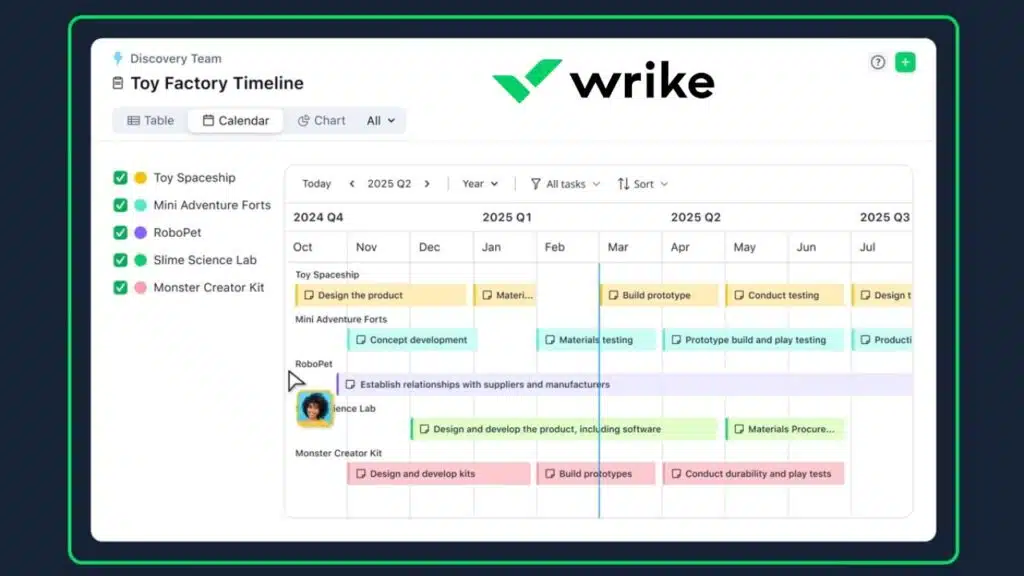
Wrike handles massive workloads like a champion, making it perfect for big companies juggling dozens of projects at once. This powerhouse software grows with your team, offering advanced reporting tools that turn complex data into clear insights your executives will actually understand.
What advanced reporting and scalability does Wrike offer?
Large teams need project management tools that grow with their business demands. Advanced reporting tools help managers track performance across multiple projects and departments.
- Advanced reporting functionality provides in-depth analytics for tracking team performance, project costs, and resource allocation across all active campaigns
- Enterprise-grade security features include single sign-on access, custom permissions, and data protection that meets corporate compliance standards
- Scalable project management adapts to growing team sizes, from small groups to thousands of users working on complex portfolio management initiatives
- Performance tracking tools offer real-time dashboards that monitor critical path analysis, task dependencies, and workflow automation across departments
- Flexible structure supports unlimited projects, custom workflows, and task hierarchy management for marketing teams and development groups
- Resource management capabilities track team workloads, budget allocation, and time tracking data to prevent bottlenecks in service delivery
- Integration options connect with Microsoft Project, Office 365, Google Docs, and other productivity tools through APIs and native connections
- Custom reporting templates generate executive summaries, team performance metrics, and project status updates for stakeholder presentations
Why is Wrike ideal for large teams managing many projects?
Wrike stands out as the perfect project management software for large teams juggling multiple projects at once. Its scalable infrastructure handles heavy workloads without breaking a sweat, making it a top choice for enterprise service delivery.
At $9.80 per user per month, Wrike offers exceptional value for organizations that need powerful project management tools. Large organizations get the most bang for their buck with Wrike’s advanced features and team collaboration tools.
Multiple concurrent projects become manageable with Wrike’s management tools and workflow automation. Teams can track progress across different departments using gantt charts, kanban boards, and custom workflows.
Resource management features help allocate team members effectively across various initiatives. Advanced integrations connect with existing systems, creating a seamless workflow for complex team structures and diverse enterprise needs.
How to Choose the Right Project Tracking Software
Picking the right project management software feels like choosing a new car – you need to match your team’s needs with the tool’s capabilities. Your team size, project complexity, and budget will guide you toward the best fit for your workflow automation needs.
How does team size and project complexity influence software choice?
Team size and project complexity shape your software needs more than any other factors. Small teams face different challenges than enterprise groups managing multiple complex workflows.
- Small teams under 10 people work best with free plans like Hive’s 10-user limit or Monday.com’s 2-seat option. These teams need basic task management features without paying for advanced tools they won’t use.
- Medium teams of 10-50 members require paid plans with better collaboration tools and resource management. Free plan user limits become too restrictive for growing teams that need more workspace flexibility.
- Large enterprise teams need scalable solutions like Wrike that handle hundreds of users across multiple projects. Flat-fee pricing often costs less than per-user pricing for big teams.
- Simple projects work fine with basic kanban boards and task lists found in most free project management software. Teams can track progress without complex workflow automation or advanced reporting features.
- Complex projects demand advanced features like gantt charts, task dependencies, and critical path analysis. These projects need paid plans with portfolio management and custom workflows for proper tracking.
- Agile development teams require specialized tools like Jira Software with sprint planning and scrum boards. Traditional project management tools lack the agile methodology support these teams need daily.
- Marketing teams benefit from visual project tracking with calendar view and document management integration. Teams working with creative assets need different features than software development groups.
- Startups should prioritize cost-effective solutions with room to grow rather than enterprise-level features they can’t use yet. Budget constraints make free plans attractive until team size outgrows user limits.
What features and scalability should you evaluate?
Choosing the right project management software means looking at features that grow with your team. Smart evaluation saves time and money down the road.
- Core task management features – Look for task lists, task prioritization tools, and task dependencies that handle complex projects. The best project management software offers kantt charts and calendar view options for different work styles.
- Collaboration tools quality – Check if the platform supports team collaboration tools like message boards and document management. Marketing teams need strong communication features that work across departments.
- Automation and workflow capabilities – Evaluate workflow automation options that reduce manual work as your team grows. Custom workflows and task hierarchy features become critical for larger projects.
- Integration ecosystem strength – Test connections with tools like Outlook, Office 365, Dropbox Paper, and iCloud. Platforms with Zapier support offer more flexibility for future needs.
- Reporting and analytics depth – Advanced reporting features help track progress and resource allocation across multiple projects. Portfolio management tools become vital as project numbers increase.
- Scalability for user growth – Review online ratings about how platforms handle increasing numbers of users and projects. Free plans often limit scalability compared to paid versions.
- Platform compatibility range – Check support for MacOS, Windows, and mobile access through apps or the cloud. Teams using different systems need consistent experiences across devices.
- Customer support quality – Support levels often vary between free plan users and paid subscribers. Growing teams need reliable help when issues arise during critical projects.
Takeaways
The right project management software can transform how your team works together. Each tool on this list offers something special for different types of teams and workflows. ClickUp shines for complex projects, while Hive works great for small teams that need flexibility.
Monday.com gives you custom workflows, and Asana makes team collaboration smooth as butter. Your team’s size, budget, and project complexity will guide your choice, so pick the one that fits like a glove.
FAQs
1. What makes the best project management software stand out in 2025?
The best project management software combines ease-of-use with powerful features like gantt charts, kanban boards, and workflow automation. Top tools like Monday.com and Zoho Projects offer team collaboration tools that actually make work easier, not harder.
2. Do these project management tools work well for marketing teams?
Yes, marketing teams love task management software with calendar view and task prioritization features. These productivity tools help track campaigns, manage deadlines, and keep everyone on the same page without endless emails.
3. Can I find free project management software that actually works?
Many platforms offer a solid free plan with basic task management features and collaboration tools. While free versions have limits, they’re perfect for small teams testing the waters before diving into paid plans.
4. How do agile project management features help modern teams?
Agile tools like scrum boards and kanban boards let teams adapt quickly when priorities shift. Jira Software excels here, offering custom workflows and task dependencies that keep sprints running smoothly.
5. What about resource management and portfolio management capabilities?
Smart project management tools now include resource allocation features and critical path analysis. This helps managers spot bottlenecks before they become headaches, especially when juggling multiple projects across different teams.
6. Are these tools easy to use, or do I need experts to set them up?
Most modern task management software focuses on user-friendliness and usability. You can usually get started with just a few mouse clicks, and many integrate seamlessly with Office 365 and other tools your team already uses.






























