

Are you stuck choosing a docker hosting plan that can scale with your app? Docker containers let you deploy containerized applications with the same code on any server.
This guide checks Kamatera, Vultr, Hostinger, DigitalOcean, and Amazon ECS. We compare solid-state drive speed, hourly billing, resource allocation, Docker Compose ease, and Jenkins pipelines.
Ready to choose?
Key Takeaways
- Kamatera costs $4 per month with a 30-day free trial and $100 credit. It scales to 32 vCPU, 128 GB RAM, and 4,000 GB SSD with a 99.95% uptime guarantee.
- Vultr offers one-click Docker on SSD VPS across 32 global data centers. Its API and Jenkins integration ease CI/CD pipelines with full root access.
- Hostinger starts at $4.49 per month with 8 cores, 32 GB RAM, and 400 GB NVMe. It adds an AI assistant, weekly backups, and daily malware scans for security.
- DigitalOcean lets you spin up SSD droplets with Docker Compose, Terraform, and API access. It links to Jenkins and GitHub Actions for fast, repeatable builds.
- Amazon ECS auto-scales on demand, ties into AWS services like Elastic Load Balancer and CloudWatch, and uses pay-as-you-go pricing for large-scale container deployments.
What Are the Essential Features of Docker-Friendly Hosting Providers?
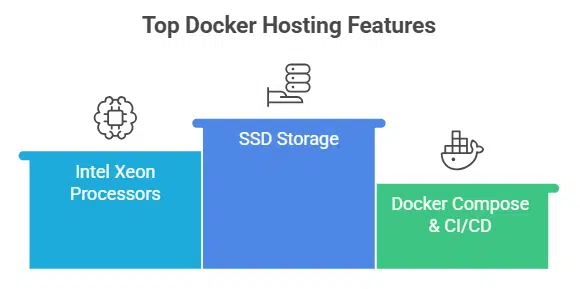
Top Docker hosts give you SSD storage and intel xeon processors, so you can tweak containers fast. They spin up containers like hotcakes with docker compose, CI/CD pipelines and API access, across platform-as-a-service and VPS hosting.
How scalable and high-performing are these hosting options?
Kamatera scales to 32 vCPU, 128 GB of RAM, and 4,000 GB of storage, with a 99.95% uptime guarantee. IONOS offers 24 cores, 48 GB of memory, 640 GB NVMe storage, and posts 99.998% availability while spinning up over 2,500 virtual machines every week.
Hostwinds stretches to 16 cores, 96 GB of RAM, 750 GB on SSD, and boasts 99.9999% uptime. These cloud providers soak up traffic spikes, power containerized applications, and deliver top performance optimization.
Amazon ECS auto-scales on demand, ties into AWS services, and uses elastic load balancing to maintain throughput. It links with AWS CloudWatch, supports CI/CD pipelines, and opens API access for custom devops workflows.
DigitalOcean spins up droplets with SSD storage, Docker Compose, and managed hosting for easy deployment. Hostinger speeds up containers on eight cores, 32 GB of RAM, and 400 GB of NVMe storage.
How easy is deployment and management on these platforms?
Most cloud hosts let you spin up a docker hosting node with just one click, so you can treat deployment like making coffee. Kamatera launches a container runtime in under a minute on SSD storage, and IONOS spins up a Linux node with Docker pre-installed at the same pace.
Vultr’s app installs Docker on Linux distributions in seconds, and Hostwinds handles instant upgrades and custom ISOs. You can hook up docker compose files, use CLI orchestration tools, or call API access to slot containers into your continuous integration pipeline.
Hostinger wraps things up in about six minutes, and its Kodee AI assistant cracks jokes while guiding you through over fifty Docker tutorials. Many providers also pipe in free 24/7 live monitoring and nightly backups, so you rest easy while your containerized applications hum along in global data centers.
Clients snag root access on self-serve VPS or dedicated servers to tweak resource allocation across CPU cores, disk space, and bandwidth through the console.
What security features should you expect?
Secure docker hosting and cloud hosting plans use role-based access, API key management, and audit logs for clear oversight. Automated vulnerability scans run daily to spot weak spots in containerized applications.
Amazon ECS plugs into AWS security tools to guard large-scale deployments. Audit logs track every login, every change, so admins catch odd activity fast.
Hostinger adds weekly backups and daily malware scans to protect your data. Hostwinds offers managed firewall options to keep docker containers isolated on your VPS hosting plan. Hosting.com uses free redundant SSD storage in RAID-1 arrays, so disks can fail without downtime.
Kamatera grants root admin access, giving you full control over system settings and security layers.
How do pricing and value compare?
Cloud hosting plans range from $4.00 at Kamatera to $5.76 at IONOS. Kamatera adds a 30 day free trial and $100 credit. Hostinger starts at $4.49 with a 50% discount for HostingAdvice readers.
Hostwinds charges $4.99 and offers hourly or monthly billing. Google Cloud Run and Microsoft Azure give free tiers for small docker hosting.
Amazon ECS uses pay as you go billing to keep costs low. Most providers give a 30 day money back guarantee. Network Solutions refunds in three business days. You pay more for SSD storage or extra bandwidth across global data centers.
You deploy containerized applications with docker compose and manage them with ci cd pipelines. You control servers via api access and root access.
Kamatera: Best for Cloud Flexibility
Kamatera spins up a VPS on SSD drives with root access, lets you tweak a compose file, and scales resources across worldwide servers in seconds—read on to learn more.
What features and benefits does Kamatera offer?
It opens with a 30-day free trial and $100 credit for new users. One-click docker hosting deploys Docker Engine in under 60 seconds. Five Linux operating system templates come with pre-installed Docker Engine versions.
Plans start at $4.00 per month with user-friendly billing. The platform runs on Intel Xeon chips in global data centers for cloud hosting. Users pick 1 to 32 vCPU, 1 to 128 GB RAM, and 20 to 4000 GB SSD.
A 99.95% uptime guarantee keeps containers humming.
Cloud hosting fans get root admin access for full system control. API access and command-line tools speed up Docker Compose tasks. Dedicated hosting options serve high memory workloads.
Managed hosting and server management handle routine chores. Teams build ci/cd pipelines and launch containerized applications fast. No setup fees or long contracts ease budget planning.
The service combines vps hosting and platform as a service. This setup boosts performance optimization and scalability solutions.
What are the pros and cons of using Kamatera?
Readers, here is a quick look at Kamatera’s strengths and drawbacks.
| Pros | Cons |
|---|---|
|
|
Vultr: Best for Customization Options
Vultr lets you pick your operating system, tweak CPU cores, and spin up Docker containers with full root access—read on to see why it stands out.
What features and benefits does Vultr provide?
Teams tap into docker hosting to launch containerized applications in seconds with a one-click Docker app for popular Linux distributions. Experts spin up ready-to-use environments with instant deployment on SSD-based VPS hosting.
Regular updates keep your docker containers current. Engineers tap into API access to script setups and link projects to GitLab CI/CD workflows. The network spans 32 global data centers and includes a CDN for fast delivery.
Admins unlock full root access to install tools and tune performance. High-performance cloud hosting runs on SSD storage and Intel Xeon compute. Teams shift resources up or down to match load.
Developers integrate via Docker API and GitLab CI/CD to fuel CI/CD pipelines.
What are the pros and cons of Vultr?
Here are the pros and cons of using Vultr for container hosting.
| Pros | Cons |
|---|---|
|
|
Hostinger: Best for Speed and Affordability
Hostinger runs Docker containers on flash storage and virtual servers at prices that won’t empty your wallet, read on for more.
What features and benefits does Hostinger have?
Plans start at $4.49 per month, with steep discounts for HostingAdvice readers. Four vps hosting plans let you scale as you grow. One plan costs under $5 per month. KVM virtualization gives direct root access and full docker hosting compatibility.
Dedicated IPv4 and IPv6 addresses come at no extra cost. A custom control panel and API access speed up server management tasks. Deploying containers with docker compose and simple pipelines feels smooth.
High-performance servers offer up to 512 GB RAM and 1 gigabit network speeds on SSD storage. Intel Xeon processors drive smooth performance optimization for production environments.
Weekly backups protect your data and the Kodee AI assistant handles routine tasks. Docker tutorials and support docs help you master cloud platform workflows. Global data centers shrink latency for multi-region deployments.
Technical support teams stand ready to resolve issues across your CI/CD pipelines.
What are the pros and cons of Hostinger?
Here is a quick look at Hostinger for Docker hosting, Readers:
| Pros | Cons |
|---|---|
|
|
DigitalOcean: Best for Developer-Friendly Tools
DigitalOcean packs Infra as Code tools, a Container Orchestrator, Cloud Servers, Disk Volumes, and an Image Store into one slick interface, so you spin up Docker containers in minutes—read on.
What features and benefits come with DigitalOcean?
The interface works like a toolbox for Docker. It helps you run docker containers at scale. It gives a clear control panel, application interface access, and a command line tool. Developers find a library of compose files and a tutorial hub.
They can spin up containerized applications with one click. CI/CD pipelines plug in with Jenkins or GitHub Actions for fast, repeatable builds. The platform cuts setup time, so teams can focus on code.
Solid SSD storage and Intel Xeon Platinum servers fuel each virtual private server. Global data centers make performance reliable and scale simple. You get full root access to tweak operating systems and resources.
Managed hosting options make cloud computing feel like a service plan. Support staff answer tickets around the clock. Developers see cost savings when they match plans to traffic. This blend of speed and ease of use fits any project size.
What are the pros and cons of DigitalOcean?
DigitalOcean packs a strong developer toolset and a clean GUI for containerized applications. Its API access and Terraform plugins let small teams launch droplets, link CI/CD pipelines, and run Docker Compose scripts fast. Solid docs cover Kubernetes, Ansible, and GitHub workflows in clear steps. Newbies joke that it feels like a Swiss Army knife for docker hosting.
Pricing charts skip exact fees, so cost planning grows tricky. Deep customization for enterprise scale and managed hosting jobs lags behind rivals. Small crews love speed and simple onboarding, but teams that need more automation or higher service tiers may hit a dead end. Cloud hosting fans get vps hosting with SSD storage, but performance metrics for docker containers stay thin, leaving big projects guessing.
Amazon ECS: Best for Large-Scale Deployments
Amazon ECS links virtual servers or Fargate with auto scaling, CloudWatch checks, and block storage to power massive microservice apps—read on to learn more.
What features and benefits does Amazon ECS include?
ECS runs containerized applications with a fully managed Docker orchestration service. You can tap into AWS services like Elastic Load Balancing and CloudWatch for logging and metrics.
Security controls and compliance tools suit enterprises that need high availability.
Automated scaling adapts capacity for large deployments, so projects stay responsive. The pay as you go pricing model cuts unexpected expenses by billing only used computing power.
Frequent updates add new features and improve compatibility with Docker compose, CI CD pipelines and other cloud services.
What are the pros and cons of Amazon ECS?
Amazon ECS packs enterprise-grade security, scaling, and deep AWS integration. It automates management for containerized applications and links with Amazon CloudWatch. The platform rolls out regular updates to keep Docker clusters current. Users enjoy high reliability and uptime for mission-critical workloads. This managed hosting choice also supports complex container orchestration at scale.
A steeper learning curve can slow newcomers. You must grasp clusters, tasks, and services inside the AWS console. The pay-as-you-go model may yield unpredictable bills. Casual users might find simpler VPS hosting more approachable. Teams running large, production-scale Docker deployments will see the most gains.
How Can You Choose the Right Docker Hosting Provider?
Compare support for compose tool and CI/CD pipeline, check SSD drive performance, API and root access, and global server zones to pick a host that scales—read on.
How do you assess your project requirements?
Assess needs for microservices architecture or a simple monolith. Check if you need fast rollbacks or twin staging and production environments. Think about container orchestration with Mirantis or Docker Compose.
Factor in multi-language support and ci/cd pipelines. Gauge your skill with cli tools and server management. Choose persistent storage or advanced networking if your software container needs talk to sql server or mysql server.
This list guides your docker hosting choice.
Weigh the size of your deployment, cloud hosting and vps hosting plans. Small projects run fine on vps with ssd storage. Large setups may call for Amazon ECS or global data centers with Intel Xeon processors.
That suits containerized applications at scale up. Check uptime guarantees, automated backups and technical support. Spot compliance rules if you deal with databases or web hosting services.
Mix in api access, root access and let’s encrypt for security. That list shapes your decision.
How can you compare provider performance and scalability?
Compare uptime rates to gauge reliability. Kamatera offers 99.95 percent while IONOS hits 99.998 and Hostwinds tops at 99.9999. Look at RAM and cores too. The flexibility of resources also plays a part, with up to 32 vCPU and 128 GB RAM on Kamatera versus 8 cores and 32 GB on Hostinger.
You can scale with instant upgrades, auto-scaling or minute billing. Testing real-time monitoring and API access gives you hands-on insight.
Data center reach and deployment speed affect performance. Vultr runs 32 global sites for low latency. Spin up a VPS hosting node in under a minute on Kamatera but plan for six minutes on Hostinger.
Containerized applications built with Docker Compose move faster when servers ring up fast. Root access and custom configurations let you tune Intel Xeon processors for CI/CD pipelines.
Takeaways
These five choices make it easy to run containerized applications. You can launch stacks with Docker compose or test locally on Docker Desktop. SSD storage in global data centers keeps your apps fast.
Kamatera and Vultr give you root access and scale on demand. DigitalOcean and Hostinger link into ci/cd pipelines and AWS for swift builds. Pick the right host to keep your projects flowing like a river.
FAQs on Best Docker-Friendly Hosting Providers
1. What is Docker hosting and why pick a Docker-friendly provider?
Docker hosting means a server that runs your Docker containers. It helps run containerized applications. A Docker-friendly host will handle resource allocation and server management. You can use cloud hosting or vps hosting and watch your apps sail smoothly.
2. How do I choose between VPS hosting and managed hosting for my apps?
VPS hosting gives you full root access, you pick your own operating system (os) and partitions. It can run on Intel Xeon processors, but you handle server management. Managed hosting takes care of updates and performance optimization on dedicated servers. You also get technical support. Think of your budget and time.
3. Does Amazon ECS or AWS (Amazon Web Services) platform-as-a-service (paas) work with Docker Compose and CI/CD pipelines?
Amazon ECS lives in AWS (Amazon Web Services), it is a platform-as-a-service (paas). You plug in your Docker Compose files and go. You can build ci/cd pipelines fast. You can add serverless pods, it scales up when you hit a surge. You only pay for what you use.
4. How do solid-state drive (ssd) storage and global data centers affect performance optimization and serverless setups?
An SSD cuts load time for websites and apps. Data centers with SSD storage often lead in performance optimization. Global data centers give low lag for users worldwide. Even in a serverless setup, fast storage matters. Cloud technology runs on speed.
5. Can I get API access and technical support when I scale up my vps (virtual private server) or cloud hosting?
Many hosts give API access so you can tweak your setup with code. They also have technical support, you can call or chat for help. You can scale up your vps or your Docker containers fast. Good hosting providers build strong scalability solutions and guide you when traffic spikes.
6. What other features matter in a Docker-friendly hosting provider?
A host that runs various operating systems (os), including Android for testing, gives you choice. A clean website and good usability help you move fast. You want hooks for version control systems. Cookie settings can keep data safe. OS-level virtualization adds a wall between apps. Watch how they handle the full life cycle of your projects. Grab a free trial to kick the tires.































