Imagine this: The storm outside is howling, the lights flicker and die, and your house plunges into darkness. In that moment of silence, the little blue light on your Wi-Fi router turns off. For most people, this is just an inconvenience. But for homeowners relying on smart security, it’s a critical vulnerability. A dead router means your “smart” home just became “dumb,” leaving you blind when you need eyes on your property the most.
Ensuring you have a reliable battery backup for home security is not just about keeping the lights on; it’s about maintaining the “brain” of your defense system. Burglars are increasingly savvy—they know that cutting the power often cuts the alarm. By implementing a few strategic power and data redundancies, you can ensure your system stays vigilant even when the grid fails.
Below are 15 proven strategies, divided into three phases, to keep your security running, recording, and alerting during an outage.
Key Takeaways
-
Internet is King: Your cameras are useless remotely without a UPS on your router.
-
Go Local: Cloud recording fails when the internet cuts; SD cards and local NVRs do not.
-
Efficiency Matters: Disabling IR night vision and lowering resolution can double your backup battery life.
-
Test It: Regular “unplugged drills” reveal dead batteries before a real emergency strikes.
Why Most Smart Homes Fail When the Grid Goes Down
Before diving into the fixes, it is crucial to understand why modern security is so fragile. The convenience of “wireless” cameras is often a marketing illusion. While the data transmission is wireless, the ecosystem relies on a chain of dependencies: The Grid > The Router > The Cloud > Your Phone.
If any single link in this chain breaks—whether due to a storm, a blown transformer, or a burglar cutting the cable line—the entire system collapses. A battery-powered camera might still be “on,” but if it cannot reach the cloud to store the video, it is effectively blind. This reliance on cloud dependency creates a massive security gap known as “The Offline Blindspot.” To fix this, we must shift our strategy from reactive (hoping the power stays on) to proactive (building a system that ignores the grid entirely).
The 3 Pillars of a Resilient Security System
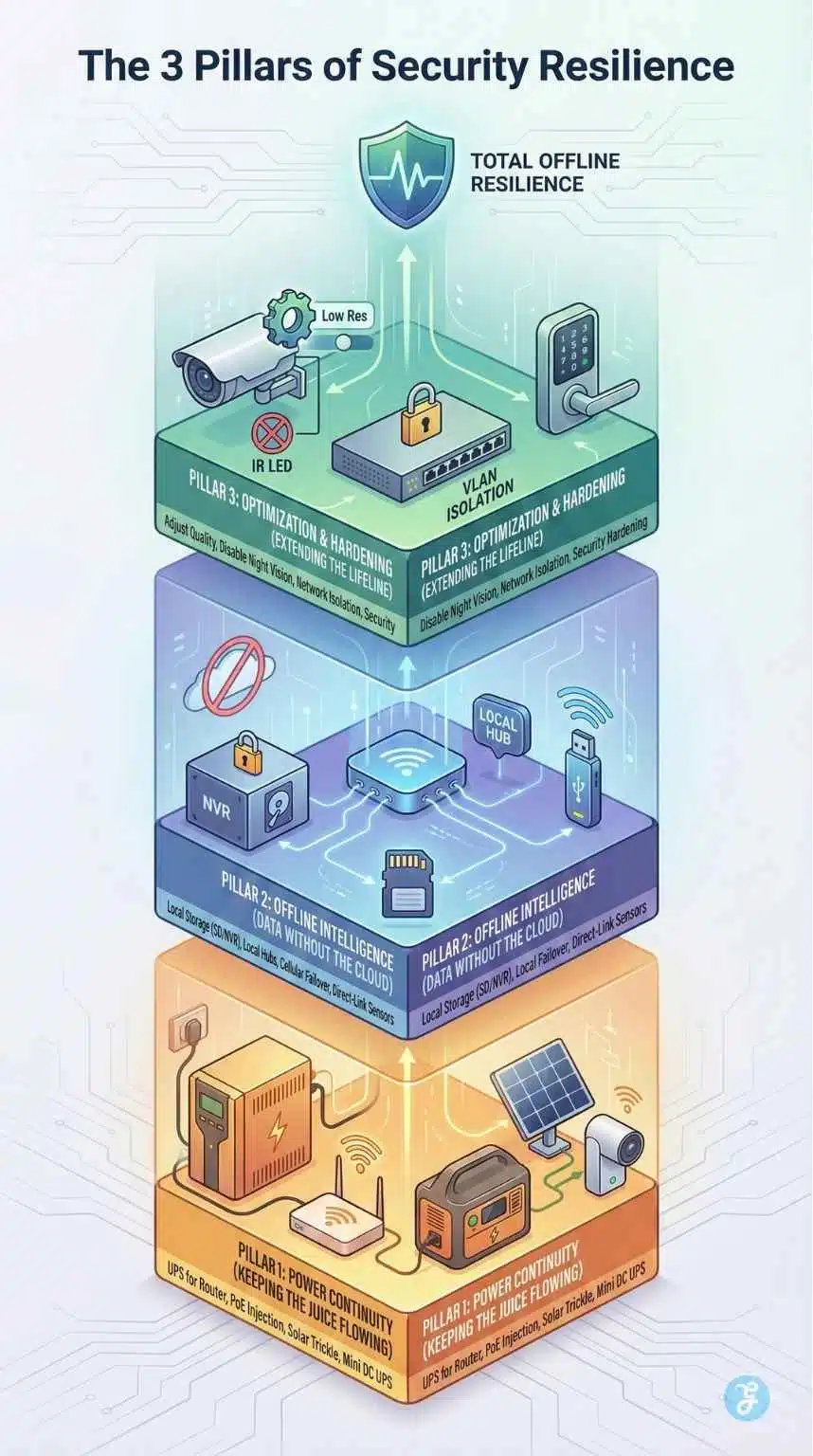
To truly “weatherproof” your home security against power outages, we cannot just rely on a single backup battery. We need a multi-layered approach. This guide is structured around the three essential pillars of offline resilience:
-
Pillar 1: Power Continuity. Ensuring the hardware (cameras, routers, and hubs) stays physically powered when the AC mains fail.
-
Pillar 2: Offline Intelligence. Guaranteeing that data is recorded and logic runs locally, even when the internet connection is severed.
-
Pillar 3: Optimization & Hardening. Managing your energy resources to extend battery life from minutes to days, while securing the network against tampering.
By addressing all three, you create a “failover” system that works just as hard in a blackout as it does on a sunny day.
Phase 1: Power Continuity (Keeping the Juice Flowing)
The first hurdle is obvious: physics. Your devices need electricity. However, plugging everything into a standard battery strip isn’t enough. You need to prioritize which devices get the “premium” power.
1. The “Internet Lifeline”: UPS for Router & Modem
Most people put a battery in their camera but forget the bridge that connects it to the world. If your Wi-Fi router dies, your battery-powered Ring or Nest camera cannot send you an alert.
The Trick: Plug your modem and Wi-Fi router into a dedicated Uninterruptible Power Supply (UPS).
Why it works: A UPS acts as a bridge. When the wall power cuts, the UPS battery kicks in instantly (in milliseconds), preventing your router from rebooting.
UPS Runtime Estimates for Routers
| UPS Capacity (VA) | Average Load (Router + Modem) | Estimated Runtime |
| 450 VA | 25 Watts | 45 – 60 Minutes |
| 600 VA | 25 Watts | 1.5 – 2 Hours |
| 850 VA | 25 Watts | 3 – 4 Hours |
| 1500 VA | 25 Watts | 6+ Hours |
2. The “PoE Injection” Hack
If you have wired cameras, you likely have them plugged into different outlets around the house. This makes backup difficult because you need a battery for every single outlet.
The Trick: Use Power over Ethernet (PoE) cameras connected to a single PoE switch.
Why it works: By running all your cameras to one central switch, you only need to power one plug with a large UPS. This centralizes your power management. If you buy one massive battery backup for that closet, every camera in the house stays online simultaneously.
3. Solar Trickle Charging (Even in Shade)
For wire-free cameras (like Arlo or Eufy), taking them down to recharge during a storm is dangerous and impractical.
The Trick: Install 3-5W solar panels for each outdoor camera.
Why it works: You don’t need full sun to get a “maintenance charge.” Even on cloudy days, a small panel can provide enough trickle charge to prevent the battery from draining to zero. It changes the dynamic from “running on a timeline” to “running indefinitely.”
4. The Efficiency Hack: DC-to-DC Mini UPS
Standard UPS units are bulky and inefficient for small devices because they convert battery power (DC) to wall power (AC) and then your router converts it back to DC. This double conversion wastes energy.
The Trick: Use a “Mini DC UPS” specifically designed for 5V, 9V, or 12V devices.
Why it works: These small, wallet-sized devices connect directly to your router or smart hub. Because there is no AC conversion loss, a tiny 10,000mAh Mini UPS can often power a router longer than a bulky brick UPS that costs twice as much.
5. Car Battery Inverter Emergency Rig
If you are facing a multi-day blackout (like after a hurricane), your small UPS units will eventually die.
The Trick: Use a power inverter connected to your car’s 12V cigarette lighter.
Why it works: Your car is essentially a massive generator. By running your car for 20 minutes with an inverter, you can recharge your portable power stations (like Jackery or EcoFlow) or top up your camera batteries. Note: Only do this outdoors to prevent carbon monoxide poisoning.
Phase 2: Offline Intelligence (No Internet? No Problem)
Power is only half the battle. If your internet Service Provider (ISP) goes down, your cameras might have power, but they can’t save footage to the cloud. You need “Offline Intelligence.”
6. Local Storage Redundancy (The SD Card Safety Net)
We rely too heavily on cloud subscriptions. If the cable line is cut, the cloud evaporates.
The Trick: Install “High Endurance” microSD cards in every camera that supports them.
Why it works: Modern cameras are smart enough to switch to local recording when they lose internet connection. They will store the footage on the card and, in some cases, upload it later when the internet returns. This is your “Black Box” flight recorder.
7. Prioritize “Local Processing” Hubs
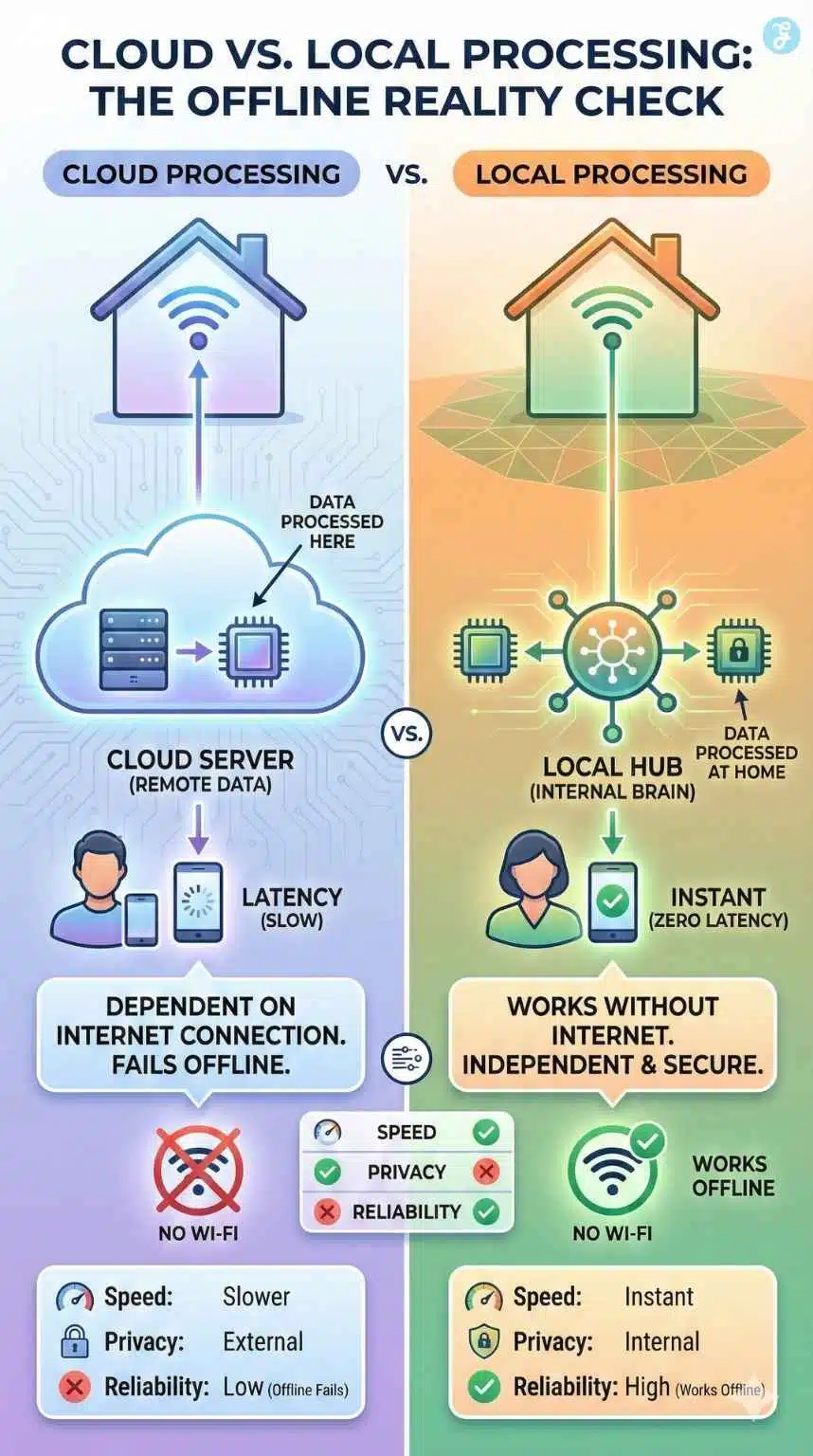
Many smart hubs (like early SmartThings or basic Alexa setups) are “cloud-dependent.” If you ask them to lock the door, the signal goes to a server and back. No internet means no automation.
The Trick: Switch to hubs that process logic locally, such as Hubitat, Home Assistant, or the Homey Pro.
Why it works: These hubs store your automation rules on the device itself. If a window sensor trips, the hub can still sound the siren and flash the lights even if the internet cable has been physically severed.
Cloud vs. Local Processing Hubs
| Feature | Cloud Hubs (e.g., Alexa, Google Home) | Local Hubs (e.g., Hubitat, Home Assistant) |
| Speed | Slow (High Latency) | Instant (Zero Latency) |
| Privacy | Data processed on external servers | Data stays inside your home |
| Offline Reliability | Fails (Cannot run automations) | Works (Runs locally stored logic) |
| Dependency | Requires an active Internet connection | Independent of the Internet |
8. The “Locked Box” NVR Method
If you are recording locally to a Network Video Recorder (NVR), a burglar’s smartest move is to steal the recorder itself.
The Trick: Place your NVR in a ventilated, locked steel box or hide it in a difficult-to-access location (like an attic or false closet).
Why it works: Without cloud backup, the physical drive is your only evidence. Physical hardening ensures that even if they break in, they can’t “delete” the footage by walking away with the box.
9. Cellular Failover: The Backup Internet Lane
If you absolutely must receive alerts on your phone during an outage, Wi-Fi isn’t enough.
The Trick: Use a router that supports “Dual WAN” with a 4G/LTE USB dongle, or a security system with built-in cellular backup (like Ring Alarm Pro).
Why it works: This creates a failover system. When the main internet line dies, the router automatically switches to the cellular data plan. It won’t stream 4K movies, but it is perfectly sufficient for sending security snapshots and arm/disarm commands.
10. Direct-Link Sensors (Device-to-Device Binding)
This is an advanced trick for Zigbee and Z-Wave users.
The Trick: Use “binding” or “direct association” to link a motion sensor directly to a smart bulb or siren.
Why it works: This bypasses the hub entirely. The motion sensor talks directly to the light. It is the ultimate fail-safe; even if the hub dies, the light will still turn on when someone walks by.
Phase 3: Optimization & Security Hardening
You have power, and you have data. Now, you need to make them last. Running a security system on backup power is a game of resource management.
11. Adjust Recording Quality & Triggers
High-definition video is a data and power hog.
The Trick: During an outage, go into your app settings and lower the resolution from 4K/2K to 1080p. Switch recording modes from “Continuous 24/7” to “Motion Only.”
Why it works: Writing to an SD card consumes power. By recording only when necessary and at a lower quality, you significantly reduce the read/write cycles, extending both storage capacity and battery life.
12. Disable IR Night Vision (Use Ambient Light)
Night vision is the biggest battery drainer on a wireless camera. The Infrared (IR) LEDs blast invisible light that eats up energy.
The Trick: If your camera is near a streetlight or you have solar motion lights nearby, turn off the camera’s IR LEDs in the settings.
Why it works: Relying on external ambient light can reduce the camera’s power consumption by up to 40% at night.
13. Isolate on a “Dummy” VLAN
Security and stability go hand in hand.
The Trick: Place your cameras on a separate VLAN (Virtual Local Area Network) that is isolated from your main home network.
Why it works: If a power outage is caused by a malicious act (like someone trying to hack or flood your network), keeping your security devices on a separate lane ensures they aren’t bogged down by other traffic or vulnerabilities. It keeps the data path clear for recording.
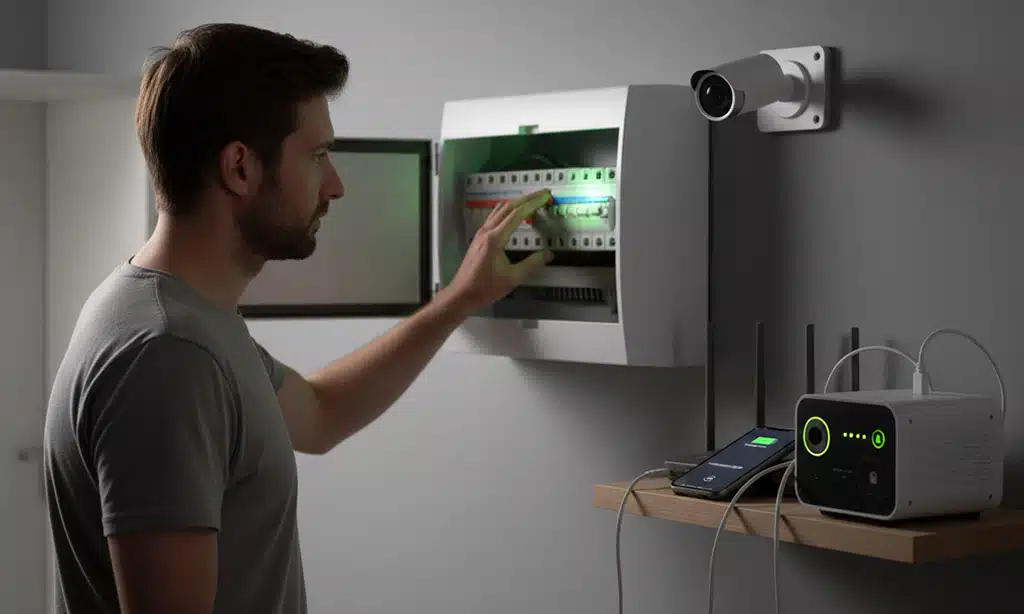
14. The “15-Minute Breaker Drill”
The worst time to test your backup plan is during a real emergency.
The Trick: Once every six months, go to your fuse box and flip the main breaker. Wait 15 minutes.
Why it works: Walk around your house. Is the router still on? Did the cameras switch to infrared? Did the siren chirp? You will almost always find one battery that is dead or one device that failed to reconnect. Fix it now, not when the burglar is at the door.
15. Keypad Smart Locks (Non-Server Based)
Finally, ensure you can actually get back into your own home.
The Trick: Choose smart locks that store access codes locally on the hardware (like Schlage Encode or Yale Assure).
Why it works: Some cheaper smart locks rely on a server check to verify a “temporary code.” If the internet is down, those codes fail. Always use locks that have a physical memory for credentials, so your PIN works 100% of the time, offline or online.
Bonus Trick: The “Canary in the Coal Mine” (Power Monitoring)
One common problem with using a UPS on your router is the “False Sense of Normalcy.” If your power goes out, but your Wi-Fi keeps running on battery, you might not even realize your home is in blackout mode until you try to turn on a light—or until the UPS dies two hours later. You need an early warning system.
The Trick: Use a cheap smart plug as a “Power Probe.”
How it works:
-
Plug a basic Wi-Fi smart plug into a wall outlet that is NOT connected to a UPS battery backup.
-
Set up a “Device Offline” notification in your smart home app (available in apps like SmartThings, Home Assistant, or via IFTTT).
-
The Logic: If your power fails, the smart plug dies instantly. However, because your router is on a UPS, your internet is still active. Your hub will detect that the smart plug has vanished and send you an alert: “WARNING: Main Power Lost.”
-
This gives you a heads-up to immediately conserve phone battery or rush home before your router’s backup runs dry.
Crucial Maintenance: Winter & Battery Health
Batteries are chemical, not magical. They have physical limitations, especially regarding temperature and lifespan. Ignoring these will result in a system that fails exactly when you need it.
1. The “Cold Weather” Rule: Lithium-ion batteries (found in Ring, Arlo, and Eufy cameras) hate the cold. Below 32°F (0°C), they stop charging. Below -4°F (-20°C), they often stop working entirely.
The Fix: If you live in a freezing climate, bring wire-free cameras inside during extreme cold snaps, or hardwire them. For outdoor UPS units, ensure they are rated for outdoor temperature fluctuations (most are meant for indoor climate-controlled closets only).
2. The 3-Year UPS Cycle: The lead-acid batteries inside a standard UPS unit degrade over time. After 3 to 5 years, a unit that claims “2 hours of runtime” might only last 5 minutes.
The Fix: Write the “Installation Date” on a piece of tape and stick it to the side of your UPS. Plan to replace the internal battery (which is cheaper than buying a whole new unit) every 3 years.
Pro Tip: Pure Sine Wave vs. Simulated Sine Wave
A technical note for those with expensive gear.
When buying a UPS, you will see two types: Pure Sine Wave and Simulated (Modified) Sine Wave.
-
Simulated Sine Wave: Cheaper. Fine for basic routers and simple electronics.
-
Pure Sine Wave: More expensive. Essential for sensitive electronics like modern desktop computers with Active PFC power supplies or high-end NVR systems.
Recommendation: For just a router and modem, a cheaper “Simulated” UPS is fine. If you are backing up a delicate NVR or server, spend the extra money for “Pure Sine Wave” to prevent hardware damage.
Summary Checklist – What to Buy First
| Priority Level | Essential Gear | Estimated Cost |
| Tier 1 (Basic) | 600VA UPS for Router + High Endurance SD Cards | ~$80 – $100 |
| Tier 2 (Advanced) | Mini DC UPS for Hubs + 4G LTE Backup Modem | ~$150 – $200 |
| Tier 3 (Pro) | PoE Switch + Solar Panels + Local NVR | ~$300+ |
Frequently Asked Questions (FAQ)
How long will a standard UPS keep my Wi-Fi running?
It depends on the size of the UPS and the power draw of your router. A standard 600VA UPS will typically keep a modern Wi-Fi router and modem running for about 2 to 3 hours. If you add a “Mini DC UPS,” you might stretch that to 4-5 hours.
Will my wireless cameras record if the Wi-Fi goes down?
Only if they have local storage (SD card) or are connected to a local NVR. If they are purely cloud-based (like the basic Ring Doorbell model without a Hub), they will not record anything during a Wi-Fi outage.
Why is my UPS beeping when the power goes out?
That is the “On Battery” alarm. While helpful, it can alert intruders that your security system is running on backup. Most decent UPS models allow you to mute this alarm via their software or a physical button. We highly recommend muting it for security setups.
Can I use a power bank (for phones) to run my router?
Generally, no. Most routers require 12V power, while standard phone power banks output 5V. However, you can buy a “5V to 12V step-up cable,” but be careful—it must match the amperage your router needs, or you risk damaging the device. A dedicated Mini DC UPS is safer.
Do cellular backup systems require a monthly fee?
Usually, yes. Systems like Ring Alarm Pro or Arlo Secure require a subscription to enable the 4G/LTE backup data. However, the cost is often worth it for the guarantee that your alarm signal will get out even if the wires are cut.
Final Thought: The Peace of Mind Protocol
Technology is amazing, but it is fragile. Relying solely on the grid and the cloud is a gamble you shouldn’t take with your family’s safety. You don’t need to implement all 15 of these tricks overnight. Start with the basics: Get a UPS for your router and put SD cards in your cameras.
By layering these battery backup strategies, you transform your home security from a fair-weather friend into a resilient, always-on guardian. When the neighborhood goes dark, your home will stay watching.