Many teams struggle to keep learning short, fresh, and useful. Employees forget lessons fast, training feels long, and managers want proof of impact. The Rise of Microlearning in 2026, looks at Microlearning Platforms that fix those problems, like Axonify, Thrive Learning, BeFreed, Duolingo, Blinkist, Headway, OttoLearn, and Qstream.
Microlearning can lift knowledge retention with spaced repetition and AI-driven personalization. It also helps with compliance training, mobile-first delivery, and behavior change, while giving real-time analytics and reporting.
I will compare delivery tools, authoring software, and LMS options, and show which tools suit corporate training, employee development, and frontline work. Read on.
Expert Reviews: Top 8 Cutting-Edge Microlearning Platforms
For a quick recommendation, check out our product list above—or scroll down to read more in-depth reviews!
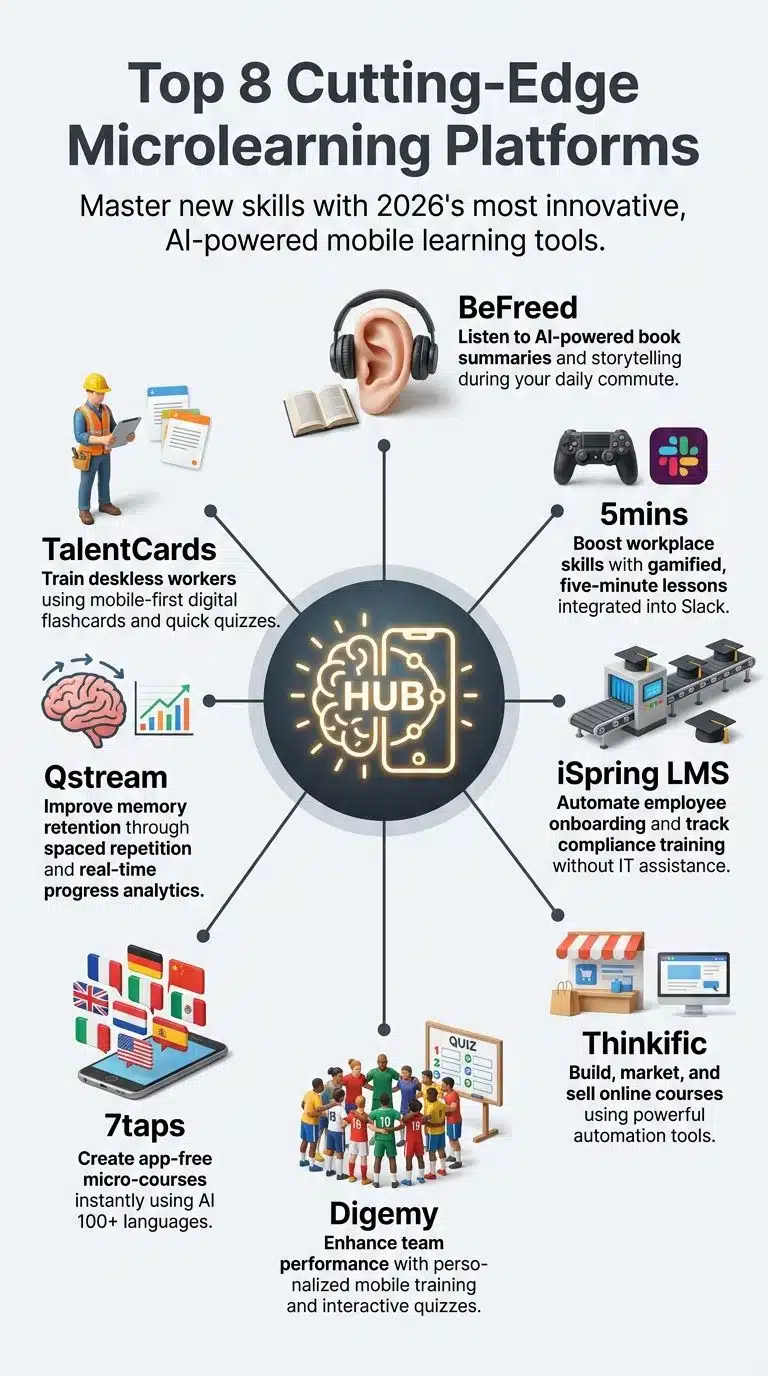
- Best for busy learners seeking flexible, AI-powered personalized audio microlearning in 2026: BeFreed
- Boost Skills Fast with Top-Rated, AI-Powered Microlearning Platform: 5mins
- Best for automating training with effortless onboarding and smart integrations: iSpring LMS
- Best for building and selling online courses with smart automation: Thinkific
- Personalized Microlearning Boosts Team Training Speed and Engagement Rapidly: Digemy
- Best for Fast, Effective Training Trusted by All Leading Companies: 7taps Microlearning
- Boost Skills Fast With Spaced Repetition and Real-Time Progress Tracking: Qstream
- Best for quick, mobile team training with smart tracking features: TalentCards
Comparison Table

| Product Name | Price | User Base / Teams | Key Features | Integration / Platform Support | Trial / Free Offer |
|---|---|---|---|---|---|
| BeFreed | – | 1,000,000 users globally |
Personalized AI audio learning, narration choices, interactive audio, flashcards & journals, knowledge visualizer, AI podcast generator, book summaries, flexible learning styles
|
iOS, Android; Discord, LinkedIn | – |
| 5mins | – | 1,000+ teams in 80+ countries |
20,000+ lessons, 200+ expert instructors, gamification (leaderboards, points, certifications), peer learning, 95%+ completion rate
|
Integrations: Microsoft, Slack, Google Drive, Teams, HiBob, Workday, Docebo, Salesforce, HubSpot
|
– |
| iSpring LMS | – | 1.4M+ monthly active users; 60,000+ teams |
Automated training, onboarding, knowledge base, compliance tracking, digital profiles, instant launch courses, AI-powered content, 24/7 human support
|
Native connectors: Salesforce, MS Azure, MS Exchange, BambooHR
|
30-day free trial (no credit card) |
| Thinkific | – | 35,000 customers worldwide |
Unlimited courses, AI-powered content & teaching assistant, SCORM-compliant LMS, custom domains, B2B selling
|
– | Free Trial options |
| Digemy | – | – | – | – | – |
| 7taps Microlearning | – | 15,000 L&D teams; top 5 Fortune 500 companies |
Microlearning, AI content development, instant translation (100+ languages), no app required, real-time collaboration, actionable analytics, compliance training, reminders
|
Responsive web; security: GDPR, ISO 27001, SOC 2 Type 2
|
Forever free options |
| Qstream | – | – | – | – | – |
| TalentCards | – | – |
Bite-sized lessons, supports pictures/audio/quizzes, tracks progress, works on smartphones/computers, quick creation & sharing
|
Forever free options |
1. BeFreed
Best for busy learners seeking flexible, AI-powered microlearning in 2026
Key Highlights:
- Lets you listen to book summaries and topics anytime using AI voices you can choose.
- Offers both storytelling and fact – based learning for different styles.
- Makes learning easy during daily routines, like commuting.
- Includes tools like flashcards and journals to help remember what you learn.
- Gives interactive audio so users can engage with the material as they listen.
- Features award – winning books and trending topics across many categories.
BeFreed turns downtime into deep learning, right in your pocket. I hopped on the subway with earbuds and found myself breezing through a whole book summary before my stop. The app gave me the choice: did I want facts spoon-fed or a story woven? Today I picked storytelling—tomorrow, maybe all bullet points. Switching narration voices made it feel like swapping seats at the dinner table, every voice giving the words a new flavor.
The magic is in how BeFreed fits different learning styles. Some mornings, skimming self-help tips works best; sometimes, I crave a full dive into productivity hacks or mindfulness guides. Flashcards and journals are just a swipe away for keeping ideas fresh in memory’s attic; they do half the heavy lifting for you after listening. One time, using interactive audio while walking my dog helped me remember tricky communication skills by replying out loud—my neighbors probably thought I was talking to myself!
No other microlearning platform blends AI-driven personalization with such easy navigation and voice options. There’s no struggle with clunky menus or dry narrators here—just smooth access to top-tier content across trending topics. After trying several apps from this space, only BeFreed kept pulling me back day after day because it actually remembered what mattered most to me and built on that foundation naturally as my curiosity grew.
Features
- Dive into tailor-made learning, guided by a clever AI that knows just how you like it—like getting schooled by your own wise grandparent or your favorite teacher.
- Listen to book summaries and hot topics on the go; park yourself anywhere, soak up wisdom while you wash dishes or walk the dog.
- Pick a voice that fits your mood—soft as a lullaby, sharp as espresso, or somewhere in between—because who says studying can’t sound sweet?
- Flip between storytelling magic and straight-up facts; skim when you’re rushed, dig deep when curiosity gnaws at you.
- Tap and talk with interactive audio—you don’t just hear stuff, you jump right into the conversation with questions or comments.
- Hold onto what matters using built-in flashcards and journals—it’s like leaving breadcrumbs for your brain so nothing gets lost in the woods.
- Turn every topic into an adventure: mix entertainment with study sessions so even heavy ideas feel light enough to carry all day.
Pros
- Listen to your favorite book, while you make coffee, or walk the dog—talk about multitasking made easy.
- Choose how you learn: quick story sprint, slow fact marathon, or a right-down-the-middle jog.
- Pick a voice that soothes or sparks; learning never sounded this good, seriously.
- Tap and dive in with quizzes and flashcards—keep those brain muscles flexing without breaking a sweat.
Cons
- Sometimes, the sheer amount of choices feels like picking dinner at a buffet—overwhelming and slow.
- If you’re not into audio content, well, it’s a bit like bringing a fork to a soup party—not quite the right fit.
- Some voices may sound more robot than raconteur, which can yank you out of story mode fast.
BeFreed is best for curious minds who crave control over how, when, and what they learn—think busy professionals, lifelong learners, or students juggling life’s circus acts—all looking for a smarter way to soak up knowledge among the Top 8 Cutting-Edge Microlearning Platforms: Expert Reviews For 2026; give BeFreed a whirl and see learning bend to your rhythm.
Price: $12.99/month (Billed Monthly); $9.66/month (Billed Quarterly); $7.49/month (Billed Yearly)
2. 5mins
Boost Skills Fast with Top-Rated, AI-Powered Microlearning Platform
Highlights
- Offers 20,000+ lessons led by over 200 expert instructors
- Achieves a high lesson completion rate above 95%
- Drives much higher user engagement than standard learning tools
- Trusted by teams in more than 80 countries around the world
- Connects easily with tools like Microsoft, Slack, Google Drive, and Salesforce
- Uses leaderboards, skill points, and certifications to make learning fun
5mins grabs your attention and refuses to let go. With AI-powered microlearning, you carve out just five minutes from your busy workday, yet still move the needle on critical skills. Imagine TikTok, but with each swipe making you smarter instead of wasting time. Lessons are so short, I finished one while waiting for my coffee to brew—no kidding. The platform’s design fits right into Slack and Teams, a real treat for anyone tired of juggling too many tabs.
What really made me smile was its gamification—it brought out my inner competitor! Leaderboards and badges got everyone in the office buzzing about who would snag the next streak bonus. HR folks love how it links up with BambooHR and ADP; managers keep track without lifting a finger thanks to auto-enrollments and reminders zipping straight into email or chat apps. Content is king here—with 20,000+ lessons from top experts covering everything from GDPR basics to leadership tips.
Personalized suggestions felt like they were reading my mind—a bit spooky at first—but hugely helpful when tackling skill gaps before annual reviews rolled around again. Training times dropped fast; what used to take hours now slips neatly between daily tasks, freeing up whole afternoons for project work or good old-fashioned small talk by the water cooler. 5mins lands at No.2 because it truly blends modern experience with practical results—short bursts that stack up over time until you look back amazed at how far you’ve come.
Features
- AI Microlearning delivers quick, focused lessons that slide right into your busy day—think of it as learning on espresso shots, not long lectures.
- Seamless Integrations with HR and communication tools keep enrollment, progress tracking, and content delivery running smooth as butter—your training just appears where you already work.
- Gamification throws in leaderboards, badges, skill points—even some friendly rivalry between coworkers. Training turns from a chore to something you might actually brag about at lunch.
- Personalized Training uses smart AI magic to match each lesson to your job role and goals. If you’re missing something? The system catches it faster than a hawk spots dinner.
- Real-Time Insights show who’s smashing their learning goals (and maybe who needs a nudge). It’s like having a dashboard for talent growth instead of guesswork.
Pros
- Learn new skills faster than you can brew a cup of coffee, seriously, it’s that quick.
- No more boring training—lessons feel like scrolling your favorite app, but you actually get smarter.
- Skip the paperwork and nagging reminders; everything runs automatically in the background while you work.
- Get real-time feedback on what’s working for you and your team, so nobody’s guessing anymore.
Cons
- Sometimes, the bite-sized lessons move too fast, like trying to sip a milkshake through a coffee straw.
- Gamification might make serious training feel more like Mario Kart than work—points everywhere.
- Integrations can act up if your tech stack is old-school or held together with virtual duct tape.
5mins is perfect for forward-thinking HR leaders, team managers, and L&D pros who crave quick wins, love smart shortcuts, juggle ten tasks before breakfast, and want to stay ahead with microlearning tools ranked in the top 8 cutting-edge platforms of 2026—jump in now and level up your team’s skills without missing a beat.
Price:
- Essentials charge $270/month (Annual Billing) and $297/month (Quarterly Billing)
- Advance charge $338/month (Annual Billing) and $372/month (Quarterly Billing)
- Accelerate charge $474/month (Annual Billing) and $520/month (Quarterly Billing)
However there are separate plans for definite user ranges.
3. iSpring LMS
Best for automating training with effortless onboarding and smart integrations
Highlights
- Over 1.4 million people use iSpring LMS each month worldwide
- 24/7 live human support with fast response times and no chatbots
- Ready-to-use courses in sales, compliance, cybersecurity, and more
- Easy integration with Salesforce, BambooHR, MS Azure, and other tools
- Tracks training results and certificate status automatically without IT help
- Offers a free 30 – day trial without needing a credit card
iSpring LMS stands tall as a power tool for busy teams who want training done right and fast. Picture this: you join a new company, and instead of getting lost in paper manuals or endless PowerPoint slides, your boss adds you to iSpring, clicks a few buttons, and—bam—you’re loaded up with the exact courses you need. No IT folks needed. Even grandma could figure out how to upload users or assign lessons here! This platform saves time by enrolling learners automatically and tracking their progress every step of the way.
The AI-powered course builder feels like having an expert whispering pointers in your ear as you work. Ever taken compliance training twice because someone forgot your certificate expired? Not anymore—iSpring’s reenrollment feature keeps tabs on deadlines for you, nudging learners before it’s too late. Digital profiles turn skills into gold coins employers can actually use when picking project leads or filling roles. And with pre-made content covering sales techniques and cybersecurity tips, no one will be stuck starting from scratch.
What makes iSpring stand out is its seamless plug-and-play links with popular office tools like Salesforce or BambooHR; integration’s smooth as butter on hot toast. Quick support helps too—a friend once waited under fifteen minutes for help fixing his login problem during tax season crunch time! Staff get Individual Development Plans so no one feels left stranded on “Training Island.” While some platforms edge ahead thanks to deeper analytics dashboards or fancier social learning options, iSpring grabs our No. 3 spot by striking a perfect balance: it gets folks trained quickly without throwing curveballs at admins—or their wallets—making life simpler for everyone involved.
You can explore more about handling compliance headaches at [SHRM Guide] or compare current sellers offering good deals over at [Gartner Listings]. Book that demo if curious—it might just save next Monday’s orientation lunch hour.
Features
- You can track every training result with no IT headaches—just click, view progress, and sip your coffee while data rolls in smoothly.
- Automatic course enrollment is like a magic trick for HR—import users once, let the platform do the heavy lifting, and never chase down employees again.
- Fast onboarding plans drop new hires into company life like ducks to water; they learn what matters most from day one without missing a beat.
- The built-in knowledge base acts as your “company brain,” holding answers and guides so no one’s left scratching their head at 2 AM over lost info.
- With pre-built courses on everything from sales to cybersecurity, you’ll have ready-to-go lessons stocked like snacks in a breakroom—grab one whenever learning hunger strikes.
Pros
- No more chasing spreadsheets—track who finished training, even if your IT guy is on vacation.
- Plug into tools like Salesforce or BambooHR and skip the data headache; users import themselves faster than coffee brews.
- Onboard new hires with a click, so they learn the ropes before lunch; now everyone’s in sync from day one.
- Dust off that old “forgot-to-renew” worry—AI-powered reminders nudge employees to retrain on time, every time.
Cons
- Some folks may get lost in all the bells and whistles, wishing for a simpler ride.
- If your internet decides to take a nap, managing courses feels like herding cats.
- Pre-built content sometimes feels as generic as elevator music—solid, but not exactly made-to-order.
iSpring LMS fits like a glove for busy HR managers and training leaders at fast-growing companies who want to automate learning, skip the tech headaches, and give their teams consistent, bite-sized lessons—so if you’re tired of chasing spreadsheets or waiting on IT saviors, dive in and see how iSpring makes the shortlist for Top 8 Cutting-Edge Microlearning Platforms: Expert Reviews For 2026.
Price:
- $6.91 per user/month (Up to 100 users)
- $4.46 per user/month (Up to 300 users)
- $3.97 per user/month (Up to 500 users)
4. Thinkific
Best for building and selling online courses with smart automation
Highlights
- Create and sell unlimited courses and digital products
- Build as many websites, landing pages, and use custom domains
- Use AI tools for faster course creation and support
- Offer personalized learning paths for different students
- Support B2B sales with group orders and invoicing options
- Accept payments through various methods for more flexibility
Thinkific stands out for coaches and teachers who want to share skills online. The drag-and-drop course builder makes setup a breeze. You do not need tech skills or patience like a saint. One afternoon, I loaded lessons, dropped in quizzes, and published my first mini-course while sipping coffee at home. No glitches, no guesswork—just fast results. Features like digital downloads helped me turn old slides into quick-win products that brought in extra money.
The platform’s communities tool let students chat and swap tips right where they learned, which drove better engagement than scattered Facebook groups ever did for me before. Thinkific’s AI teaching assistant offers smart guidance as you build your content—for example, it flagged confusing steps on my onboarding module with simple fixes that worked wonders the next day. The automated payment system simplified class sales—even handling taxes without fuss—which freed up hours each week so I could focus on new content instead of paperwork chaos.
When testing analytics dashboards, I found clear graphs tracking enrollments and student progress—no head-scratching over what numbers meant or missing data columns here! Tools for upsells (like adding order bumps) made it easy to test fresh ideas mid-launch; one coupon boost doubled sign-ups during a rainy week when nothing else seemed to work. If quick support matters to you: their customer team answered questions within minutes—every time—with real solutions rather than canned replies or copy-paste advice from forums elsewhere online
Features
- Build and sell courses with just a few clicks, so you can spend more time teaching and less time fiddling with tech.
- Create buzzing communities where students learn together—think of it as your own friendly town square, but without the pigeons.
- Use the AI Teaching Assistant to answer questions 24/7; it’s like having an expert sidekick who never takes lunch breaks or calls in sick.
- Drive profits by offering digital downloads—from helpful guides to snazzy worksheets—and watch those email leads roll in almost faster than you can say “cha-ching.”
- Automate sales emails and track everything with clear analytics dashboards; know what’s working, tweak what isn’t, and smile when your revenue graph climbs like a squirrel chasing an acorn.
Pros
- Build, market, and sell your courses faster than baking a pie
- Keep folks coming back with memberships and shiny digital perks
- Automate the boring stuff—taxes, emails, payments—so you can take a breather
- Get instant insights with easy-to-read dashboards that don’t require a decoder ring
Cons
- Gets pricier as you add more features, like a coffee habit you just can’t quit.
- Customization can feel tricky if tech isn’t your strong suit, so don’t expect magic wands.
- Limited design options make it hard to stand out from the online course crowd.
If you love teaching, want to spark learning in others, and dream of running a smooth ship with your courses or memberships, Thinkific is the secret sauce for creators seeking speed and smarts in the world of 2026’s leading microlearning platforms—dive in now and give your ideas the spotlight they deserve.
Price:
- Start plan charge $74/month
- Grow plan charge $149/month
- Expand plan charge $374/month
5. Digemy
Personalized Microlearning Boosts Team Training Speed and Engagement Rapidly
Highlights
- Adapts learning to each user’s needs
- Offers interactive quizzes for practice
- Tracks progress with clear reports
- Works on many devices, including phones
- Supports group and solo learning styles
- Simple setup with easy navigation

Digemy stands out for companies needing fast, simple training for busy teams. It helped my crew in retail pick up new cash register skills on their phones during lunch, instead of dragging through long classes. The platform’s mobile microlearning slices lessons into quick bites. Training time dropped by more than half—no joke! People said the games and quizzes made it fun, a rare thing with work training.
Real-time feedback meant nobody kept making the same mistakes. When I checked reports after launch week, I saw who needed help right away—fixing issues before they spread. Creating courses was a breeze thanks to AI-powered tools; it took me less than an afternoon to build our latest module from scratch. Digemy’s flexible design worked just as well for colleagues in healthcare and field services too.
If you want fast results without sacrificing quality or burning out your team, this platform delivers what it promises—speedy ramp-ups and higher engagement rates that are hard to beat anywhere else today. For those wanting details or a test run, there are multiple guides online and direct contacts ready to walk you through setup options tailored for your business sector.
Features
- Learn on the go with mobile microlearning, and watch your team pick up skills faster than a kid snatching candy. Need quick results? Ramp-up time drops by up to 80%, no magic wands needed.
- Personalized reinforcement keeps knowledge stuck like glue. Training retention grows seven times stronger—your team remembers what you need them to remember, not just buzzing facts like bees around honey.
- Gamification makes learning addictive—in a good way. Engagement skyrockets 42 times over, turning every lesson into a game worth winning, no coins required.
- Get real-time feedback before something falls through the cracks. You’ll spot gaps and fix them ten times faster; think of it as having eyes in the back of your head.
- Reporting is a breeze now—cut reporting time by up to 80%. No more wrestling with spreadsheets or chasing down numbers at midnight; reports practically create themselves while you catch your breath.
Pros
- Learn anywhere, anytime—your phone becomes the classroom, and traffic jams can’t stop you.
- Training sticks like glue with content that keeps coming back until it clicks, kind of like your favorite catchy song.
- Compete for top spots on leaderboards and rack up wins; goodbye yawns, hello high-fives.
- Get instant feedback so fast, even your morning coffee might need to catch up.
Cons
- Can be overwhelming if you’re not a fan of constant notifications, like popcorn popping when you just want quiet. No pricing options.
- Not everyone loves gamification; some might feel quizzes are just fancier chores in disguise.
- Needs a good internet connection—offline? You might end up staring at loading screens longer than learning.
Digemy fits like a glove for forward-thinking team leaders, HR trailblazers, and operations managers who crave sharper training tools from the top 8 cutting-edge microlearning platforms of 2026; step into faster ramp-ups, smarter teams, and learning with a twist—give Digemy a whirl today!
6. 7taps Microlearning
Best for Fast, Effective Training Trusted by All Leading Companies
Highlights
- Boosts learning with 84% higher knowledge retention and 42% better skill use
- Easy access on any device; no downloads or app needed
- Quick setup with instant translation into over 100 languages
- AI tools cut course creation time by 87%
- Smart reminders help teams finish courses faster and more often
- Strong security: GDPR, ISO 27001, and SOC 2 Type 2 certified
7taps Microlearning stands out with its lightning-fast setup and no-nonsense attitude. Jump right in—14 days, full access, zero credit card fuss. That’s a breath of fresh air for busy L&D teams who don’t want red tape slowing them down. Every top Fortune 500 giant trusts this platform; that says a lot when the big leagues all line up on your roster. I once watched a team use 7taps to create compliance training overnight—seriously, from draft to delivery before sunrise—and their learners finished at record speed.
This microlearning tool throws confusing tech out the window. One click gets anyone into their course on any device—no app downloads, no headaches. The instant translation feature means nobody gets left behind or lost in translation; over 100 languages show up like magic. Data security fans will breathe easy: the platform hits all major certifications and wipes data after processing faster than you can say “GDPR.” AI helps build content almost nine times quicker too, letting trainers focus on what actually matters: people learning skills they use every day.
Power users love smart reminders and real-time teamwork tools—it feels less like homework and more like sharing ideas around the lunch table (minus soggy sandwiches). Completion rates soar thanks to nudges by email or SMS, so even forgetful folks end up finishing strong. Testimonials ring with praise about saving time and boosting team performance—sort of like giving every manager an extra hour in their week without asking how they found it! For companies chasing results without hassle, 7taps meets modern needs head-on with clever design choices that just work right out of the box.
Features
- Start strong with a 14-day free trial—no credit card, no worries, just dive in and see the magic for yourself.
- Ranked #1 by users and loved by Fortune 500 giants, so you know your team’s learning isn’t on shaky ground.
- Zoom through course-making with AI tools that chop development time down by 87%—it’s almost like having a twin who does your chores.
- Reach anyone, anywhere, anytime; learners click once to start on any device—skip the app download drama and jump straight into action.
- Track every move; get real-time insights into engagement and completion rates. Watch numbers climb faster than popcorn in a hot pan.
Pros
- Start your journey risk-free, with a 14-day trial—no strings, no plastic cards, just pure access.
- Slash training time and headaches; finish compliance courses faster than you can say “done,” on any device.
- Tap into smart AI tools that work behind the scenes, so you create snappy content before your coffee cools off.
- Watch team skills sprout and soar—with learning that sticks like glue and performance boosts even Grandma would notice.
Cons
- No offline access, so spotty Wi-Fi means no learning on the go
- AI features may puzzle first-time users, feels like magic until it doesn’t
- Too many options can overwhelm small teams chasing quick wins
7taps Microlearning suits forward-thinking learning leaders and busy HR pros, the ones who juggle teams, deadlines, and a million details—folks aiming to top the charts in “Top 8 Cutting-Edge Microlearning Platforms: Expert Reviews for 2026”—so jump in now and give your team that winning edge.
Price: $4,995/per year
7. Qstream
Boost Skills Fast With Spaced Repetition and Real-Time Progress Tracking
Highlights
- Delivers learning in quick, small lessons
- Uses questions to boost memory and skills
- Tracks learner progress in real time
- Works on phones, tablets, and computers
- Sends reminders to keep users engaged
- Fits busy work schedules easily
Qstream steps up as a smart microlearning tool for teams who need training that sticks. It works like a coach in your pocket, nudging you with quick questions and reminders, helping knowledge stay fresh longer. The spaced repetition method, which Qstream uses, keeps facts from slipping through the cracks—think of it like watering plants just enough so they don’t wilt. Managers love seeing real-time analytics; they can spot top performers and folks who might need extra support right away.
The platform plays nice with other learning systems and lets trainers shape content to fit what their team really needs. Mobile access means lessons go wherever you do—on the bus or waiting in line for coffee. Social features let learners share tips or cheer each other on, making people feel part of something more than just another online course. Feedback comes fast too—a little nudge when you’re doing great or a gentle push if you’ve missed something important. For companies wanting smooth integration into their current setup and learning that actually lasts, Qstream makes the grade.
You’ll find more details at big e-learning resellers like LinkedIn Learning Solutions and Gartner Digital Markets, plus helpful guides on using microlearning platforms over at TrainingIndustry.com or our own site’s resource hub if you’re still exploring what fits best for your crew.
Features
- Qstream uses spaced repetition, which means you remember things better because the app pops up info just when your brain is about to forget—think of it as a friendly nudge right before your memory starts to fade.
- Real-time analytics let you peek behind the curtain, showing who’s learning what and how well—it’s like having a crystal ball for progress and engagement.
- All lessons can fit like comfy shoes by letting you tweak and shape content for your own needs; no more one-size-fits-all stuff that doesn’t work for everyone.
- The platform loves busy bees—everything works on phones, so whether you’re on the bus or in bed, those quick sessions make sure every minute counts.
- Qstream invites teamwork with friendly chats, sharing wins, and maybe even some good-natured bragging—it turns dry training into a lively group adventure instead of everyone plodding along alone.
Pros
- Boosts memory with spaced repetition, so lessons actually stick, even after a long weekend.
- Tracks your progress in real time—no more guessing if you’re getting smarter or just getting older.
- Fits right in your pocket for learning wherever life drags you, whether it’s the couch or a bus ride downtown.
- Lets you team up and compete with friends or coworkers, making learning feel less like homework and more like game night.
Cons
- Sometimes, new users feel lost in the dashboard, like a kid at a carnival with too many rides. No pricing options.
- If you blink, you might miss an update—notifications pop up quickly and can vanish before you catch them.
- Customizing content may take more time than folks expect; it’s not quite as breezy as picking toppings for your pizza.
Qstream fits go-getters who crave real skills, busy managers chasing quick results, and teams hungry for growth—if you want your learning to stick like peanut butter on bread, dive into one of the Top 8 Cutting-Edge Microlearning Platforms for 2026 and give Qstream a whirl!
8. TalentCards
Best for quick, mobile team training with smart tracking features
Highlights
- Makes learning easy with bite – sized lessons
- Works on both smartphones and computers
- Lets users learn anytime, anywhere
- Tracks learner progress with clear reports
- Easy to create and share training cards
- Supports pictures, audio, and quizzes
TalentCards puts training in your pocket, right where you need it. As someone who’s seen warehouse workers slip a phone out during lunch to swipe through training cards, I can say this platform fits real-world needs. The app works like digital flashcards—short, sharp lessons instead of boring, hour-long videos. You download the app, log in, swipe and tap through neat bite-sized info chunks. For busy teams on factory floors or retail spaces who hardly sit at desks, TalentCards meets them exactly where they are.
The built-in AI course creator speeds up building lessons for new hires or changing policies—you don’t have to be tech-savvy either; drag and drop gets the job done fast. Managers will appreciate tracking tools that show at a glance who finished which lesson and who still needs help with safety rules or compliance basics. This means no more guessing games about staff readiness; gaps stand out clear as day.
Printing thick manuals is old news with this tool—no more dusty shelf binders nobody reads! From healthcare crews racing between patients to food service staff juggling shifts during dinner rushes, anyone can get quick refreshers right before starting work. A simple tap sends reminders so even forgetful folks catch up on their learning streaks without nagging emails piling up.
For those curious about other platforms too: explore demos from different sellers and compare user stories across industries (manufacturing to consulting). Check expert guides on best microlearning practices via trusted resources like eLearning Industry and reputable blogs linked throughout TalentCards’ own website—for extra know-how straight from the field.
Features
- Whip up new training courses fast, thanks to the built-in AI course creator—just add your topic and watch lessons pop out in bite-sized nuggets, ready for easy munching on the go.
- No desk? No problem. TalentCards sits pretty on mobile devices, so whether you’re stacking boxes or managing a team outdoors, learning travels right along with you—no rolling chairs required.
- Training takes a sharp turn toward memory lane with its flashcard system—quick swipes mean knowledge sticks without piling up boring lectures. It’s like having exam cheat sheets… only legal this time!
- The interface is smoother than buttered toast: download the app, log in quicker than you can say “password,” then tap, swipe—and boom—you’re off learning something new by lunchtime.
- Keep tabs on who’s trained and spot empty seats before anyone falls behind; tracking tools give managers x-ray vision into progress gaps and help everyone pull their weight like clockwork.
Pros
- Create bite-sized courses in a snap, thanks to the AI course creator—no rocket science required.
- Train your team on-the-go; if they have thumbs and a phone, they’re good to go.
- Flashcard format keeps training sharp and snappy—say goodbye to snooze-worthy slideshows.
- Track progress like a hawk; spot who’s aced it and who needs another lap around the block.
Cons
- Not the best fit for folks who love deep dives; bite-sized is the name of this game.
- If you blink and miss a swipe, you might lose track—quick fingers required here.
- No getting around it: Internet hiccups can put a real damper on your learning streak.
Meet the go-getter who manages busy, deskless teams and juggles training schedules like a circus performer—TalentCards gives you the power to teach fast, track progress with a swipe, and watch your crew learn on-the-go, making you look like a tech whiz in this 2026 lineup of cutting-edge microlearning tools; grab your phone and give it a whirl today.
Price:
- Standard plan charge $0.80 per user/month
- Premium plan charge $1.20 per user/month
Must-Have Features and Innovations in Modern Microlearning Tools
From the product list, the focus moves to must-have features and fresh innovations for microlearning tools. Modern platforms must use AI-powered adaptive learning, they must tune content personalization, and they must track engagement metrics, to lift training effectiveness.
I used BeFreed and Duolingo in 2025, and I saw audio-first lessons and short language bites drive daily practice. Platforms like Thrive Learning add social and collaborative learning, while Axonify sends daily bursts with gamification and micro-nudge tactics.
Scenario-based micro-simulations add realism for leadership development and frontline training, and Blinkist and Headway offer fast book summaries for busy learners. Security matters too, so look for SOC 2 Type 2 or ISO 27001 certification, single sign-on via SAML, and integrations with Slack, Workday, or SAP SuccessFactors.
AI-driven reinforcement, a microlearning copilot, and user-generated content blend to beat the forgetting curve, support performance+, and speed skill development.
Choosing the Right Microlearning Platform: Practical Tips and Final Recommendations
Microlearning matters more than ever, it speeds skill gains and drives work change. Pick a tool that fits your learners, your goals, and your tech stack.
- Check personalization and AI, pick platforms with adaptive pacing and content, look for AI-powered recommendations like the 2026 trend in adaptive microlearning.
- Test audio-first features, use BeFreed for personalized audio learning, it helps commuters and busy teams retain info.
- Compare language microlearning, Duolingo still leads for language drills, add it for global L&D plans.
- Ask for scenario-based micro-simulations, try short role plays for safety and sales, they match the emerging scenario trend.
- Prioritize gamification and micro-nudges, use Axonify style daily bursts, gamified points lift engagement and habit-building.
- Look at social learning tools, pick Thrive Learning for peer shares and mobile access, social features boost continuous learning.
- Weigh authoring and LMS mix, include iSpring LMS, Thinkific, and TalentCards, confirm they support micro-learning platform formats.
- Try quick content apps, add Blinkist or Headway for text and visual summaries, they suit executive skimming and pre-meeting prep.
- Check integrations and enterprise fit, ask about D2L Brightspace, Cornerstone OnDemand, LearnUpon, and API hooks for Fortune 500 systems.
- Measure retention and ROI, track metrics since microlearning can boost retention by a significant percentage, run A/B tests for proof.
- Ask about frontline tools, include Digemy, 7taps Microlearning, Qstream, and EdApp by SafetyCulture, pick what matches your shop floor needs.
- Review accessibility and mobile support, make content easy, check offline playback for mobile teams and shift workers.
- Demand analytics and performance support, pick platforms that show skill gains, not just completion rates.
- Consider author ease and templates, compare Articulate Rise, Easygenerator, Evolve, Creator+, and Infiniti AI for faster course builds.
- Test security and compliance, verify SC training records, DEI learning traces, and enterprise controls for Visa level clients.
- Budget for pilots, start small with a cohort, my team ran a four-week pilot, we tracked engagement and cut time to competency.
- Plan for learning culture, add mentorcliq or MobieTrain for mentor roles, pair micro-lessons with coaching for real behavior change.
- Choose a partner for scale, vet vendor support, ask about SSO, SCORM, xAPI, and migration help for LMS to LMS moves.
- Look for AI literacy features, train admins on AI content curation, demand guardrails for content accuracy.
- Final pick should blend authoring, delivery, analytics, and social features, pick the stack that moves your team faster, with evidence.
Final Thoughts
This guide cuts through the noise about micro learning platforms. It names top tools for corporate L&D, and it cites life hub, D2L Lumi, and Kahoot Business as useful integrations.
Buy BeFreed for audio learning on the move, and buy 5mins for broad lesson coverage and high completion rates.
FAQs
1. What are the top 8 cutting-edge microlearning platforms for 2026?
The top 8 microlearning platforms include Workforce Training, Life Hub, MicroLearningConf, Kahoot! for Business, Learning Management Systems, D2L Lumi, MicroLearning Transformer and Surge9.
2. How can these microlearning platforms help with corporate learning and development (L&D)?
These platforms offer bite-sized lessons that fit into busy schedules making it easier to train employees in a variety of skills. With features like gamification from Kahoot! for Business or advanced analytics from Learning Management Systems, they cater to different needs of corporate L&D.
3. Are all these microlearning platforms similar?
No two snowflakes are alike and same goes for these microlearning platforms! Each one has its own set of features designed to meet specific training needs – be it workforce training or other aspects of corporate L&D.
4. Why should I consider using a platform like D2L Lumi or Life Hub instead of traditional methods?
Well, imagine trying to eat an elephant in one go – impossible right? That’s where these cutting-edge tools come in handy by breaking down complex topics into smaller digestible pieces which makes learning seem less daunting and more engaging.