
Ever opened a cloud invoice and felt your stomach drop? You are not the only one. Cloud scaling seems simple on paper: add more servers, handle more traffic, grow the business. Yet, the hidden costs often catch even the most experienced teams off guard.
According to the Flexera 2025 State of the Cloud Report, organizations waste nearly 30% of their cloud spend on idle resources and over-provisioned infrastructure. That is almost a third of the budget vanishing with zero return.
So, grab a coffee, and let’s walk through the hidden costs of Cloud Scaling and share the specific steps and tools to keep your cloud bills boring and predictable.
Unpredictable Billing and Egress Fees

After setting the stage, let’s look under the hood at cloud billing. Most providers charge for every action, computing power, storage, and especially network use. The most common “silent killer” of a budget is data egress.
Many teams focus on the cost of storing data but forget the cost of moving it. For example, in 2025, AWS charges roughly $0.09 per GB for data transfer out to the internet. That might sound small, but if you have a media application serving terabytes of traffic, it adds up instantly.
The “Double Tax” of NAT Gateways
One specific trap I often see involves Managed NAT Gateways. These are necessary for private servers to talk to the internet, but they come with a sting. You pay an hourly rate (around $0.045/hour in US East) plus a data processing fee of $0.045 per GB.
This means you are effectively taxed twice: once to process the data through the gateway, and again to send it out to the internet. A single misconfigured backup job sending data through a NAT Gateway instead of a free VPC Endpoint can cost thousands overnight.
Over-Provisioned Services and Idle Resources
Companies often pay for cloud resources they do not use. It is common to see development servers running on weekends when no one is working, or high-performance instances hosting simple internal tools. We call these “zombie resources.”
The Flexera 2025 State of the Cloud Report highlights that despite years of warnings, wasted spend remains a massive issue. Teams spin up large instances “just in case” traffic spikes, but that spike rarely justifies the 24/7 cost.
The Danger of “Set and Forget”
One size never fits all. A test environment left running after a project finishes is like leaving a taxi meter running while you sleep. Cloud providers make it easy to scale up with one click, but they don’t automate the scale-down process for you.
“Those machines are eating our lunch!”
That was the reaction from our accounting team during a budget review. To fix this, you need automated scheduling. Tools like AWS Instance Scheduler can automatically stop non-critical instances at 6 PM and start them again at 8 AM. This simple change alone can reduce compute costs for development environments by nearly 70%.
Storage Cost Creep and Snapshot Fees
After talking about idle compute, the next minefield is storage. You add a bit more data each month, backups, logs, and user uploads, and it feels harmless. But storage pricing is not flat, and picking the wrong tier is an expensive mistake.
For example, storing data in Amazon S3 Standard costs about $0.023 per GB. However, if you have data that you rarely access, like compliance logs from three years ago, keeping it there is a waste. Moving that same data to S3 Glacier Deep Archive drops the price to just $0.00099 per GB.
| Storage Tier | Est. Cost Per GB (US East) | Best Use Case |
|---|---|---|
| S3 Standard | $0.023 | Active data needed instantly (e.g., website images). |
| S3 Standard-IA | $0.0125 | Backups are accessed once a month. |
| S3 Glacier Deep Archive | $0.00099 | Regulatory archives are accessed once a year. |
The Snapshot Trap
Snapshot fees are another silent leak. EBS Snapshots are vital for backups, but they cost around $0.05 per GB/month. A newer feature, EBS Snapshot Archive, offers storage for just $0.0125 per GB, a 75% saving.
However, there is a catch: the Archive tier has a 90-day minimum retention policy. If you delete the snapshot before 90 days, you still pay for the full period. I learned this lesson the hard way when our team tried to “save money” by archiving daily backups that we deleted a week later. We ended up paying more in penalties.
Vendor Lock-In and Migration Costs
Sticking with one cloud provider can feel like being glued to your seat at a long movie you cannot leave. For years, the biggest fear was egress fees, the cost to move your data out.
In a major shift during 2024, providers like Google Cloud, AWS, and Azure announced they would waive egress fees for customers who are fully leaving their platforms. While this sounds like great news, the real cost of migration has shifted.
The new lock-in is technical, not financial. If you built your entire app using proprietary tools like AWS DynamoDB or Google Firestore, moving to another cloud isn’t just about copying files. You have to rewrite your application code to work with a standard SQL database or a different proprietary tool.
In 2025, engineering hours are the biggest migration cost. I’ve seen teams spend months refactoring code, costing well over $25,000 in salary time, just to switch providers. To avoid this, we now prioritize open-source standards like PostgreSQL or Kubernetes. These technologies work largely the same way on any cloud, giving you true portability.
Complex Multi-Cloud Cost Management
Juggling many cloud providers gets tricky fast. Each platform has its own pricing models, discount rules, and billing dashboards. I have seen teams waste hours scrubbing through separate bills for AWS, Azure, and Google Cloud.
A major challenge is “tagging hygiene.” One team might tag a project as “Production,” while another uses “Prod,” and a third uses “prod-v1.” When you try to combine these bills, it is a mess. You cannot accurately track how much a specific project costs if the labels don’t match.
Virtual Tagging to the Rescue
This is where modern tools like Vantage shine. They offer a feature called “Virtual Tagging,” which allows you to normalize these tags in the dashboard without asking engineers to go back and retag thousands of servers manually.
At a leading SaaS engineering company, I found that using a unified dashboard was the only way to catch discrepancies. We once found idle virtual machines in one cloud while paying full speed for compute in another, simply because the bills were reviewed by different people. A single view prevents these silos.
Diminishing ROI as Workloads Scale
Cloud computing offers fast scaling, but costs do not always grow at the same pace as value. As resource needs climb, your return on each dollar spent can start to shrink. This is where the concept of Cloud Unit Economics becomes critical.
Instead of just looking at the total bill, you must look at the “cost per unit.” For a video platform, this might be “cost per hour streamed.” For an e-commerce site, it is “cost per transaction.”
If your total cloud bill goes up by 50%, but your customer base only grows by 10%, your unit economics are broken. I have seen large projects balloon in price because engineers spun up powerful m5.4xlarge instances when smaller t3.medium instances would have done the job. Without tracking unit costs, you might celebrate growth while actually losing margin on every new customer.
Strategies to Manage Hidden Cloud Costs
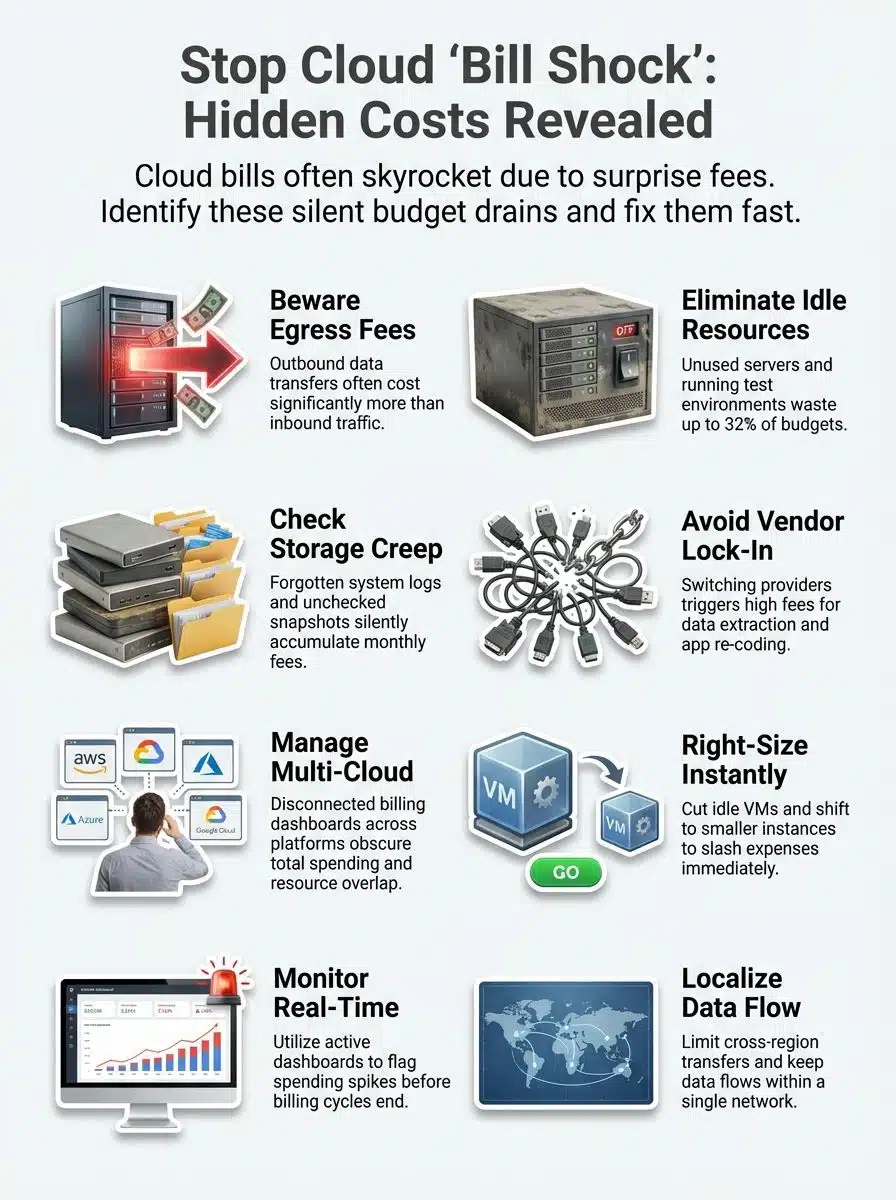
Smart cost control starts with knowing where your dollars go in the cloud. Small tweaks make big savings, and spotting waste early means less bill shock down the road.
Right-sizing and resource optimization
Allocating more cloud resources than needed drains budgets fast. Right-sizing helps match what you use to what you pay for. For example, moving workloads to AWS Graviton processors can often deliver up to 40% better price-performance compared to standard Intel-based instances.
Resource optimization tools like AWS Compute Optimizer can check usage patterns in real-time and suggest cheaper options. Autoscaling is another must-have; it ensures your system grows only when traffic increases, so money is not wasted on quiet days.
Monitoring and cost forecasting tools
Cloud billing can spin out of control fast. Tools like AWS Cost Anomaly Detection use machine learning to learn your normal spending patterns. If a developer accidentally leaves a massive cluster running, the tool sends an alert immediately, rather than waiting for the end of the month.
Smart cost forecasting keeps bills steady. Power users like Netflix use custom dashboards to watch every penny. Simple charts show which services eat up money each month, letting teams cut waste with clear eyes. This transparency stops “bill shock” cold.
Avoiding unnecessary data egress
Moving large amounts of data out of cloud platforms is expensive. To cut costs, keep your data transfers inside a single provider’s network. A specific pro-tip for AWS users: use Gateway VPC Endpoints for S3.
These endpoints are free to use and keep your traffic within the AWS network, bypassing those expensive NAT Gateways I mentioned earlier.
Benefits of Proactive Cost Management in Cloud Scaling

Proactive cost management helps keep bills predictable and prevents big surprises. Teams can track usage daily, spot rising costs early, and fix problems fast. Simple expense tracking tools show where money goes each month.
This means no more guessing about fees. Resource allocation gets smarter; idle servers do not sit around eating up cash. Usage optimization puts every dollar to work, making financial planning much simpler for growing companies.
Clear pricing models help teams set business goals without fear of hidden charges sneaking in later. Action today saves headaches tomorrow, and keeps everyone smiling when the bill arrives.
Real-World Examples of Avoiding “Bill Shock”
Smooth scaling brings many perks, yet high cloud costs can sneak up on anyone. These real stories show how smart moves and strong financial oversight help keep cloud bills under control.
- A fintech startup was hit hard in late 2023 after a single month’s storage fees jumped over 200%. They enabled S3 Intelligent-Tiering, which automatically moved rarely accessed data to cheaper storage, instantly cutting their monthly bill by 15%.
- A media company kept video archives in the cloud in early 2022. Their IT head spotted idle resources using CloudHealth. After shutting down what was not needed, monthly spending dropped by $9,000.
- An e-commerce site switched to a pay-as-you-go pricing model early last year. They adopted Spot Instances for their background processing jobs, which offered spare compute capacity at up to a 90% discount compared to on-demand prices.
- At an AI startup, engineers tested new workloads across multiple clouds before committing long-term. They used Terraform to write their infrastructure as code, allowing them to deploy the exact same setup on AWS and Azure to compare real-world costs before signing a contract.
- The finance department of an online education firm used cost management dashboards starting in mid-2020. By setting a strict budget in AWS Budgets, they received email alerts whenever costs reached 80% of their limit, preventing overruns every quarter.
- In 2023, a SaaS provider noticed egress fees rising fast during system updates across regions. They optimized data flows and implemented CloudFront caching, which reduced the amount of data that needed to be fetched from the origin server, cutting egress charges by half.
- Retail managers at a chain store group met weekly since January 2024 with IT staff to discuss resource optimization progress. They implemented a policy to delete unattached EBS volumes automatically after 7 days, eliminating storage cost creep.
- A health tech business ran into trouble with vendor lock-in costs in mid-2022. They decided to containerize their application using Docker and Kubernetes, ensuring that future migrations would not require a complete code rewrite.
- During the summer sales season of 2023, a gaming app team relied on usage forecasting tools. They purchased Savings Plans for their baseline usage, committing to a one-year term in exchange for a significantly lower hourly rate compared to standard pricing.
Each of these examples highlights the impact of simple steps in cost management across different sectors, showing how careful attention helps prevent “bill shock” even as cloud computing scales rapidly today.
Final Thoughts
Cloud scaling can sneak up on your wallet if you do not pay close attention. Unexpected fees, over-provisioned services, and tricky billing models make expense tracking a true challenge.
Using practical steps like right-sizing resources, keeping an eye on usage, and setting clear alerts helps control costs before they explode. These tips are easy to follow and bring more peace of mind when handling cloud bills.
Staying sharp with cost management stops surprise charges from ruining budgets. I’ve seen smart cost controls save teams thousands, so roll up your sleeves, double-check that bill every month, and let no hidden fee catch you off guard!