
If your infrastructure bills are climbing while your conversions stay flat, you are likely hosting an invisible party for non-human visitors. As Large Language Models (LLMs) hunger for data, aggressive AI bots on server load and bandwidth costs significantly for website owners. These aren’t just the polite search engine spiders of the past; they are high-frequency scrapers harvesting your content to train models or generate real-time answers.
Whether they are training crawlers consuming massive datasets or user-triggered fetchers browsing on behalf of ChatGPT, their impact is financial and operational. They consume CPU cycles, saturate your upload bandwidth, and skew your analytics. In this guide, we will break down the true cost of this non-converting traffic, help you distinguish helpful crawlers from abusive scrapers, and provide a decision framework to protect your bottom line without becoming invisible to the future of search.
What are AI Bots?
Simply put, these are automated scripts designed to harvest data. They range from training crawlers (gathering massive datasets to train models) and search/answer crawlers (fetching real-time info for user queries) to aggressive scrapers and user-triggered fetchers (agents acting on behalf of a specific user request).
For website owners, DevOps engineers, and CTOs, understanding these bots is no longer optional. This guide provides a complete cost model, detection techniques, and a decision framework to protect your infrastructure without becoming invisible to the future of search.
What Counts as “AI Bots” vs Normal Crawlers?
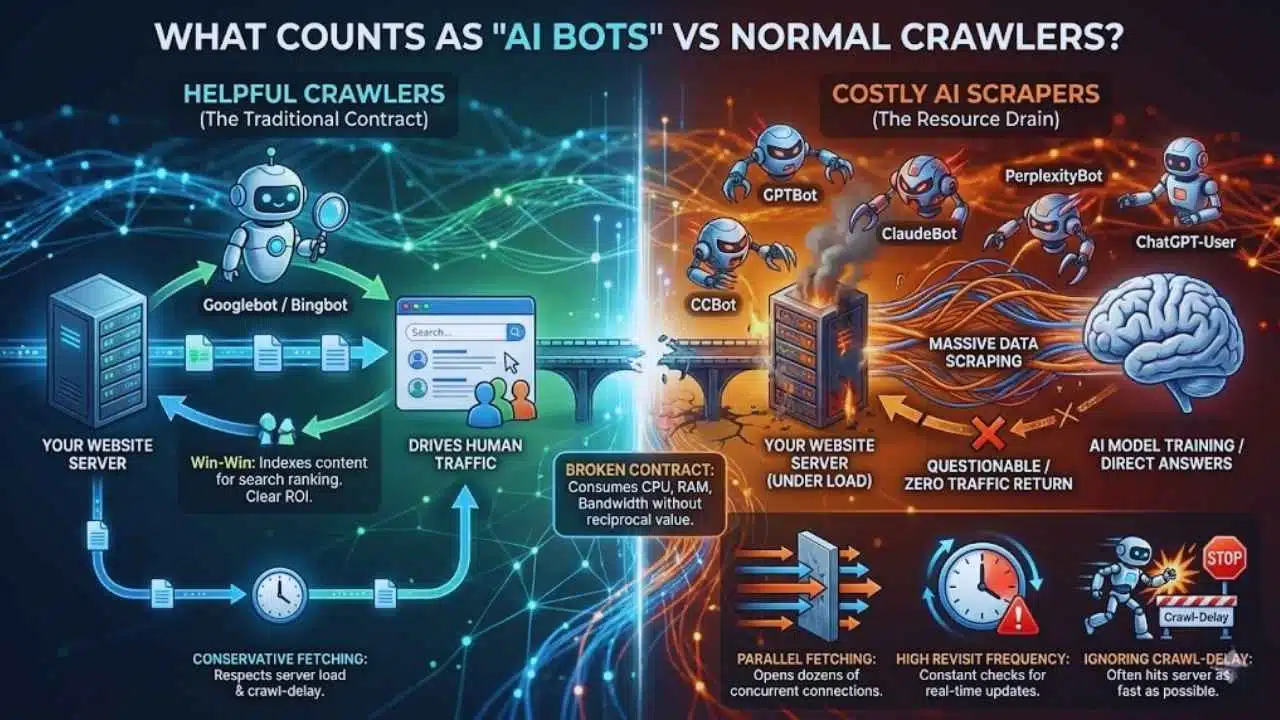
To manage traffic effectively, you must first distinguish between a helpful visitor and a resource drain. Not all non-human traffic is created equal.
Helpful Crawlers vs Costly Scrapers
For decades, the “contract” between websites and bots was simple: I let you crawl my content, and you give me traffic.
- Helpful Crawlers (e.g., Googlebot, Bingbot): They index your pages to rank them in search results. The return on investment (ROI) is clear—they drive human users to your site.
- Costly Scrapers: These bots scrape your content to train a model or generate a direct answer for a user on their platform, often without sending the user to your site. They consume your server resources (CPU, RAM, Bandwidth) but offer questionable or zero traffic in return.
Common AI Crawler Types and Behaviors
It is crucial to recognize the specific entities hitting your servers. Here are the major players you will likely see in your logs:
- GPTBot (OpenAI): Collects data to train future GPT models.
- ChatGPT-User (OpenAI): A fetcher triggered when a user asks ChatGPT to browse a specific URL.
- ClaudeBot (Anthropic): Crawls data to train the Claude series of models.
- Google-Extended: A token that controls how Google’s AI tools (like Gemini/Vertex AI) use your site data, separate from standard search indexing.
- PerplexityBot: Fetches real-time data to provide sourced answers in the Perplexity AI engine.
- CCBot (Common Crawl): A massive web scraper used by many different AI companies for training data.
Why AI Crawlers Can Be “Heavier” Than Traditional Search Bots
AI bots often act differently than the polite search crawlers we are used to. Their behavior can be significantly more taxing on infrastructure:
- Parallel Fetching: While Googlebot tends to be conservative, some AI scrapers open dozens of concurrent connections to “rip” a site’s content as fast as possible.
- High Revisit Frequency: AI answer engines need real-time data. They may hit your site multiple times an hour to check for updates, regardless of whether you’ve actually updated the content.
- Ignoring Crawl-Delay: While many bots respect robots.txt, they often ignore the crawl-delay directive, meaning they will hit your server as fast as their connection allows unless you forcibly rate-limit them.
How AI Bots Increase Server Load

When an AI bot hits your site, it doesn’t just “look” at a page. It triggers a cascade of server-side events. Here is the technical breakdown of the impact.
Request Volume and Concurrency
The most obvious impact is the sheer number of requests. However, concurrency is the real killer.
If 50 different AI bots decide to crawl your site simultaneously, and each opens 10 concurrent connections, your web server (Nginx/Apache) suddenly has to manage 500 active threads. For smaller servers, this can saturate the worker processes, causing legitimate human users to encounter “502 Bad Gateway” errors.
Origin Amplification (Database/API Calls, SSR Pages)
Modern websites are dynamic. When a bot requests a page, your server isn’t just handing over a static HTML file.
- The Chain Reaction: One bot request might trigger a backend application (Node.js/Python), which then queries the database five times and calls an external API.
- SSR (Server-Side Rendering): If you use Next.js or Nuxt, every bot hit requires the server to “build” the page on the fly. This is CPU-intensive.
- Heavy Endpoints: Bots often get stuck in loops on search pages or filter combinations (e.g., /shop?color=red&size=small&sort=price). These are computationally expensive queries that offer zero value to an AI trainer.
Cache Misses and Low Cacheability
Bots are notorious for causing “cache thrashing.”
- Unique Query Strings: Bots often append random query parameters or tracking IDs to URLs, forcing the server to bypass the cache and generate a fresh response.
- Cold Starts: If you have a global audience, AI bots might crawl your site from a region where you don’t have active users (and thus no warm cache), forcing your origin server to do all the work.
Indirect Performance Damage
The cost isn’t just financial; it’s operational.
- Queueing: When bots clog the request queue, real users have to wait. This increases your Time to First Byte (TTFB).
- Latency: High CPU usage from bot processing slows down database queries for everyone.
- Timeouts: If a bot scrapes a massive PDF or image gallery, it can tie up connection slots, leading to timeouts for paying customers.
Where the Money Goes: A Practical Cost Breakdown
Traffic isn’t free. Whether you are on AWS, Vercel, Cloudflare, or a dedicated box, AI bots directly impact your bill.
Bandwidth / Egress Fees (CDN + Cloud Data Transfer)
This is often the most painful surprise. “Egress” is the cost of data leaving your server to go to the internet.
- The Media Problem: AI bots don’t just read text; multimodal models scrape images and PDFs. If a bot downloads 1TB of images to train a vision model, you pay the egress fee for that 1TB.
- CDN Costs: Even if you use a CDN, you usually pay per GB transferred.
- Note: Some providers (like the Bandwidth Alliance) offer reduced fees, but for most AWS/GCP users, egress is a high-margin cost center.
Request-Based Pricing (WAF, CDN Requests, Serverless Invocations)
Many modern hosting platforms charge by the request.
- Serverless (Lambda/Edge Functions): You pay every time a function runs. If a bot hits your site 1 million times, that’s 1 million billable invocations.
- WAF (Web Application Firewall): Security services often charge based on the “number of requests evaluated.” Ironically, checking if a visitor is a bot costs money.
Compute Costs (CPU, Autoscaling, Dedicated Upgrades)
If your application uses autoscaling (e.g., Kubernetes or AWS Auto Scaling Groups), a bot swarm will trigger your infrastructure to spin up more servers to handle the load. You end up paying for extra EC2 instances just to serve content to a scraper that will never buy your product.
Hidden Costs
- Analytics Pollution: Your marketing team makes decisions based on data. If 30% of your “users” are bots, your conversion metrics, bounce rates, and A/B test results are garbage.
- Incident Response: The cost of an engineer waking up at 3:00 AM to fix a server crash caused by an aggressive crawler is significant.
Mini Cost Model
Use this simple formula to estimate what AI bots are costing you monthly:
Monthly Bot Cost ≈
$$(\text{Bot Egress GB} \times \text{Cost per GB}) + (\text{Bot Requests} \times \text{Cost per Request}) + (\text{Extra Compute Hours} \times \text{Hourly Rate})$$
Example: If bots consume 500GB egress ($0.09/GB), generate 5M requests ($0.60/M), and force an extra server for 100 hours ($0.10/hr), your “Bot Tax” is **$45 + $3 + $10 = $58/month**. For enterprise sites, add zeros to these numbers.
How to Confirm AI Bots Are the Culprit
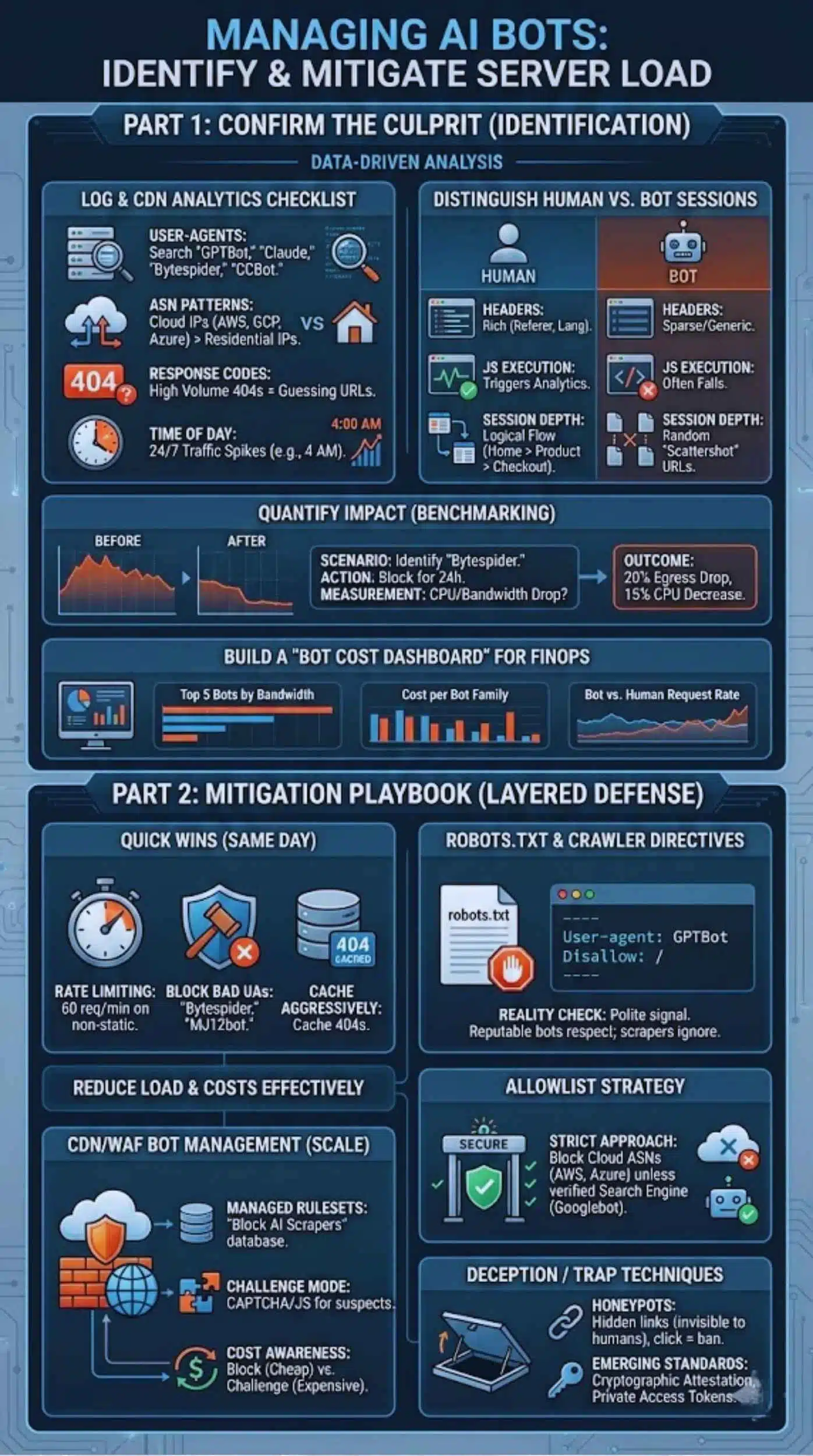
Before you start blocking, you must verify the source of the load. Do not guess; use data.
Log and CDN Analytics Checklist
Dive into your server logs (Nginx/Apache) or CDN dashboard (Cloudflare/Fastly). Look for:
- User-Agents: Search for strings containing “GPTBot,” “Claude,” “Bytespider,” or “CCBot.”
- ASN Patterns: Bots usually come from cloud hosting providers (AWS, Google Cloud, Azure IPs) rather than residential ISP networks (Comcast, Verizon).
- Response Codes: A high volume of 404 errors often indicates a bot trying to guess URLs or following broken links.
- Time of Day: Bots don’t sleep. A massive traffic spike at 4:00 AM local time is rarely human.
Distinguish Human vs Bot Sessions
- Headers: Humans have rich header data (Referer, Accept-Language, Sec-CH-UA). Bots often have sparse or generic headers.
- JS Execution: Many simple scrapers cannot execute JavaScript. If a “user” requests a page but never triggers the Google Analytics script, it’s likely a bot.
- Session Depth: Humans browse logically (Home -> Product -> Checkout). Bots often “scattershot” URLs in a random or alphabetical order.
Quantify Impact With Before/After Benchmarks
To prove the value of mitigation to stakeholders, run a benchmark.
- Scenario: You identify “Bytespider” as a major offender.
- Action: Block it for 24 hours.
- Measurement: Did the CPU usage drop? Did bandwidth costs decrease?
- Example Outcome: “After blocking aggressive AI scrapers, we saw a 20% reduction in egress bandwidth and a 15% drop in database CPU load.”
Build a “Bot Cost Dashboard” for FinOps
Don’t just look at logs once. Create a dashboard in Datadog or Grafana that tracks:
- Top 5 Bot User-Agents by Bandwidth.
- Cost per Bot Family.
- Bot Request Rate vs. Human Request Rate.
This bridges the gap between engineering and finance.
Mitigation Playbook: Reduce Load and Costs
Once you know who they are, here is how to manage them. This is a layered defense strategy.
Quick Wins (Same Day)
- Rate Limiting: Do not allow any IP address to make more than 60 requests per minute on non-static assets. This stops the “burst” damage.
- Block Obvious Bad UAs: If you have no business need for “Bytespider” (associated with TikTok/ByteDance) or “MJ12bot,” block their User-Agents at the web server level immediately.
- Cache Aggressively: Ensure that 404 pages are cached. Bots love hitting dead links; don’t let your database pay the price for every 404.
Robots.txt and Crawler Directives
This is the “polite” way to ask bots to leave. It works for reputable companies (OpenAI, Google, Anthropic) but not for rogue scrapers.
Example robots.txt entry:
Plaintext
User-agent: GPTBot
Disallow: /
User-agent: CCBot
Disallow: /
- Reality Check: While OpenAI respects this, thousands of smaller scrapers will ignore it. Treat robots.txt as a signal of intent, not a security wall.
CDN/WAF Bot Management (Recommended for Scale)
For serious protection, you need a Web Application Firewall (WAF) like Cloudflare, AWS WAF, or Akamai.
- Managed Rulesets: These providers maintain massive databases of known bot IPs. You can flip a switch to “Block AI Scrapers.”
- Challenge Mode: Instead of blocking, serve a “Managed Challenge” (CAPTCHA or JS calculation). Humans pass easily; simple bots fail.
- Cost Awareness: Be careful. If your WAF charges per inspection, a massive bot attack could spike your WAF bill. Configure rules to “Block” (cheaper) rather than “Challenge” (expensive) for known bad actors.
Allowlist Strategy
Instead of trying to block the bad, only allow the good.
- Strict Approach: Block all cloud provider ASNs (AWS, Azure, GCP, DigitalOcean) unless the User-Agent specifically matches a verified search engine (Googlebot, Bingbot). This eliminates 90% of scrapers hiding in cloud servers.
Deception / Trap Techniques
- Honeypots: Create a hidden link on your page (visible in HTML, invisible to humans via CSS). If a visitor clicks that link, they are a bot. Ban their IP automatically.
- Emerging Standards: The industry is moving toward “cryptographic attestation” where bots must prove their identity. Keep an eye on standards like “Private Access Tokens.”
Block or Allow AI Crawlers? A Decision Framework
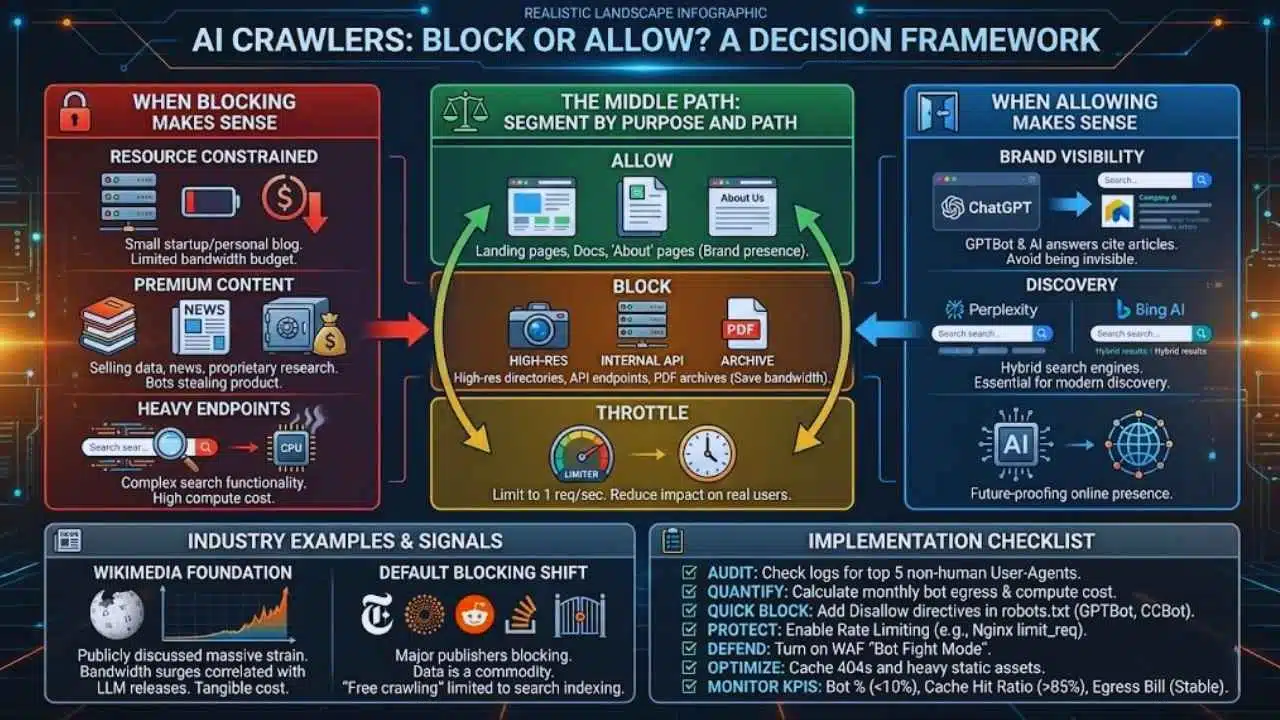
Should you block them? The answer isn’t always “yes.” It depends on your business model.
When Blocking Makes Sense
- Resource Constrained: You are a small startup or personal blog with a limited bandwidth budget.
- Premium Content: You sell data, news, or proprietary research. AI bots are essentially stealing your product to resell it in their answers.
- Heavy Endpoints: Your site has complex search functionality that costs real money to compute.
When Allowing (or Partially Allowing) Makes Sense
- Brand Visibility: If you block GPTBot, ChatGPT cannot cite your articles or recommend your products. Being invisible to AI might be as dangerous as being invisible to Google in the future.
- Discovery: Some “AI” bots are hybrid search engines (like Perplexity or Bing’s AI). Blocking them removes you from modern search results.
The Middle Path: Segment by Purpose and Path
You don’t have to be binary.
- Allow: Landing pages, documentation, and “About” pages (for brand presence).
- Block: High-res image directories, internal API endpoints, and PDF archives (to save bandwidth).
- Throttle: Allow them to crawl, but limit them to 1 request per second so they don’t impact real users.
Industry Examples and What They Signal
Open Knowledge/Media and Bandwidth Surges
The Wikimedia Foundation (Wikipedia) has publicly discussed the massive strain AI training bots place on their infrastructure. They noticed significant bandwidth surges correlated with the release windows of major LLMs. Their experience validates that this is not a theoretical problem—it is a tangible infrastructure cost.
The Shift Toward Default Blocking
Major media publishers (New York Times, Reuters) and platforms (Reddit, Stack Overflow) have moved to block general AI scraping by default. This signals a shift in the internet ecosystem: Data is now a commodity, not a free resource. The trend suggests that “free crawling” will soon be limited strictly to search indexing, while AI training will require licensing deals.
Implementation Checklist
Copy this checklist to start managing your bot traffic today.
- Audit: Check logs for top 5 non-human User-Agents.
- Quantify: Calculate estimated monthly cost of bot egress and compute.
- Quick Block: Add Disallow directives in robots.txt for GPTBot, CCBot, and others you don’t need.
- Protect: Enable Rate Limiting on your web server (e.g., Nginx limit_req).
- Defend: Turn on “Bot Fight Mode” or equivalent WAF rules in your CDN.
- Optimize: Cache 404 responses and heavy static assets.
- Monitor KPIs:
- Bot % of total requests (Target: <10%)
- Cache Hit Ratio (Target: >85%)
- Egress Bill (Target: Stable)
Final Thoughts: Control the Cost Without Killing Visibility
AI bots are a permanent fixture of the modern web. Ignoring them leads to inflated infrastructure bills, skewed analytics, and degraded performance for your human users. However, indiscriminately blocking everything risks making your brand invisible in the AI-driven future of search.
The balanced approach is key: Measure the financial impact, block the abusive scrapers that offer no value, and carefully manage the useful bots that help your brand.