
You feel stuck when you turn a Figma file into code by hand. This slows your web development. It can block rapid prototyping and hurt code quality.
Figma comes with Dev Mode that links designs to VS Code and shows HTML, CSS, and Tailwind CSS snippets. This fact shows how a design tool can speed up your workflow. We will walk you through five free design-to-code helpers: Figma, Locofy, Builder.io, Webflow, and UXPin.
You will learn how to get clean front end code in minutes. Keep reading.
Key Takeaways
- Figma spits out HTML, CSS, and Tailwind CSS snippets in Dev Mode. Its AI tools like Figma Make and Buzz generate React and Next.js code fast.
- Locofy maps Figma and Adobe XD designs into React, Angular, Vue, and Next.js modules. It adds Tailwind CSS or Material UI styles and exports code to GitHub or AWS.
- Builder.io converts Figma artboards into Svelte components with Tailwind CSS. Its AI engine updates code live and spins builds on AWS or Kubernetes.
- Webflow exports clean HTML, CSS, and JavaScript with built-in media queries. It syncs with Git, Next.js, and AWS for continuous integration and rapid prototyping.
- UXPin turns interactive prototypes into HTML and CSS with states, triggers, and animations. It links designs to React or Next.js, GitHub, Jira, CI pipelines, and Docker.
Figma

Figma spits out clean CSS snippets right in your browser. You call up Dev Mode, grab the code, and drop it into Visual Studio Code to see components spring to life.
Utilize Dev Mode for extracting developer-friendly code
Dev Mode lets developers grab code right from designs. It fits into existing frontend workflows.
- Inspect component properties in Dev Mode. It runs in any Full or Dev seat on paid plans. It shows color codes and spacing. It extracts html/css snippets for web applications and mobile apps.
- Use Ready for dev view for handoff. It turns designs into dev-ready artboards. It adds media queries for responsive layouts. It aligns with frontend workflows and rapid prototyping.
- Compare design changes with version history. It ties into version control systems like azure devops and Git. It tracks updates across time stamps. It helps in continuous integration and continuous delivery pipelines.
- Integrate with Visual Studio Code for code review. It installs a plugin that links design frames to code files. It shows color tokens and css classes inside a text editor. It leaps into integrated development environments with no copy-paste.
- Link design systems with code via Code Connect. It taps into material ui, ant design, or chakra ui variables. It pushes modular code snippets and design tokens. It supports api integration for cloud platform themes.
- Communicate via updates, comments, notifications. It triggers alerts when designers change a component. It logs feedback in one channel. It smooths pull request handoffs in software development teams.
Leverage AI features for automatic code generation
Figma packs AI tools that spin code from your layouts. It cuts manual work and speeds development.
- Figma Make taps natural prompts to build React and Next.js modules fast. It maps color palettes, design tokens, and media queries into modular code.
- AI features scan frames and suggest html/css tweaks. They strip boilerplate and add Tailwind CSS classes that fit material ui or chakra ui themes.
- Figma Buzz in beta churns out SVG assets and icons on brand. It links them to cloud storage or Firebase hosting via built-in API integration.
- Figma Sites in beta publishes responsive pages in seconds. It fires serverless functions on Amazon Web services or Kubernetes clusters, and works with any platform as a service.
- Release notes flag each AI upgrade, from continuous integration tweaks to rapid prototyping boosts. Teams use this log to sync frontend workflows in VSCode or JetBrains.
Locofy
Locofy grabs your Figma frames and other vector editor assets, then bakes them into ReactJS and Angular code, complete with responsive modules. You can weave Next.js into your setup and stitch in Tailwind CSS styles in just a few clicks.
Convert Figma and Adobe XD designs into production-ready frontend code
Teams get code fast and keep designs pixel perfect. The platform cuts manual work and speeds up development.
- Upload Figma or Adobe XD files to the Locofy cloud, drop artboards, watch the AI map layers to semantic HTML.
- AI routines churn out HTML/CSS and Next.js modules, slash manual coding and deliver code ready for immediate deployment.
- Customize output with Tailwind CSS, Material components or Chakra UI, swap themes and tweak props in seconds.
- Verify code fidelity pixel by pixel, as the engine preserves colors, fonts and spacing from original mockups.
- Export clean, modular code to GitHub or a continuous integration tool, link to AWS EC2 or container clusters to spin up test builds in minutes.
- Ship live prototypes that handle media queries, API calls and cross-platform layouts, cut feedback loops in half.
Support for multiple frameworks and responsive components
Locofy plugs into top front-end stacks and spins out code fast. It crafts components that flex across phones, tablets, and desktops.
- Designers pick from React, Angular, Vue, Next.js, and other JavaScript frameworks for code export, integrating with npm and Node. Locofy churns out modular code per framework.
- Engineers get responsive modules that use Tailwind CSS or Material UI, sizing via media queries to fit every viewport.
- Output meets modern HTML, CSS, and JavaScript standards, ready for cloud platform deployment. Developers skip manual fixes and connect to CI pipelines.
- Components adapt to mobile, tablet, and desktop. Developers test across device breakpoints with elastic grids.
- Locofy links with Figma and Adobe XD, plus API integration with Firestore. This smooths rapid prototyping in frontend workflows.
- Code suits simple landing pages and large portals. The SaaS tool scales with project size in production environments.
- Developers push code to Git repos and trigger builds with continuous integration. This ties design to development in continuous flow.
Builder. io
Builder.io pulls your Figma layouts into a live canvas and spits out Svelte views plus utility-css kit modules, so you skip grunt work and ship fast. You tweak components with AI prompts, watch code update in real time, and feel like a wizard behind a cloud console.
Transform Figma designs into Svelte and Tailwind CSS code
Design teams can speed code work with one-click conversions. AI cuts hours off manual coding.
- Builder.io’s AI tool runs one-click conversions, extracting production-ready code from Figma designs into Svelte modules with Tailwind CSS classes.
- Tailwind CSS rules align with your design, so responsive styles and media queries land exactly where you set them.
- Svelte components bake in props, events, and lifecycle scripts, all from your original artboard.
- Design fidelity remains intact, matching shadows, spacing, and fonts without a single pixel hunt.
- Export fits Next.js, or any modern frontend project, with modular code ready for API integration and CI pipelines.
- Iteration speeds up dramatically, since each tweak in the canvas triggers a fresh html/css export in seconds.
- Cloud pipelines on Amazon Web Services spin up builds on demand, scaling with service meshes via Kubernetes pods.
Customize components with AI-powered workflows
Builder.io’s AI engine adapts UI components after Figma exports. Teams tweak layouts and styles in real time.
- AI engine transforms design tokens into clean HTML/CSS for modular code output.
- Teams adjust grid settings and media queries with instant preview, cutting manual fixes.
- Utility classes from a utility-first CSS framework like Tailwind CSS integrate right into modules.
- Code modules match patterns in reactive UI libraries such as Svelte or Next.js for smooth frontend workflows.
- Build test protocol in a CI pipeline validates each update in distributed version control, boosting reliability.
- Hosted software on a public cloud vendor taps application hosting services for automatic scale.
- Real-time iteration cuts feedback loops and improves user experience with fast turnaround.
Webflow
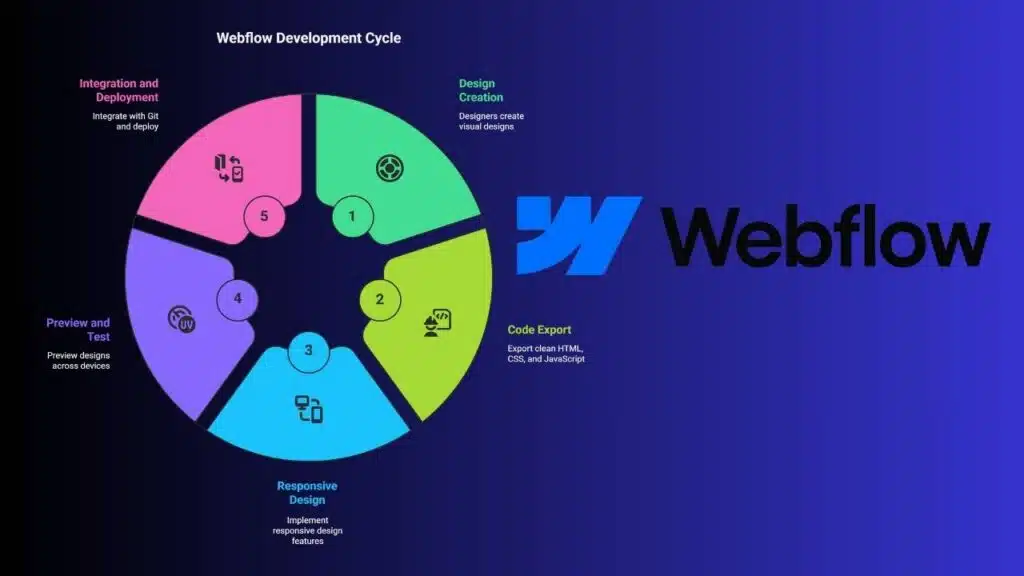
Webflow spits out clean HTML, CSS, and JavaScript, ready for a frontend workflow. You can tweak code in your IDE, set up media queries by hand, or ship assets to a PaaS in minutes.
Create and export clean HTML, CSS, and JavaScript from designs
Designers get working code in minutes. Teams speed up frontend workflows.
- Directly export HTML, CSS and JavaScript from design files, slashing manual coding time.
- Produce modular code that nests media queries for smooth responsive design across devices.
- Optimize output for cleanliness and performance, eliminating unused selectors to boost load speeds.
- Integrate exported files into Git or Next.js projects and link to API integration or Amazon Web Services cloud infrastructure.
- Automate repetitive tasks, enabling rapid prototyping without tedious edits in IDEs like JetBrains or Sublime Text.
- Structure each component for easy maintenance, so you can scale with continuous integration and source code management.
- Preserve visual fidelity from prototypes, delivering pixel perfect pages that match the original layout exactly.
Simplify responsive design implementation
Webflow cuts the work to build sites that fit on all screens. Teams preview designs on desktop, tablet and phone.
- Visual breakpoints mimic media query rules, viewers drag edge markers and watch layouts shift without typing code.
- Automatic components spawn html/css rules to resize columns and images, they adapt from wide monitors to tiny phones and keep modular code ready.
- Live previews pack desktop, tablet and mobile into one view, readers catch usability issues in real time.
- Flex and grid controls let developers tweak spacing with a click, they ditch custom CSS and speed up implementation.
- Clean CSS and JavaScript exports fit with Tailwind CSS, Material UI or Chakra UI workflows, developers port code into Next.js or pure html/css sites.
- Platform hosting runs on a cloud computing platform, teams share updates via pull requests in a web-based repo, they sync code fast.
- Style panels store font sizes and margins per breakpoint, they boost accessibility and keep ux design uniform across screens.
UXPin
UXPin exports clean HTML and CSS that plug right into your modern JS framework. Your team wires API integration, CI pipelines, and Docker containers in JetBrains IDE.
Generate code from interactive prototypes
Designers and developers link interactive mockups to working code in one click. This feature trims coding time and fits modern html/css workflows.
- Interface captures interactive prototypes and builds code with logic for web development.
- Generated assets keep states, triggers, and animations alive in HTML and CSS.
- Exported modules work in a popular JavaScript library or other libraries.
- Teams plug code into a utility-first CSS framework or a UI component library for fast styling.
- Developers merge code into a React-based platform or container pipelines on AWS, tapping API integration and microservices.
- Platform lives in the cloud as a SaaS service and links to CI and collaboration tools.
- Code output suits modular architectures and speeds up MVP builds through rapid prototyping workflows.
Seamlessly integrate design and development workflows
UXPin merges design and code in one hub. Teams watch artboards sync to repos and task boards.
- UXPin connects to GitHub repos and Jira boards, so teams cut handoff friction at every sprint.
- Syncs artboards with GitLab or Trello, linking design frames to project tasks.
- Adds inline annotation to speed rapid prototyping and clear team communication.
- Feeds stakeholder comments back into prototypes in seconds, supporting agile sprints.
- Maps specs to Tailwind CSS and Chakra UI, boosting modular code in HTML/CSS layouts.
- Aligns artboards to Next.js and React code, pulling media queries into live previews.
- Streams updates into continuous integration systems and AWS builds, so deployments roll without delay.
Takeaways
Tools cut coding time. Figma shows dev mode and AI code. Locofy builds production-ready front ends fast. Builder.io shapes JavaScript library code and utility-first framework styles.
Webflow crafts clean markup and style rules. This one, UXPin, links interactive prototypes with code. Teams grab API integration aids, media query helpers, and CI tools. Pick a tool, and boost your frontend workflow.
FAQs
1. What are the best free design-to-code tools for web development?
Think of your design like a recipe. These tools handle the chopping and mixing, then serve you html/css or Next.js code. They work with component kits like Material UI, Ant Design, Chakra UI and Tailwind CSS. You get modular code fast, so you spend more time building features and less time typing boilerplate.
2. How do these tools speed up my frontend workflows?
They link your mockups and wireframes to live code. You drag, drop, tweak a style, and watch html/css update in real time. It feels like magic, but really it’s rapid prototyping. No more copy-pasting or hunting down missing media queries or style declarations.
3. Can I run them on macOS and inside my IDE?
Yes. Many run in your browser or as a local app on macOS. You can also plug them into integrated development environments, like Eclipse IDE or any text editor with syntax highlighting. They play well with search and replace, and they slot right into your continuous integration pipelines.
4. Do these tools help with API integration and databases?
Absolutely. You wire up API integration in a few clicks, fetch data from any REST endpoint or elastic computing service, and map it to your UI. You can skip opening database management tools or direct work in database engines. The tool generates the fetch calls and keeps your code neat.
5. Will these tools fit into my cloud setup or microservices architectures?
Yes, they forge code you can pack into containers, run on VMs, or deploy via Docker Swarm. They link smoothly to platform as a service or infrastructure as a service. Whether you host on amazon web services (aws) or a private cloud, you get production-ready code.
6. Can I still customize and maintain the code after prototyping?
For sure. The output is clean, readable html/css or Next.js modules. You can tweak props, hook in dashboards or IoT streams, push changes to Perforce or Git, then let your continuous integration handle the rest. It’s like getting a head start, without losing control of your application development.